
Official Python toolkit for roboto.ai
Verified details
These details have been verified by PyPIProject links
GitHub Statistics
Maintainers


Project description
Roboto SDK
Roboto makes it easy to manage and analyze robotics data at scale 🤖
This package contains the official toolkit for interacting with Roboto. It consists of the roboto Python module and command line utility.
If this is your first time using Roboto, we recommend reading the docs and exploring the core concepts.
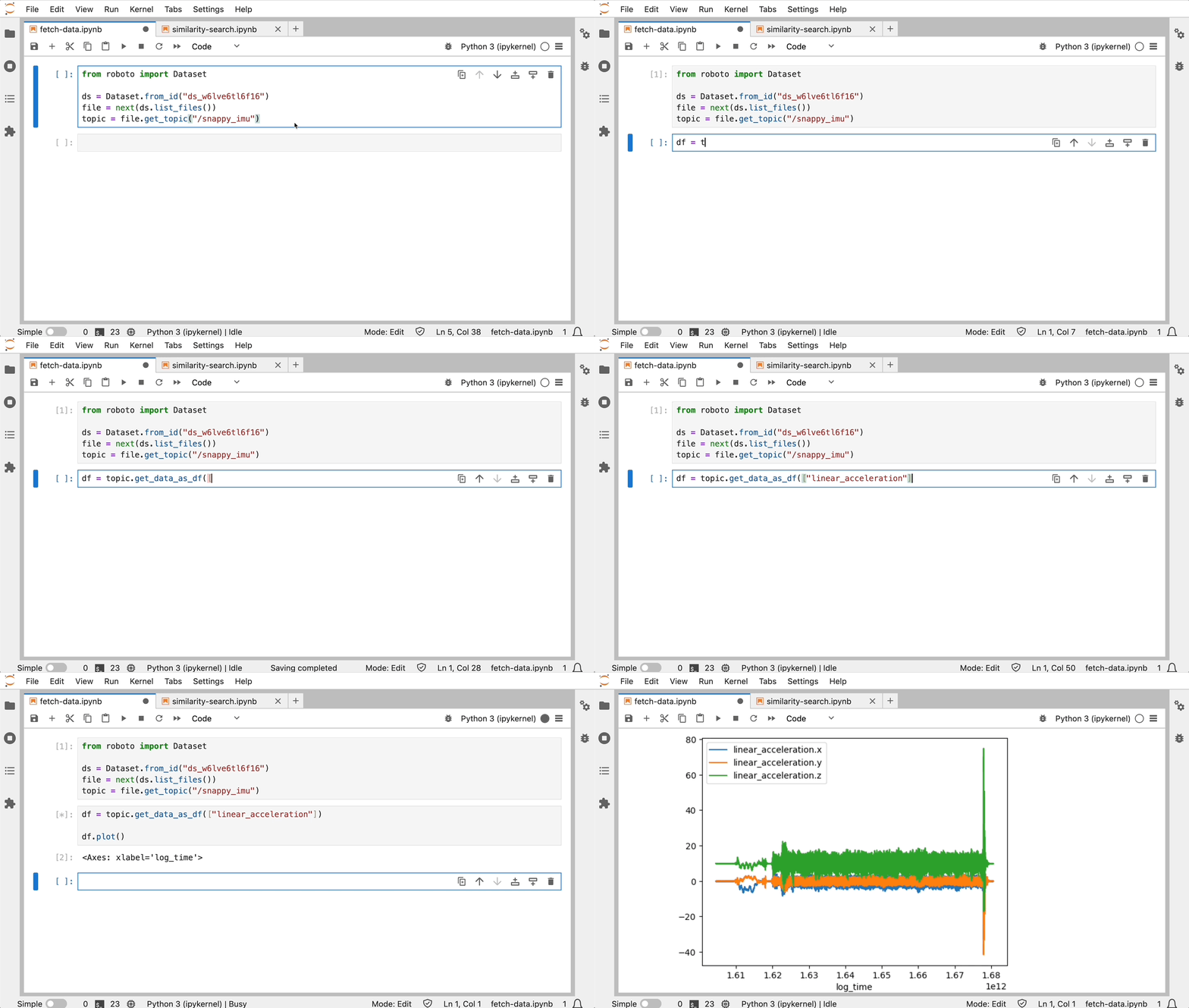
Why Roboto?
Most robotics teams start with manual review: visualizing logs and replaying data. But that approach alone doesn’t scale. It makes it hard to catch issues or measure performance as your fleet grows. Roboto helps you move beyond that. It gives you the tools to automate analysis and scale up 🚀
You can ingest logs and efficiently extract data from them — but that’s just the beginning. Roboto lets you query data and define custom actions to post-process it, so you can identify events, generate KPIs, and more.
See below for supported data formats, installation instructions and getting started examples.
Data Formats
Roboto can ingest data from a variety of formats, each with corresponding actions in the Action Hub.
| Format | Extensions | Status | Action |
|---|---|---|---|
| ROS 2 | .mcap, .db3 |
✅ | ros_ingestion |
| ROS 1 | .bag |
✅ | ros_ingestion |
| PX4 | .ulg |
✅ | ulog_ingestion |
| Parquet | .parquet |
✅ | parquet_ingestion |
| CSV | .csv |
✅ | csv_ingestion |
| Journal | .log |
✅ | journal_log_ingestion |
Roboto’s extensible design can also support custom formats. Reach out to discuss your use case.
Install Roboto
To use the Roboto SDK and CLI:
- Sign up at app.roboto.ai and create an access token (docs)
- Save your access token to
~/.roboto/config.json
Python
The Roboto Python SDK is available on PyPI.
Requirements: Python 3.10+
Installation:
pip install roboto
[!TIP]
If
pip install robotofails or behaves unexpectedly, the two most common causes are:
- Python version below 3.10
- Dependency conflicts from installing into your system Python or an existing environment
Verify your Python version and set up a virtual environment Confirm your Python version meets the requirement:
python3 -c "import sys; assert sys.version_info >= (3, 10), f'Python 3.10+ required, found {sys.version}'"
Then create and activate a virtual environment:
# macOS/Linux
python3 -m venv .venv && source .venv/bin/activate

# Windows
python3 -m venv .venv && .venv\Scripts\activate
Then re-run pip install roboto.
Authentication (required):
Roboto requires credentials to communicate with the platform. If you haven't authenticated yet, see Setting up programmatic access.
Verify your credentials are configured correctly:
roboto users whoami
See the complete SDK documentation.
CLI
If you want to interact with Roboto on the command line, and don't need the Python SDK, we recommend installing the standalone CLI.
You can find all versions of pre-built binary artifacts on the releases page of this package. We currently build for Linux (aarch64, x86_64), Mac OS X (aarch64, x86_64) and Windows (x86_64). See installation instructions per platform below.
Installing the CLI will provide the roboto command line utility. You can see available commands with roboto -h or see the complete CLI reference documentation.
Linux
- Go to the latest release page for this package
- (apt) Download the relevant
roboto.debfile for your platform- e.g.
roboto-linux-x86_64_0.9.2.deb(don't pick aroboto-agentrelease) - Double click on the downloaded
debfile and letapttake over
- e.g.
- (non-apt) Download the relevant
robotofile for your platform- e.g.
roboto-linux-x86_64(don't pick aroboto-agentrelease) - Move the downloaded file to
/usr/local/binor where ever makes sense for your platform
- e.g.
Coming soon: direct apt-get install support
Mac OS X
You can either use the Homebrew package manager:
brew install roboto-ai/tap/roboto
Or download the relevant Mac binary from the latest release page e.g. roboto-macos-aarch64
If you used Homebrew, you can also upgrade via brew upgrade roboto
Windows
- Go to the latest release page for this package
- Download the
roboto-windows-x86_64.exefile - Move the downloaded
.exeto a folder that is on yourPATH, likeC:\Program Files\
Upgrade CLI
The CLI will automatically check for updates and notify you when a new version is available.
If you installed the CLI with the SDK via pip, you can simply upgrade with pip install --upgrade roboto.
If you installed the CLI from a .deb or by adding an executable like roboto-linux-x86_64 to your PATH, you can
upgrade by downloading the latest version and replacing the old executable.
For OS X Homebrew users, you can upgrade by running brew upgrade roboto.
Getting Started
The CLI is convenient for quickly creating new datasets, uploading or downloading files, and running actions. The Python SDK has comprehensive support for all Roboto platform features and is great for data analysis and integration with your other tools.
CLI Example
With the Python SDK, or standalone CLI installed, you can use roboto on the command line.
The example below shows how to create a new dataset and upload a file to it.
> roboto datasets create --tag boston
{
  "administrator": "Roboto",
  "created": "2024-09-25T22:22:48.271387Z",
  "created_by": "benji@roboto.ai",
  "dataset_id": "ds_9ggdi910gntp",
  ...
  "tags": [
    "boston"
  ]
}

> roboto datasets upload-files -d ds_9ggdi910gntp -p scene57.bag
100.0%|█████████████████████████ | 58.9M/58.9M | 2.62MB/s | 00:23 | Src: 1 file
Python Example
With the Python SDK installed, you can import roboto into your Python runtime.
The example below shows how to access topic data for an ingested ROS bag file:
from roboto import Dataset

ds = Dataset.from_id("ds_9ggdi910gntp")
bag = ds.get_file_by_path("scene57.bag")
steering_topic = bag.get_topic("/vehicle_monitor/steering")

steering_data = steering_topic.get_data(
    start_time="1714513576", # "<sec>.<nsec>" since epoch
    end_time="1714513590",
)
You can also create events:
from roboto import Event

Event.create(
  start_time="1714513580", # "<sec>.<nsec>" since epoch
  end_time="1714513590",
  name="Fast Turn",
  topic_ids=[steering_topic.topic_id]
)
Or even search for logs matching metadata and statistics with RoboQL:
from roboto import query, RobotoSearch
roboto_search = RobotoSearch(query.client.QueryClient())

query = '''
dataset.tags CONTAINS 'boston' AND
topics[0].msgpaths[/vehicle_monitor/vehicle_speed.data].max > 20
'''

results = roboto_search.find_files(query)
See the notebooks directory for complete examples!
Learn More
For more information, check out:
Contact
If you'd like to get in touch with us, feel free to email us at info@roboto.ai, or join our community Discord server.
Project details
Verified details
These details have been verified by PyPIProject links
GitHub Statistics
Maintainers
Release history Release notifications | RSS feed


Download files
Download the file for your platform. If you're not sure which to choose, learn more about installing packages.
Source Distribution
Built Distribution
Filter files by name, interpreter, ABI, and platform.
If you're not sure about the file name format, learn more about wheel file names.
Copy a direct link to the current filters
File details
Details for the file roboto-0.41.0.tar.gz.
File metadata
- Download URL: roboto-0.41.0.tar.gz
- Upload date:
- Size: 337.4 kB
- Tags: Source
- Uploaded using Trusted Publishing? Yes
- Uploaded via: twine/6.1.0 CPython/3.13.12
File hashes
| Algorithm | Hash digest | |
|---|---|---|
| SHA256 |
a433d84531140582e24704b5b3a8336988ca7405d4fcb2122c5ea55a9ab04d9c
|
|
| MD5 |
035dfbb5282fb631b62c8d047c2b950b
|
|
| BLAKE2b-256 |
f1dd74803fbce95abe24ad8b515a81aef423b002489116741c0ecbc475b1ae44
|
Provenance
The following attestation bundles were made for roboto-0.41.0.tar.gz:
Publisher:
sdk.yml on roboto-ai/roboto-python-sdk
-
Statement:
-
Statement type:
https://in-toto.io/Statement/v1 -
Predicate type:
https://docs.pypi.org/attestations/publish/v1 -
Subject name:
roboto-0.41.0.tar.gz -
Subject digest:
a433d84531140582e24704b5b3a8336988ca7405d4fcb2122c5ea55a9ab04d9c - Sigstore transparency entry: 1359594155
- Sigstore integration time:
-
Permalink:
roboto-ai/roboto-python-sdk@76065261b90bb359142776cf2100f1d3f0767d55 -
Branch / Tag:
refs/tags/v0.41.0 - Owner: https://github.com/roboto-ai
-
Access:
public
-
Token Issuer:
https://token.actions.githubusercontent.com -
Runner Environment:
github-hosted -
Publication workflow:
sdk.yml@76065261b90bb359142776cf2100f1d3f0767d55 -
Trigger Event:
push
-
Statement type:
File details
Details for the file roboto-0.41.0-py3-none-any.whl.
File metadata
- Download URL: roboto-0.41.0-py3-none-any.whl
- Upload date:
- Size: 492.2 kB
- Tags: Python 3
- Uploaded using Trusted Publishing? Yes
- Uploaded via: twine/6.1.0 CPython/3.13.12
File hashes
| Algorithm | Hash digest | |
|---|---|---|
| SHA256 |
7d4cac574dde1f4f31288bcbfdcbc18e5d73d9ede8e698b498265126b1279a04
|
|
| MD5 |
8f971bc703891891efe270aa9827b0f3
|
|
| BLAKE2b-256 |
74140251f5e2d30724581d739414cd115f0863d12dec3cdc6a0b8a1a5edea0d7
|
Provenance
The following attestation bundles were made for roboto-0.41.0-py3-none-any.whl:
Publisher:
sdk.yml on roboto-ai/roboto-python-sdk
-
Statement:
-
Statement type:
https://in-toto.io/Statement/v1 -
Predicate type:
https://docs.pypi.org/attestations/publish/v1 -
Subject name:
roboto-0.41.0-py3-none-any.whl -
Subject digest:
7d4cac574dde1f4f31288bcbfdcbc18e5d73d9ede8e698b498265126b1279a04 - Sigstore transparency entry: 1359594334
- Sigstore integration time:
-
Permalink:
roboto-ai/roboto-python-sdk@76065261b90bb359142776cf2100f1d3f0767d55 -
Branch / Tag:
refs/tags/v0.41.0 - Owner: https://github.com/roboto-ai
-
Access:
public
-
Token Issuer:
https://token.actions.githubusercontent.com -
Runner Environment:
github-hosted -
Publication workflow:
sdk.yml@76065261b90bb359142776cf2100f1d3f0767d55 -
Trigger Event:
push
-
Statement type:






