
Official RoboTrace Python SDK and CLI - observability and evals for AI-powered robots (pip install robotrace-dev, import robotrace).

Project description
RoboTrace SDK
Official Python SDK for RoboTrace - observability and evals for AI-powered robots.
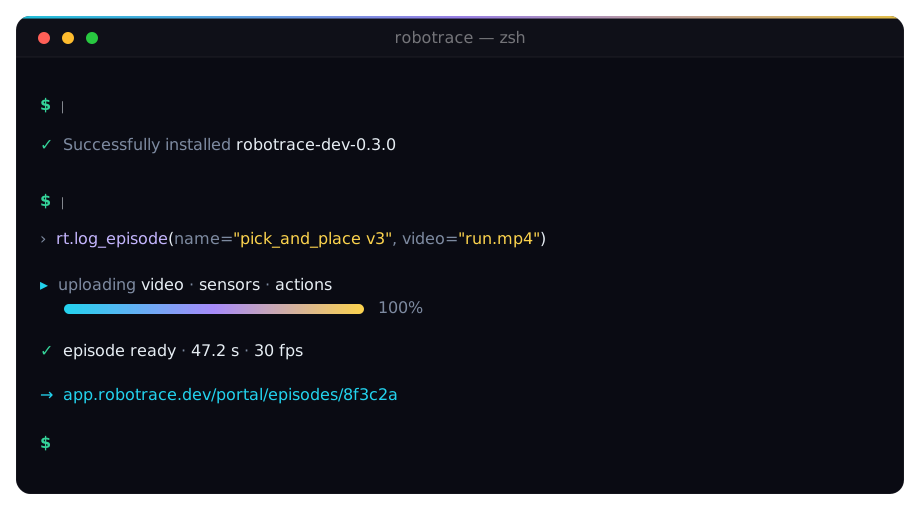
pip install robotrace-dev · import robotrace
Log episodes (synchronized video, sensors, actions), replay them, version datasets, and re-roll new policy versions against historical observations to measure regressions - without rolling another in-house dashboard.
Early access - portal signup is invite-only during alpha. Contact hello@robotrace.dev or request access at robotrace.dev.










Works with Python 3.10+ · ROS 2 (humble / jazzy) · LeRobot v2.1 · Gymnasium ≥ 1.0 · macOS & Linux. Episode bytes go straight to your object storage — policy weights never leave your machines.
How it works
RoboTrace closes the loop from "we recorded a run" to "we won't ship that regression to a real robot":
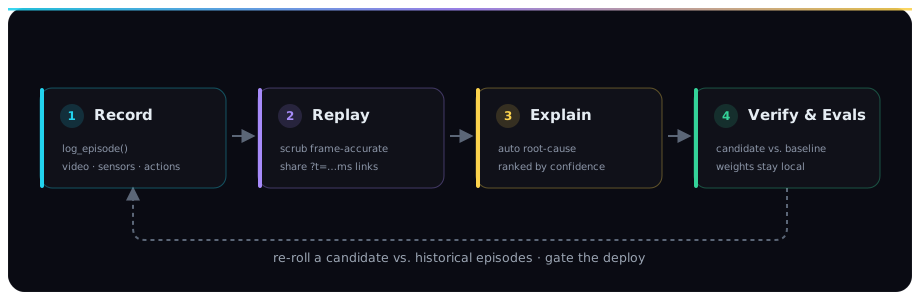
- Record —
log_episode(...)ships synchronized video + sensors + actions to object storage, keyed by the four reproducibility fields (policy_version/env_version/git_sha/seed). Heavy bytes go straight to Cloudflare R2 via signed URLs; only metadata touches our API. - Replay — scrub every run frame-accurate in the portal, with camera, sensor, and action tracks locked to one timeline. Copy a
?t=…mslink and a teammate lands on your exact frame. - Explain — failed runs surface an auto root-cause card the moment they finalize: replay regressions, raised exceptions, battery brownouts — ranked by confidence, not a raw metadata dump.
- Verify & Evals — re-roll a candidate policy against thousands of historical episodes, see exactly where it does better and worse, and gate the deploy — without booking another hour on the arm.
Contents
Install · Status · Quickstart · CLI · API · Errors · Storage · Adapters · Stability · Layout · Contributing
Install
pip install robotrace-dev
Distribution name vs. import name. PyPI distributes us as
robotrace-dev(matching ourrobotrace.devdomain). The un-hyphenatedrobotracePyPI namespace is held by an unrelated robotics project, and PyPI's typo-squat protector blocks any single-edit-distance variant (sorobo-tracewas rejected too). The import name staysimport robotrace- same pattern aspip install python-dateutil→import dateutil.Pinning for reproducibility (CI,
requirements.txt) still works as usual -pip install robotrace-dev==0.2.0pulls this README. Older pins (0.1.0a15,0.1.0a13,0.1.0a12, …) are prior alphas on the same API surface and keep working on PyPI.
Status
Stable (0.2.0). The public API in this README is now semver-locked
under 0.x; breakages require a major bump and a full minor of
DeprecationWarning first (see Stability). Once we cut
1.0.0, the log_episode signature
is locked permanently per AGENTS.md. Official product site:
robotrace.dev. Docs:
robotrace.dev/docs.
Quickstart
You need an API key on this machine once. Pick one path:
A) Portal - create a key
Sign in at app.robotrace.dev/login?next=/portal/api-keys (portal sign-in - after authentication you land on API keys). Click Create key, copy it once, then:
import robotrace as rt

rt.init(
    api_key="rt_…",
    base_url="https://app.robotrace.dev",   # or http://localhost:3000 in dev
)

rt.log_episode(
    name="pick_and_place v3 morning warmup",
    source="real",
    robot="halcyon-bimanual-01",
    policy_version="pap-v3.2.1",
    env_version="halcyon-cell-rev4",
    git_sha="abc1234",
    seed=8124,
    video="/tmp/run.mp4",
    sensors="/tmp/sensors.bin",
    actions="/tmp/actions.parquet",
    duration_s=47.2,
    fps=30,
    metadata={"task": "pick_and_place", "scene": "tabletop"},
)
The episode appears in your portal at
app.robotrace.dev/portal/episodes
immediately, with the four reproducibility fields (policy / env /
git / seed) front-and-center on the detail page. The SDK also
prints a clickable URL to the run as soon as start_episode /
log_episode opens it - usually before the bytes finish uploading.
B) CLI - browser login (no copy-paste)
Use the robotrace executable installed with the package:
robotrace login
This opens your default browser (or prints a link to open). After you
authorize in the portal, the CLI writes ~/.robotrace/credentials
with your API key and base URL (chmod 0600). From Python you can
skip init() - the default client loads that file when ROBOTRACE_API_KEY
is not set:
import robotrace as rt

rt.log_episode(
    name="pick_and_place v3 morning warmup",
    policy_version="pap-v3.2.1",
    env_version="halcyon-cell-rev4",
    git_sha="abc1234",
    seed=8124,
    video="/tmp/run.mp4",
    sensors="/tmp/sensors.bin",
    actions="/tmp/actions.parquet",
    duration_s=47.2,
    fps=30,
    metadata={"task": "pick_and_place", "scene": "tabletop"},
)
Point at a local web stack (same machine as the SDK):
robotrace login --base-url http://localhost:3000
# or: export ROBOTRACE_BASE_URL=http://localhost:3000 && robotrace login
See also robotrace whoami, robotrace logout, and the CLI login reference (browser flow, --base-url, and security notes).
From environment variables
Same call without hardcoding the key:
export ROBOTRACE_API_KEY=rt_…
export ROBOTRACE_BASE_URL=https://app.robotrace.dev
import robotrace as rt

# init() is optional when both env vars are set - the default
# client is constructed lazily on first use.
rt.log_episode(
    name="…",
    policy_version="…",
    video="/tmp/run.mp4",
)
If you already ran robotrace login, a credentials file usually takes
precedence when env vars are unset - see CLI login.
Command-line interface
Installing the wheel adds the robotrace executable:
| Command | What it does |
|---|---|
robotrace login |
Browser authorization; writes ~/.robotrace/credentials (chmod 0600) |
robotrace whoami |
Print signed-in email and base URL for the active profile |
robotrace logout |
Drop local credentials; optional --revoke invalidates the key on the server |
robotrace replay run … |
Customer-side replay regression against baseline episodes |
Global flags: robotrace --help, and --base-url / --profile on
commands that talk to the API. Full CLI reference: CLI login and Evals.
API
log_episode - the sacred call
The one-shot entrypoint. Equivalent to start_episode → upload all
artifacts → finalize. Use this for the 95% case of "I have files
on disk, log them and move on."
rt.log_episode(
    *,
    # Identification
    name: str | None = None,
    source: Literal["real", "sim", "replay"] = "real",
    robot: str | None = None,

    # Reproducibility - load-bearing per AGENTS.md
    policy_version: str | None = None,
    env_version: str | None = None,
    git_sha: str | None = None,
    seed: int | None = None,

    # Artifact paths (uploaded to object storage via signed PUT URLs)
    video: str | Path | None = None,
    sensors: str | Path | None = None,
    actions: str | Path | None = None,

    # Run details
    duration_s: float | None = None,
    fps: float | None = None,
    metadata: Mapping[str, Any] | None = None,

    # Final state
    status: Literal["ready", "failed"] = "ready",
) -> Episode
Returns the finalized Episode. On failure during upload the SDK
flips the run to status="failed" and re-raises so your program
sees what went wrong.
start_episode - explicit lifecycle
When you want fine-grained control (stream uploads, defer finalize,
react to upload errors per-artifact), use start_episode and the
returned Episode handle:
with rt.start_episode(
    name="pick_and_place v3 morning warmup",
    policy_version="pap-v3.2.1",
    artifacts=["video", "sensors"],     # only request the slots you'll fill
) as ep:
    ep.upload("video", "/tmp/run.mp4")
    ep.upload("sensors", "/tmp/sensors.bin")
    # No explicit finalize - context manager handles it:
    #   • clean exit → status="ready"
    #   • exception  → status="failed", with metadata.failure_reason set
Or explicit:
ep = rt.start_episode(name="…", policy_version="…", artifacts=["video"])
ep.upload("video", "/tmp/run.mp4")
ep.finalize(status="ready", duration_s=47.2, fps=30)
Failed runs can pin a frame-accurate failure instant so the portal's
replay scrubber lands on the right frame (added in 0.1.0a12):
ep = rt.start_episode(name="…", policy_version="…", artifacts=["video"])
ep.upload("video", "/tmp/run.mp4")
ep.finalize(
    status="failed",
    duration_s=18.4,
    failure_time_s=12.34,           # collision watchdog tripped at 12.34 s
    metadata={"failure_reason": "wrist collision"},
)
failure_time_s is also valid on log_episode(...). It's only
accepted with status="failed" - the SDK raises ValueError early
otherwise so mis-wired error handlers fail loudly.
Client - explicit instance
Skip the module-level default when you need multiple deployments at once (e.g. shipping the same run to staging + production), or for clean dependency injection in tests:
with rt.Client(api_key="rt_…", base_url="https://…") as client:
    client.log_episode(name="…", policy_version="…", video="…")
Client holds a connection pool - construct it once at process
startup, reuse across many episodes, and close() (or use as a
context manager) on shutdown.
Errors
Every SDK error inherits from robotrace.RobotraceError. Catch by
type rather than parsing message strings:
| Exception | When |
|---|---|
ConfigurationError |
Missing api_key / base_url, file path doesn't exist |
TransportError |
Network / DNS / TLS / timeout |
AuthError |
401 - bad / missing / revoked key |
NotFoundError |
404 - episode id doesn't exist (or cross-tenant) |
ConflictError |
409 - episode is archived, etc. |
ValidationError |
400 - payload didn't pass server-side validation |
ServerError |
5xx - flag for retries |
from robotrace import RobotraceError, AuthError

try:
    rt.log_episode(...)
except AuthError:
    # mint a fresh key and reload
    raise
except RobotraceError:
    # generic recovery / alert
    raise
Storage
Artifact uploads go to Cloudflare R2 via short-lived signed PUT URLs the server mints for each call. The SDK streams from disk so memory stays flat regardless of file size.
When the deployment hasn't wired R2 yet (R2_ACCOUNT_ID etc. are
blank), the create response has storage="unconfigured" and any
upload_* call raises ConfigurationError with a pointer to the
production setup checklist. Metadata-only runs still work - useful
for testing the SDK contract end-to-end before R2 is provisioned.
Adapters
Framework adapters slurp third-party recording / dataset formats
(or run live env loops) into the canonical log_episode contract.
None are loaded by default - each lives behind an extras pin so the
base install stays slim:
# rosbag2 → episode (sqlite3 + mcap; no rclpy required)
pip install 'robotrace-dev[ros2]==0.2.0'

# Hugging Face LeRobot v2.1 datasets → episode-per-trajectory
pip install 'robotrace-dev[lerobot]==0.2.0'

# Gymnasium env rollout → episode
pip install 'robotrace-dev[gymnasium]==0.2.0'

# Multi-camera mp4 encoding (opencv) - combine with any adapter that writes video
pip install 'robotrace-dev[ros2,video]==0.2.0'
# ROS 2: one rosbag2 directory → one episode
from robotrace.adapters import ros2
ros2.upload_bag(
    "./run_2026-05-08/",
    policy_version="pap-v3.2.1",
    env_version="halcyon-cell-rev4",
    git_sha="abc1234",
)

# LeRobot: one HF dataset → one episode per trajectory
from robotrace.adapters import lerobot
lerobot.upload_dataset(
    "lerobot/aloha_static_cups_open",
    policy_version="aloha-v1",
    env_version="aloha-cell-1",
)

# Gymnasium: one env rollout → one episode
import gymnasium as gym
from robotrace.adapters import gymnasium as rt_gym

env = gym.make("CartPole-v1", render_mode="rgb_array")
rt_gym.upload_rollout(
    env,
    policy=lambda obs, info: 1,
    policy_version="cartpole-v1",
    env_version="CartPole-v1",
    seed=42,
)
env.close()
All three adapters mirror the same surface: scan_* for read-only
introspection, encode_* to write artifacts to disk without
uploading, and upload_* for the one-shot pipeline. Full reference
at robotrace.dev/docs/sdk/ros2,
robotrace.dev/docs/sdk/lerobot,
and robotrace.dev/docs/sdk/gymnasium.
The LeRobot adapter deliberately does not depend on the heavy
lerobot PyPI package (which would pull torch + torchvision +
pyav + several CUDA wheels). It reads the v2.1 on-disk format
directly via pyarrow + huggingface_hub - ~20 MB install
footprint, comparable to [ros2]. LeRobot v3.0 (multi-episode
parquet shards, late 2025) is on the roadmap.
Stability
The public surface is mechanically frozen so a pip install -U can't
silently orphan a running training job. Every CI run executes
tests/test_api_surface_freeze.py,
which diffs the live SDK against the committed baseline at
api-surface.json:
- Additions pass silently.
- Removals, signature narrowings, required-param flips, kind changes, and positional reorderings fail the build with a per-symbol report.
Breaking changes ride the deprecation path - we ship DeprecationWarnings
for at least one minor before a removal (see Episode.upload_video / upload_sensors / upload_actions, deprecated in 0.1.0a13). The
log_episode signature is the one we
treat as load-bearing; it's locked on the 1.0.0 cut and any breakage
requires a major version bump.
Semantics follow SemVer. During alpha (
0.1.0aN) the surface still moves, but only additively between patch alphas - we never tighten or remove without a deprecation cycle.
Layout (current)
src/robotrace/
├── __init__.py          # public API + module-level default client
├── _version.py
├── _credentials.py      # netrc / keyring / env resolution
├── _http.py             # internal httpx wrapper
├── _otel.py             # optional OpenTelemetry hook
├── client.py            # Client class
├── episode.py           # Episode handle + UploadUrl + ArtifactKind
├── errors.py            # RobotraceError + typed subclasses
├── cli.py               # `robotrace` CLI entrypoint
└── adapters/
    ├── __init__.py
    ├── ros2/            # rosbag2 → episode (since 0.1.0a1)
    │   ├── __init__.py
    │   ├── _classify.py
    │   ├── _scan.py
    │   ├── _encode.py
    │   └── _upload.py
    ├── lerobot/         # HF LeRobot v2.1 → episode (since 0.1.0a3)
    │   ├── __init__.py
    │   ├── _classify.py
    │   ├── _meta.py
    │   ├── _encode.py
    │   └── _upload.py
    └── gymnasium/       # env rollout → episode (since 0.1.0a7)
        ├── __init__.py
        ├── _scan.py
        ├── _flatten.py
        ├── _encode.py
        └── _upload.py
Next adapter targets (not yet shipped): MuJoCo (standalone), Genesis,
Isaac Sim, LeRobot v3.0. MuJoCo envs already work through Gymnasium
when users install gymnasium[mujoco].
Contributing
The public source lives at github.com/Artl13/robotrace-dev - a read-only mirror auto-synced from our internal monorepo. File issues and PRs against the mirror; we'll cherry-pick approved changes back into the private repo and they'll flow out on the next sync.
The web app at apps/web (private) exposes the ingest API the SDK
talks to - coordinate breaking changes by emailing the
/api/ingest/episode
contract owner before opening a SDK PR that depends on a server
change.
License
The Python SDK is released under the MIT License.
See LICENSE beside this README for the full legal text - it ships in PyPI wheels and sdists as well.
Release history Release notifications | RSS feed


Download files
Download the file for your platform. If you're not sure which to choose, learn more about installing packages.
Source Distribution
Built Distribution
Filter files by name, interpreter, ABI, and platform.
If you're not sure about the file name format, learn more about wheel file names.
Copy a direct link to the current filters
File details
Details for the file robotrace_dev-0.2.0.tar.gz.
File metadata
- Download URL: robotrace_dev-0.2.0.tar.gz
- Upload date:
- Size: 122.9 kB
- Tags: Source
- Uploaded using Trusted Publishing? Yes
- Uploaded via: twine/6.1.0 CPython/3.13.12
File hashes
| Algorithm | Hash digest | |
|---|---|---|
| SHA256 |
24d6a7518e5f6da13f4eaf1cea1870ecf597b0e1a16973d0806f6c805865ffe6
|
|
| MD5 |
f353208abde86a735df05e942516b7a1
|
|
| BLAKE2b-256 |
fb6564adee8f70d33fb51c511f318fefd15b0b6d8a1f2d790bac741589fe9f32
|
Provenance
The following attestation bundles were made for robotrace_dev-0.2.0.tar.gz:
Publisher:
publish-sdk.yml on Artl13/robotrace
-
Statement:
-
Statement type:
https://in-toto.io/Statement/v1 -
Predicate type:
https://docs.pypi.org/attestations/publish/v1 -
Subject name:
robotrace_dev-0.2.0.tar.gz -
Subject digest:
24d6a7518e5f6da13f4eaf1cea1870ecf597b0e1a16973d0806f6c805865ffe6 - Sigstore transparency entry: 1770367980
- Sigstore integration time:
-
Permalink:
Artl13/robotrace@a51fa2f36bf8deebac1f5664f5bb718de511da3c -
Branch / Tag:
refs/tags/sdk-v0.2.0 - Owner: https://github.com/Artl13
-
Access:
private
-
Token Issuer:
https://token.actions.githubusercontent.com -
Runner Environment:
github-hosted -
Publication workflow:
publish-sdk.yml@a51fa2f36bf8deebac1f5664f5bb718de511da3c -
Trigger Event:
push
-
Statement type:
File details
Details for the file robotrace_dev-0.2.0-py3-none-any.whl.
File metadata
- Download URL: robotrace_dev-0.2.0-py3-none-any.whl
- Upload date:
- Size: 120.1 kB
- Tags: Python 3
- Uploaded using Trusted Publishing? Yes
- Uploaded via: twine/6.1.0 CPython/3.13.12
File hashes
| Algorithm | Hash digest | |
|---|---|---|
| SHA256 |
76bbc1b1fca9db691ce8a86422a0409ed910cc054ff0bf7ab2133d7e35337c5c
|
|
| MD5 |
0d0e9e62f3714efde0a68d6f2962f691
|
|
| BLAKE2b-256 |
1b79caddb7c76fabff3c2f10d9a797c77160cef7f71db67e6e398b88cca46d8b
|
Provenance
The following attestation bundles were made for robotrace_dev-0.2.0-py3-none-any.whl:
Publisher:
publish-sdk.yml on Artl13/robotrace
-
Statement:
-
Statement type:
https://in-toto.io/Statement/v1 -
Predicate type:
https://docs.pypi.org/attestations/publish/v1 -
Subject name:
robotrace_dev-0.2.0-py3-none-any.whl -
Subject digest:
76bbc1b1fca9db691ce8a86422a0409ed910cc054ff0bf7ab2133d7e35337c5c - Sigstore transparency entry: 1770368219
- Sigstore integration time:
-
Permalink:
Artl13/robotrace@a51fa2f36bf8deebac1f5664f5bb718de511da3c -
Branch / Tag:
refs/tags/sdk-v0.2.0 - Owner: https://github.com/Artl13
-
Access:
private
-
Token Issuer:
https://token.actions.githubusercontent.com -
Runner Environment:
github-hosted -
Publication workflow:
publish-sdk.yml@a51fa2f36bf8deebac1f5664f5bb718de511da3c -
Trigger Event:
push
-
Statement type:






