
This release is a pre-release and may not be stable for production use.

Chain tools. Skip calls.
RoboZ is a framework for building llm powered agents. The core ingredient is that every tool may be chained conditionally to a subsequent tool thus allowing easy injection of deterministic flows into agentic processes.



Basic idea
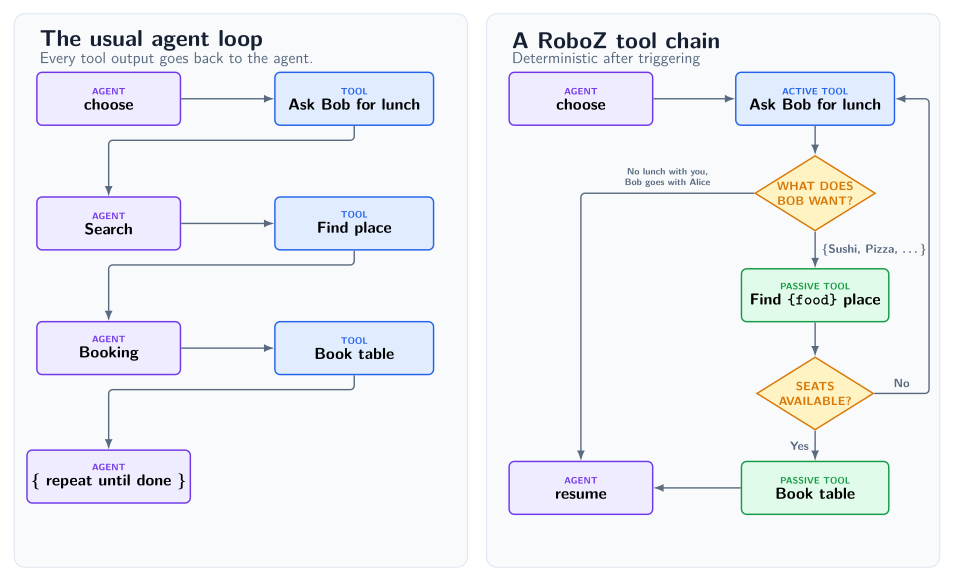
Problems to solve: Context bloat and too many llm calls
Suppose the task we want to achieve is ask our buddy Bob out to lunch and then book a table. For the sake of argument assume that our agent has access to the following MCP servers (Note: this is an example, RoboZ has native Tool primitives):
- Ask Bob what they want
- Find a restaurant
- Book a table.
In the usual approach an agent is presented each MCP server separately in their system prompt and it must call them one-by-one to complete the task. When the agent is completing the task, at every turn it must choose the correct tool, formulate its output accordingly and absorb the reply into its context, which already must contain the specific instructions on how to use each tool. In addition, at each turn one has to wait for the llm to reply, each reply costs tokens and each reply risks a mistake from the llm.
Deterministic chains
The philosophy in RoboZ is that a workflow is (mostly) deterministic and only on occasion does one need to call an llm. For example in RoboZ an agent would trigger the "ask Bob if they want to have lunch" tool and all subsequent steps come by chaining: each tool can be chained to other tools upstream where their outputs are passed down the chain. Each link/edge may introduce a True/False condition, in our case for example if Bob is interested in having lunch (with us). If he is not, RoboZ allows for the chain to break and returns back to the default tool, which for an agentic process is usually "ask the llm what to do next". The default mode is that chained tools are not presented to the agent, they are thus passive or in other words their role is strictly in forming deterministic workflows and they cannot be invoked.
Chaining not only reduces the llm calls, but it also provides a useful way of introducing a fine-grained guard layer for tool calls. This is in fact precisely how the cli tools and their access policies work in Roboz. For a cli command a chained passive tool evaluates the intent and breaks the chain if policies are violated.
Start here: Agent with a tool
from random import choice

from simpsons_quotes import QUOTES

from roboz import Agent, tool
from roboz.llm.endpoints import MockLLMEndpoint
from roboz.models import Empty, Message, Stop


@tool
def get_quote(input: Empty, messages: list[Message]) -> Stop:
    """Return a random Simpsons quote and then stop."""
    return Stop(value=choice(QUOTES))


mock = MockLLMEndpoint(
    responses=[{"action": "get_quote", "rationale": "Need Simpsons quote!"}]
)

agent = Agent(
    name="demo",
    system_prompt="You are a Simpsons quote generator",
    agent_endpoint=mock,
    tools=[get_quote],
)

output, messages_ = agent.invoke()
print(f'"{output.value}"')
The above simple example uses the accompanying quote file in this repository. Run it from the repository root with
uv run python examples/simple.py
It creates an agent that returns a random Simpsons quote. The docstring in the tool is the instruction that the agent sees. It uses a mock endpoint, with pre-determined replies, so you can run it without API keys. The main contracts of RoboZ are already visible:
@toolcreates an instance of a usable tool for the agent- A tool's input and output are typed. Tools also receive the entire message stack
- Callable endpoints are single instances, as a hard rule
- Different output types impact the dynamics, importantly
Stopbreaks out of the agentic loop agent.invoke()runs the agent and returns its outputStopand messages.
The above does not show the main idea of tool chaining, for that read the following sections.
The central abstraction
An agent is a loop that calls tools. Everything is defined as a tool: Skills, background agents, prompting the agent, prompting the user, running nested agents, start up hooks etc. Everything.
A tool can be triggered in three ways:
- Invoked by an agent: The
prompt_agenttool asks an LLM what to do next and itsInvokeoutput always calls another tool. It is constructed internally forAgentMode.STEERABLEandAgentMode.AUTONOMOUSagents, but it is still just a tool. - By chaining. After an invoked tool has fired RoboZ checks if a chained tool with a true chain condition exists (for more than one true condition for a fork you get a runtime error). If yes, the output is passed on and the process repeats until the first broken chain or all chained tools are exhausted
- As default tools. Defaults are ordered chain roots owned by the scheduler. When no chained successor exists, they run in configuration order; a default may feed downstream tools, and the sequence resumes with the next default after that branch ends. A default cannot itself be downstream, so it cannot declare
chained_to.
RoboZ then collapses to the traditional agentic approach as a special case if one just has the prompt_agent as the default with no chaining. An AgentMode.DETERMINISTIC agent has no prompt_agent; its default tools perform tasks directly, allowing deterministic branching through chaining. This is useful for a background agent that performs periodic maintenance work. AgentMode.STEERABLE agents may ask the user for input, while AgentMode.AUTONOMOUS agents cannot.
Why is this framework useful?
Tool Chaining
This may be used to reduce the number of llm calls, leading to a speed increase, lower cost and fewer AI errors. It also provides a useful way of introducing a guard layer for tool calls, which can be used to restrict agentic actions.
Output Truncation
A tool’s output can be hidden from the llm, also partially, and this can start to apply after the message has been shown N times.
Tool outputs are typed
The contract in RoboZ is that every action in the agentic loop is a tool call and all outputs are typed classes. Raw strings or JSON is never exchanged (unless explicitly opted in) as is and typed classes and validation are present throughout, with designated classes for tasks such as Invoke and Stop.
LLM Endpoints are instances
As a fundamental design rule in Roboz, everything that depends on an LLM call must be trivially swappable to another provider or model. This makes changing an agent endpoint trivial and furthermore multi-endpoint functionality, where inside a single agent several endpoints are implemented, quite easy.
To see the above in practice see the complex example example below.
Chains, factories, truncation and many endpoints
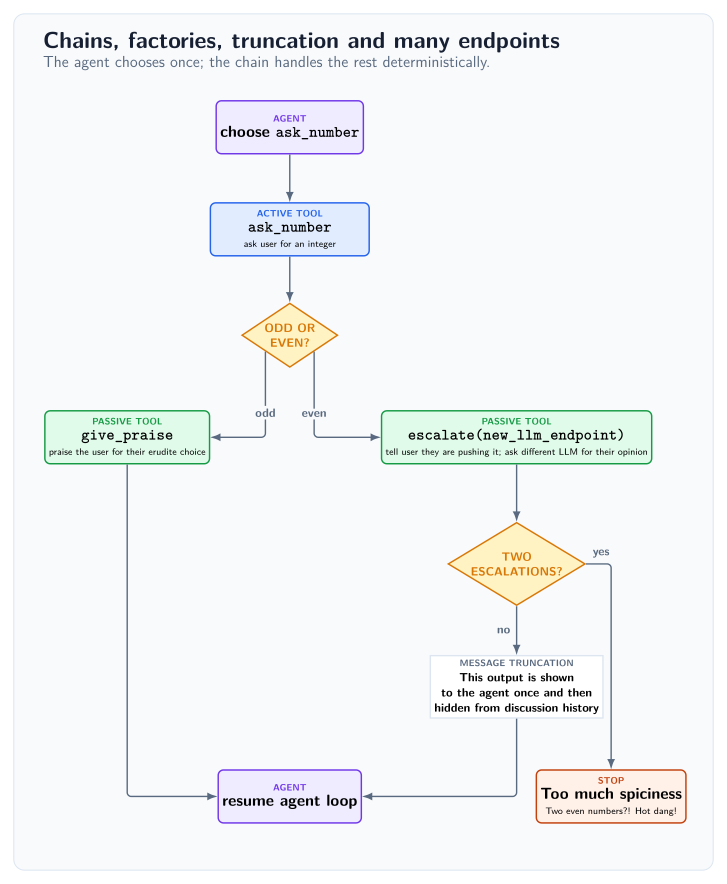
In the code example below we illustrate some of the features that make RoboZ different from other frameworks.
Tool chaining is usually introduced via the decorator argument chained_to, which points from a downstream tool to the upstream tool whose output becomes its input (tools also possess a .chain method). The input/output contract must be Liskov compatible, i.e. the upstream output must be a subclass of the downstream input. A possible chain_condition can be passed in, which by definition has access to the tool's input argument and returns a boolean. The chain condition must evaluate to at most one true condition, but it can evaluate to false on all links, in which case scheduling resumes with the next configured default. Defaults may be referenced as upstream parents without also appearing in tools, but cannot declare chained_to themselves. AgentMode.STEERABLE and AgentMode.AUTONOMOUS construct a prompt_agent tool backed by the agent endpoint; AgentMode.DETERMINISTIC uses the configured default tools.
The escalate is an example of a tool factory, which is a simple concept. It accepts a context parameter which is added to the tool's closure and calling the factory with a context argument returns a tool. A very common use case is a tool with an endpoint as a context. In RoboZ all llm endpoints are instances, so it is easy to have a specific endpoint for a tool, that is different from that of the agent, below we construct deterministic mock endpoints so that no API keys are required for the examples. Factories have precisely the same chaining arguments in their decorator as a tool.
Also demonstrated in the escalate factory is the message truncation feature. This parameter is present in all output types and allows the tool to decide if the output should be visible in the conversation passed on to the agent. A message can be truncated partially (show only n chars or just a caller stub) or completely. Importantly, we can choose to start applying the truncation only after the complete message has been shown to the agent n times. Below, we choose to show the message once and then truncate it completely, a useful pattern for example for long tracebacks etc.
All RoboZ tools by definition include the full conversation messages as input. These are not intended to be altered in place (although they can be and this is how e.g. conversation compactification works), but can be used to alter the behavior of tools in a non-trivial way. For example, a start up hook intended to show the agent some information at the start or performing some initial maintenance can simply be one of the default tools that checks if it has already been called and if it has, does nothing.
The tool instruction is its docstring. In addition, the system prompt includes a technical prompt by default that gives the specific tool calling instructions. This can of course be switched off. When in doubt, you can always use the method .show_agent_info() to check the complete agent configuration including the system prompt, tools, dependencies, persistence locations etc.
from builtins import input as read_input

from roboz import Agent, factory, tool
from roboz.llm import EndpointLike, MockLLMEndpoint, get_completion
from roboz.models import Empty, Int, Message, Role, Stop, Str, filter_messages
from roboz.models.truncation import Severity, Truncation
from roboz.runtime.io import interact_with_user
from roboz.runtime.sinks import CliSink
from roboz.tools import stop


@tool
def ask_number(input: Empty, messages: list[Message]) -> Int:
    """Ask the user for an integer, repeating until the response is valid."""
    while True:
        reply = read_input("Enter an integer: ")
        try:
            return Int(value=int(reply))
        except ValueError:
            print("Please enter an integer :)")


@factory(chained_to=ask_number, chain_condition=lambda x: x.value % 2 == 0)
def escalate(input: Int, messages: list[Message], ctx: EndpointLike) -> Stop | Str:
    """An even number?! Need to check this with HR!"""
    interact_with_user("Careful now, that is pretty spicy!", with_reply=False)
    prompt = f"The user chose {input.value}. Is this too hot to handle?! (y/n)?"
    verdict = get_completion(
        endpoint=ctx, messages=[Message(role=Role.SYSTEM, content=prompt)]
    )
    is_first_escalation = (
        len(filter_messages(caller="escalate", messages=messages)) == 0
    )
    if verdict == "y" and not is_first_escalation:
        return Stop(value="Too much spiciness, need to quit!")
    return Str(
        value="HR gave a pass, but still, let's show this to the agent only once.",
        truncation=Truncation(threshold=1, severity=Severity.REMOVE),
    )


@tool(chained_to=ask_number, chain_condition=lambda x: x.value % 2 != 0)
def give_praise(input: Int, messages: list[Message]) -> Str:
    """We need to give praise for such an erudite approach to the problem."""
    interact_with_user(f"{input.value} a fine and bold choice!", with_reply=False)
    return Str(value=f"{input.value} is good, no biggie.")


agent_endpoint = MockLLMEndpoint(
    responses=[
        *(10 * [{"action": "ask_number", "rationale": "This is my only job"}]),
        {"action": "stop", "rationale": "Enough numbers!", "value": ""},
    ]
)
guard_endpoint = MockLLMEndpoint(responses=10 * ["y"])

agent = Agent(
    name="demo",
    system_prompt=f"Without exception, use the {ask_number.name} tool.",
    event_sinks=[CliSink.default()],
    agent_endpoint=agent_endpoint,
    tools=[ask_number, escalate(guard_endpoint), give_praise, stop],
)
agent.invoke()
The above complex example can be run from the root with
uv run python examples/complex.py
Try it out
uv add roboz
Or with pip:
python -m pip install roboz
Packages
This repository contains four independently versioned Python distributions. They share development and release tooling, but are published separately so an application only needs to install the parts it uses.
| Distribution | Import | Provides |
|---|---|---|
roboz |
roboz |
Core agent, tool, workflow, endpoint, and runtime primitives. |
roboshed |
roboshed |
Reusable capabilities, guarded system tools, memory, agents, and deployment building blocks. |
roboz-endpoints |
roboz_endpoints |
Model catalogues and optional provider adapters. |
roboz-proton-bridge |
roboz_proton_bridge |
Proton Bridge email integration. |
The companion packages build on roboz; roboz-proton-bridge also uses
roboshed.
Development
uv sync --locked --dev
uv run pytest
uv run ruff check
uv run pyright
bash scripts/run_type_tests.sh
See CONTRIBUTING.md for development and testing guidance. The
verification workflow defines the complete CI
gate.
Roboz is typed and ships a PEP 561 py.typed marker.
License
Roboz is licensed under the Apache License 2.0. Copyright © 2026 Tachion Oy.
1 maintainer

Release files for roboz 0.1.2.dev10
For a detailed explanation of source distributions (sdists) and built distributions (wheels), please see the package formats documentation.
Source distribution (sdist)
| File | Size | Uploaded | |
|---|---|---|---|
| roboz-0.1.2.dev10.tar.gz | 87.3 kB | Details |
Built distribution (wheel)
| File | Interpreter | ABI | Platform | Reset |
|---|---|---|---|---|
| roboz-0.1.2.dev10-py3-none-any.whl | Python 3 | none | any | Details |
Total release size: 195.0 kB
Release files / roboz-0.1.2.dev10.tar.gz
| Download URL | roboz-0.1.2.dev10.tar.gz |
|---|---|
| Size | 87.3 kB |
| Tags | Source |
|
SHA-256 checksum How to use checksums |
67ab785816747012a0c49f38f25533219240b0d0998bc2d8a02282bb57e42b07
|
|
BLAKE2b-256 checksum How to use checksums |
36a4ddb444f2e3ab21636b34dc14f694dda9b4148e4a24e99e582400ee5c8949
|
| Upload date | |
|
Uploaded using Trusted Publishing? What is trusted publishing? |
Yes |
| Uploaded via |
twine/7.0.0 CPython/3.13.14
|
Provenance
Provenance describes where a file came from. On PyPI, provenance is shared via attestations, which provide a verifiable record of the build or publishing details. View details, limitations and caveats.


PyPI Publish Attestation
PyPI verified that this artifact, at this checksum, originated from the publisher listed below.
Signed by GitHub Actions, verified by PyPI on Sep 20, 2026.
Transparency logRelease files / roboz-0.1.2.dev10-py3-none-any.whl
| Download URL | roboz-0.1.2.dev10-py3-none-any.whl |
|---|---|
| Size | 107.7 kB |
| Tags | Python 3 |
|
SHA-256 checksum How to use checksums |
5eaf1f6a1faf1e1a3e98ee081719aee55fd24dfa28918eb55eb77e8b9603ce15
|
|
BLAKE2b-256 checksum How to use checksums |
bb9137871c41c478b7c6fe663223c446c8d2effc89701f0287cc8c91344718e0
|
| Upload date | |
|
Uploaded using Trusted Publishing? What is trusted publishing? |
Yes |
| Uploaded via |
twine/7.0.0 CPython/3.13.14
|
Provenance
Provenance describes where a file came from. On PyPI, provenance is shared via attestations, which provide a verifiable record of the build or publishing details. View details, limitations and caveats.
PyPI Publish Attestation
PyPI verified that this artifact, at this checksum, originated from the publisher listed below.
Signed by GitHub Actions, verified by PyPI on Sep 20, 2026.
Transparency log













