
Bot client for rocketchat BotBridgeApp

Project description
This is a RocketChat bot library using an app bridge to create bots with interactive elements such as buttons.
☝ Important
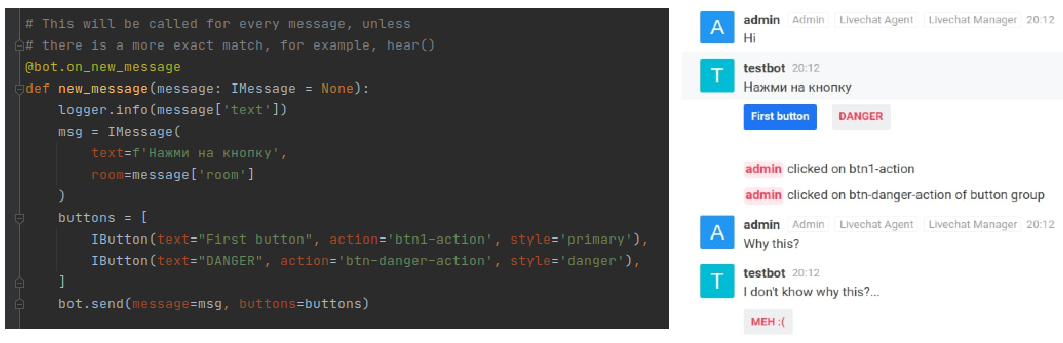
In addition to this description, be sure to see an example of a bot on how to send and build data to send
Usage
- First, you need to install this application on your rocket chat server.
- Then go to the admin settings -> applications -> BotBridge -> and copy the
POST webhookaddress - In the
Controlled botssettings field, enter the nickname of the bot user you want to use. Or leave it blank if you want to use the standard@bbot.botaccount automatically created for the application - install package with
pip install rocketchat-bot-simple-app-botand import this in your projectfrom rocketchat_bot_app_bridge.RCBot import RCBot from rocketchat_bot_app_bridge.definitions.application import IButton from rocketchat_bot_app_bridge.definitions.message import IMessage from rocketchat_bot_app_bridge.definitions.user import IUser - Now you can create a bot instance.
bot = RCBot()If you want to use a custom bot account, then after adding it in the application settings, pass its username like this
bot = RCBot(account_username='testbot') - Since communication is carried out in both directions between the RocketChat application and this bot server. Here a web server will be configured on the default port
3228
You can specify your port in the environment variable
export BOT_PORT=12345Also you can pass the port when creating the botRCBot (port=12345)[[[подробнее в файле примаера добавитьссылку]]] - Also, the link you copied to the
POST webhookmust be passed to theAPP_ENDPOINTenvironment variable
Or when created in the same way as the port. more details here.export APP_ENDPOINT=http://rocket.chat/api/apps/private/2c3927404e41/sab7/webhook - Now there are several decorators available to you that you can use on your functions.
@bot.on_new_message
def new_message(message: IMessage = None):
    pass

@bot.on_button_click(action='btn1-action')
def click_button(action, user: IUser = None, source_message: IMessage = None):
    pass

@bot.on_button_click(startswith='btn-danger-')
def click_button(action, user: IUser = None, source_message: IMessage = None):
    pass

@bot.hear(pattern=r"Why (?P<phrase>.*)\??")
def answer_the_question(message: IMessage, phrase):
    pass
- Finally, you need to start the server and wait loop.
bot.run()

while True:
    time.sleep(300)
P.S. Eliminate the need for loop in my todo for easier work - After launching, there will be a line in the log saying that the server is running.
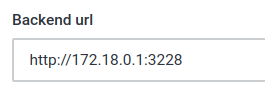
| INFO | run:57 - Listen on **http://0.0.0.0:3228/** copy this(or service ip for kubernetes) to RocketChat app settings
You need to specify the address of the server on which the bot is running in the rocket chat settings as a backend address.
Instead of 0.0.0.0, there should be one of your server addresses, which will be available for rocket chat. Eg. Service name in docker-compose or kubernetes
Release history Release notifications | RSS feed

Download files
Download the file for your platform. If you're not sure which to choose, learn more about installing packages.
Source Distribution
Built Distribution
Filter files by name, interpreter, ABI, and platform.
If you're not sure about the file name format, learn more about wheel file names.
Copy a direct link to the current filters
File details
Details for the file rocketchat_bot_simple_app_bot-0.1.0.tar.gz.
File metadata
- Download URL: rocketchat_bot_simple_app_bot-0.1.0.tar.gz
- Upload date:
- Size: 7.6 kB
- Tags: Source
- Uploaded using Trusted Publishing? No
- Uploaded via: twine/3.2.0 pkginfo/1.6.1 requests/2.25.0 setuptools/51.0.0 requests-toolbelt/0.9.1 tqdm/4.54.1 CPython/3.8.5
File hashes
| Algorithm | Hash digest | |
|---|---|---|
| SHA256 |
cf902e4b87196db9f6bea0bf5fa20e788f668fec9b4709ac63752a158c425161
|
|
| MD5 |
4811f851257b4099f19f04ff55dff416
|
|
| BLAKE2b-256 |
8652abd4e777ff17e93fc42f45ab685e533c9a735224b9a31996e4c4a9341243
|
File details
Details for the file rocketchat_bot_simple_app_bot-0.1.0-py3-none-any.whl.
File metadata
- Download URL: rocketchat_bot_simple_app_bot-0.1.0-py3-none-any.whl
- Upload date:
- Size: 8.9 kB
- Tags: Python 3
- Uploaded using Trusted Publishing? No
- Uploaded via: twine/3.2.0 pkginfo/1.6.1 requests/2.25.0 setuptools/51.0.0 requests-toolbelt/0.9.1 tqdm/4.54.1 CPython/3.8.5
File hashes
| Algorithm | Hash digest | |
|---|---|---|
| SHA256 |
df4b5ac7550ba6a01d1ac88356a34dfbb9cefde36922d099e6dd8a1aa7cedb4c
|
|
| MD5 |
281bc9c5b93087c88b090399ed37290e
|
|
| BLAKE2b-256 |
69d7d85cb3401897f3de07d706f11fcbcbfbcf7288882b39d709ce80de0359e6
|






