
rocmate




Get AMD GPUs running with AI tools — without the rabbit hole.
rocmate is a curated compatibility index and CLI for running modern AI workloads on AMD GPUs — via ROCm or Vulkan. It tells you what works on your specific card, what to set, and what to avoid — based on configurations that real users have tested.
pip install rocmate
Why?
AMD GPUs offer great VRAM-per-dollar (especially the RX 7900 XTX with 24 GB), but getting Ollama, ComfyUI, faster-whisper, or axolotl to actually use the GPU still involves hunting through blog posts, GitHub issues, and Discord threads. Information is scattered, often outdated, and rarely specific to your chip generation (gfx1030 vs gfx1100 vs gfx1151 vs gfx1201).
rocmate consolidates this knowledge into one place — version-controlled, testable, community-maintained.
Quickstart
pip install rocmate
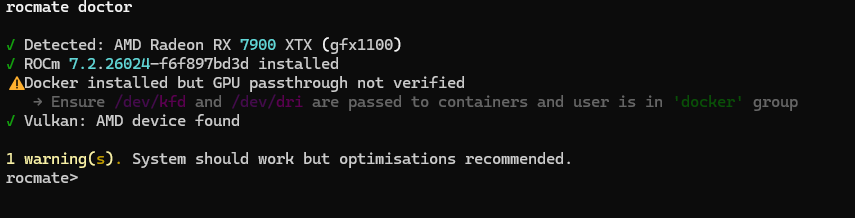
Check your system:
$ rocmate doctor
✓ GPU detected: AMD Radeon RX 7900 XTX (gfx1100)
✓ ROCm found: 7.2.3
✗ User not in 'render' group — run: sudo usermod -aG render $USER
✓ Docker available
✓ Vulkan available
Show the tested config for a tool:
rocmate show llama-cpp               # auto-detects your chip
rocmate show llama-cpp --chip gfx1100
Find tools by keyword:
rocmate search llm
rocmate list --chip gfx1151          # filter by chip
Install with the right ENV vars (shows plan first, asks for confirmation):
rocmate install ollama
rocmate install ollama --chip gfx1100   # skip GPU detection

# Auto-fix detected issues
rocmate doctor --fix
Supported tools
→ Live compatibility matrix — auto-updated on every commit.
| Tool | gfx1151 Radeon 8060S/8050S |
gfx1100 RX 7900 XT/XTX |
gfx1101 RX 7800/7700 XT |
gfx1102 RX 7600 |
gfx1030 RX 6800/6900 |
gfx1201 RX 9070 |
|---|---|---|---|---|---|---|
| Ollama | ✅ | ✅ | ✅ | ✅ | ✅ | 🟡 |
| ComfyUI | 🟡 | ✅ | ✅ | 🟡 | 🟡 | — |
| faster-whisper | ✅ | ✅ | 🟡 | — | — | — |
| llama.cpp | ✅ | ✅ | ✅ | ✅ | ✅ | 🟡 |
| Stable Diffusion WebUI | 🟡 | ✅ | ✅ | 🟡 | 🟡 | — |
| vLLM | ✅ | ✅ | ✅ | 🟡 | 🟡 | 🟡 |
| Axolotl | 🟡 | ✅ | ✅ | 🟡 | 🟡 | — |
| ExLlamaV2 | 🟡 | ✅ | ✅ | 🟡 | 🟡 | — |
✅ tested · 🟡 partial / workarounds needed · — no data yet
Run rocmate show <tool> for chip-specific ENV vars, install hints, and tested ROCm versions.
Status
Actively maintained by @T0nd3 on an RX 7900 XTX. Contributions for other AMD chips are very welcome — one YAML file, five minutes. See CONTRIBUTING.md.
License
MIT — see LICENSE.
1 maintainer

Metadata
1 maintainer
Release files for rocmate 0.5.3
For a detailed explanation of source distributions (sdists) and built distributions (wheels), please see the package formats documentation.
Source distribution (sdist)
| File | Size | Uploaded | Provenance | |
|---|---|---|---|---|
| rocmate-0.5.3.tar.gz | 66.0 kB | With provenance | Details |
Built distribution (wheel)
| File | Interpreter | ABI | Platform | Reset |
|---|---|---|---|---|
| rocmate-0.5.3-py3-none-any.whl | Python 3 | none | any | Details |
Total release size: 92.0 kB
Release files / rocmate-0.5.3.tar.gz
| Download URL | rocmate-0.5.3.tar.gz |
|---|---|
| Size | 66.0 kB |
| Tags | Source |
|
SHA-256 checksum How to use checksums |
2c698ec1d3ef9869f035c6fbad0e2ae71a7271b4e28c99c6bbf2074fd99e7a0c
|
|
BLAKE2b-256 checksum How to use checksums |
fd057e4245bca1edbbacd91cb7d71e5b125bff047c26c422e79b335ba6e63848
|
| Upload date | |
|
Uploaded using Trusted Publishing? What is trusted publishing? |
Yes |
| Uploaded via |
twine/6.1.0 CPython/3.13.12
|
Provenance
Provenance describes where a file came from. On PyPI, provenance is shared via attestations, which provide a verifiable record of the build or publishing details. View details, limitations and caveats.


PyPI Publish Attestation
PyPI verified that this artifact, at this checksum, originated from the publisher listed below.
Signed by GitHub Actions, verified by PyPI on May 20, 2026.
Transparency logRelease files / rocmate-0.5.3-py3-none-any.whl
| Download URL | rocmate-0.5.3-py3-none-any.whl |
|---|---|
| Size | 26.0 kB |
| Tags | Python 3 |
|
SHA-256 checksum How to use checksums |
49cedb7bdc995c979a65a6e5eed9312e46dfad3867d58c09e597eeea1819375c
|
|
BLAKE2b-256 checksum How to use checksums |
b52bf310b7a9c71d82fed84ab6a68386096649754f15704036ee806059a3a795
|
| Upload date | |
|
Uploaded using Trusted Publishing? What is trusted publishing? |
Yes |
| Uploaded via |
twine/6.1.0 CPython/3.13.12
|
Provenance
Provenance describes where a file came from. On PyPI, provenance is shared via attestations, which provide a verifiable record of the build or publishing details. View details, limitations and caveats.
PyPI Publish Attestation
PyPI verified that this artifact, at this checksum, originated from the publisher listed below.
Signed by GitHub Actions, verified by PyPI on May 20, 2026.
Transparency logSecurity for rocmate 0.5.3
Provenance
Provenance describes where a file came from. On PyPI, provenance is shared via attestations, which provide a verifiable record of the build or publishing details. View details, limitations and caveats.
Full provenance
All 2 files in this release have been uploaded with provenance metadata.
Attestation for rocmate-0.5.3.tar.gz
PyPI Publish Attestation
PyPI verified that this artifact, at this checksum, originated from the publisher listed below.
Signed by GitHub Actions, verified by PyPI on May 20, 2026.
Transparency logA note on package security
PyPI is a repository for distributing packages, not a service for auditing them. While third-party security researchers and our staff do their best to detect and remove malicious packages, PyPI cannot guarantee the quality, security or suitability of any given package.
To learn more about protecting yourself from malicious actors, visit our package security documentation.














