
Röntgen
Röntgen is a set of monochrome 14 × 14 px pixel-aligned icons. All icons are under the CC BY 4.0 license. You can use them freely, but please give the appropriate credit.
Röntgen was created for the Map Machine project to represent different map features from the OpenStreetMap database. However, it can be easily used for any map project or even for non-map-related projects. Some icons can also be used as emoji symbols. Several Röntgen icons are used in iD editor for OpenStreetMap and other projects using icons from the iD tagging schema.
To use the icons, you can
- browse and download them from the Röntgen website,
- use the npm package
@enzet/roentgen:
npm i @enzet/roentgen, - use the PyPI package
roentgen-icons:
pip install roentgen-icons, - download them from the
iconsdirectory, - download the release ZIP file from GitHub Releases.
All icons are stored as optimized SVG files. The majority of them contain only one path element with a minimal number of points. File sizes range from 207 bytes to 4 KB, with mean and median sizes of about 1 KB.
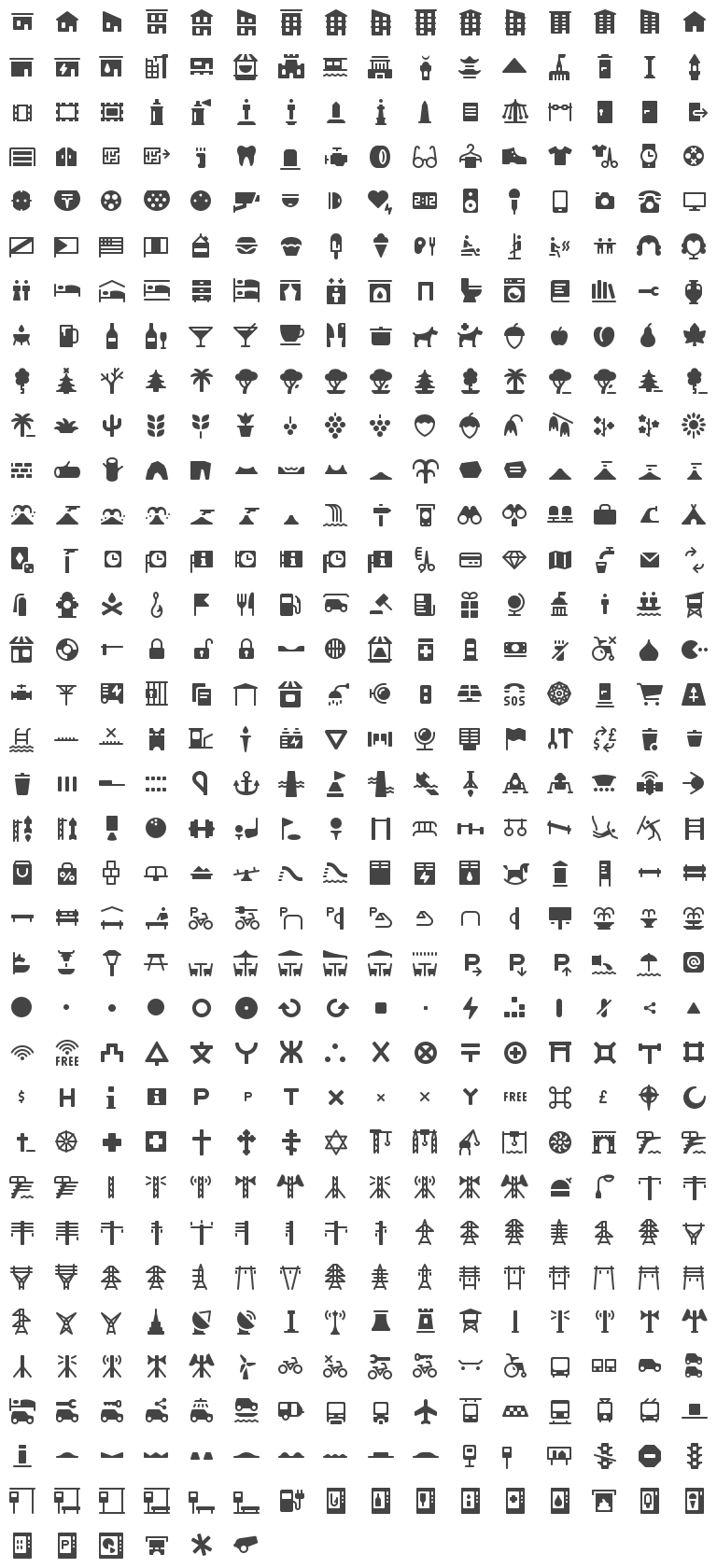
All icons follow a common design style inspired by Maki, Osmic, and Temaki.
Feel free to request new icons via issues on GitHub.
Installation
npm Package
Röntgen is available as an npm package:
npm install @enzet/roentgen
After installation, you can use SVG files directly:
import treeIcon from '@enzet/roentgen/icons/tree.svg';
Or use them in HTML:
<img src="node_modules/@enzet/roentgen/icons/tree.svg" alt="Tree icon" />
PyPI Package
Röntgen is available as a PyPI package:
pip install roentgen-icons
After installation, you can use the icons in your Python code:
from roentgen import get_roentgen, Roentgen
from svgwrite.path import Path

instance: Roentgen = get_roentgen()

shape: Shape | None = instance.get_shape("tree")
if shape is not None:
    svg_path: Path = shape.get_svg_path()
    path_commands: str = shape.get_path_commands()
Design Principles
Requirements
- Icons must be monochrome and not depend on color (they can be recolored without losing their meaning).
- Maximum icon size is 14 × 14 px (equivalent to 16 × 16 px with one pixel padding).
- Lines must not be thinner than 1 px. Lines should preferably have an integer pixel width (1 px, 2 px, etc.) for clean rendering at target size.
Recommendations
- Icon parts should be pixel-aligned for better rendering, when possible.
- Lines should have rounded caps. Line joins and bends should also be rounded where possible, unless sharp corners are essential to the shape.
- Prefer fewer details: omit elements that do not contribute to immediate recognition at small sizes. A simpler silhouette reads better than a detailed but cluttered one.
- Use negative space intentionally: cutouts and gaps inside a filled shape can convey detail without adding strokes, keeping the icon clean.
Icon Generation
The icons directory contains generated and optimized SVG icons.
Some of the icons are described with
iconscript files in the
iconscript directory. Others are generated from sketch SVG files
in the data directory by Python scripts. This greatly simplifies the
process of creating new icons.
To regenerate icons and preview grids, run
python -m roentgen icons
Command-Line Interface
Grid Drawing
Draw an SVG file with an icon grid.
python -m roentgen grid
| Option | Description |
|---|---|
--columns |
Number of columns in the grid |
--filter |
Regular expression for filtering icons |
--new-in |
Draw only icons new in a given version (e.g. --new-in 0.13.0 or --new-in HEAD) |
--output |
Output SVG file |
--scale |
Icons scale |
OpenStreetMap Tags
Röntgen was created for the Map Machine, a rendering engine for OpenStreetMap data, and its primary purpose is to represent tags of objects from the OpenStreetMap database.
The data/tags.json file contains a possible mapping from OpenStreetMap tags
to Röntgen icons.
License
All Röntgen icons are licensed under the CC BY 4.0. This means you can use them for any purpose, but please give the appropriate credit, e.g.:
Röntgen icons by Sergey Vartanov (CC BY 4.0)
1 maintainer

Download files
Download the file for your platform. If you're not sure which to choose, learn more about installing packages.
Source Distribution
Built Distribution
Filter files by name, interpreter, ABI, and platform.
If you're not sure about the file name format, learn more about wheel file names.
Copy a direct link to the current filters
File details
Details for the file roentgen_icons-0.16.0.tar.gz.
File metadata
- Download URL: roentgen_icons-0.16.0.tar.gz
- Upload date:
- Size: 1.3 MB
- Tags: Source
- Uploaded using Trusted Publishing? No
- Uploaded via:
twine/6.2.0 CPython/3.10.15
File hashes
| Algorithm | Hash digest | |
|---|---|---|
| SHA256 |
1a3e1d317605d09daa3c087b200c4bdefb193a396acc541efe1950df37588312
|
|
| MD5 |
a67c7106c92d6a5efa9b3f6c223bdccf
|
|
| BLAKE2b-256 |
4f366cf9e3874890a273f2d5d3f2d8c17811399d75c6d2dacf8eeb81d69b094d
|
File details
Details for the file roentgen_icons-0.16.0-py3-none-any.whl.
File metadata
- Download URL: roentgen_icons-0.16.0-py3-none-any.whl
- Upload date:
- Size: 178.1 kB
- Tags: Python 3
- Uploaded using Trusted Publishing? No
- Uploaded via:
twine/6.2.0 CPython/3.10.15
File hashes
| Algorithm | Hash digest | |
|---|---|---|
| SHA256 |
e7448a2bf0cc88410837884bdd2032725b84b6b510c2bd4566b15c2d9381aa82
|
|
| MD5 |
8097a9447071afd7128cf9ebb5dc0f14
|
|
| BLAKE2b-256 |
5f88e094f328264fc8ff4c8e3ae1e05b92c063b44383ba12c5445bf8ed5c99bd
|














