
rbw-rofi
A rofi (and dmenu-like) frontend for Bitwarden
Based on the alternative Bitwarden CLI rbw and inspired by rofi-pass, rbw-rofi is a simplistic password typer/copier using rofi, wofi, fuzzel, and bemenu.


Features
- Autotype password or username (
Enter/Alt+3andAlt+2, respectively) - Autotype username and password (with a
tabcharacter in between) withAlt+1(and copy TOTP to clipboard) - Configure autotyping either as a keybinding or by having a
_autotypefield in your credential - Copy username, password or TOTP to the clipboard (
Alt+u,Alt+pandAlt+t, respectively) - Show an autotype menu with all fields
Usage
First, you need to configure rbw. See its documentation for that.
Then, you can start rofi-rbw. It is not available as a rofi mode.
Configuration
You can configure rofi-rbw either with cli arguments or with a config file called $XDG_CONFIG_HOME/rofi-rbw.rc. In the file, use the long option names without double dashes.
Please check the man page for details.
Options
| long option | short option | possible values | description |
|---|---|---|---|
--action |
-a |
type (default), copy, print |
Choose what rofi-rbw should do. |
--target |
-t |
username, password, notes, totp (or any custom field) |
Choose which components of the selected entry are interesting. Can be passed multiple times to type/copy/print several components. Default is username and password. |
--prompt |
-r |
any string | Define the text of the prompt. |
--keybindings |
Define custom keybindings in the format <shortcut>:<action>:<target>, for example Alt+x:copy:username. Multiple keybindings can be concatenated with ,; multiple targets for one shortcut can be concatenated with :. Note that wofi doesn't support keybindings. |
||
--menu-keybindings |
Define custom keybindings for the target menu in the format <shortcut>:<action>, similar to --keybindings. Note that wofi doesn't support keybindings. |
||
--no-cache |
Disable the automatic frecency cache. It contains sha1-hashes of the selected entries and how often they were used. | ||
--clear-after |
integer number >= 0 (default is 0) |
Limit the duration in seconds passwords stay in your clipboard (unless overwritten). When set to 0, passwords will be kept indefinitely. | |
--typing-start-delay |
delay in milliseconds (default is 0) |
Set a delay before the typing starts. | |
--typing-key-delay |
delay in milliseconds (default is 0) |
Set a delay between key presses when typing. | |
--action-sequence-delay |
delay in milliseconds (default is 1000) |
Duration to wait when a delay step is encountered in a keybinding sequence (e.g. Alt+c:copy:username:delay:password), for both type and copy actions. |
|
--no-help |
Don't show the help message about the available shortcuts. | ||
--display-fields |
name_only, name_with_folder, folder, user, uri |
Ordered list of fields to show in the overview, given as separate arguments (e.g. --display-fields name_only user). Defaults to name_with_folder user. |
|
--selector-args |
Define arguments that will be passed through to rofi, wofi, fuzzel or bemenu.Please note that you need to specify it as --selector-args="<args>" or --selector-args " <args>" because of a bug in argparse |
||
--selector |
rofi, wofi, fuzzel, bemenu |
Show the selection dialog with this application. Chosen automatically by default. | |
--clipboarder |
xsel, xclip, wl-copy |
Access the clipboard with this application. Chosen automatically by default. | |
--typer |
xdotool, wtype, ydotool, dotool |
Type the characters using this application. Chosen automatically by default. | |
--use-notify-send |
Send a desktop notification after each field is copied (e.g. "username copied to clipboard"). |
Autotyping
By default, Alt+1 will type username and password, separated with a tab character. However, you can change this behavior by defining your own keybinding (if your selector supports this). For example, Alt+1:type:username:enter:delay:password:enter will type the username, enter, wait for a second and then type the password and enter again.
This sequence can also be defined as a field _autotype on each credential.
Installation
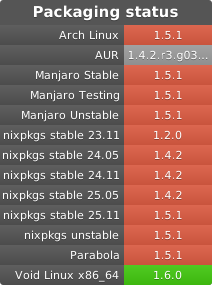
From distribution repositories
From PyPI
rofi-rbw is on PyPI. You can install it with pip install --user rofi-rbw (or sudo pip install rofi-rbw).
Manually
Download the wheel file from releases and install it with pipx install $filename.
Note that it needs configargparse to work.
Dependencies
You also need:
- Python 3.9 or higher
rofi,wofi,fuzzelorbemenurbw1.14 or higher- Something to programmatically type characters into other applications. Depending on your display server, it's
xdotool,wtype,ydotoolordotool. - Something to copy text to the clipboard. Again, depending on the display server, you want
xclip,xselorwl-copy. - Optionally
libnotifyto providenotify-sendneeded for--use-notify-send
1 maintainer

Download files
Download the file for your platform. If you're not sure which to choose, learn more about installing packages.
Source Distribution
Built Distribution
Filter files by name, interpreter, ABI, and platform.
If you're not sure about the file name format, learn more about wheel file names.
Copy a direct link to the current filters
File details
Details for the file rofi_rbw-1.7.0.tar.gz.
File metadata
- Download URL: rofi_rbw-1.7.0.tar.gz
- Upload date:
- Size: 90.1 kB
- Tags: Source
- Uploaded using Trusted Publishing? Yes
- Uploaded via:
twine/7.0.0 CPython/3.13.14
File hashes
| Algorithm | Hash digest | |
|---|---|---|
| SHA256 |
8907980538abbd985efe05c2d55d56c314a86fa0beceb115213c3725cdb51fd7
|
|
| MD5 |
873f8c858a6d45ad8e6253d04b1ffecd
|
|
| BLAKE2b-256 |
17dac56b7f2f3e0c3d9b0aae6521046270e0a91ebc4bb2b537f78e46df17d772
|
Provenance
The following attestation bundles were made for rofi_rbw-1.7.0.tar.gz:
Publisher:
release.yaml on fdw/rofi-rbw
-
Statement:
-
Statement type:
https://in-toto.io/Statement/v1 -
Predicate type:
https://docs.pypi.org/attestations/publish/v1 -
Subject name:
rofi_rbw-1.7.0.tar.gz -
Subject digest:
8907980538abbd985efe05c2d55d56c314a86fa0beceb115213c3725cdb51fd7 - Sigstore transparency entry: 2310442555
- Sigstore integration time:
-
Permalink:
fdw/rofi-rbw@337f489c98e6af5f5e461f8e08087e95a5893551 -
Branch / Tag:
refs/tags/1.7.0 - Owner: https://github.com/fdw
-
Access:
public
-
Token Issuer:
https://token.actions.githubusercontent.com -
Runner Environment:
github-hosted -
Publication workflow:
release.yaml@337f489c98e6af5f5e461f8e08087e95a5893551 -
Trigger Event:
push
-
Statement type:
File details
Details for the file rofi_rbw-1.7.0-py3-none-any.whl.
File metadata
- Download URL: rofi_rbw-1.7.0-py3-none-any.whl
- Upload date:
- Size: 29.4 kB
- Tags: Python 3
- Uploaded using Trusted Publishing? Yes
- Uploaded via:
twine/7.0.0 CPython/3.13.14
File hashes
| Algorithm | Hash digest | |
|---|---|---|
| SHA256 |
052b920a31d556de4903b3155c33a33105bb29eb338d60a392baf052c213076c
|
|
| MD5 |
ede31194b86fe10162729d9de709c057
|
|
| BLAKE2b-256 |
eb857be60418db079c919c6c22e3fd104497bc98c0785fa43672c755f4ccd05e
|
Provenance
The following attestation bundles were made for rofi_rbw-1.7.0-py3-none-any.whl:
Publisher:
release.yaml on fdw/rofi-rbw
-
Statement:
-
Statement type:
https://in-toto.io/Statement/v1 -
Predicate type:
https://docs.pypi.org/attestations/publish/v1 -
Subject name:
rofi_rbw-1.7.0-py3-none-any.whl -
Subject digest:
052b920a31d556de4903b3155c33a33105bb29eb338d60a392baf052c213076c - Sigstore transparency entry: 2310442569
- Sigstore integration time:
-
Permalink:
fdw/rofi-rbw@337f489c98e6af5f5e461f8e08087e95a5893551 -
Branch / Tag:
refs/tags/1.7.0 - Owner: https://github.com/fdw
-
Access:
public
-
Token Issuer:
https://token.actions.githubusercontent.com -
Runner Environment:
github-hosted -
Publication workflow:
release.yaml@337f489c98e6af5f5e461f8e08087e95a5893551 -
Trigger Event:
push
-
Statement type:














