
A terminal-based client for the Gemini Protocol

Project description
Rogallo
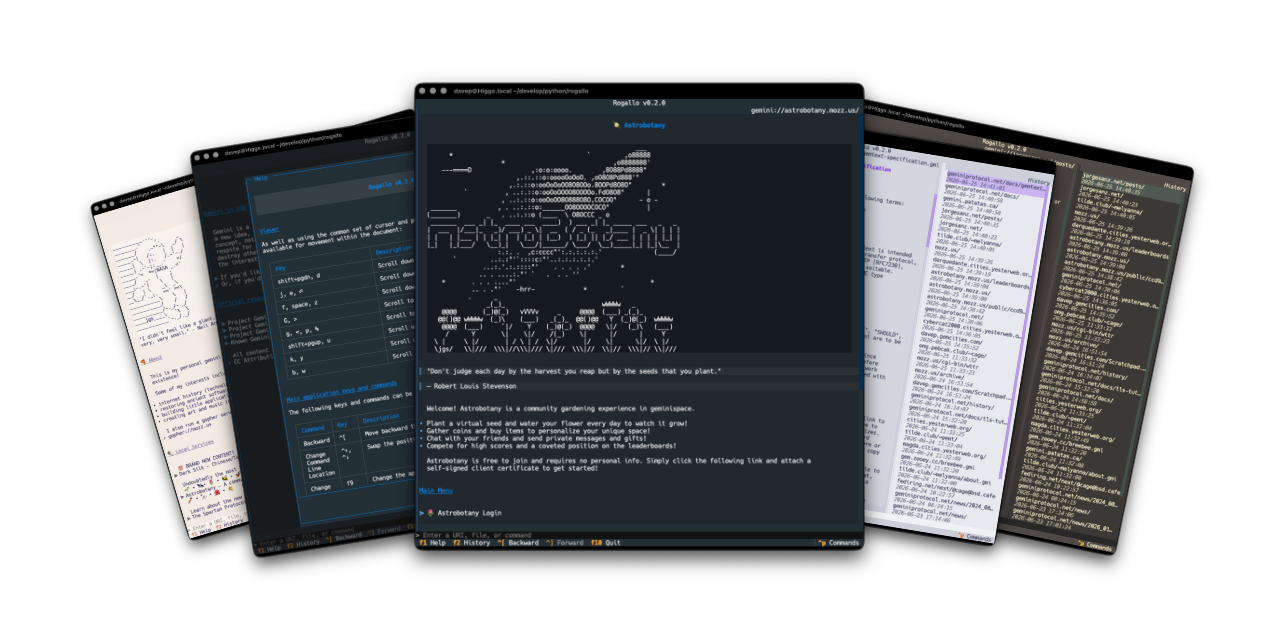







Introduction
Rogallo is a terminal-based client for the Gemini Protocol. As of the time of writing it should be considered to be very early alpha-quality software. What features it has work well, but it is lacking a good number of features. It is in early active development.
[!important] This means, until it hits v1.0.0, any given update might be very different or might break things from the previous update. If you decide to try it out, please keep this in mind.
Installing
pipx
The application can be installed using pipx:
$ pipx install rogallo
uv
The application can be installed using uv:
uv tool install rogallo
If you don't have uv installed you can use uvx.sh to
perform the installation. For GNU/Linux or macOS or similar:
curl -LsSf uvx.sh/rogallo/install.sh | sh
or on Windows:
powershell -ExecutionPolicy ByPass -c "irm https://uvx.sh/rogallo/install.ps1 | iex"
Once installed run the rogallo command.
File locations
Rogallo stores files in an rogallo directory within both $XDG_DATA_HOME
and
$XDG_CONFIG_HOME.
If you wish to fully remove anything to do with Rogallo you will need to
remove those directories too.
Expanding for the common locations, the files normally created are:
~/.config/rogallo/configuration.json-- The configuration file.~/.local/share/rogallo/*-- The locally-held data.
Getting help
If you need help, or have any ideas, please feel free to raise an issue or start a discussion.
TODO
See the TODO tag in issues to see what I'm planning.
Release history Release notifications | RSS feed


Download files
Download the file for your platform. If you're not sure which to choose, learn more about installing packages.
Source Distribution
Built Distribution
Filter files by name, interpreter, ABI, and platform.
If you're not sure about the file name format, learn more about wheel file names.
Copy a direct link to the current filters
File details
Details for the file rogallo-0.4.0.tar.gz.
File metadata
- Download URL: rogallo-0.4.0.tar.gz
- Upload date:
- Size: 22.9 kB
- Tags: Source
- Uploaded using Trusted Publishing? No
- Uploaded via: uv/0.11.25 {"installer":{"name":"uv","version":"0.11.25","subcommand":["publish"]},"python":null,"implementation":{"name":null,"version":null},"distro":{"name":"macOS","version":null,"id":null,"libc":null},"system":{"name":null,"release":null},"cpu":null,"openssl_version":null,"setuptools_version":null,"rustc_version":null,"ci":null}
File hashes
| Algorithm | Hash digest | |
|---|---|---|
| SHA256 |
3155fac58393f2ab737edbc471441684bf7a4a6bb43d756239f5dd30e8ceea30
|
|
| MD5 |
a928ba3e930f9826e82a1f34cfdb58dd
|
|
| BLAKE2b-256 |
df2c9f60d042910a4298fbbffdac6a7420aea767f50f94541f0489c66f8ab580
|
File details
Details for the file rogallo-0.4.0-py3-none-any.whl.
File metadata
- Download URL: rogallo-0.4.0-py3-none-any.whl
- Upload date:
- Size: 38.3 kB
- Tags: Python 3
- Uploaded using Trusted Publishing? No
- Uploaded via: uv/0.11.25 {"installer":{"name":"uv","version":"0.11.25","subcommand":["publish"]},"python":null,"implementation":{"name":null,"version":null},"distro":{"name":"macOS","version":null,"id":null,"libc":null},"system":{"name":null,"release":null},"cpu":null,"openssl_version":null,"setuptools_version":null,"rustc_version":null,"ci":null}
File hashes
| Algorithm | Hash digest | |
|---|---|---|
| SHA256 |
04ee4369ce39b54dd65969d0e743b811e52f2ea527bf4867031001c6ac9c9214
|
|
| MD5 |
872c23136ca85f08a433a08f7ace954a
|
|
| BLAKE2b-256 |
dc695c1cc82a0b47c6fcd0b92b41eaeebaadb4e159fdd7715d1e88f6d54524c1
|






