
ROK4 Python tools
The rok4-tools package help to use ROK4 project concepts, like Tile Matrix Sets, data pyramids or layers.
Installation
Required system packages :
- debian :
apt install python3-rados python3-gdal
The rok4 package is available on :
- PyPI :
pip install rok4 - GitHub :
pip install https://github.com/rok4/core-python/releases/download/<version>/rok4-<version>-py3-none-any.whl
Tools
PYR2PYR
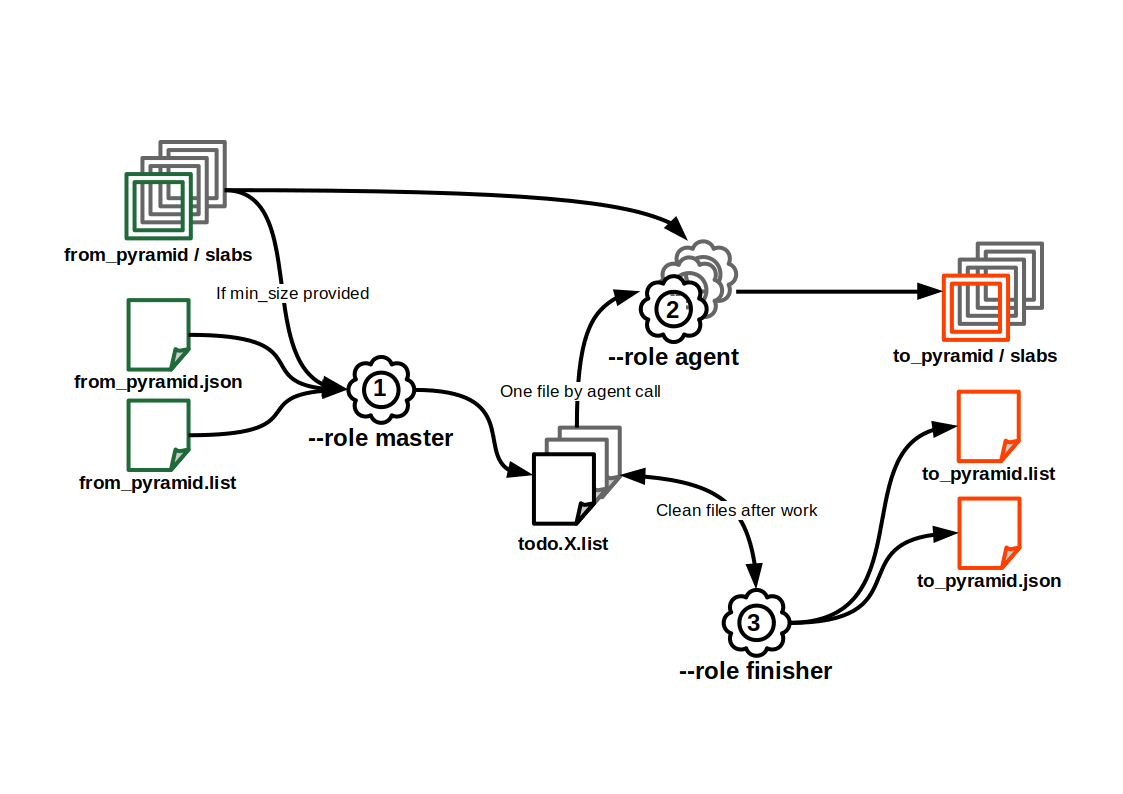
PYR2PYR allow to copy a pyramid from a storage to another one. It is possible to ignore slab under a provided size. Copy is parallelized. If MD5 hash are in the pyramid's list file, they are used to check integrity after copy.
To obtain an example of JSON configuration, call pyr2pyr --role example. To check a JSON configuration, call pyr2pyr --role check --conf conf.json. JSON configuration can be a file or a S3 object(use a path's prefix, for example : s3://bucket/configuration.json)
Usage
A full copy requires the tool call with the three modes (all need the JSON configuration), in this order :
masterrole- Actions : write N TODO lists, in a file or s3 directory.
- Call :
pyr2pyr --role master --conf conf.json
agentrole :- Actions : read the TODO list from the work directory and copy slabs
- Call (one by TODO list) :
pyr2pyr --role agent --conf conf.json --split X
finisherrole:- Actions : read all TODO lists and write the output pyramid's list file and its descriptor
- Call :
pyr2pyr --role finisher --conf conf.json
Configuration
logger(object): Logger configuration.layout(string): Log format, according to logging python library. Default:%(asctime)s %(levelname)s: %(message)s.file(string): Path to log file. Standard output is used if not provided.level(string): Log level. Must be one of:['DEBUG', 'INFO', 'WARNING', 'ERROR', 'CRITICAL', 'NOTSET']. Default:WARNING.
from(object): Pyramid to copy.descriptor(string): Path to pyramid's descriptor to copy.
to(object): Pyramid to write.name(string): Output pyramid's name.storage(object)type(string): Storage type. Must be one of:['FILE', 'S3', 'CEPH'].root(string): Storage root : a directory for FILE storage, pool name for CEPH storage, bucket name for S3 storage.depth(integer): Tree depth, only for FILE storage. Minimum:1. Default:2.
process(object): Processing parameters.directory(string): Directory to write copies to process, FILE directory or S3/CEPH prefix.parallelization(integer): Parallelization level, number of todo lists and agents working at the same time. Minimum:1. Default:1.follow_links(boolean): Do we follow links (data slabs in others pyramids than the 'from' one). Default:False.slab_limit(integer): Minimum slab size (if under, we do not copy). Minimum:0. Default:0.
JOINCACHE
JOINCACHE build a raster pyramid from consistent pyramids (same TMS, same slab size, same bands format). Source pyramids are provided per levels.
To obtain an example of JSON configuration, call joincache --role example. To check a JSON configuration, call joincache --role check --conf conf.json. JSON configuration can be a file or a S3 object(use a path's prefix, for example : s3://bucket/configuration.json)
Usage
A full build requires the tool call with the three modes (all need the JSON configuration), in this order :
masterrole- Actions : write N TODO lists, in a file or s3 directory.
- Call :
joincache --role master --conf conf.json
agentrole :- Actions : read the TODO list from the work directory and build or link slabs
- Call (one by TODO list) :
joincache --role agent --conf conf.json --split X
finisherrole:- Actions : read all TODO lists and write the output pyramid's list file and its descriptor
- Call :
joincache --role finisher --conf conf.json
Configuration
logger(object): Paramètres du logger. Cannot contain additional properties.layout(string): Log format, according to logging python library. Default:"%(asctime)s %(levelname)s: %(message)s".file(string): Path to log file. Standard output is used if not provided.level(string): Log level. Must be one of:["DEBUG", "INFO", "WARNING", "ERROR", "CRITICAL", "NOTSET"]. Default:"WARNING".
datasources(array): Source pyramids.- Items (object): Cannot contain additional properties.
bottom(string, required): Bottom level's usage for source pyramids.top(string, required): Top level's usage for source pyramids.source(object, required): Pyramids as data source. Cannot contain additional properties.type(string, required): Source type. Must be one of:["PYRAMIDS"].descriptors(array, required): Paths to pyramids' descriptors (all with the same characteritics : TMS, formats...). Length must be at least 1.- Items (string)
- Items (object): Cannot contain additional properties.
pyramid(object): Output pyramid's storage informations. Cannot contain additional properties.name(string, required): Output pyramid's name.root(string, required): Storage root : a directory for FILE storage, pool name for CEPH storage, bucket name for S3 storage.mask(boolean): Mask export ? If true, masks are used for processing. Default:false.
process(object): Processing parameters. Cannot contain additional properties.directory(string, required): Directory to write copies to process, FILE directory or S3/CEPH prefix.parallelization(integer): Parallelization level, number of todo lists and agents working at the same time. Minimum:1. Default:1.mask(boolean): Source masks used for processing ? Default:false.only_links(boolean): Only links are made ? If true, only top slab will be considered and linked. Default:false.
MAKE-LAYER
MAKE-LAYER generate a layer's descriptor, ROK4 server compliant, from pyramids' descriptors
Usage
make-layer [-h] [--version] --pyramids storage://path/to/pyr.json[>BOTTOM>TOP] [storage://path/to/pyr.json[>BOTTOM>TOP] ...] --name my_data [--styles normal [normal ...]] [--title my data] [--abstract my data description] [--resampling {nn,linear,bicubic,lanczos_2,lanczos_3,lanczos_4}] [--directory s3://layers_bucket]
-h, --help: show this help message and exit--version: show program's version number and exit--pyramids storage://path/to/pyr.json[>BOTTOM>TOP] [storage://path/to/pyr.json[>BOTTOM>TOP] ...]: Pyramids' descriptors, with extrem levels to use if not all levels have to be used--name my_data: Layer's technical name--styles normal [normal ...]: Styles ID available for the layer (no controls, ID are added as provided)--title my data: Layer title--abstract "my data description": Layer description--resampling {nn,linear,bicubic,lanczos_2,lanczos_3,lanczos_4}: Layer resampling--directory s3://layers_bucket: Directory (file or object) where to write layer's descriptor. Print in standard output if not provided
PYROLYSE
PYROLYSE analyse a pyramid, to get slab/tile size and count, for the entire pyramide and per level. Slab and tile sizes are not all processed : a ratio limits the number of measures. This ratio is assumed for a level (to avoid to have mainly data for the best level). If tile statistics is enabled, access time are compiled.
For size and access time, it's possible to get deciles and not all values.
Usage
pyrolyse [-h] [--version] --pyramid storage://path/to/pyr.json [--json storage://path/to/conf.json] [--tiles] [--progress] [--deciles] [--ratio N]
-h, --help: show this help message and exit--version: show program's version number and exit--pyramid storage://path/to/pyr.json: pyramid's descriptor, to analyse--output storage://path/to/conf.json: file/object to write results. Print in standard output if not provided--tiles: get size analysis for tiles--progress: Print a progress bar (only with --output option)--deciles: get deciles for sizes and read times rather than values--ratio N: ratio of measured slabs and tiles ( choose one). All slabs are counted
TMSIZER
TMSIZER converts data according to a pivot Tile Matrix Set. Input data can be read from a file, an object or standard input. The output data can be write to a file, an object or standard output. Several input and output formats are allowed.
Usage
tmsizer [-h] [--version] --tms <TMS identifier> [-i storage://path/to/data] -if <format> [-io <KEY>:<VALUE> [<KEY>:<VALUE> ...]] [-o storage://path/to/results] -of <format> [-oo <KEY>:<VALUE> [<KEY>:<VALUE> ...]] [--progress]
-h, --help: show this help message and exit--version: show program's version number and exit--tms <TMS identifier>: tile matrix set identifier-if <format>, --input-format <format>: input format-of <format>, --output-format <format>: output format-i storage://path/to/data, --input storage://path/to/data: file/object to read data. Read from standard input if not provided-o storage://path/to/results, --output storage://path/to/results: file/object to write results. Print in standard output if not provided-oo <KEY>:<VALUE> [<KEY>:<VALUE> ...], --output-option <KEY>:<VALUE> [<KEY>:<VALUE> ...]: options for output-io <KEY>:<VALUE> [<KEY>:<VALUE> ...], --input-option <KEY>:<VALUE> [<KEY>:<VALUE> ...]: options for input--progress: print a progress bar (only with --output option)
Availables conversions (mandatory options in bold, optionnal options in italic) :
| Input format | Input options | Output format | Output options | Description |
|---|---|---|---|---|
| GETTILE_PARAMS | levels=<id>[,<id> ...],layers=<id>[,<id> ...] |
COUNT | Count the GetTiles requests using the pivot TMS and optionnally the provided level and layer | |
| GETTILE_PARAMS | levels=<id>[,<id> ...],layers=<id>[,<id> ...] |
HEATMAP | bbox=<xmin>,<ymin>,<xmax>,<ymax> or area=<id>, dimensions=<width>x<height> or level=<id> |
Create an heat map of requested tiles on the provided area, optionnaly filtering with provided level and layer |
| GEOMETRY | format=<WKT|GeoJSON|WKB>,level=<id> |
GETTILE_PARAMS | Generate GetTile query parameters for tiles intersecting input geometries for the provided level |
Available areas for a heatmap :
EPSG:3857FXX(European France)
Example (GETTILE_PARAMS -> HEATMAP) :
tmsizer -i logs.txt --tms PM -io levels=15,14 -io layer=LAYER.NAME1,LAYER.NAME2,LAYER.NAME3 -if GETTILE_PARAMS -of HEATMAP -oo bbox=65000,6100000,665000,6500000 -oo dimensions=600x400 -o heatmap.tif
Example (GETTILE_PARAMS -> HEATMAP) with predefined area and pixel-level superposition:
tmsizer -i logs.txt --tms PM -if GETTILE_PARAMS -of HEATMAP -oo area=FXX -oo level=15 -o heatmap.tif
3 maintainers


Metadata
3 maintainers
Release files for rok4-tools 1.5.2
For a detailed explanation of source distributions (sdists) and built distributions (wheels), please see the package formats documentation.
Source distribution (sdist)
| File | Size | Uploaded | |
|---|---|---|---|
| rok4_tools-1.5.2.tar.gz | 60.4 kB | Details |
Built distribution (wheel)
| File | Interpreter | ABI | Platform | Reset |
|---|---|---|---|---|
| rok4_tools-1.5.2-py3-none-any.whl | Python 3 | none | any | Details |
Total release size: 117.0 kB
Release files / rok4_tools-1.5.2.tar.gz
| Download URL | rok4_tools-1.5.2.tar.gz |
|---|---|
| Size | 60.4 kB |
| Tags | Source |
|
SHA-256 checksum How to use checksums |
a281bab272310356b57cd8b23a7c2c7337ae6544adceaf974f020a3a7bcade57
|
|
BLAKE2b-256 checksum How to use checksums |
02052e4b4df2dc4374bffbf9c089397aea954090d31d3ca9fc4f88075af2d1dd
|
| Upload date | |
|
Uploaded using Trusted Publishing? What is trusted publishing? |
No |
| Uploaded via |
twine/5.1.1 CPython/3.12.7
|
Release files / rok4_tools-1.5.2-py3-none-any.whl
| Download URL | rok4_tools-1.5.2-py3-none-any.whl |
|---|---|
| Size | 56.6 kB |
| Tags | Python 3 |
|
SHA-256 checksum How to use checksums |
f959990b1b83bf80190c9887b051b908dc419da7c226c647826c038a0128f8d5
|
|
BLAKE2b-256 checksum How to use checksums |
5522f51de90211bba3bb6a3409a118ffe56b75bca0dd20d1aff55b41c03dd546
|
| Upload date | |
|
Uploaded using Trusted Publishing? What is trusted publishing? |
No |
| Uploaded via |
twine/5.1.1 CPython/3.12.7
|














