










Table of contents
- Introduction
- Installation and uninstallation
- Getting started
- Colors and Styles
- Log class
- Highlight class
- Text class
- Random methods
- All Examples
- Change History
- License
- Contributing
Introduction
Rong is a simple and easy to use Python module to colorize text in the console. It is a simple and easy to use module. It is a very lightweight, fast and reliable module. We are ensuring it's reliability by writting unittest for it.
[!NOTE] Please let me know if you have any suggestions or improvements.
Installation and uninstallation
It is very easy to install. Like as usual you can install it with pip.
pip install rong
You can also install it from source, if your very curious about the source code.
# Clone the Github repository
git clone https://github.com/Almas-Ali/rong

# Go to the project directory
cd rong

# Create virtual environment
python -m venv .venv

# Activate virtual environment (Windows)
.venv\Scripts\activate

# Activate virtual environment (Linux)
source .venv/bin/activate

# Install the package
pip install -e .
Your ready to go with this module now.
To uninstall this just simple use this pip command.
pip uninstall rong
Is that simple to install and uninstall this module.
Getting started
This is the most easiest way to use this module. You can use this module in your project by importing it. Here is a simple example to use this module.
import rong

log = rong.Log(debug=False)

text = rong.Text(
    log.errormsg("Something went wrong! Please try again."),
    fg=rong.ForegroundColor.VIOLET,
    bg=rong.BackgroundColor.TRANSPARENT,
    styles=[rong.Style.BOLD, rong.Style.UNDERLINE_WAVY, rong.Style.BLINK],
)

text.print()
This is the most easiest example to get started with this module.
Colors and Styles
After a huge headache, I have decided to use Enum class to make it more reliable and easy to use. Here is the example to use this module.
from rong import (
	ForegroundColor,
	BackgroundColor,
	Style,
	Text,
)

text = Text(
	# Text to display
	"Hello World!",
	# Red color in foreground
	fg=ForegroundColor.RED,
	# Light green color in background
	bg=BackgroundColor.LIGHTGREEN,
	# Adding multiple styles. Bold, underline wavy and blinking text
	styles=[Style.BOLD, Style.UNDERLINE_WAVY, Style.BLINK],
)

print(text)
All ForegroundColors are listed here:
BLACKREDGREENYELLOWBLUEPURPLECYANWHITEORANGETOMATOPINKVIOLETGRAYDARKGREENGOLDYELLOWGREENLIGHTGRAYLIGHTBLUELIGHTGREENLIGHTYELLOWLIGHTPURPLELIGHTCYANLIGHTWHITELIGHTSEAGREENLIGHTREDLIGHTPINKLIGHTORANGELIGHTVIOLETTRANSPARENT
All BackgroundColors are listed here:
BLACKREDGREENYELLOWBLUEPURPLECYANWHITEORANGETOMATOPINKVIOLETGRAYDARKGREENGOLDYELLOWGREENLIGHTGRAYLIGHTBLUELIGHTGREENLIGHTYELLOWLIGHTPURPLELIGHTCYANLIGHTWHITELIGHTSEAGREENLIGHTREDLIGHTPINKLIGHTORANGELIGHTVIOLETTRANSPARENT
All Styles are listed here:
-
BLINK -
BOLD -
CLEAR -
CONCEALED -
INVISIBLE -
ITALIC -
OVERLINE -
REVERSE -
STRIKE -
DIM -
UNDERLINE -
UNDERLINE_SOLID -
UNDERLINE_WAVY -
UNDERLINE_DOTTED -
UNDERLINE_DOUBLE -
UNDERLINE_DASHED -
NOTE :
- You can use
clearto clear all setted styles. - When you use
underlineit will beunderline-solidby default. underline-wavy,underline-dottedandunderline-dashedunderline is not supported in all terminals.
- You can use
Log class
rong.Log is a simple logging text class for coloring text. It has a parameter debug which is True by default. If you set it to False it will not print any output rather than it will return the output as a string. After creating an object of this class you can use the following methods to display text.
-
To display primary text
primary(text:str) -
To display blue text
blue(text:str) -
To display success text
success(text:str) -
To display green text
green(text:str) -
To display ok text
ok(text:str) -
To display warning text
warning(text:str) -
To display yellow text
yellow(text:str) -
To display help text
help(text:str) -
To display danger text
danger(text:str) -
To display error text
error(text:str) -
To display fail message
fail(text:str) -
To display underline
underline(text:str) -
To display bold text
bold(text:str) -
To display ok message
okmsg(text:str) -
To display wait message
waitmsg(text:str) -
To display error message
errormsg(text:str)
Log Example
from rong import Log

log = Log() # debug=True by default

log.okmsg("Everything is ok")
log.waitmsg("Please wait")
log.errormsg("Something went wrong")
If debug is set to False then it will return the output as a string.
from rong import Log

log = Log(debug=False)

log.okmsg("Everything is ok")
log.waitmsg("Please wait")
log.errormsg("Something went wrong")
Now, you won't see any output in the console rather than it will return the output as a string. You can use this string as you want. You can print it manually or you can save it in a file. It is used to debug applications business logic.
Highlight class
rong.Highlight is a class for highlighing text color. It is a inline usable class. You can use this class to highlight text in a single line. It has the following methods to highlight text.
-
To get white color
white(text:str) -
To get bold white color
bwhite(text:str) -
To get green color
green(text:str) -
To get bold green color
bgreen(text:str) -
To get blue color
blue(text:str) -
To get bold blue color
bblue(text:str) -
To get yellow color
yellow(text:str) -
To get bold yellow color
byellow(text:str) -
To get red color
red(text:str) -
To get bold red color
bred(text:str)
Highlight Example
from rong import Highlight

print(Highlight.red("This is a red text"))
print(Highlight.bred("This is a bold red text"))
print(Highlight.blue("This is a blue text"))
print(Highlight.bblue("This is a bold blue text"))
print(Highlight.yellow("This is a yellow text"))

print(f"This is a {Highlight.green('green')} text")
print(f"This is a {Highlight.bgreen('bold green')} text")
Text class
Most powerfull class in this module is rong.Text. It is used to create a text object with different styles and colors. It has the following methods to create a text object.
-
foreground(color: ForegroundColor) -> Text -
background(color: BackgroundColor) -> Text -
style(styles: List[Style]) -> str -
update(text: str) -> Text -
print() -> None
You can dynamically add colors and styles to the text object with this methods. It is also possible to update the text of the object. You can print the output with print method. Normal print(text) also works same as text.print().
Text Example
import rong

log = rong.Log(debug=False)

text = rong.Text(
    log.errormsg("Something went wrong! Please try again."),
    fg=rong.ForegroundColor.VIOLET,
    bg=rong.BackgroundColor.TRANSPARENT,
    styles=[rong.Style.BOLD, rong.Style.UNDERLINE_WAVY, rong.Style.BLINK],
)

text.print()
Here, in this example we have created a text object with a error message and added some styles and colors. Then we have printed the output.
Random methods
rong module has some random methods to get ForegroundColor, BackgroundColor and Style to make it more easy to use. Here is the example to use this module.
Random Example
from rong import (
	get_random_background_color,
	get_random_foreground_color,
	get_random_style,
)

print(get_random_background_color())
print(get_random_foreground_color())
print(get_random_style())
You can use this methods with Text class to get random colors and styles.
from rong import (
	get_random_background_color,
	get_random_foreground_color,
	get_random_style,
	Text,
)

text = Text(
	"Hello World!",
	fg=get_random_foreground_color(),
	bg=get_random_background_color(),
	styles=[get_random_style()],
)

print(text)
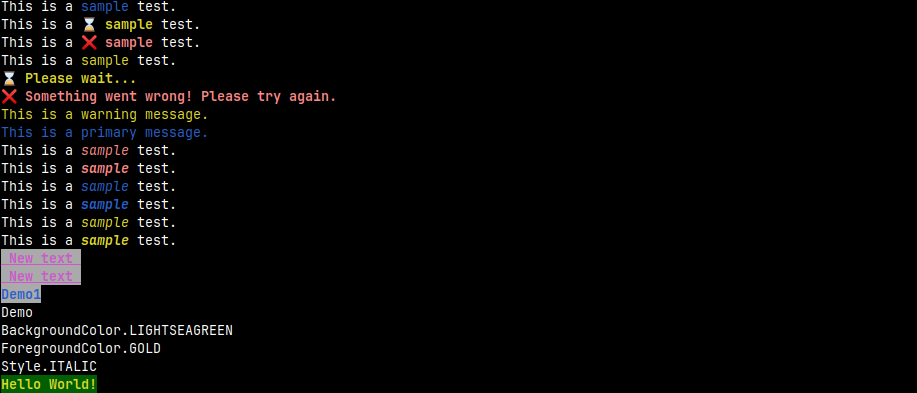
All Examples
Here is the all examples to use this module.
from rong import *

# In line Log display
log = Log(debug=False)
print(f"This is a {log.primary('sample')} test.")
print(f"This is a {log.waitmsg('sample')} test.")
print(f"This is a {log.errormsg('sample')} test.")
print(f"This is a {log.warning('sample')} test.")

# Normal log
log = Log()  # debug=True by default
log.waitmsg('Please wait...')
log.errormsg('Something went wrong! Please try again.')
log.warning('This is a warning message.')
log.primary('This is a primary message.')


# In line text highlighting
print(f"This is a {Highlight.red('sample')} test.")
print(f"This is a {Highlight.bred('sample')} test.")
print(f"This is a {Highlight.blue('sample')} test.")
print(f"This is a {Highlight.bblue('sample')} test.")
print(f"This is a {Highlight.yellow('sample')} test.")
print(f"This is a {Highlight.byellow('sample')} test.")


# Working with Text objects
# Creating Text class object
text = Text(text='Sample Text')

# Adding forground color / text color
text.foreground(ForegroundColor.BLUE)
text.foreground(ForegroundColor.PURPLE)

# Adding background color
text.background(BackgroundColor.WHITE)

# Adding custom styles
text.style(styles=[Style.BOLD, Style.UNDERLINE])

# Updating object text
text.update(text=' New text ')

# Printing output in two ways
# Advance methode bashed mode
text.print()
# Normal pythonic mode
print(text)

# Doing everything in one line
text1 = Text(
    text='Demo1',
    fg=ForegroundColor.BLUE,
    bg=BackgroundColor.WHITE,
    styles=[Style.BOLD],
)
text1.print()

# Clearing all styles
text2 = Text(text='Demo', styles=[Style.CLEAR])
text2.print()


# Random methods. This return random Enum class object of ForegroundColor, BackgroundColor and Style.
print(get_random_background_color())
print(get_random_foreground_color())
print(get_random_style())

text3 = Text(
	"Hello World!",
	fg=get_random_foreground_color(),
	bg=get_random_background_color(),
	styles=[get_random_style()],
)

print(text3)
Output Screenshot
Change History
0.0.3 - Updated color and style with Enum class. Added unittest for more reliability. Refactored hole code base.
0.0.2 - Fixed default background issue, added huge amonut of colors and styles varient. Added more examples and documentation.
0.0.1 - Initialized this project and written all this codes.
License
This project is licensed under the MIT License - see the LICENSE file for details.
Contributing
[!IMPORTANT] Everything is open source. You can contribute in this project by submitting a issue or fixing a problem and make pull request.
Made with love by © Md. Almas Ali
1 maintainer

Metadata
1 maintainer
Release files for rong 0.0.3
For a detailed explanation of source distributions (sdists) and built distributions (wheels), please see the package formats documentation.
Source distribution (sdist)
| File | Size | Uploaded | |
|---|---|---|---|
| rong-0.0.3.tar.gz | 278.0 kB | Details |
Built distribution (wheel)
| File | Interpreter | ABI | Platform | Reset |
|---|---|---|---|---|
| rong-0.0.3-py3-none-any.whl | Python 3 | none | any | Details |
Total release size: 287.1 kB
Release files / rong-0.0.3.tar.gz
| Download URL | rong-0.0.3.tar.gz |
|---|---|
| Size | 278.0 kB |
| Tags | Source |
|
SHA-256 checksum How to use checksums |
2f717505d6f374b086a7325d08f7ef6aef531c73e2d2b35cc46f9c34006a4119
|
|
BLAKE2b-256 checksum How to use checksums |
3a7452fbd76dbd050c5a381bea9af09730a1c8c600446e89dafb9789905ceaa6
|
| Upload date | |
|
Uploaded using Trusted Publishing? What is trusted publishing? |
No |
| Uploaded via |
twine/5.0.0 CPython/3.9.18
|
Release files / rong-0.0.3-py3-none-any.whl
| Download URL | rong-0.0.3-py3-none-any.whl |
|---|---|
| Size | 9.1 kB |
| Tags | Python 3 |
|
SHA-256 checksum How to use checksums |
064c55dfdc22c3401462d0cd3e5ef98f00663f7dca64f529581201ae9fcfda8a
|
|
BLAKE2b-256 checksum How to use checksums |
8bdc04c14bb0f1fc2e798b7efa90616816614329a8dc8f6dfabdf06395c11c89
|
| Upload date | |
|
Uploaded using Trusted Publishing? What is trusted publishing? |
No |
| Uploaded via |
twine/5.0.0 CPython/3.9.18
|














