
A desktop music player for Linux, built with PyQt6.

Project description
RoPlayer
A desktop music player for Linux, built with PyQt6. Point it at a folder of local audio files and it organizes everything into a browsable library — albums, artists, playlists, and a YouTube Music-style home screen — with cover art, synced lyrics, Last.fm scrobbling, Chromecast support, and native Linux desktop integration.
Features
Library & playback
- Local library scanning — recursively scans a music folder, grouping tracks into albums by folder and tag metadata. Supports
.mp3,.flac,.m4a,.mp4,.ogg,.oga,.wav,.wma, and.aac. - Cover art & tags — pulls embedded artwork and metadata (artist, album, year, title) straight from your files via Mutagen.
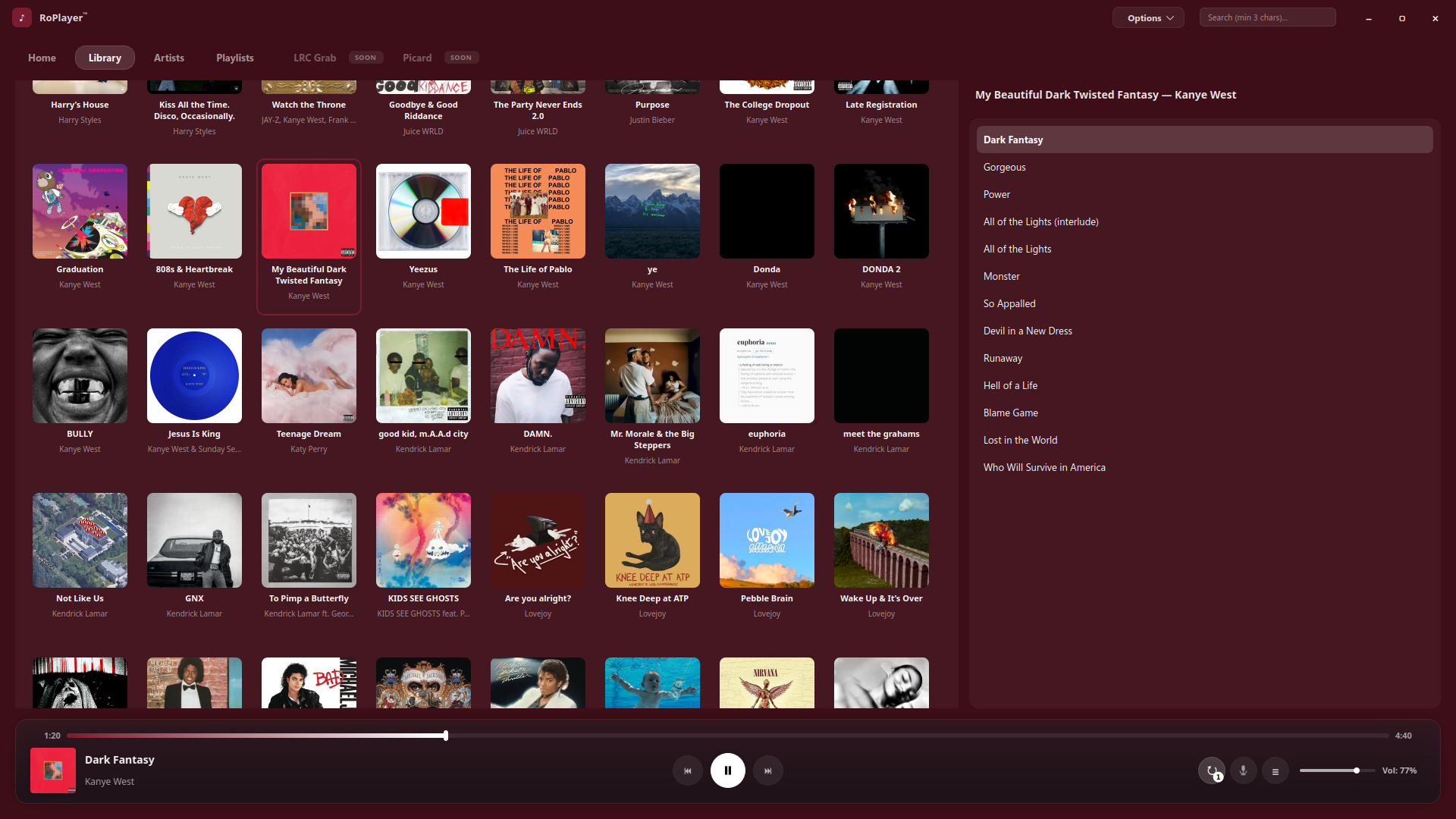
- Home, Library, and Artist views — browsable shelves and artist detail pages with photos and public listener/scrobble stats.
- Adaptive theming — the UI's accent color smoothly crossfades to match the average color of whatever's currently playing, so the whole app subtly shifts with your cover art.
- Playback modes — shuffle and repeat (track/playlist), with playback position remembered between sessions.
- Search — quick search across your library.
Playlists & queue
- Playlists — create, rename, delete, and reorganize playlists; add or remove tracks from anywhere in the app via right-click; set a custom cover image per playlist, or let RoPlayer generate one from the tracks inside it.
- Play queue — a session queue separate from your playlists. "Play Next" or "Add to Queue" from any track's context menu, then drag-and-drop to reorder the queue itself.
- Pinned albums — pin favorite albums so they always surface at the top of your library.
Home screen & smart mixes
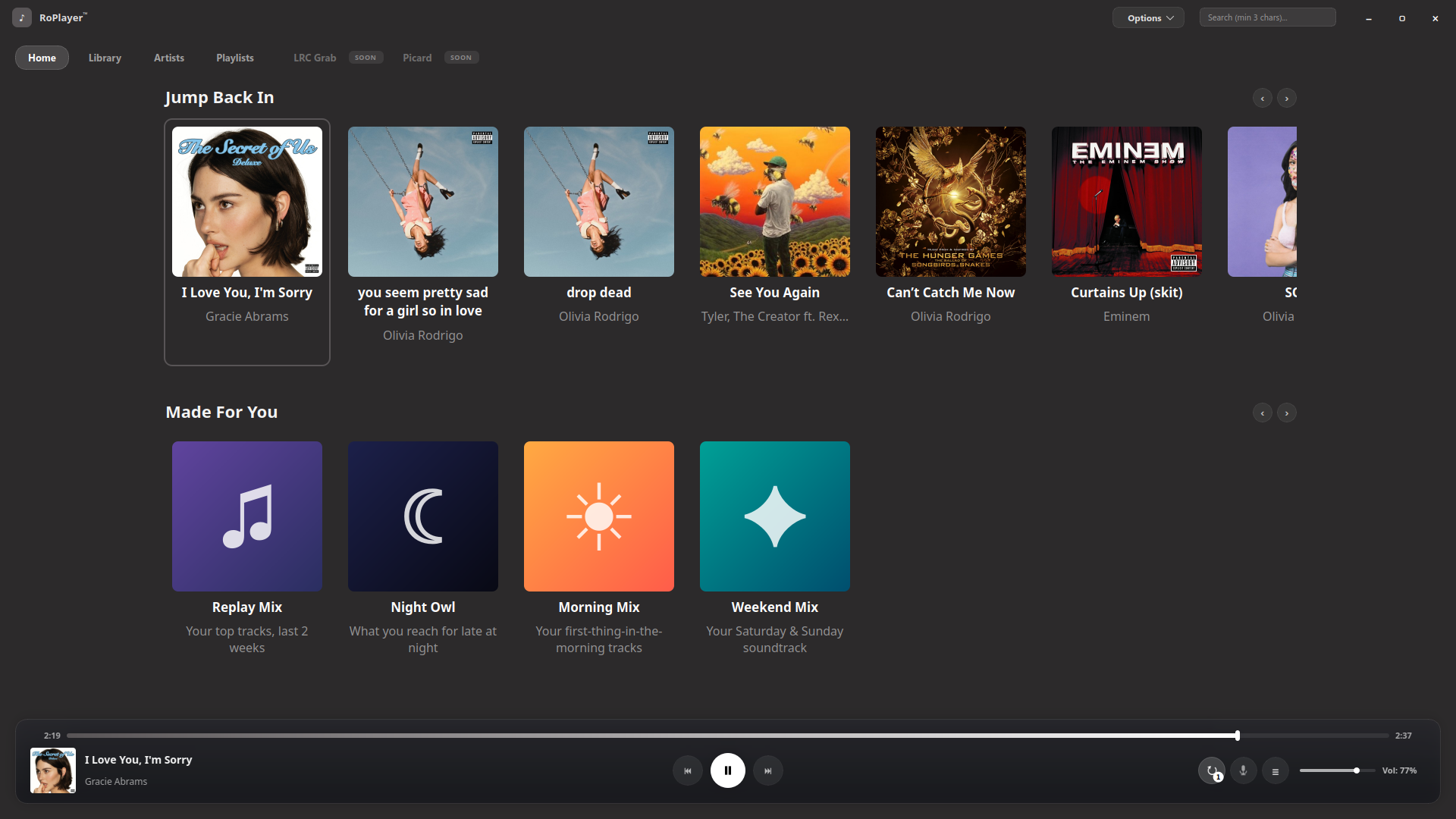
- Jump Back In — surfaces whatever you've been listening to heavily lately, including your own generated mixes.
- Made For You — a set of algorithmically generated mixes built from your own listening history, each with its own generated cover art:
- Replay Mix and On Repeat — built from your overall and current heavy-rotation listening.
- Forgotten Favorites — tracks you used to play a lot but haven't touched recently.
- Album Rewind and Month Rewind — revisits albums and stretches of your history you've drifted away from.
- Night Owl and Morning Mix / Weekend Mix — time-of-day and day-of-week aware mixes.
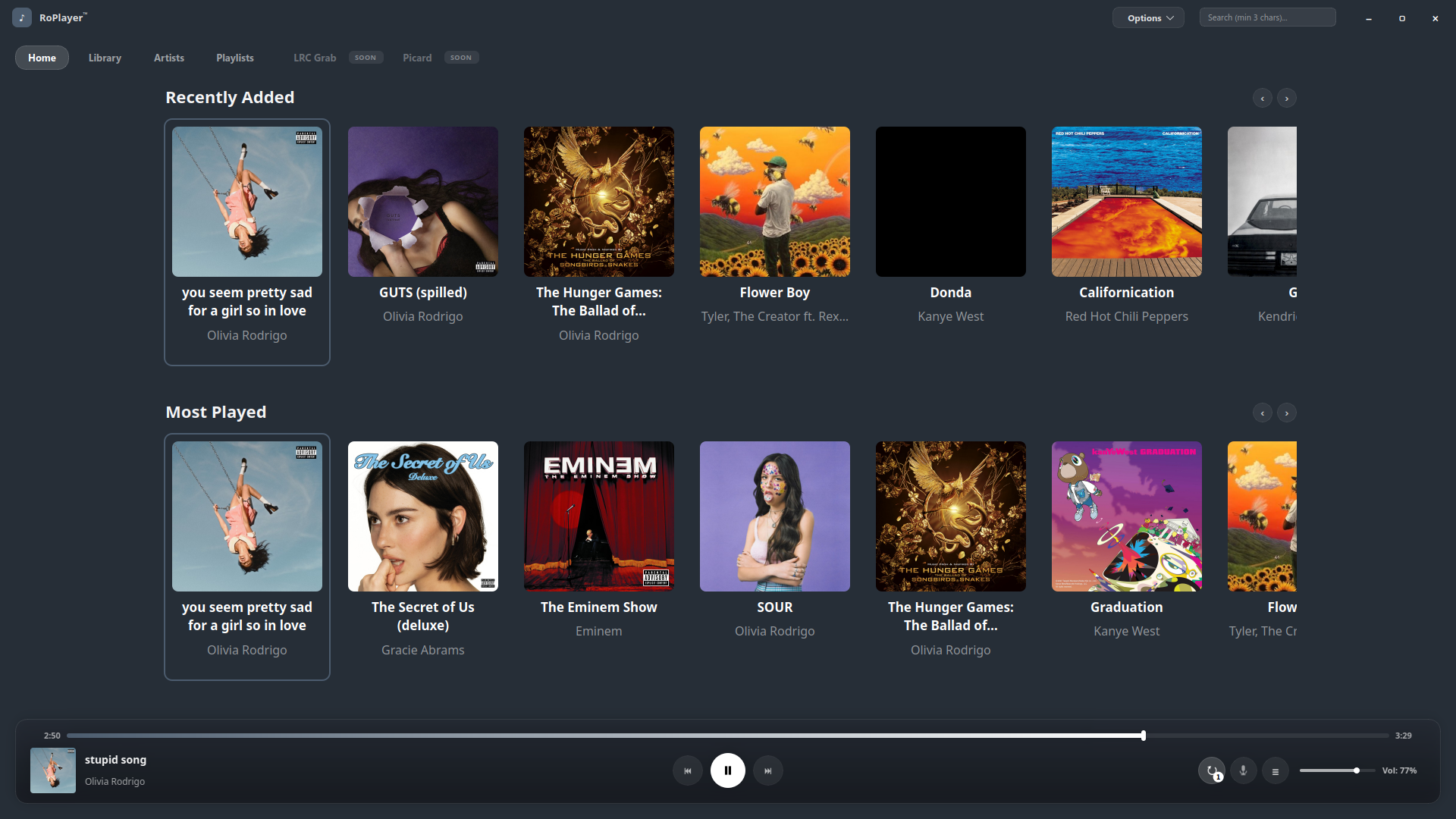
- Recently Played, Recently Added, Most Played, Favorites — additional home shelves rounding out your library at a glance.
- Artist Top Songs — each artist page ranks their most-played tracks in your library, with a one-click toggle to play them as a mix.
- Fan-favorite badges — artist and album cards can show a "fan favorite" flame badge sourced from Last.fm's public listening data.
Lyrics
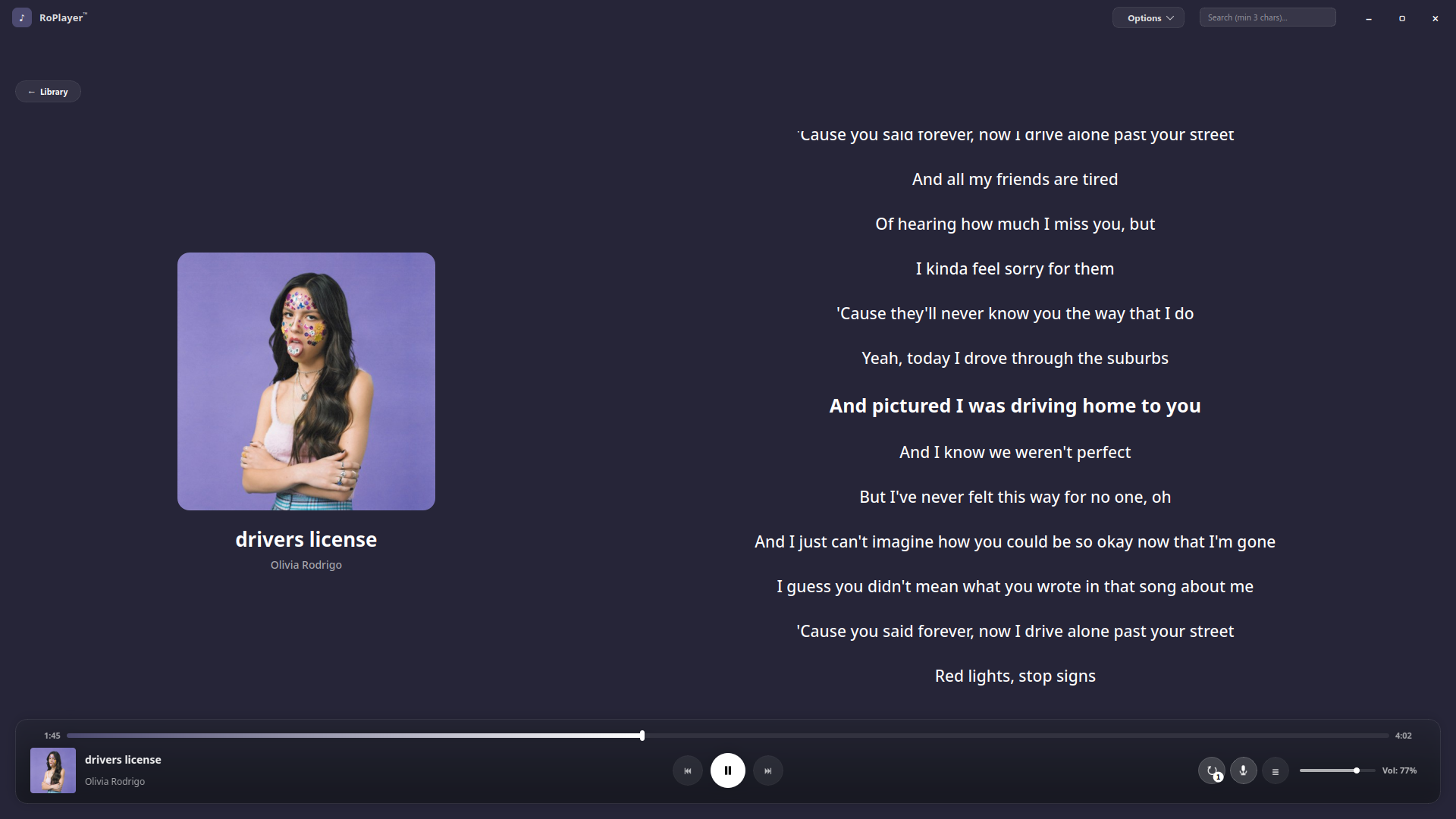
- Lyrics view — dedicated panel for following along while a track plays.
- Synced lyrics — automatically picks up a matching
.lrc(or timestamped.txt) file alongside a track and highlights lines in time with playback; falls back to plain static lyrics when no timed file is found.
Scrobbling & casting
- Last.fm scrobbling — logs in via your browser, tracks now-playing status, and scrobbles as you listen.
- Chromecast support — cast playback to any Chromecast device on your network.
Desktop integration
- MPRIS2 integration — media keys, system tray widgets, and lock-screen "now playing" info on Linux desktops (KDE Plasma, GNOME, etc.) via D-Bus.
Requirements
- Python 3
- PyQt6 (including
QtMultimedia) - Mutagen for tag/cover-art reading
- pychromecast for Chromecast support
dbus-pythonandPyGObject(optional — enables MPRIS2 desktop integration on Linux; the app runs fine without them, just without media-key/tray support)
Installation
Arch Linux
A PKGBUILD is included:
makepkg -si
Manual
git clone https://github.com/rohanisawesome/RoPlayer.git
cd RoPlayer
pip install PyQt6 mutagen pychromecast
python player.py
Usage
Launch RoPlayer and point it at your music folder to build your library. From there:
- Browse Home for your generated mixes and shelves, or jump into Library, Artist, Playlists, or the Queue
- Use the search bar to jump straight to a track, album, or artist
- Right-click any track, album, or playlist to Play Next, Add to Queue, or add it to a playlist (including creating a new one on the spot)
- Pin an album from its context menu to keep it at the top of your library
- Drop a
.lrcfile next to a track (same filename,.lrcextension) to get synced, line-by-line lyrics - Enable Last.fm scrobbling from the settings dialog to start tracking plays
- Right-click a Chromecast-capable device to cast playback
Configuration & data
- Settings are stored via
QSettingsunder theRohanApps/AdaptiveMusicPlayernamespace. - Cached artist images, bios, and stats live in
~/.cache/AdaptiveMusicPlayer. - Playlists, pinned albums, and queue state are stored locally alongside your other settings.
- Last.fm session keys are stored locally per-user and are never included in this repository.
License
MIT — see LICENSE.
Release history Release notifications | RSS feed


Download files
Download the file for your platform. If you're not sure which to choose, learn more about installing packages.
Source Distribution
Built Distribution
Filter files by name, interpreter, ABI, and platform.
If you're not sure about the file name format, learn more about wheel file names.
Copy a direct link to the current filters
File details
Details for the file roplayer-0.1.1.tar.gz.
File metadata
- Download URL: roplayer-0.1.1.tar.gz
- Upload date:
- Size: 149.2 kB
- Tags: Source
- Uploaded using Trusted Publishing? No
- Uploaded via: twine/6.2.0 CPython/3.14.6
File hashes
| Algorithm | Hash digest | |
|---|---|---|
| SHA256 |
71e340625a861f26ecf6f8ed263de762891c7dbc4962d30c7e279f508278dced
|
|
| MD5 |
a7e240b94cac41bbdf42f6a52887d73f
|
|
| BLAKE2b-256 |
ffcace4482035b0890846801f88d130a436fcfebf825625325d44d6ce5f32616
|
File details
Details for the file roplayer-0.1.1-py3-none-any.whl.
File metadata
- Download URL: roplayer-0.1.1-py3-none-any.whl
- Upload date:
- Size: 150.6 kB
- Tags: Python 3
- Uploaded using Trusted Publishing? No
- Uploaded via: twine/6.2.0 CPython/3.14.6
File hashes
| Algorithm | Hash digest | |
|---|---|---|
| SHA256 |
d74c041fa1297b04b079247becf3ce55451ea21fcb440b8617a313fc2904f282
|
|
| MD5 |
b159aa7526c4d9efb79c4db0eff7592d
|
|
| BLAKE2b-256 |
6eadb687f0445aae652f29e107114e8757b880632879e70dcec328a0c962a00f
|






