
RUBI - ROS Utility Board Interface: a lightweight single-window ROS 2 control board.

Project description
RUBI (ROS_Utility_Board_Interface) (V2)
RUBI v2: A single-window ROS 2 control board — not just a monitor:
- Live topic rates/bandwidth/delays | QoS mismatch detection | Health watchdog
- Message inspection | Live plotting | Logs | Parameters | TF health | Exports
- Lifecycle control | Service/Action caller | Rosbag record/play | Graph snapshot/diff
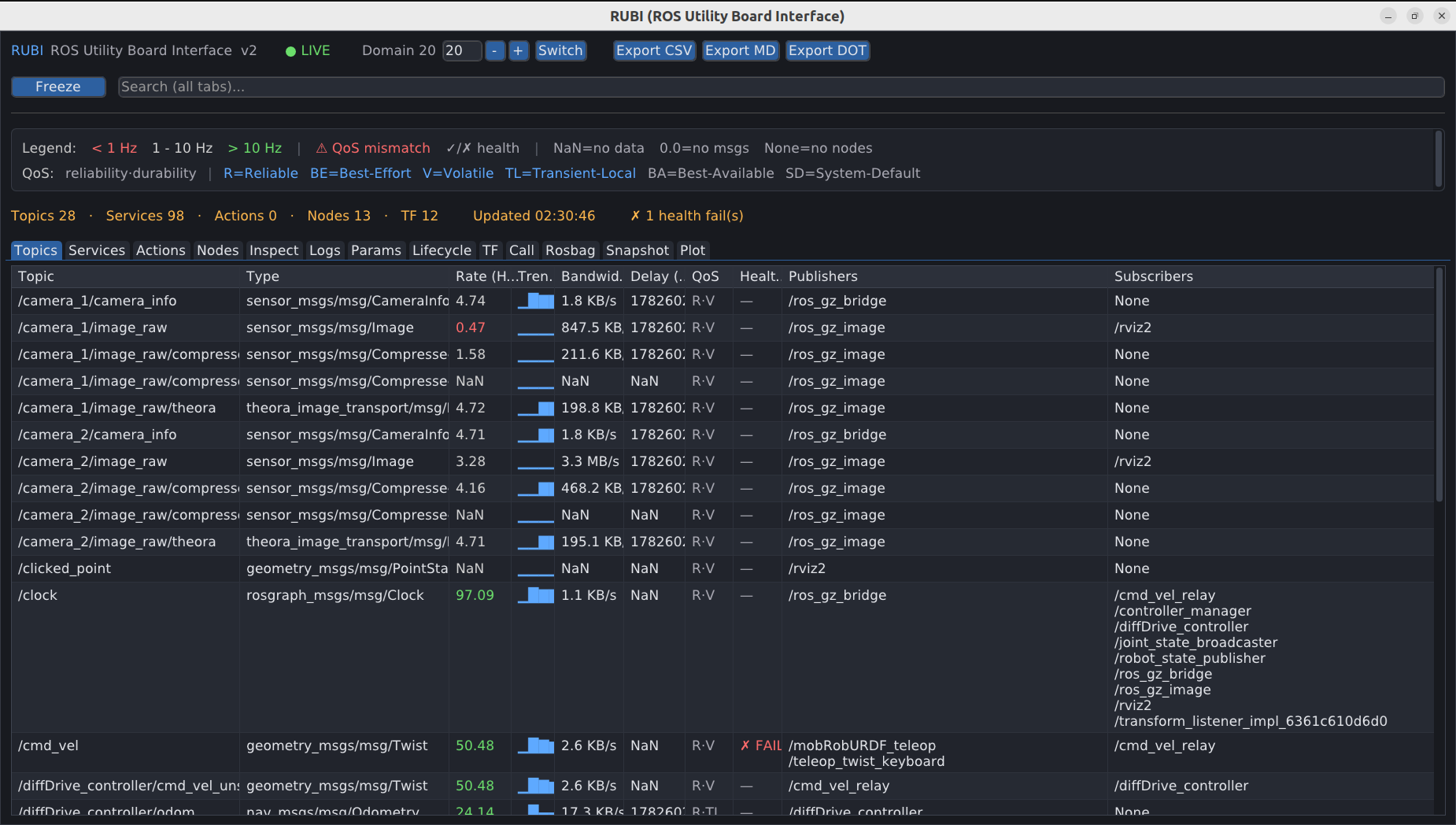
What is RUBI?
RUBI gives you a single, clean window to understand and operate your ROS 2 robot at a glance — no web server, no heavy stack. Runs fast even on embedded systems.
Features
Observe
- Realtime monitoring — topic rates, delays, and a per-topic rate sparkline (trend) updated continuously
- Live bandwidth — per-topic throughput in human-readable B/s, like
ros2 topic bwbut for everything at once - QoS mismatch detector — shows each topic's QoS and flags incompatible publisher/subscriber pairs (reliability & durability) right in the table — the #1 cause of silent "no data"
- Health watchdog — expected
min_hz/max_hz/max_delayper topic (YAML + glob patterns) → instant ✓/✗ status and an alert banner - Message inspector — peek the latest message of any topic as YAML (with a live toggle)
- Live plotter — select a topic, drill into its numeric fields (including array elements like
position[0]for/joint_states), and plot them live vs time; overlay multiple signals with legend, pan/zoom, scrolling window and auto-Y - /rosout log pane — severity-filtered, color-coded, searchable
- Node process metrics — best-effort PID / CPU% / memory per node (psutil)
- TF health — frame tree (child → parent), per-frame rate, and stale-transform detection
- Lifecycle states — detects lifecycle nodes and shows their current state
Operate
- Parameter browser & live edit — pick a node, choose a parameter from a dropdown, and set it (the value box shows the expected type)
- Lifecycle control — trigger configure / activate / deactivate / cleanup / shutdown
- Service & Action caller — pick any service/action from a dropdown; its request/goal form is pre-filled from the type, edit and call
- Rosbag — record, play (rate/loop), and inspect bags (
ros2 bag info); recordings are saved underBag/
Analyze & share
- Graph snapshot & diff — capture the graph and diff later to catch intermittent nodes/topics
- Export — topic table to CSV / Markdown, or the node graph to Graphviz
.dot(saved underCSV/,MD/,DOT/) - Multi-domain — switch
ROS_DOMAIN_IDfrom the header (relaunches on the chosen domain)
Polish
- Flicker-free tables (in-place updates, preserved scroll), 60 FPS, clean dark theme, global search, freeze mode.
Requirements
- ROS 2 Humble or Jazzy, installed and sourced. RUBI uses
rclpyand ROS interface packages that come from your ROS install — they are not on PyPI, so ROS 2 must be present and sourced however you run RUBI. - Python 3.8+ and three non-ROS Python packages:
dearpygui,pyyaml,psutil.
source /opt/ros/humble/setup.bash        # or: source /opt/ros/jazzy/setup.bash
pip install dearpygui pyyaml psutil
Installation
Option A — run directly (quickest):
git clone https://github.com/ali-pahlevani/ROS_Utility_Board_Interface.git
cd ROS_Utility_Board_Interface
python3 rubi.py                       # or: python3 rubi.py --rules rubi_rules.yaml --domain 0
Option B — colcon (recommended for ROS users; enables ros2 run):
mkdir -p ~/ros2_ws/src && cd ~/ros2_ws/src
git clone https://github.com/ali-pahlevani/ROS_Utility_Board_Interface.git
cd ~/ros2_ws && colcon build --packages-select ros_utility_board_interface
source install/setup.bash
ros2 run ros_utility_board_interface rubi
Option C — pip (adds a rubi command):
pip install ros-utility-board-interface   # from PyPI
# or, from a clone for development:
#   git clone https://github.com/ali-pahlevani/ROS_Utility_Board_Interface.git
#   cd ROS_Utility_Board_Interface && pip install .
rubi                                       # run inside a shell where ROS 2 is sourced
However you install it (pip, PyPI, or colcon), ROS 2 must still be sourced at runtime —
rclpyis provided by ROS, not pip.
Outputs
RUBI writes into folders next to where it runs: exports under CSV/, MD/,
DOT/, and rosbag recordings under Bag/.
Health watchdog rules
Create a rubi_rules.yaml (a sample ships with the repo):
topics:
  "/scan":              { min_hz: 8, max_hz: 12 }
  "/odom":              { min_hz: 20, max_delay: 0.1 }
  "/camera/*/image_raw": { min_hz: 25 }   # glob patterns supported
Topics outside their bounds turn ✗ FAIL (red) in the Health column, with a running count in the status bar. Topics without a rule simply show —.
I’d love collaborations! Contribute via pull requests on GitHub for bug fixes, new features, or documentation improvements. Reach out via GitHub Issues for questions, suggestions, or partnership ideas.
Contributing
Contributions are welcome! To contribute:
- Fork the repository.
- Create a branch (
git checkout -b feature/your-feature). - Commit changes (
git commit -m "Add your feature"). - Push to the branch (
git push origin feature/your-feature). - Open a pull request.
- Questions? Reach out: a.pahlevani1998@gmail.com
- LinkedIn: https://www.linkedin.com/in/ali-pahlevani/
Release history Release notifications | RSS feed

Download files
Download the file for your platform. If you're not sure which to choose, learn more about installing packages.
Source Distribution
Built Distribution
Filter files by name, interpreter, ABI, and platform.
If you're not sure about the file name format, learn more about wheel file names.
Copy a direct link to the current filters
File details
Details for the file ros_utility_board_interface-2.0.0.tar.gz.
File metadata
- Download URL: ros_utility_board_interface-2.0.0.tar.gz
- Upload date:
- Size: 32.4 kB
- Tags: Source
- Uploaded using Trusted Publishing? No
- Uploaded via: twine/6.2.0 CPython/3.10.12
File hashes
| Algorithm | Hash digest | |
|---|---|---|
| SHA256 |
334859ad41db95458261b36cd1bd8e861b1de61878c432f6eee1ab300fbc0d84
|
|
| MD5 |
036bd21c2998061da2dc9640ae0ac613
|
|
| BLAKE2b-256 |
36d22d5b3a0cdd6ad17c63b0f80dc2dcaef17ad0c40964836ea3001982e9772c
|
File details
Details for the file ros_utility_board_interface-2.0.0-py3-none-any.whl.
File metadata
- Download URL: ros_utility_board_interface-2.0.0-py3-none-any.whl
- Upload date:
- Size: 30.1 kB
- Tags: Python 3
- Uploaded using Trusted Publishing? No
- Uploaded via: twine/6.2.0 CPython/3.10.12
File hashes
| Algorithm | Hash digest | |
|---|---|---|
| SHA256 |
f6fbc48e61bc2bc858bfa64458d62ab28022ed00eaacc5a2ffd9db8383a0835b
|
|
| MD5 |
be08c1067ef402a6beff2da5bbadf14a
|
|
| BLAKE2b-256 |
406f95c9eb99387dc429c95962e0df56085e045ff9eadf2eb98fda684a484a25
|






