
A software to calibrate the sky background of Space Telescope images

Project description






ROSALIA: ROman Sky Analyst for Low surface brightness Imaging & Astronomy
Explore the docs »
View Demo · Report Bug · Request Feature
Table of Contents
About The Project
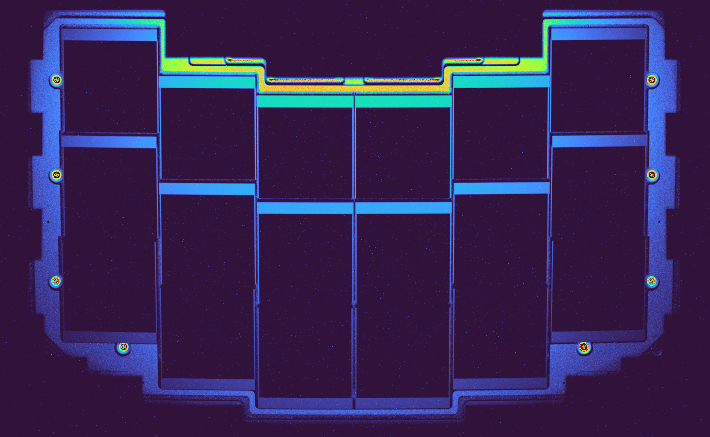
ROSALIA (Roman Sky Analyst for Low surface brightness Imaging & Astronomy) is a pipeline to model the sky background level on astronomical images obtained with NASA/Nancy Grace Roman Space Telescope and its direct predecessor, the legendary NASA/Hubble Space Telescope. In particular ROSALIA is focused on the prediction and calibration of stray-light in the Roman Wide Field Instrument, one of the main contaminants in ultra deep low surface brightness observations, and the main source of gradients of parasitic light for space telescopes. ROSALIA combines the information from existing photometric catalogs (Gaia, 2MASS, WISE) with precise optical and payload ray-tracing models of the Roman Space Telescope, allowing to generate images of stray-light and other components of the sky-background for user-defined observational conditions.
ROSALIA is funded through a NASA Grant (D.14 Roman 2022), ROSES/Nancy Grace Roman Space Telescope Research and Support Participation Opportunities.
Sci-PI: Alejandro S. Borlaff (NASA ARC). Admin-PI: Pamela M. Marcum (NASA ARC)
Note:
This package is under active development. Our team is working hard to provide a reliable pipeline that allows to model the sky backgrounds for Roman Space Telescope Wide Field Instrument. However, progress does not come overnight. We are open-source testing code and substantial changes will occur regularly. Use at your own risk. In case of doubt, send an email to Alejandro S. Borlaff, a.s.borlaff@nasa.gov.
Installation
Managing dependencies
ROSALIA is based on multiple packages, including Astropy, Astroquery, and Romanisim, NumPy, SciPy, and Matplotlib among many others. The easiest way to install all the dependencies is through a package manager like Conda or Mamba. If you have a Conda/Mamba package manager already installed in your system, skip to the following section. If you do not have a package manager, follow the Conda installation instructions at the Space Telescope stenv environment webpage.
Installing ROSALIA
Create a clean environment for ROSALIA
conda create -n rosalia python=3.12 conda-forge::astromatic-swarp
After the new environment is created, we can activate it.
conda activate rosalia
Once in a clean conda environment, we can install ROSALIA. The preferred method to install it is through pip.
pip install rosalia
ROSALIA needs a set of calibrations files to work. Most functions will work without it, but the main ones (rosalia_stray) will return an error when executed if these files are not found. The ROSALIACACHE folder must be defined in the environment as:
export ROSALIACACHE=/home/user/project/rosalia_cache
Add this line to your .bashrc or .zshrc to set it up by default.
That is it! We are ready to start analyzing Space Telescope images.
Minimal Use Example - Simulating stray-light
I want to calculate the stray-light background on an image an I want it now!
Alright, alright! ROSALIA can generate a quick simulation of stray-light background for Roman / WFI, provided the coordinates of the center of WFI, position angle, date, bandpass, and exposure time:
import rosalia as rs
from astropy.time import Time

# First define a Roman Space Telescope WFI exposure basic parameters.
ra = 123  # Right ascension at the center of the FOV, in degrees.
dec = 45  # Declination at the center of the FOV, in degrees.
PA = 67   # Position angle, counter-clockwise from North, in degrees.
date = Time("2026-10-01T00:00:00")  # Date of the observation, in Astropy Time format.
bandpass = "F129"  # A string with the bandpass name for WFI. See https://roman.gsfc.nasa.gov/science/WFI_technical.html
exptime = 600  # Exposure time, in seconds.

rosalia_stray = rs.correct.rosalia_stray(ra=ra, dec=dec, PA=PA, date=date,
                                         bandpass=bandpass, exptime=exptime)
The estimated background stray-light model will be stored in a new FITS file, named using the input parameters:
Not-So-Minimal Use Examples
Simulating Zodiacal light
ROSALIA estimates the amount of stray-light from Roman Space Telescope images. To do this, it calculates how many photons reach the focal plane array from secondary optical paths, based on a function called Normalized Detector Irradiance (NDI).
Those photons represent a source of contamination and typically must be modeled and removed before the images are ready for science. ROSALIA calculates the flux of photons for each pixel of the focal plane array. For Roman/WFI, that is a total of 300,811,392 pixels! (18 4088x4088 H4RG-10 detectors).
Let's do a quick example to figure out how many photons do we expect to see on an average Roman / WFI exposure. The main source of background light (under normal conditions) is the Zodiacal light.
import rosalia as rs
from astropy.time import Time

# First define a Roman Space Telescope WFI exposure basic parameters.
ra = 123  # Right ascension at the center of the FOV, in degrees.
dec = 45  # Declination at the center of the FOV, in degrees.
PA = 67   # Position angle, counter-clockwise from North, in degrees.
date = Time("2026-10-01T00:00:00")  # Date of the observation, in Astropy Time format.
bandpass = "F129"  # A string with the bandpass name for WFI. See https://roman.gsfc.nasa.gov/science/WFI_technical.html
exptime = 600  # Exposure time, in seconds.

rosalia_zody = rs.correct.rosalia_zody(ra=ra, dec=dec, PA=PA, date=date,
                                        bandpass=bandpass, exptime=exptime)
The code above will generate a FITS file containing 18 SCI extensions, each of them with the predicted Zodiacal light flux in electrons per second (e/s). The file will be automatically named following following the input ROSALIA convention, in this case:
WFI_F129_RA_123.000_DEC_045.000_MJD_61314.00000_PA_067.00_zody.fits
From the model, we expect to have a Zodiacal light background of ~0.62 e/s.
Simulating PSF (stars)
Another use of ROSALIA is to simulate stars that actually land inside the field of view of Roman. These are modeled by rosalia_psf.
import rosalia as rs
import pandas as pd
from astropy.time import Time

ra = 123 # Right ascension, in degrees.
dec = 23 # Declination, in degrees.
PA = 45 # Position angle, in degrees.
date = Time("2024-06-01T00:00:00") # Date of the observation, in Astropy Time YYYY-MM-DDTHH:MM:SS format.
bandpass = "F129"
g_mag_max = 15 # Maximum Gaia g-band magnitude considered when searching stars in the Gaia / 2MASS / WISE database.
exptime = 600 # Exposure time, in seconds.

catalog = {"ra": [123.01, 123.02, 123.03],
           "dec": [23.01, 23.02, 23.03],
           "mag_lambda": [14, 14.5, 15],
           "source_id": [1, 2, 3],
           "cat_id": [1, 2, 3]}

input_catalog = pd.DataFrame(catalog) # Optional: By defining this catalog manually, we override the automatic query in Gaia / 2MASS / WISE. Useful for quick tests.

rosalia_psf = rs.correct.rosalia_psf(ra=ra, dec=dec, PA=PA, date=date,
                                     bandpass=bandpass, exptime=exptime,
                                     input_catalog=input_catalog,
                                     g_mag_max=15, verbose=1)
What is ASDF? Where are the FITS files?
ROSALIA uses FITS files instead of ASDF files. ASDF is the successor of FITS format and has been adopted since JWST. However, as of 2026, GUI visualizers like SAODS9 are not yet compatible with ASDF. In case that you are using ASDF, ROSALIA provides an easy way to extract most useful information from the ASDF files through exposure-inspector:
exposure-inspector RST_WFI_ROSALIA_test_Orion_Belt_SCAWFI01.asdf
exposure-inspector will print a series of fields containing basic information from the ASDF tree, including the name of the telescope, instrument, detector, and filter, pointing information like right ascension and declination, transmission curve of the filter, and the WCS of the header.
Roadmap
- Automatic queries of catalogs of bright sources.
- Gaia, 2MASS, WISE
- Horizons/JPL Solar System Objects
- Retrieval of stray-light blocking efficiency from ray-tracing models
- Ingestion of ASDF Roman/WFI simulated files (i.e., https://romanisim.readthedocs.io/en/latest/)
- Add diffraction modelling to Roman/WFI.
- Add thermal emission model (internal stray-light).
- Complete support for Hubble Space Telescope ACS & WFC3/IR.
- Automatic identification of SSOs in Roman/WFI observations.
See the open issues for a full list of proposed features (and known issues).
Contributing
Contributions are what make the open source community such an amazing place to learn, inspire, and create. Any contributions you make are greatly appreciated.
If you have a suggestion that would make ROSALIA better, there are two options.
- You can also simply open an issue with the tag "enhancement" (see below).
- Fork the repo and create a pull request.
- Email the PI's of the project (a.s.borlaff@nasa.gov) with your ideas.
Instructions for fork/pull contributions.
- Fork the Project
- Create your Feature Branch (
git checkout -b feature/AmazingFeature) - Commit your Changes (
git commit -m 'Add some AmazingFeature') - Push to the Branch (
git push origin feature/AmazingFeature) - Open a Pull Request
Top contributors:


License
ROSALIA © 2025 by Alejandro S. Borlaff is licensed under Creative Commons Attribution-NonCommercial-ShareAlike 4.0 International.
Contact
Alejandro S. Borlaff - @asborlaff - a.s.borlaff@nasa.gov
Project Link: https://github.com/Borlaff/ROSALIA
Acknowledgments
Release history Release notifications | RSS feed


Download files
Download the file for your platform. If you're not sure which to choose, learn more about installing packages.
Source Distribution
Built Distribution
Filter files by name, interpreter, ABI, and platform.
If you're not sure about the file name format, learn more about wheel file names.
Copy a direct link to the current filters
File details
Details for the file rosalia_wfi-0.9.7.5.tar.gz.
File metadata
- Download URL: rosalia_wfi-0.9.7.5.tar.gz
- Upload date:
- Size: 3.2 MB
- Tags: Source
- Uploaded using Trusted Publishing? No
- Uploaded via: twine/6.2.0 CPython/3.12.12
File hashes
| Algorithm | Hash digest | |
|---|---|---|
| SHA256 |
4686ff5254da473a5a427319bfeea685535384b8a4777e72df203c6c73d17b09
|
|
| MD5 |
11ba6543b1e0991540f671a7db989608
|
|
| BLAKE2b-256 |
b99ce03a567173edf4e6d6c6ed9321c4ca0479baf87d4a54a41606821deaa472
|
File details
Details for the file rosalia_wfi-0.9.7.5-py3-none-any.whl.
File metadata
- Download URL: rosalia_wfi-0.9.7.5-py3-none-any.whl
- Upload date:
- Size: 3.2 MB
- Tags: Python 3
- Uploaded using Trusted Publishing? No
- Uploaded via: twine/6.2.0 CPython/3.12.12
File hashes
| Algorithm | Hash digest | |
|---|---|---|
| SHA256 |
c83e231ca2f5bc6ee7a0417b1276fec5435aa3547736e674d1a4599818019fba
|
|
| MD5 |
3630e85a16cc698809ca0d6a465bcb35
|
|
| BLAKE2b-256 |
6567509410fae88c99b3fb58a731808ab10cf56d0a9002012d3f5bb49f1fd121
|






