

Rosight





Rosight = ROS + sight. A keyboard-driven terminal cockpit for ROS 2.
Browse the live ROS 2 graph — messages, nodes, services, actions, parameters, TF, bags, interfaces — and live-plot any numeric field, all from one screen without a mouse. Built for SSH, tmux, robot consoles.
📖 Docs: https://deyuf.github.io/rosight/
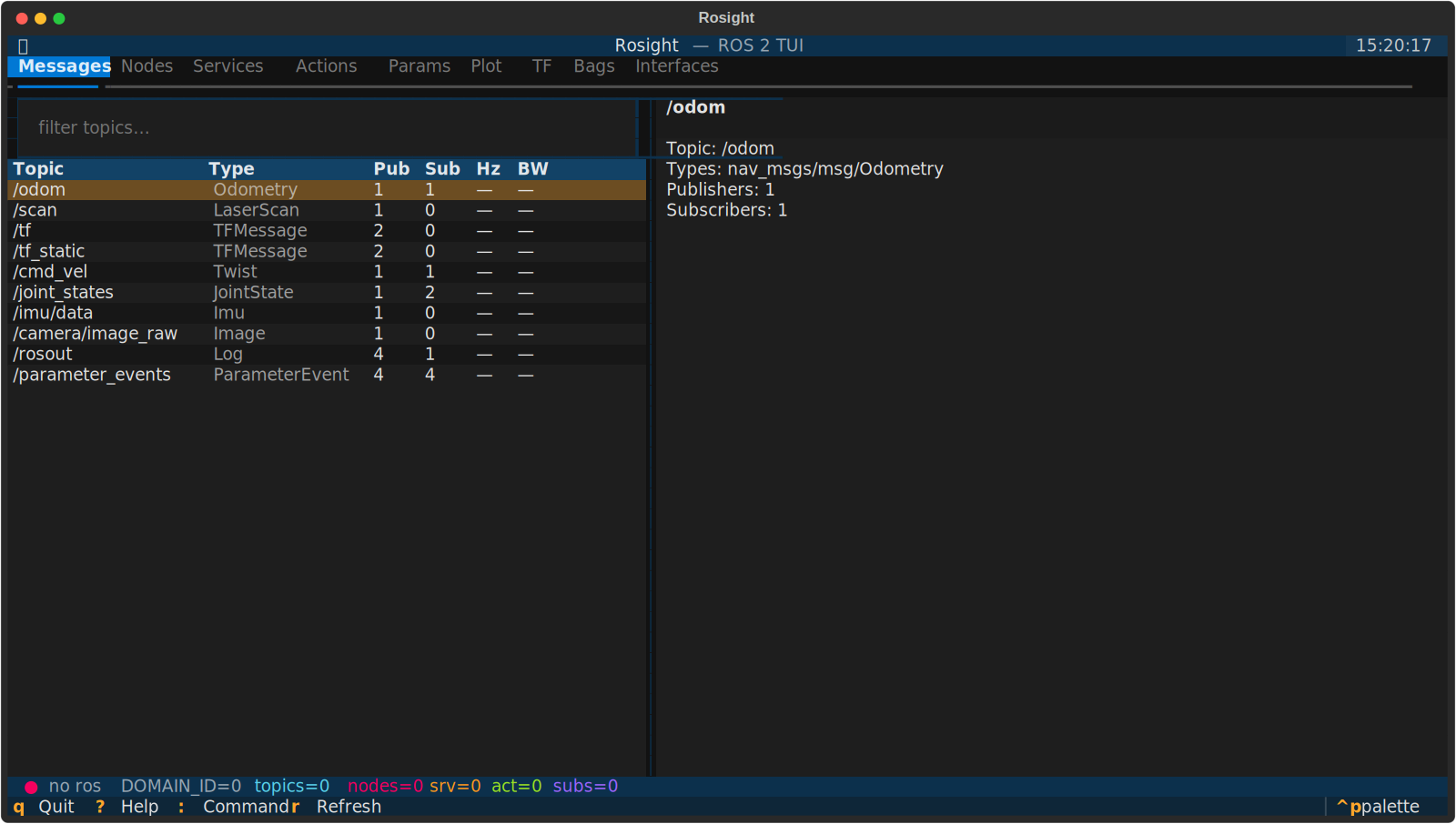
What's inside
Nine tabs, keyboard-driven, all on one screen:
# |
Tab | What you can do |
|---|---|---|
1 |
Messages | Filter the topic table, Enter to subscribe, the right pane shows live hz / bw / jitter and the message tree. Press i for static topic info (types, publishers, QoS). Press v to open a live image preview for sensor_msgs/Image / CompressedImage topics. |
2 |
Nodes | Discover every node, drill into its publishers, subscribers, service servers/clients, action servers/clients. |
3 |
Services | List services with types. c opens a call form (planned). |
4 |
Actions | List action servers with types. Goal monitor (planned). |
5 |
Params | Browse parameters per node, get / set with type awareness. |
6 |
Plot | Multi-series live plot — scalar time-series and 1D-array snapshots (e.g. LaserScan ranges). Pick a numeric leaf or numeric array in the message tree and press p / Enter. Pause / window-scale / CSV export. |
7 |
TF | Auto-built frame tree from /tf and /tf_static. |
8 |
Bags | ros2 bag record / play / info. The header tells you which key stops the recording while it's running. |
9 |
Interfaces | Browse msg / srv / action definitions of every interface package on the system. |
Image rendering uses the terminal's native graphics protocol when available (kitty / sixel / iTerm2) and falls back to Unicode half-blocks otherwise — see docs/plotting.md for the support matrix.
Screenshots
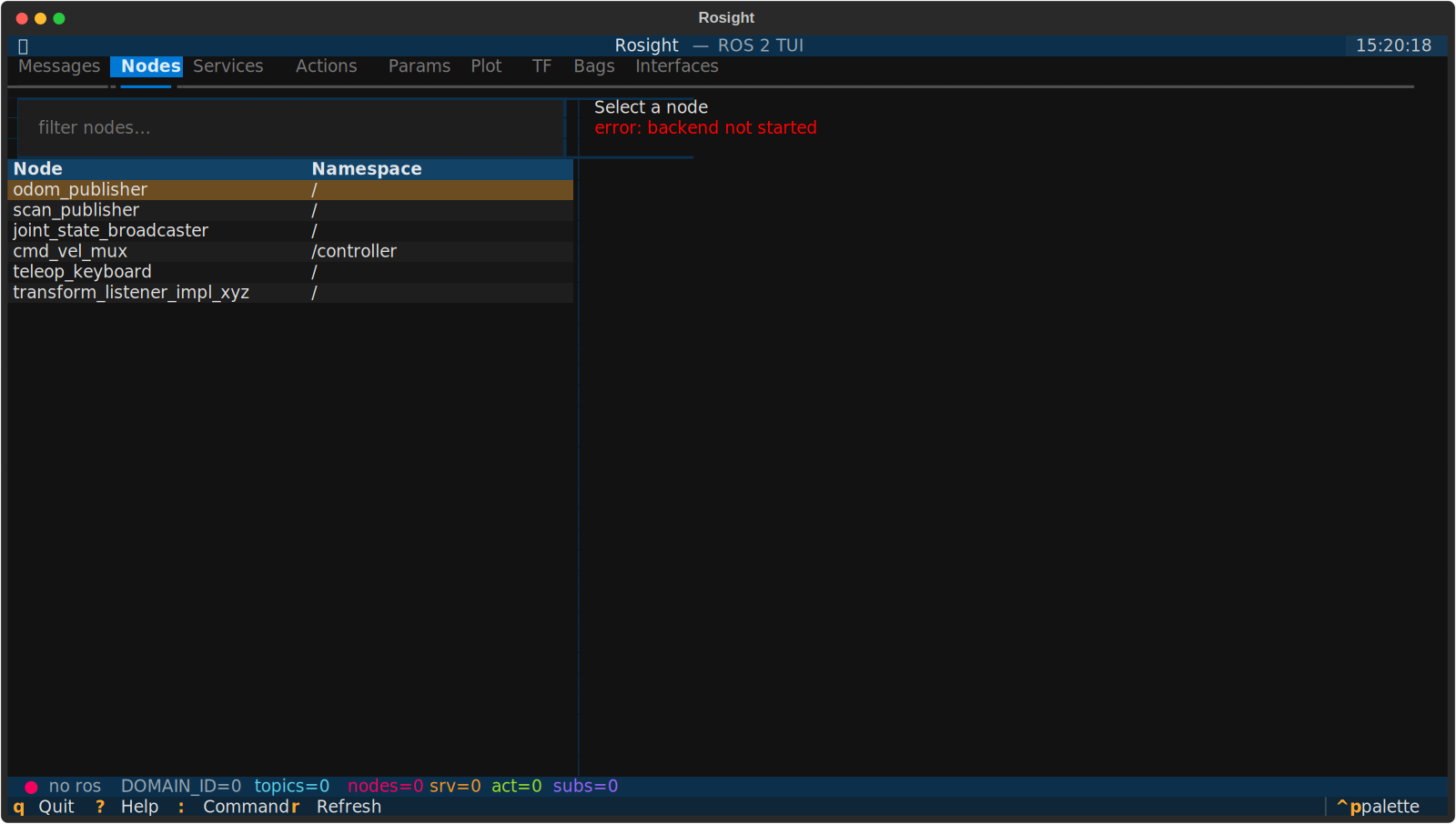
2)
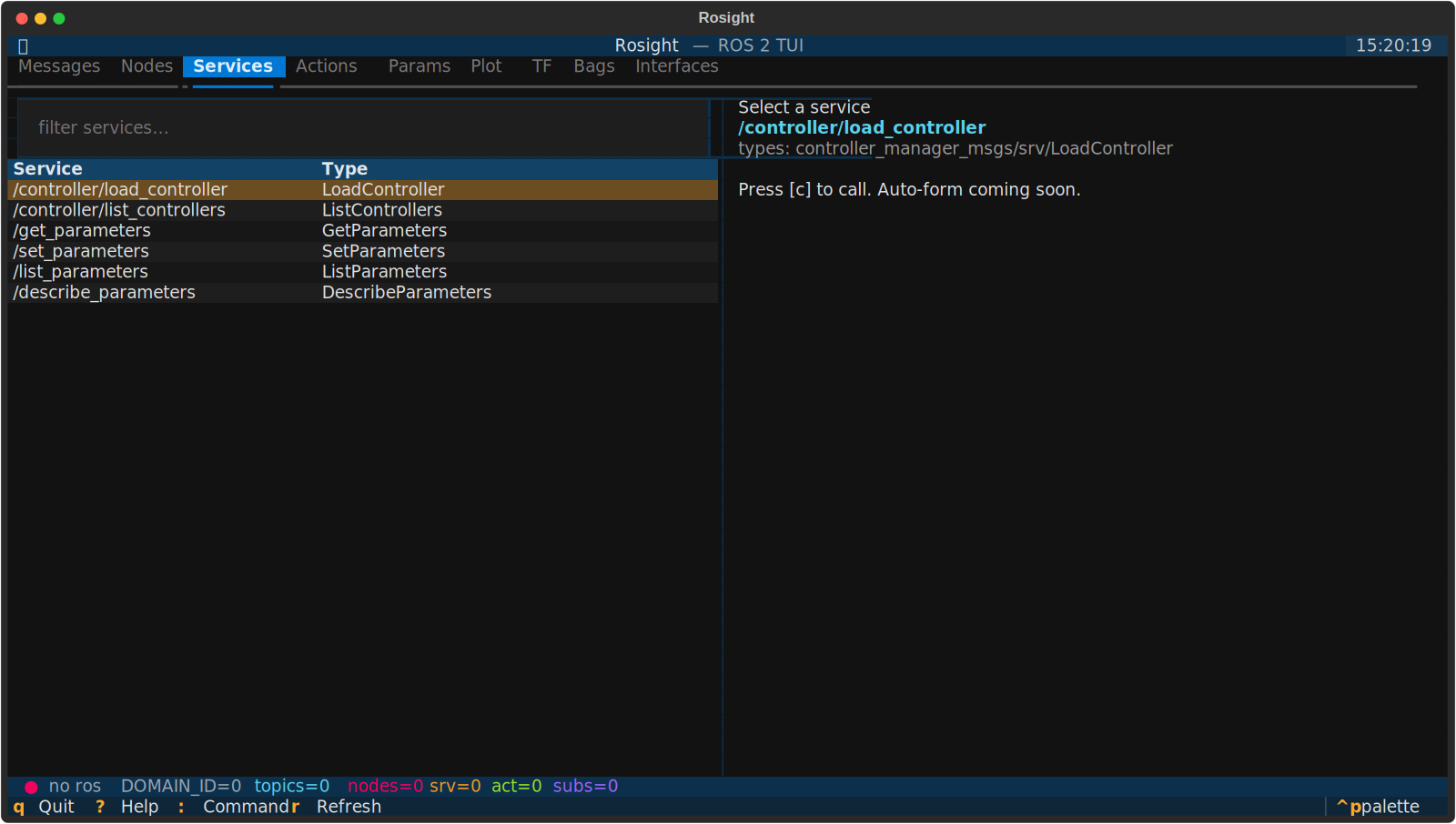
3)
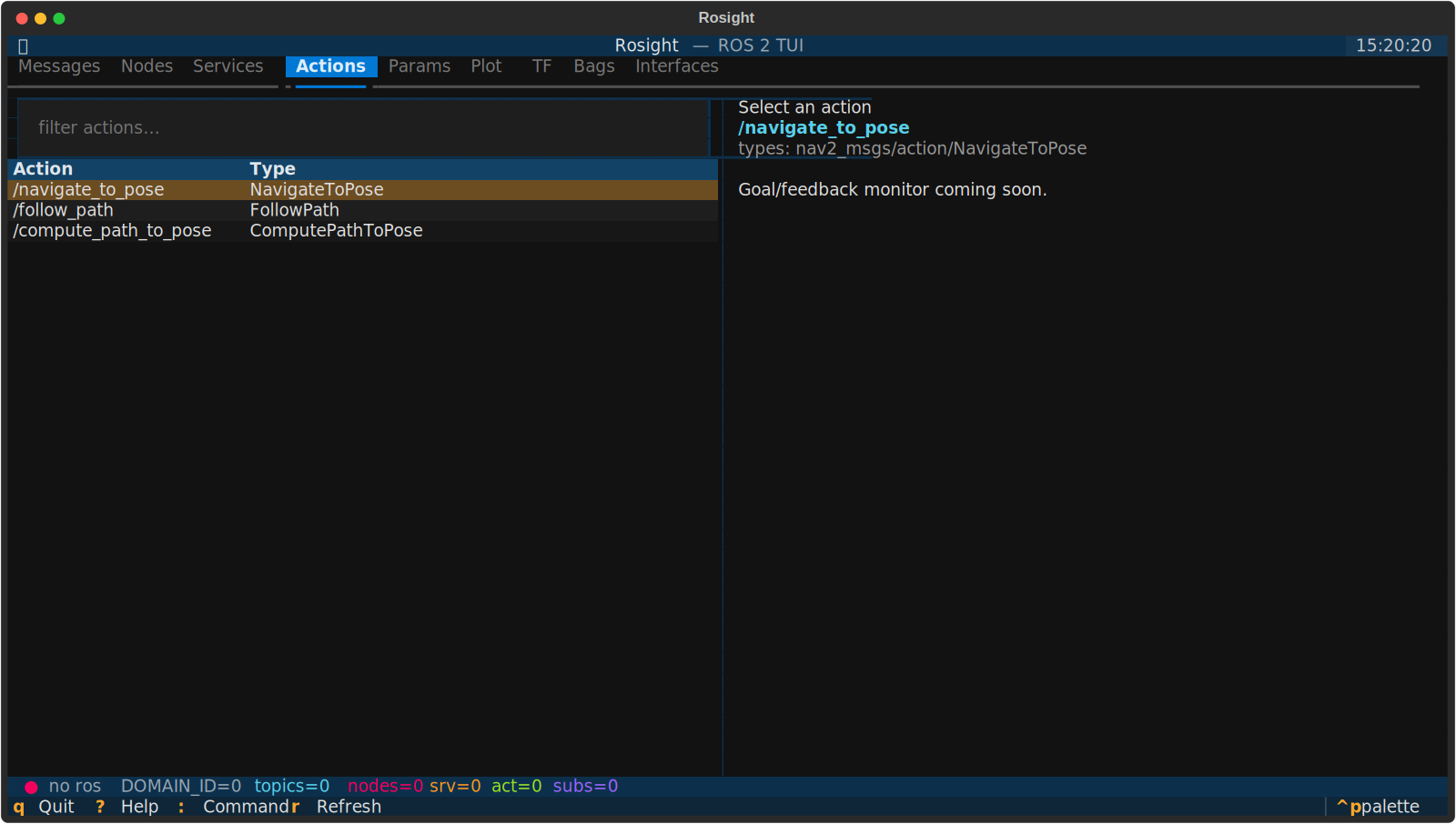
4)
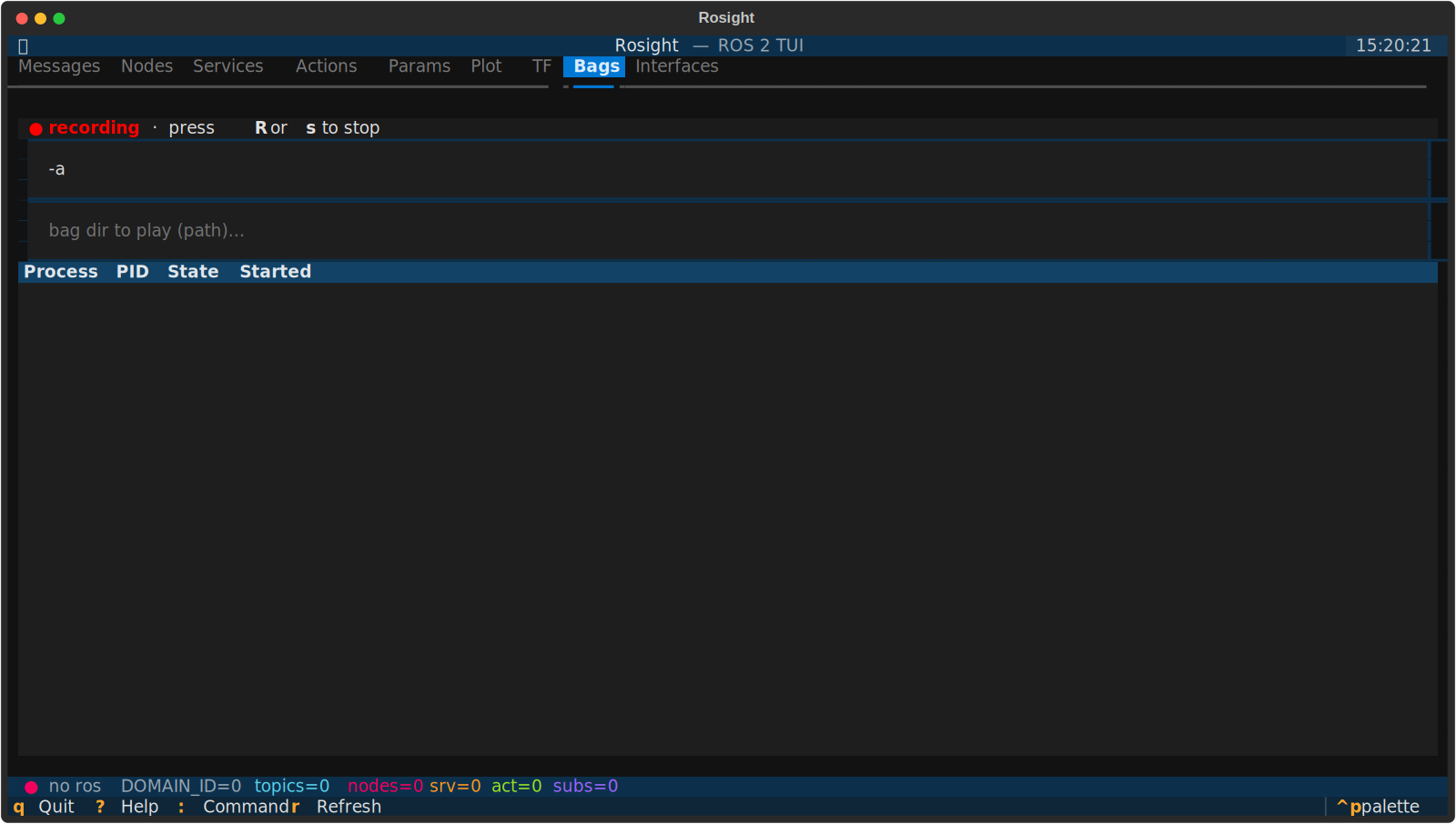
8) — recording state
Cross-cutting features:
- Auto-QoS — subscriber profile is negotiated to match every publisher of a topic (BEST_EFFORT vs RELIABLE, TRANSIENT_LOCAL, etc.), so sensor topics "just work".
- Theme persistence — pick a theme via
Ctrl+P → Change theme; it survives restarts (stored next to your config in a smallstate.toml). - Runtime domain switch —
:domain 5reconnects the rclpy backend on a newROS_DOMAIN_IDwithout restarting the app. - Live notifications — important actions (subscribed, started recording, switched domain) show as toasts; nothing important hides in a covered status bar.
- No ROS required for the UI — the package imports cleanly without
rclpy, so you can dev / unit-test on cloud machines. Run with--no-rosto stay offline.
Install
From PyPI:
pip install rosight
Then, in any terminal where you want to use it:
source /opt/ros/<distro>/setup.bash
rosight
If you maintain multiple distros, source the one whose rclpy should drive
discovery before launching. See the
installation guide for the
recommended --system-site-packages venv layout that keeps the system rclpy
reachable while pip manages everything else.
From source (for development):
git clone https://github.com/deyuf/rosight
cd rosight
pip install -e ".[dev]"
Quick start
# launch (inherits ROS_DOMAIN_ID from env)
rosight

# pick a domain explicitly + log to file
rosight --domain-id 5 --log-file /tmp/rosight.log

# UI-only mode, no rclpy needed (great for theme / layout dev)
rosight --no-ros
Inside the app:
?— keyboard reference overlay:— command palette (topic <filter>,plot <topic> <path>,record,domain <N>,quit)1–9— jump to a tabqorCtrl+C— quitr— manual refresh
Plotting workflow (the question new users ask most):
- Messages tab, cursor over a topic, Enter to subscribe (focus auto-jumps to the message tree)
- Use arrow keys / Space to expand fields in the tree
- Cursor on a numeric leaf (int / float), press p — series is added and the Plot tab opens
Documentation
Full docs site: https://deyuf.github.io/rosight/
| Topic | Page |
|---|---|
| Installation per distro | Install |
| Daily usage | Usage |
| Keybindings | Keybindings |
| Configuration | Configuration |
| Plotting deep-dive | Plotting |
| Architecture | Architecture |
| Contributing | Development |
| FAQ | FAQ |
Project layout
src/rosight/
├── app.py             # Textual App, panel registry, global key bindings
├── cli.py             # argparse entry point
├── config.py          # TOML config loader + state.toml persistence
├── ros/
│   ├── backend.py     # central rclpy facade (lifecycle, sub mgmt, domain switch)
│   ├── introspection.py  # dynamic message-type resolution
│   ├── qos.py         # plain-data QoS + auto-negotiation
│   └── stats.py       # hz / bw monitors
├── utils/
│   ├── datatable.py   # row-cursor preservation + last-column auto-fit
│   ├── ringbuffer.py  # thread-safe bounded buffers
│   ├── path.py        # message field-path parser
│   └── formatting.py  # human-readable display helpers
└── widgets/           # one file per panel + status bar / help / palette
Tech stack & rationale — short version
- Python 3.10+ + rclpy (first-class ROS 2 client, dynamic message introspection via
rosidl_runtime_py) - Textual ≥ 0.79 (modern async TUI, CSS-like styling, headless pilot tests — that's how the 80-test suite stays meaningful for a TUI)
- plotext for ANSI plotting in the Plot tab
- hatch + ruff + mypy + pytest-asyncio for the dev loop
- MkDocs Material for the docs site
- rclpy runs on its own
MultiThreadedExecutordaemon thread so DDS spinning never blocks the Textual main loop. SeeDESIGN.mdfor the full reasoning.
Status
Beta. Discovery, subscription, plotting, TF, bag record/play, theme persistence, runtime domain switch — all working. Auto-forms for service call and action goal are on the roadmap.
License
MIT. See LICENSE.
1 maintainer

Metadata
1 maintainer
Release files for rosight 0.2.0
For a detailed explanation of source distributions (sdists) and built distributions (wheels), please see the package formats documentation.
Source distribution (sdist)
| File | Size | Uploaded | |
|---|---|---|---|
| rosight-0.2.0.tar.gz | 809.6 kB | Details |
Built distribution (wheel)
| File | Interpreter | ABI | Platform | Reset |
|---|---|---|---|---|
| rosight-0.2.0-py3-none-any.whl | Python 3 | none | any | Details |
Total release size: 877.1 kB
Release files / rosight-0.2.0.tar.gz
| Download URL | rosight-0.2.0.tar.gz |
|---|---|
| Size | 809.6 kB |
| Tags | Source |
|
SHA-256 checksum How to use checksums |
8ef41c8cc94cdf509852b260f2d61afc6a0be9f59a9afdd6010f8c9cf2f1fd2e
|
|
BLAKE2b-256 checksum How to use checksums |
2264ae65396625253dcee74c9ba728d6eeb9bd58d9a2ed4fe8c1a94c171e5b78
|
| Upload date | |
|
Uploaded using Trusted Publishing? What is trusted publishing? |
Yes |
| Uploaded via |
twine/6.1.0 CPython/3.13.12
|
Provenance
Provenance describes where a file came from. On PyPI, provenance is shared via attestations, which provide a verifiable record of the build or publishing details. View details, limitations and caveats.


PyPI Publish Attestation
PyPI verified that this artifact, at this checksum, originated from the publisher listed below.
Signed by GitHub Actions, verified by PyPI on May 18, 2026.
Transparency logRelease files / rosight-0.2.0-py3-none-any.whl
| Download URL | rosight-0.2.0-py3-none-any.whl |
|---|---|
| Size | 67.6 kB |
| Tags | Python 3 |
|
SHA-256 checksum How to use checksums |
a4f8572810bca018e988a534d68a53a102dba0dad8a59e8b934d41c4913f9041
|
|
BLAKE2b-256 checksum How to use checksums |
cffdc71122d3186b0c7931cfeb20cf4e2cda04ad2c55bb61429a57eb6bf9e224
|
| Upload date | |
|
Uploaded using Trusted Publishing? What is trusted publishing? |
Yes |
| Uploaded via |
twine/6.1.0 CPython/3.13.12
|
Provenance
Provenance describes where a file came from. On PyPI, provenance is shared via attestations, which provide a verifiable record of the build or publishing details. View details, limitations and caveats.
PyPI Publish Attestation
PyPI verified that this artifact, at this checksum, originated from the publisher listed below.
Signed by GitHub Actions, verified by PyPI on May 18, 2026.
Transparency log













