
Create graph images with help of graphviz module

Project description
Rosmontis
Rosmontis is a lightweight library that outputs a graph image using graphviz based on the adjacency list, dictionary, or matrix. This module simplified the steps of creating a graph, where it adds the nodes and edges automatically from the input data to graphviz, creating the graph in one function call.
Installation
- Currently,
rosmontisonly supports Python 3. Usepipto install:
$ pip install --upgrade rosmontis
- You also need to have
graphvizinstalled in order to generate the image based on the.dotfiles. See the official website for the installation process: Graphviz.org.
Usage & Examples
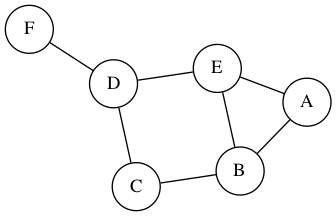
Unweighted Undirected Graph in Adjacency List
import rosmontis

g = [['A', ['B', 'E']],   # node A is connected to node B and node E
     ['B', ['E', 'C']],   # node B is connected to node E and node C
     ['C', ['D']],
     ['D', ['E', 'F']]]

# output a png image representing the graph in the same
# directory of this file.
rosmontis.renderGraphList(graph=g, graphName="example1", weighted=False, directed=False)
Weighted Undirected Graph in Adjacency Dictionary
import rosmontis

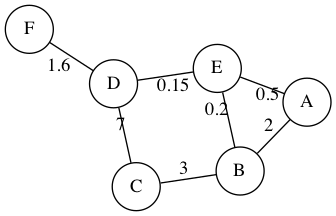
# node A is connected to node B with weight of 2, and node E with weight of 0.5
# node B is connected to node E with weight of 0.2, and node C with weight of 3
# ... etc
g = {'A': [['B', 2], ['E', 0.5]],
     'B': [['E', 0.2], ['C', 3]],
     'C': [['D', 7]],
     'D': [['E', 0.15], ['F', 1.6]]}

rosmontis.renderGraphDict(graph=g, graphName="example2", weighted=True, directed=False)
Unweighted Undirected Graph in Adjacency Matrix
import rosmontis

# Note column 0 and row 0 are the headers/labels of each node. The actual weight
# starts from row 1 column 1
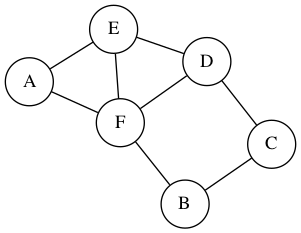
# 1 indicates there is an edge, 0 indicates no connection
g = [[None, "A", "B", "C", "D", "E", "F"],
     ["A",   0,   0,   0,   0,   1,   1 ],
     ["B",   0,   0,   1,   0,   0,   1 ],
     ["C",   0,   1,   0,   1,   0,   0 ],
     ["D",   0,   0,   1,   0,   1,   1 ],
     ["E",   1,   0,   0,   1,   0,   1 ],
     ["F",   1,   1,   0,   1,   1,   0 ]]

rosmontis.renderGraphMatrix(graph=g, graphName="example3", weighted=False, directed=False)
Weighted Directed Graph in Adjacency Matrix
import rosmontis

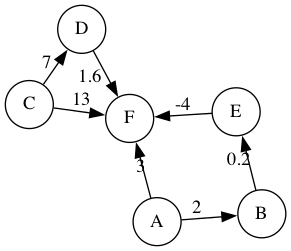
# Change the numbers from 1 to the weight value. Numbers other than 0 represents
# a connection, vice versa.
g = [[None, "A",   "B",   "C",   "D",   "E",   "F"  ],
     ["A",   0,     2,     0,     0,     0,     3   ],
     ["B",   0,     0,     0,     0,     0.2,   0   ],
     ["C",   0,     0,     0,     7.5,   0,     13  ],
     ["D",   0,     0,     0,     0,     0,     1.6 ],
     ["E",   0,     0,     0,     0,     0,     -4  ],
     ["F",   0,     0,     0,     0,     0,     0   ]]

rosmontis.renderGraphMatrix(graph=g, graphName="example4", weighted=True, directed=True)
See more examples in the examples/ folder.
Release history Release notifications | RSS feed


Download files
Download the file for your platform. If you're not sure which to choose, learn more about installing packages.
Source Distribution
Built Distribution
Filter files by name, interpreter, ABI, and platform.
If you're not sure about the file name format, learn more about wheel file names.
Copy a direct link to the current filters
File details
Details for the file rosmontis-1.0.0.tar.gz.
File metadata
- Download URL: rosmontis-1.0.0.tar.gz
- Upload date:
- Size: 4.1 kB
- Tags: Source
- Uploaded using Trusted Publishing? No
- Uploaded via: twine/4.0.2 CPython/3.9.15
File hashes
| Algorithm | Hash digest | |
|---|---|---|
| SHA256 |
3d4e5c897243c06a8e241c2a36e0eded84d2e8b10c8e7941ee616d66168875b5
|
|
| MD5 |
58b9399bef1744f3a816959944b48f9a
|
|
| BLAKE2b-256 |
01fb3edf20865a6cea9096dc4335ff9487f1bdd43ce20c5a4e61f9fe366a2618
|
File details
Details for the file rosmontis-1.0.0-py3-none-any.whl.
File metadata
- Download URL: rosmontis-1.0.0-py3-none-any.whl
- Upload date:
- Size: 4.1 kB
- Tags: Python 3
- Uploaded using Trusted Publishing? No
- Uploaded via: twine/4.0.2 CPython/3.9.15
File hashes
| Algorithm | Hash digest | |
|---|---|---|
| SHA256 |
e4fec36aad72db038acb48d92bda13de99c102a1a68a649e98d2c5113dada7a7
|
|
| MD5 |
99e2ff70ccc06cf796ec4560048fe854
|
|
| BLAKE2b-256 |
8df6f11c6ad4ec65e3ade2dabe44c82f3685578ccee5ddb88435edc4222c6977
|






