
rosterops
A deterministic, configurable, Polars-based pharma roster processing and validation engine.
rosterops ingests a baseline roster (or a single snapshot) plus optional movement files — transfers, promotions, terminations, leave, hires/rehires, temporary coverage — normalizes them into a canonical model, reconstructs the expected roster as of a requested date, applies configurable business rules, and returns validated Polars DataFrames with audit-ready reports.
It is a local-first data-processing library and CLI. It never writes back to a CRM, HR system, or database, requires no network access, and never fabricates historical events from a single snapshot.
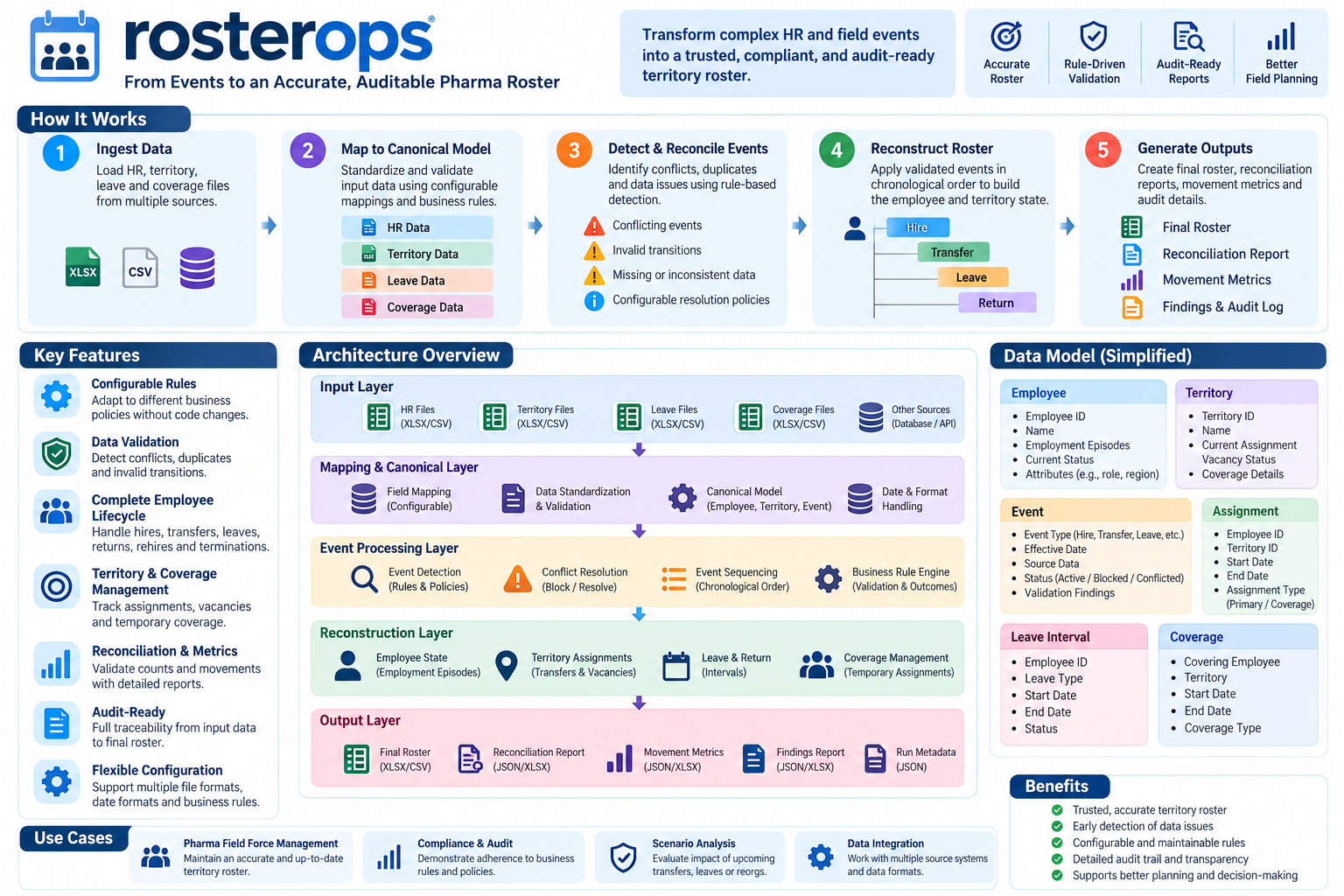
Table of Contents
- Key Features
- Status
- Installation
- Quick Start
- Usage Examples
- Outputs
- CLI Reference
- Configuration
- Architecture
- Documentation
- Development
- License
Key Features
- Two Modes: Mode A (Process) reconstructs state from a baseline + movement history and validates rules; Mode B (Validate) validates a consolidated snapshot without reconstructing history.
- Deterministic & Auditable: All events get stable fingerprints and lineage (
source_file,source_sheet,source_row). Excluded events are retained with findings (never silently dropped). - Canonical Model: Normalizes heterogeneous inputs to a consistent schema with half-open interval semantics (
[start, end)) and explicit termination date handling. - Comprehensive Rules Engine: 86 configurable business rules across transfers, promotions, leave/coverage, territories/vacancies, temporal integrity, reconciliation, and more.
- Rich Outputs: Writes CSV, Parquet, JSON, and an Excel report (
rosterops_report.xlsx) with findings, reconciliation, movement metrics, and final roster. - Flexible Inputs: Supports CSV, Parquet, and Excel (
.xlsx/.xlsm) viafastexcel/openpyxl. Per-role column mapping, aliases, date formats, and null tokens are all configurable. - Pandas Interop (Optional): Convert results to/from pandas without mutating caller dataframes.
- Local-First & Secure: No network calls, no writes to source systems, no fabrication of history.
Status
See IMPLEMENTATION_PHASES.md for the full tracker and REQUIREMENTS.md for the operative specification.
Installation
# Basic install
pip install rosterops

# With Excel support
pip install rosterops[excel]

# With pandas interop
pip install rosterops[pandas]

# Development install (from source)
pip install -e ".[dev,excel,pandas]"
Requirements: Python 3.10+. Core dependencies: polars, pydantic, PyYAML.
Quick Start
CLI
# Explore available rules
rosterops rules list
rosterops rules describe TRF-002

# Validate your configuration and inputs
rosterops validate-inputs --config examples/config/scenario.yaml

# Run the included example scenario (Mode A)
rosterops process \
  --config examples/config/scenario.yaml \
  --baseline examples/inputs/baseline.csv \
  --baseline-date 2026-09-30 \
  --as-of 2026-10-31 \
  --transfers examples/inputs/transfers.csv \
  --promotions examples/inputs/promotions.csv \
  --leaves examples/inputs/leaves.csv \
  --returns examples/inputs/returns.csv \
  --terminations examples/inputs/terminations.csv \
  --territories examples/inputs/territories.csv \
  --output-dir out --overwrite
Python API
from rosterops import RosterConfig, RosterEngine

# Load configuration
config = RosterConfig.from_file("examples/config/scenario.yaml")

# Run processing
result = RosterEngine.process(
    config=config,
    baseline_path="examples/inputs/baseline.csv",
    baseline_date="2026-09-30",
    as_of="2026-10-31",
    transfers_path="examples/inputs/transfers.csv",
    promotions_path="examples/inputs/promotions.csv",
    leaves_path="examples/inputs/leaves.csv",
    returns_path="examples/inputs/returns.csv",
    terminations_path="examples/inputs/terminations.csv",
    territories_path="examples/inputs/territories.csv",
)

# Inspect results
print(result.final_roster.height)  # number of active assignments
print(result.validation_issues)    # Polars DataFrame of findings
print(result.reconciliation)      # dict with reconciliation metrics
print(result.movement_metrics)    # dict with movement stats
Usage Examples
Example Scenario Walkthrough
The examples/ directory contains a synthetic, runnable scenario showing all movement types in action:
| File | Purpose |
|---|---|
config/scenario.yaml |
Minimal config using canonical column names |
inputs/baseline.csv |
Baseline roster as of 2026-09-30 (E001–E003, M001) |
inputs/transfers.csv |
Transfer E001 from T100 → T400 (2026-10-01) |
inputs/promotions.csv |
Promotion E001 → SENIOR_REP (2026-10-15) |
inputs/leaves.csv |
Leave E002 2026-10-05 to 2026-10-12 |
inputs/returns.csv |
Return E002 2026-10-13 |
inputs/terminations.csv |
Termination E003 2026-10-20 |
inputs/territories.csv |
Territory master (T100–T400 require owners) |
Expected outcome (as of 2026-10-31):
ending_active = 3(4 starting - 1 termination)- Headcount reconciliation:
4 + 0 + 0 - 1 = 3 - T100 and T300 flagged as vacancies (TER-005) — required-owner territories with no active owner
- All movements processed deterministically with full audit trail
See examples/README.md for detailed instructions and Mode B validation examples.
Validating a Snapshot (Mode B)
rosterops validate \
  --config examples/config/scenario.yaml \
  --snapshot examples/inputs/baseline.csv \
  --as-of 2026-09-30 \
  --output-dir out
In Mode B, movement metrics are reported as not_available (REC-007) since no history is being reconstructed.
Working with Pandas
import pandas as pd
from rosterops import RosterEngine, RosterConfig

config = RosterConfig.from_file("examples/config/scenario.yaml")
result = RosterEngine.process(config=config, baseline_path="baseline.csv", ...)

# Convert to pandas (non-mutating)
df_pandas = result.final_roster.to_pandas() if hasattr(result.final_roster, 'to_pandas') else pd.DataFrame(result.final_roster.to_dict())
issues_pdf = result.validation_issues.to_pandas()
Outputs
Each run produces audit-ready artifacts in the output directory:
| File | Description |
|---|---|
final_roster.csv / .parquet / .json |
Reconstructed roster as of --as-of with employee, territory, role, status, and effective intervals |
validation_issues.csv / .parquet / .json |
All rule findings with rule_id, severity, category, employee/territory, effective date, message, and lineage |
reconciliation.json |
Headcount reconciliation (starts + hires - terminations = ends), movement counts, and pass/fail status |
movement_metrics.json |
Transfers, promotions, leaves, returns, terminations, hires/rehires counts |
rosterops_report.xlsx |
Consolidated Excel report with multiple sheets for easy review and sharing |
run_manifest.json |
Run metadata, config hash, input paths, timestamps, and exit code |
In Mode B (snapshot validation), some artifacts may be marked unavailable with reasons (e.g., movement metrics not applicable).
CLI Reference
rosterops --help                 # Show all commands
rosterops --version              # Print version
rosterops rules list             # List all 86 rules
rosterops rules describe <ID>    # Show details for a specific rule
rosterops validate-inputs --config <file>  # Validate config and input structure
rosterops process ...            # Mode A: process baseline + movements
rosterops validate ...           # Mode B: validate a snapshot
Exit codes: 0 = clean (no error-severity findings / reconciliation passed), 1 = error-severity findings or reconciliation failed, 2 = run impossible / not-yet-available.
Configuration
Configuration is YAML-based with strict validation via Pydantic v2. Key sections:
version: 1

data:
  grain: employee_territory  # or employee_only

dates:
  interval_convention: half_open
  baseline_includes_effective_date: true
  default_date_format: "%Y-%m-%d"
  termination_date_semantics: last_working_day_inclusive

policies:
  allow_multiple_active_territories: true
  max_primary_territories_per_employee: 1
  allow_unassigned_active_employees: true
  leave:
    retains_employment_status: true
    retains_home_assignment: true
    allow_overlapping_leave_types: false
  vacancy:
    derive_only_for_required_owner_territories: true
    count_leave_as_vacancy: false
  events:
    reject_events_on_or_before_baseline_date: true
    resolve_conflicting_same_date_events: false

inputs:
  baseline: { required: true }
  transfers: { required: false }
  # ... other roles with optional column mappings/aliases

outputs:
  formats: [csv, parquet, json]
  excel_row_cap: 50000
- Column mapping: Use
inputs.<role>.columnsto map source columns to canonical names, or rely on aliases. - Date parsing: Supports 11 formats by default with deterministic day-first resolution for ambiguous slashes.
- Rule overrides: Enable/disable rules or change severities via config.
- Grain enforcement: Validates
employee_territoryvsemployee_onlyconstraints (GRN-001..003).
Architecture
The diagram above illustrates the end-to-end flow:
- Input Ingestion — Read CSV/Parquet/Excel, detect formats, apply null tokens and column mappings
- Canonicalization — Map to canonical schema, normalize dates/identifiers, track lineage
- Event Ledger — Build normalized event ledger with fingerprints, deduplication, window filtering, conflict detection
- Reconstruction — Apply events deterministically to reconstruct roster state as of
as_of(half-open intervals) - Rule Engine — Execute 86 rules (mode-aware) producing findings with stable issue keys
- Outputs — Generate final roster, issues, reconciliation, metrics, and Excel report
All processing is deterministic, local-only, and fully auditable.
Documentation
REQUIREMENTS.md— Operative requirements: modes A/B, domain model, effective-date semantics, the complete 86-rule catalogue, outputs, security, and testing strategy.IMPLEMENTATION_PHASES.md— Phase-by-phase progress tracker with acceptance criteria, test matrices, and backlog.examples/README.md— Detailed walkthrough of the included scenario with expected outputs.CONTRIBUTING.md— Contribution guidelines.CHANGELOG.md— Release history.
Development
# Lint and format
ruff check . && ruff format --check .

# Type checking (strict)
mypy src

# Run tests
pytest

# Run tests with coverage
pytest --cov=rosterops --cov-report=term-missing
Testing: 262+ tests with unit, integration, property-based (Hypothesis), and packaging E2E coverage.
License
MIT — see LICENSE.
1 maintainer

Metadata
1 maintainer
Release files for rosterops 0.1.2
For a detailed explanation of source distributions (sdists) and built distributions (wheels), please see the package formats documentation.
Source distribution (sdist)
| File | Size | Uploaded | Provenance | |
|---|---|---|---|---|
| rosterops-0.1.2.tar.gz | 1.8 MB | Without provenance | Details |
Built distribution (wheel)
| File | Interpreter | ABI | Platform | Reset |
|---|---|---|---|---|
| rosterops-0.1.2-py3-none-any.whl | Python 3 | none | any | Details |
Total release size: 1.9 MB
Release files / rosterops-0.1.2.tar.gz
| Download URL | rosterops-0.1.2.tar.gz |
|---|---|
| Size | 1.8 MB |
| Tags | Source |
|
SHA-256 checksum How to use checksums |
b765c74b250a3dd0e3b0ccdaa6ebb666e33bf602bd3cb9b99ec55f4bfc0e4c33
|
|
BLAKE2b-256 checksum How to use checksums |
c85e066f7ba0eb0929736e7ec421f1dddf7926a5010f7d8f08a33351c14c878e
|
| Upload date | |
|
Uploaded using Trusted Publishing? What is trusted publishing? |
No |
| Uploaded via |
twine/7.0.0 CPython/3.11.3
|
Release files / rosterops-0.1.2-py3-none-any.whl
| Download URL | rosterops-0.1.2-py3-none-any.whl |
|---|---|
| Size | 100.6 kB |
| Tags | Python 3 |
|
SHA-256 checksum How to use checksums |
0ab3be1774d6feaa84a692c05e72e8c7189361b81be3c72be945d4aee739d3c6
|
|
BLAKE2b-256 checksum How to use checksums |
b879c66ceb8e95c0980d2cbb9866af2a63b933812bcfcea3c2f12966ca196bfa
|
| Upload date | |
|
Uploaded using Trusted Publishing? What is trusted publishing? |
No |
| Uploaded via |
twine/7.0.0 CPython/3.11.3
|
Security for rosterops 0.1.2
Provenance
Provenance describes where a file came from. On PyPI, provenance is shared via attestations, which provide a verifiable record of the build or publishing details. View details, limitations and caveats.
No provenance found
None of the files in this release were uploaded with provenance metadata.
A note on package security
PyPI is a repository for distributing packages, not a service for auditing them. While third-party security researchers and our staff do their best to detect and remove malicious packages, PyPI cannot guarantee the quality, security or suitability of any given package.
To learn more about protecting yourself from malicious actors, visit our package security documentation.














