
Common operations and transformations on routes represented by a 2D line in xy space and corresponding z-axis data.

Project description
Routely


Travis build Python 3.6, 3.7, 3.8.
Intro
Common operations and transformations on routes represented by a 2D line in xy space
Route is designed to provide many of the common route operations and transformations to make route processing simpler and quicker.
A route is represented by a series of point coordinates on a two dimensional x-y plane. Z-axis data can be specified as well, however the primary focus of these common transformations are based on the x-y plane data with z-axis data being transformed accordingly.
The primary focus is on x-y plane data because z-axis data does not have to represent a path through three dimensional space, rather z-data can represent additonal layers of route data that correspond to the x-y path.
For example, a runner may be tracking pace or heartrate, a car will have changes in speed, etc. Therefore, transformations are primarily concerned with the x-y route taken.
Installation
pip install routelyQuick start
To begin with, let’s define a path that comprises two lists of x and y points that together form the coordinates of the line.
# x and y coordinates of a path.
x = [-5, 5, 15, 25, 20, 0]
y = [0, 10, 40, 15, 5, 20]
To make use of Routely, we can pass these lists of x and y points to Routely’s Route class.
from routely import Route

r = Route(x, y)

# Plot x vs y
r.plotroute()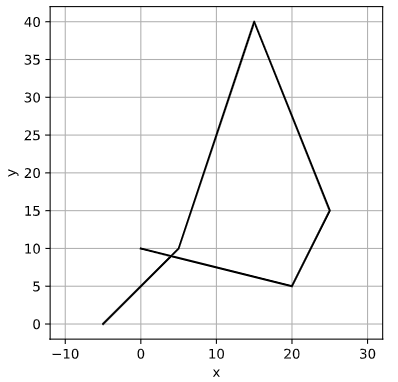
You can add z-axis data too, which should be passed as a dictionary. This enables you to have one or more z-axis datasets.
# Add a few z-axis datasets
z1 = [0, 1, 2, 3, 4, 5]
z2 = [0, 1, 2, 3, 2, 0]

# z-axis data must be passed as a dictionary
z_data = {'foo':z1, 'bar':z2}

r = Route(x, y, z=z_data)

# Plot z-axis data
# Note that z-axis data is plotted against the distance along the route
r.plot_z()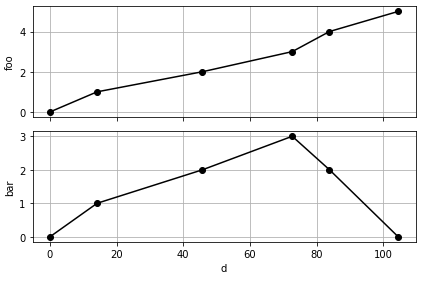
Using the Route object, you can now quickly and easily get key properties of the route data such as:
# Get the bounding box and center coordinates of the route
r.bbox()
((-5, 0), (25, 40))

r.center()
(10.0, 20.0)

# The absolute width, height and centerof the route
r.width()
30

r.height()
40

Download files
Download the file for your platform. If you're not sure which to choose, learn more about installing packages.
Source Distribution
Built Distribution
Filter files by name, interpreter, ABI, and platform.
If you're not sure about the file name format, learn more about wheel file names.
Copy a direct link to the current filters
File details
Details for the file routely-0.1.3.tar.gz.
File metadata
- Download URL: routely-0.1.3.tar.gz
- Upload date:
- Size: 8.0 kB
- Tags: Source
- Uploaded using Trusted Publishing? No
- Uploaded via: twine/3.3.0 pkginfo/1.7.0 requests/2.25.1 setuptools/47.1.0 requests-toolbelt/0.9.1 tqdm/4.56.2 CPython/3.7.9
File hashes
| Algorithm | Hash digest | |
|---|---|---|
| SHA256 |
ebc7e93e2d4f7c7a37c48af073886bef975f2d5fd91f052a4a9ffa6abef19e5b
|
|
| MD5 |
6501246d219c45e90c7355d4ce7d109a
|
|
| BLAKE2b-256 |
71c82a15a2fd10482538ed3b4df32b93c99a135a5ddbf230c2e1d937b3d68285
|
File details
Details for the file routely-0.1.3-py3-none-any.whl.
File metadata
- Download URL: routely-0.1.3-py3-none-any.whl
- Upload date:
- Size: 9.0 kB
- Tags: Python 3
- Uploaded using Trusted Publishing? No
- Uploaded via: twine/3.3.0 pkginfo/1.7.0 requests/2.25.1 setuptools/47.1.0 requests-toolbelt/0.9.1 tqdm/4.56.2 CPython/3.7.9
File hashes
| Algorithm | Hash digest | |
|---|---|---|
| SHA256 |
e8c4662de7e42cd73588e7f1c6e204a894822c01cf5e28633b0e6fa827a29f21
|
|
| MD5 |
924f3e4a16073fe68eb55e292652273e
|
|
| BLAKE2b-256 |
c4f6947703320af36976f500a17eb7712bbe42fc89538c838edfa1c5bf5b311c
|






