
a stylish, batteries-included terminal file manager.

Project description
rovr - a stylish, batteries-included terminal file manager.
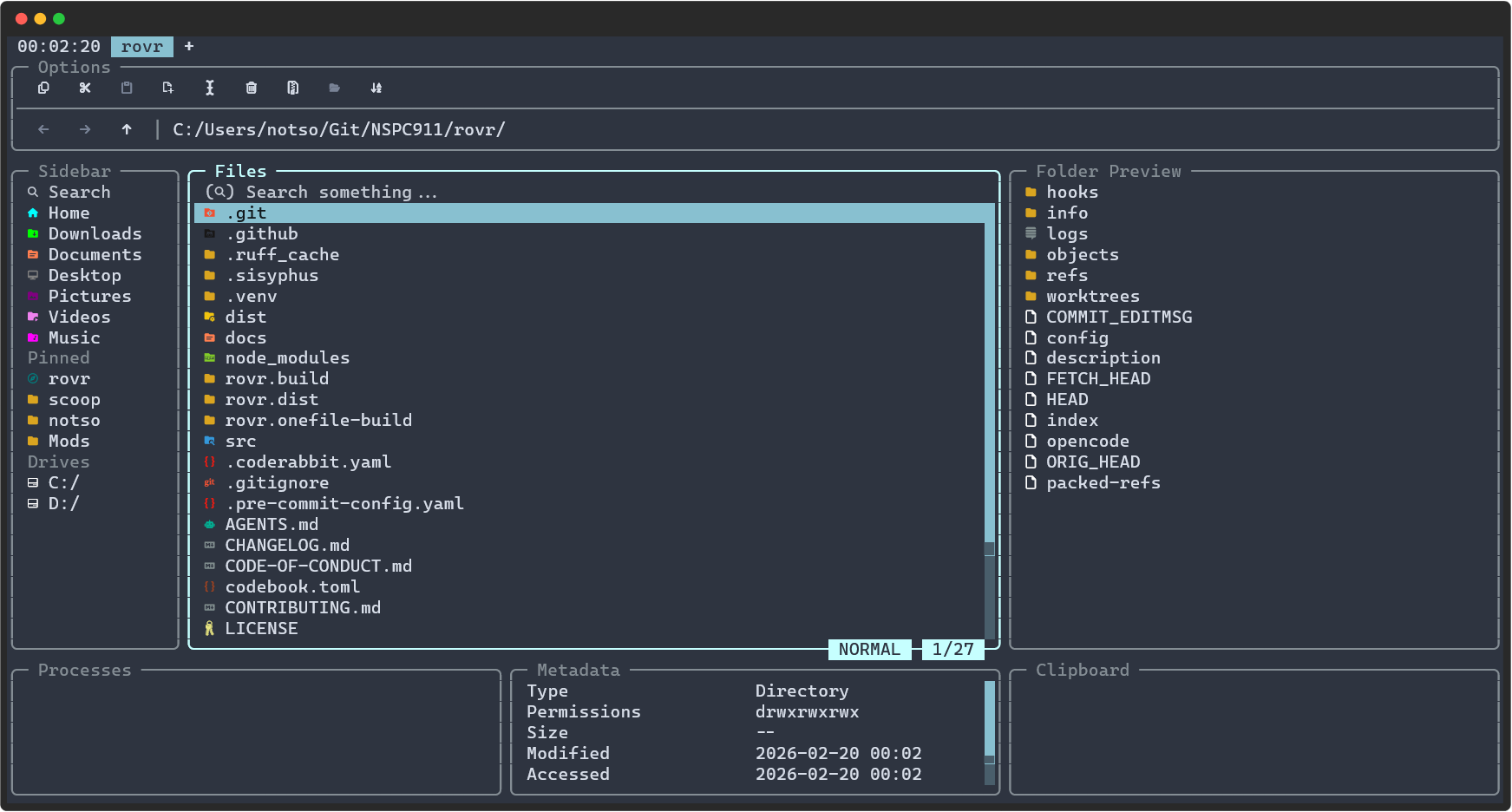
rovr is a terminal file manager built with Python's Textual framework. It was born out of a frustration that TUI apps do not support the mouse properly, and I wanted to make a change.
Features
- Modern UI: Built with Textual for a beautiful and functional terminal interface.
- Highly Customizable: Tweak themes, borders, icons, and UI elements to match your exact preference. Configs for nearly everything.
- Batteries Included: Handles file preview, image preview, archive handling and more without reaching to external software (but still has integrations for popular tools out-of-box)
- Cross-Platform: Powered by Python, running smoothly anywhere Python 3.13 is supported. Binaries are also provided.
- Real Mouse Support: Full mouse support for navigation, selection, and actions, making it more intuitive to use.
Project Status
Currently in public beta similar to yazi. rovr follows the major version 0 scheme, meaning whenever the minor version (like 0.7.0 -> 0.8.0) is done, there are a lot of breaking changes.
I try to minimise them, and guide the user to what had gone wrong and more info on how to fix them, as well as attempt to fix it.
Installation
Quick Test:
## uv
uvx rovr
## pipx
pipx run rovr
# Install
## uv (my fav)
uv tool install rovr
## or pipx
pipx install rovr
## or plain old pip
pip install rovr
Other package managers
With AUR:
# binary
yay -S rovr-bin
# pip version
yay -S rovr
With scoop (windows):
scoop bucket add le-bucket https://github.com/NSPC911/le-bucket
scoop install rovr
With Conda/Pixi:
pixi global install rovr
Running from source
uv run rovr
Running in dev mode to see debug outputs and logs
uv run rovr --dev
# or with just
just dev
the Textual console must also be active to see debug outputs
uv run textual console
# or uvx if not running from source
uvx --from textual-dev textual console
# or just capture print statements
just log
For more info on Textual's console, refer to https://textual.textualize.io/guide/devtools/#console
Contributing
-
What can I contribute?
- Themes and features can be contributed.
- Refactors will be frowned on, and may take a longer time before merging.
-
How do I contribute?
- You need uv at minimum. prek, ruff and ty are automatically installed.
- Clone the repo, and inside it, run
uv sync. - Make your changes, ensure that your changes are properly formatted, before pushing to a custom branch on your fork.
- For more info, check the how to contribute page.
-
How do I make a feature suggestion?
- Open an issue using the
feature-requesttag. Make sure to add details and context to your suggestion.
- Open an issue using the
FAQ
-
There isn't X theme/Why isn't Y theme available?
- Textual's currently available themes are limited. However, extra themes can be added via the config file.
- You can take a look at what each color represents in https://textual.textualize.io/guide/design/#base-colors
Inheriting themes will not be added. - More info on styling can be found in https://nspc911.github.io/rovr/configuration/theming (dev version)
-
Why not ratatui (rust) or bubbletea (go), why python, why??? sad, angry, weird compiled noises
- I like Python, feel free to leave if you hate it.
-
What's with the name?
-
How should I stylize rovr?
- Just "rovr", please. You can add backticks to it if you want, so
rovr, but please don't capitalise any letters.
- Just "rovr", please. You can add backticks to it if you want, so
-
Why should I use rovr?
- I don't want to sell it to you. I made it for myself. If you don't like it, sure go ahead, use yazi (rust) or superfile (go), or heck even use the cli, I'm not bothered.
-
OhMGee why are there so many borders and so many icons and so many xxx and so many yyy??? more angry noises
- Keep in mind, you can disable them. The screenshot is my setup, and the default setup. Textual CSS lets you hide things, disable borders, etc etc, so you can make it look however you want.
-
Is this vibe-coded?
- Depends on the meaning. AI was used in certain parts of the code, especially in cli functions, but aside from that, it is few and far between. However, AI was used to ensure I don't make mistakes while making changes.
License
This project is licensed under the MIT License. See the LICENSE file for details.
Stargazers
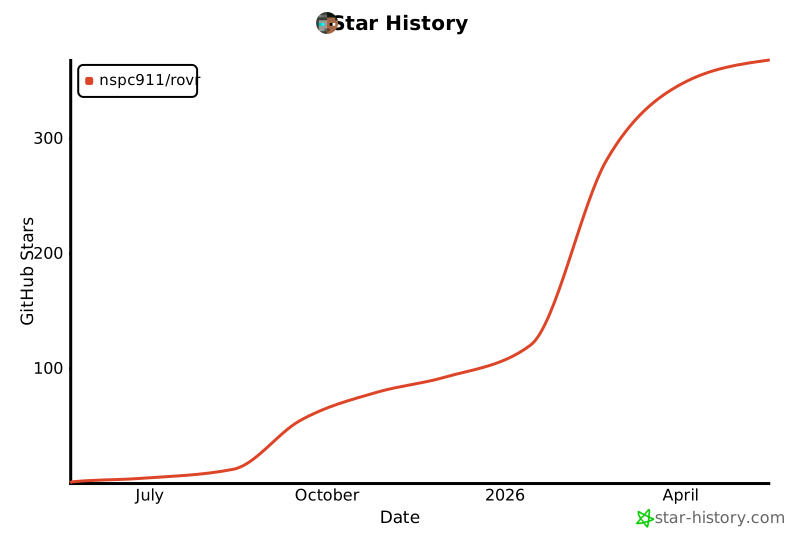
Thank you so much for starring this repo! Each star pushes me more to make even more amazing features for you!
 _ ___  ___ __   _ˍ_ ___
/\`'__\/ __`\ \ /\ \`'__\
\ \ \_/\ \_\ \ V_/ /\ \_/
 \ \_\\ \____/\___/\ \_\
  \/_/ \/___/\/__/  \/_/ by NSPC911
Release history Release notifications | RSS feed


Download files
Download the file for your platform. If you're not sure which to choose, learn more about installing packages.
Source Distribution
Built Distribution
Filter files by name, interpreter, ABI, and platform.
If you're not sure about the file name format, learn more about wheel file names.
Copy a direct link to the current filters
File details
Details for the file rovr-0.9.1.tar.gz.
File metadata
- Download URL: rovr-0.9.1.tar.gz
- Upload date:
- Size: 181.3 kB
- Tags: Source
- Uploaded using Trusted Publishing? No
- Uploaded via: uv/0.11.19 {"installer":{"name":"uv","version":"0.11.19","subcommand":["publish"]},"python":null,"implementation":{"name":null,"version":null},"distro":{"name":"CachyOS Linux","version":null,"id":null,"libc":null},"system":{"name":null,"release":null},"cpu":null,"openssl_version":null,"setuptools_version":null,"rustc_version":null,"ci":null}
File hashes
| Algorithm | Hash digest | |
|---|---|---|
| SHA256 |
5fd9ecb4c5a06c42288f380b62b5f605fbc8170b1ac4a6cbf49651adc003b3fa
|
|
| MD5 |
4b42dbccd24d8f8c7df5dfe1f26f8d72
|
|
| BLAKE2b-256 |
ee623ae3713c84d71636dd66781e6d5af0292d18ccfa7b2ac25a8bfff35da87c
|
File details
Details for the file rovr-0.9.1-py3-none-any.whl.
File metadata
- Download URL: rovr-0.9.1-py3-none-any.whl
- Upload date:
- Size: 222.5 kB
- Tags: Python 3
- Uploaded using Trusted Publishing? No
- Uploaded via: uv/0.11.19 {"installer":{"name":"uv","version":"0.11.19","subcommand":["publish"]},"python":null,"implementation":{"name":null,"version":null},"distro":{"name":"CachyOS Linux","version":null,"id":null,"libc":null},"system":{"name":null,"release":null},"cpu":null,"openssl_version":null,"setuptools_version":null,"rustc_version":null,"ci":null}
File hashes
| Algorithm | Hash digest | |
|---|---|---|
| SHA256 |
63529c7c5e6b9b01ff5e0c57c27bbcab5808096ccd50624ff88cc6d6a12c0dee
|
|
| MD5 |
d60b9cd140aae9fe36d44ba336bb8e7a
|
|
| BLAKE2b-256 |
256e69ab93370e4d8a56bb7bd476f3b63faa33fb13fccae4e9d472e8fb56ce9d
|






