
rowdelta
See exactly what changed between two versions of a table.
rowdelta matches rows by key and tells you which rows were added, removed and changed, and which columns changed in each one. It reads CSV, Parquet, JSON, SQLite, DuckDB, pandas and Arrow, or a file at a git revision, and it runs on DuckDB, so ten million rows take seconds.




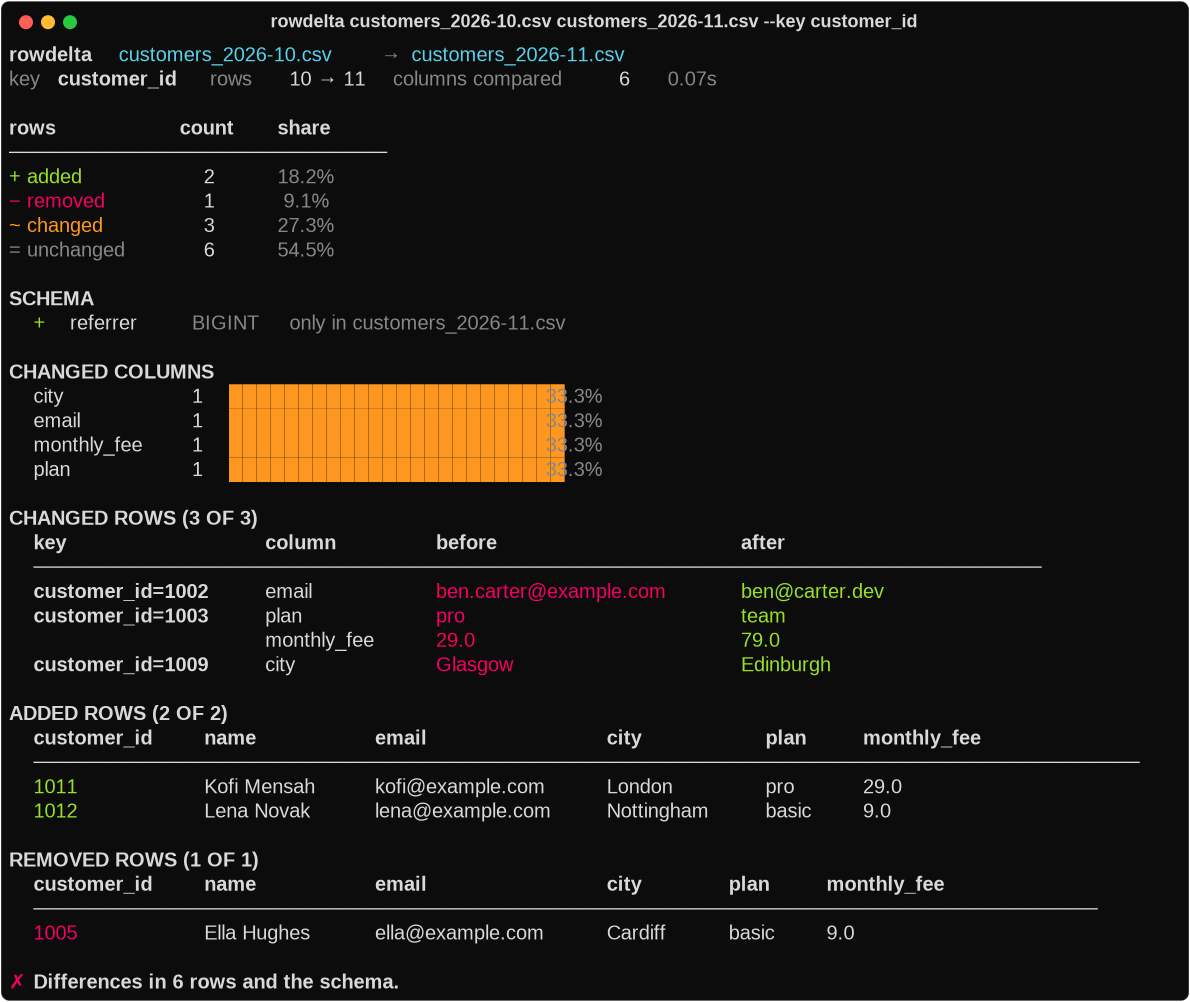
rowdelta customers_2026-10.csv customers_2026-11.csv --key customer_id
Why
Tables change all the time: a nightly export, a dbt model after a refactor, a pipeline after an upgrade,
a spreadsheet someone "fixed". git diff on a CSV compares lines, not records, so it falls apart as soon
as rows are reordered, a column moves, or 29 becomes 29.0. Most teams end up writing the same
one-off pandas script each time.
rowdelta is that script done properly, once:
- Matches rows by key, including composite keys, so order never matters.
- Shows the change itself: for each changed row, which columns changed and their old and new values.
- Is safe with real data: NULLs compare correctly, duplicate and empty keys are reported instead of silently mismatched, and columns match even when their order or capitalisation differs.
- Fits into CI: exit code
1when something differs, Markdown output for pull request comments, JSON for scripts, and a ready-made GitHub Action. - Is fast: one DuckDB join does the work. See Performance.
Install
pipx install git+https://github.com/Atharv1414/rowdelta
or pip install git+https://github.com/Atharv1414/rowdelta. It needs Python 3.10 or newer and installs
two dependencies: duckdb and rich.
Quick start
# Two files, matched on a key
rowdelta before.csv after.csv --key id

# Any mix of formats, and composite keys
rowdelta orders_old.parquet orders.csv --key order_id,line_no

# What changed in a file since the last commit, or against main
rowdelta HEAD:data/prices.csv data/prices.csv --key sku
rowdelta origin/main:data/prices.csv data/prices.csv --key sku

# A table in SQLite or DuckDB
rowdelta prod.sqlite::users staging.sqlite::users --key id

# Ignore noise: timestamps, tiny float differences, case and spaces
rowdelta a.parquet b.parquet --key id --ignore updated_at --atol 0.005 --trim --ignore-case

# Only some rows, only some columns
rowdelta a.csv b.csv --key id --where "country = 'GB'" --columns price,stock

# Reports and the full list of changes
rowdelta a.csv b.csv --key id -o report.html -o report.json
rowdelta a.csv b.csv --key id --export changes.parquet
--export writes every added, removed and changed row with a status column, a changed_columns column,
and <column>_before / <column>_after pairs, so you can keep investigating in SQL, pandas or a
spreadsheet.
No key? rowdelta suggests columns that look like one. Or use --keyless to compare whole rows as a
multiset (it then reports added and removed copies, but cannot say which rows "changed").
Sources
| Source | Example |
|---|---|
CSV, TSV (also .gz, .zst) |
data.csv, data.tsv.gz |
| Parquet, one file or a glob | data.parquet, "lake/2026/*.parquet" |
| JSON array or JSON Lines | data.json, data.jsonl |
| SQLite table | app.sqlite::users (.sqlite, .sqlite3, .db) |
| DuckDB table | warehouse.duckdb::orders |
| A file at a git revision | main:data/users.csv, HEAD~3:data/users.csv |
| pandas, polars, Arrow (Python API) | rowdelta.compare(df_old, df_new, key="id") |
The two sides can be different formats. A column that is text on one side and numeric on the other is
compared as text (so 01234 vs 1234 is a change); integers and floats are compared as numbers.
Differences only in width, such as INTEGER vs BIGINT, are not reported as schema changes.
In CI: the GitHub Action
Post a diff on every pull request that changes a data file:
name: data diff
on:
  pull_request:
    paths: ["data/**"]

jobs:
  diff:
    runs-on: ubuntu-latest
    permissions:
      contents: read
      pull-requests: write
    steps:
      - uses: actions/checkout@v4
        with:
          fetch-depth: 0 # so the base branch is available to compare against

      - id: diff
        uses: Atharv1414/rowdelta@v0
        with:
          before: origin/${{ github.base_ref }}:data/customers.csv
          after: data/customers.csv
          key: customer_id
          args: --ignore updated_at
          # fail-on: removed   # make the check fail if any rows were removed

      - uses: marocchino/sticky-pull-request-comment@v2
        with:
          path: ${{ steps.diff.outputs.report }}
The report also goes to the job summary. Outputs: has-differences, added, removed, changed,
report (Markdown file) and json (JSON file). Set fail-on to any, rows, schema, added,
removed or changed to turn the step into a gate; it defaults to none, which only reports.
Without the Action, any CI system can use the exit code:
rowdelta expected.parquet actual.parquet --key id --quiet # 0 = same, 1 = different, 2 = error
Python API
import rowdelta

with rowdelta.compare("old.parquet", "new.parquet", key=["order_id", "line"], atol=0.01) as diff:
    print(diff.added, diff.removed, diff.changed, diff.unchanged)
    print(diff.column_changes)  # {'price': 812, 'status': 40}
    print(diff.schema.only_in_b)  # new columns
    for row in diff.rows("changed", limit=5):
        print(row)  # {'status': 'changed', 'order_id': 7, 'price_before': 9.5, ...}
    diff.export("changes.parquet")

    report = diff.result.to_dict()  # plain data, safe to keep after the connection closes
compare also accepts pandas or polars DataFrames and Arrow tables. Useful in tests:
def test_refactor_keeps_output_identical(old_model, new_model):
    with rowdelta.compare(old_model, new_model, key="id", atol=1e-9) as diff:
        assert not diff.has_differences, diff.column_changes
Options
| Option | What it does |
|---|---|
-k, --key COL |
Column(s) that identify a row. Repeat or comma-separate for a composite key. |
--keyless |
Compare whole rows as a multiset instead of by key. |
-c, --columns COL |
Compare only these columns. |
-i, --ignore COL |
Leave these columns out. |
--atol N, --rtol N |
Numbers within atol + rtol × abs(after) count as equal. |
--trim, --ignore-case |
Ignore spaces at the ends of text, or differences in case. |
--where SQL |
Filter both sides first, e.g. "region = 'EU'". |
-o, --output FILE |
Write a report: .md, .json, .html, anything else is text. Repeatable. |
-f, --format |
terminal, markdown, json or html for the screen (or a single -o). |
--export FILE |
Every changed row with before and after values, as .parquet, .csv or .json. |
-n, --sample N |
Example rows per kind in reports (default 10). |
--fail-on WHAT |
What sets exit code 1: any (default), rows, schema, added, removed, changed, none. |
--labels A B |
Names to show instead of the paths. |
--title TEXT |
Heading for Markdown and HTML reports. |
--memory-limit 2GB |
Cap DuckDB's memory; larger work spills to disk. |
-q, --quiet |
Print nothing; files are still written. |
Performance
Measured with benchmarks/bench.py on a MacBook Air (Apple M2, 8 GB RAM), DuckDB
2.0.1, Python 3.13. Table B is table A with 1% of rows changed, 0.5% removed and 0.5% added; 8 columns of
mixed types. Times include reading both files and computing counts, per-column totals and samples.
| Rows | Format | Added | Removed | Changed | Time |
|---|---|---|---|---|---|
| 1,000,000 | Parquet | 5,000 | 5,000 | 10,000 | 0.3 s |
| 1,000,000 | CSV | 5,000 | 5,000 | 10,000 | 0.6 s |
| 10,000,000 | Parquet | 50,000 | 50,000 | 100,000 | 7.3 s |
Run python benchmarks/bench.py to measure on your machine.
How it works
- Each side is loaded into DuckDB (filtered by
--where), and the two schemas are compared. - Rows with an empty key, and keys that appear more than once on either side, are counted and set aside, because they cannot be matched one to one. They are reported, never guessed.
- A single
FULL OUTER JOINon the key gives each key a status (added, removed, changed or same), with one NULL-safe "differs" flag per compared column that applies the tolerance and text options. - Totals and per-column counts come from that one table; samples and
--exportjoin back for values.
The engine is about 600 lines in src/rowdelta/engine.py. Tests compare it
against a plain-Python reference diff on hundreds of random tables on every run, using
Hypothesis.
Limits
- Both tables are loaded into DuckDB. Large inputs spill to disk, but very large ones are better compared
where they live; set
--memory-limitto keep a laptop responsive. - Comparing tables directly inside Postgres, MySQL or a cloud warehouse is not built in yet. Export to Parquet first (or use DuckDB's database extensions with the Python API).
- Excel files are not read directly; save as CSV.
- Floats compare exactly unless you give
--atolor--rtol. - Not on PyPI yet; install from GitHub as shown above.
Related tools
datacompy is a Python library for comparing DataFrames. Datafold's data-diff, which compared tables across databases, was archived in May 2024. rowdelta aims at the everyday case: two files or tables, one command, a clear answer, and a report you can paste into a pull request.
Contributing
Issues and pull requests are welcome; see CONTRIBUTING.md. Good first areas: more sources (Excel, Postgres through DuckDB extensions), report polish, and Windows testing.
License
MIT
1 maintainer

Metadata
1 maintainer
Release files for rowdelta 0.1.0
For a detailed explanation of source distributions (sdists) and built distributions (wheels), please see the package formats documentation.
Source distribution (sdist)
| File | Size | Uploaded | Provenance | Actions |
|---|---|---|---|---|
| rowdelta-0.1.0.tar.gz | 43.7 kB | With provenance | Details for rowdelta-0.1.0.tar.gz |
Built distribution (wheel)
| File | Interpreter | ABI | Platform | Actions Reset |
|---|---|---|---|---|
| rowdelta-0.1.0-py3-none-any.whl | Python 3 | none | any | Details for rowdelta-0.1.0-py3-none-any.whl |
Total release size: 74.0 kB
Release files / rowdelta-0.1.0.tar.gz
| Download URL | rowdelta-0.1.0.tar.gz |
|---|---|
| Size | 43.7 kB |
| Tags | Source |
|
SHA-256 checksum How to use checksums |
b52955fa4677f0728312113b0461cd18fc4ffac6e999cd15e62493343f5a2c97
|
|
BLAKE2b-256 checksum How to use checksums |
9b2b0784a966458893f0ece92d6e1fdd756e0b05b79abf6857dc73df02db0112
|
| Upload date | |
|
Uploaded using Trusted Publishing? What is trusted publishing? |
Yes |
| Uploaded via |
twine/7.0.0 CPython/3.13.16
|
Provenance
Provenance describes where a file came from. On PyPI, provenance is shared via attestations, which provide a verifiable record of the build or publishing details. View details, limitations and caveats.


PyPI Publish Attestation
PyPI verified that this artifact, at this checksum, originated from the publisher listed below.
Signed by GitHub Actions, verified by PyPI on Nov 28, 2026.
Transparency logRelease files / rowdelta-0.1.0-py3-none-any.whl
| Download URL | rowdelta-0.1.0-py3-none-any.whl |
|---|---|
| Size | 30.3 kB |
| Tags | Python 3 |
|
SHA-256 checksum How to use checksums |
450213603529f845026cf0c80ca52041816196047788ff52672c5b94835fde43
|
|
BLAKE2b-256 checksum How to use checksums |
74b32eec93688df401cc287985fa01e0d509580ff0aa90528e7072a59794fb93
|
| Upload date | |
|
Uploaded using Trusted Publishing? What is trusted publishing? |
Yes |
| Uploaded via |
twine/7.0.0 CPython/3.13.16
|
Provenance
Provenance describes where a file came from. On PyPI, provenance is shared via attestations, which provide a verifiable record of the build or publishing details. View details, limitations and caveats.
PyPI Publish Attestation
PyPI verified that this artifact, at this checksum, originated from the publisher listed below.
Signed by GitHub Actions, verified by PyPI on Nov 28, 2026.
Transparency logSecurity for rowdelta 0.1.0
Provenance
Provenance describes where a file came from. On PyPI, provenance is shared via attestations, which provide a verifiable record of the build or publishing details. View details, limitations and caveats.
Full provenance
Both files in this release have been uploaded with provenance metadata.
Attestation for rowdelta-0.1.0.tar.gz
PyPI Publish Attestation
PyPI verified that this artifact, at this checksum, originated from the publisher listed below.
Signed by GitHub Actions, verified by PyPI on Nov 28, 2026.
Transparency logA note on package security
PyPI is a repository for distributing packages, not a service for auditing them. While third-party security researchers and our staff do their best to detect and remove malicious packages, PyPI cannot guarantee the quality, security or suitability of any given package.
To learn more about protecting yourself from malicious actors, visit our package security documentation.














