
rpg_map


A fast, zero-dependency Python library for visualizing exploration and movement across large pixel-based maps. Built in Rust for speed and efficiency, rpg_map is perfect for turn-based or real-time RPGs, strategy games, and D&D-style map reveals.
Key Features
Hides unexplored areas of the map
Reveals areas as they’re explored or passed through
Draws travel paths using A* pathfinding
Fast and lightweight with zero Python dependencies
Operates directly on pixel data
Customizable visual styles and highlight zones
Includes examples using static image processing and Pygame
Install
Install via pip:
pip install rpg-mapDocumentation
Full documentation and examples available at: https://rpg-map.readthedocs.io/
How It Works
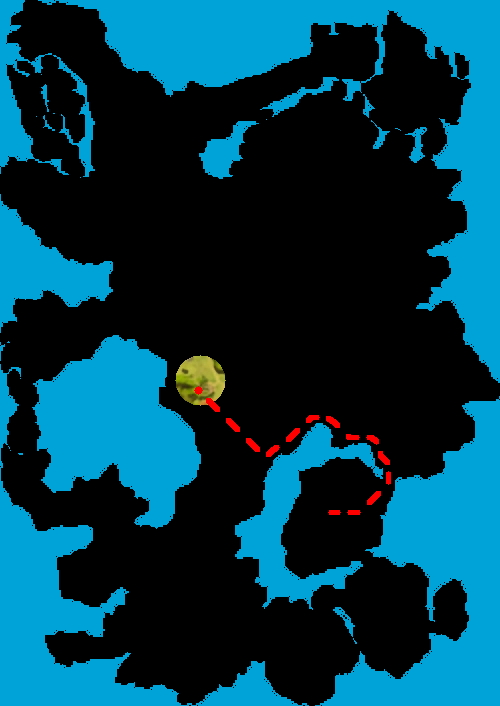
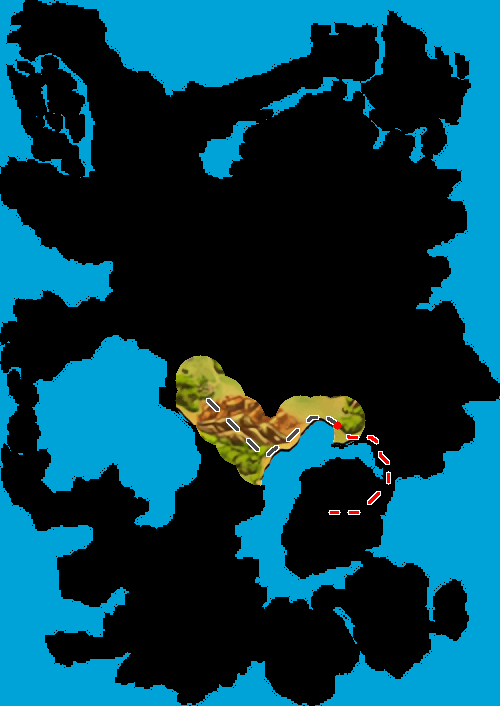
The library uses step-by-step image processing to reveal and annotate the map. Here’s an overview of the process:
Code:
This is the code which was used to generate the final result of the example steps below:
from rpg_map import Travel, Map, MapType, PathStyle, PathProgressDisplayType, PathDisplayType
from PIL import Image

LOCAL_DIR = "../test_assets/map.png"
BACKGROUND_DIR = "../test_assets/background.png"
GRID_SIZE = 20
START, END = (198, 390), (172, 223)
START_X, START_Y = START

image = Image.open(LOCAL_DIR).convert("RGBA")
# get image bytes
image_bytes = list(image.tobytes())
background = Image.open(BACKGROUND_DIR).convert("RGBA")
# get background bytes
background_bytes = list(background.tobytes())
map = Map(
   image_bytes,
   image.size[0],
   image.size[1],
   GRID_SIZE,
   MapType.Limited,
   obstacles=[[(160, 240), (134, 253), (234, 257), (208, 239)]],
)

travel = Travel(map, START, END)
path_bits =  Map.draw_background(
   map.with_dot(START_X, START_Y, (255, 0, 0, 255), 4).draw_path(
      travel,
      1.0,
      2,
      PathStyle.DottedWithOutline((255, 0, 0, 255), (255, 255, 255, 255)),
   ),
   background_bytes
)

# Display the image
image = Image.frombytes("RGBA", (image.width, image.height), path_bits)
image.show()
Steps:
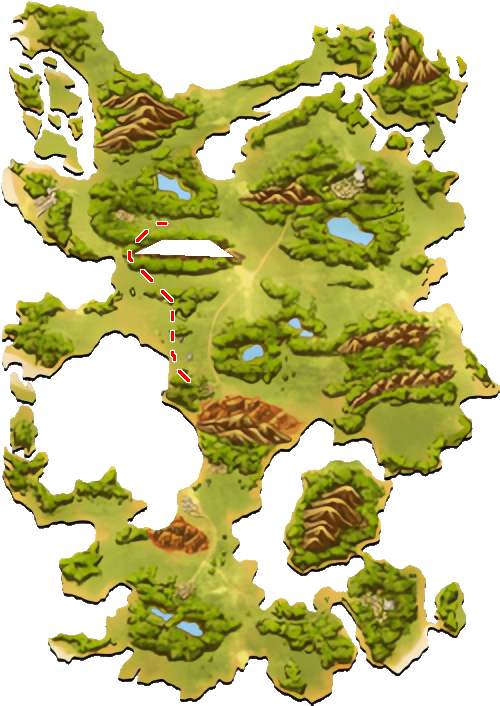
Draw Obstacles
The Map class accepts an obstacles parameter which allows you to define N-sided polygons. These are rendered onto the map as solid barriers.
Add Padding and Convert to Pathfinding Grid
Obstacles and map edges are padded and the image is converted into a binary map (0 = path, 1 = obstacle) for pathfinding.
Pathfinding with A*
The library uses the A* algorithm to find the shortest path from point A to point B. The path is drawn on the map using a customizable style.
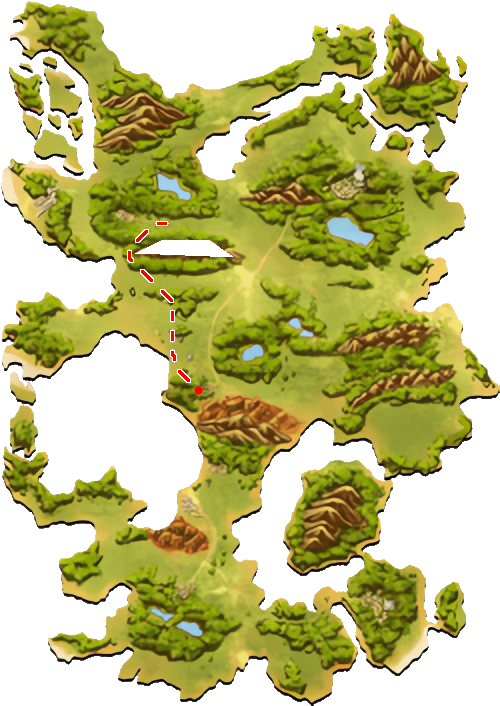
Draw Dots
Optional dots can be placed on the map (e.g., for points of interest, the player, markers).
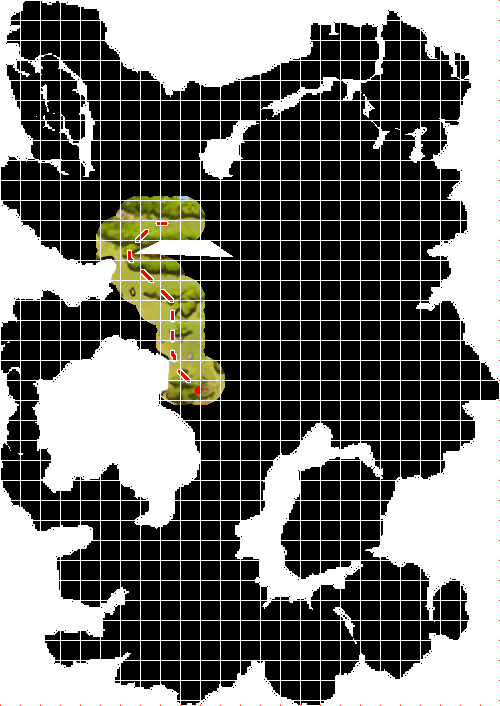
Divide into Grid Squares
The image is divided into equal squares based on the grid_size parameter.
Reveal Explored Areas
A mask overlays the map. Areas near the travel path or manually unlocked via Map.unlock_point are revealed in circular zones.
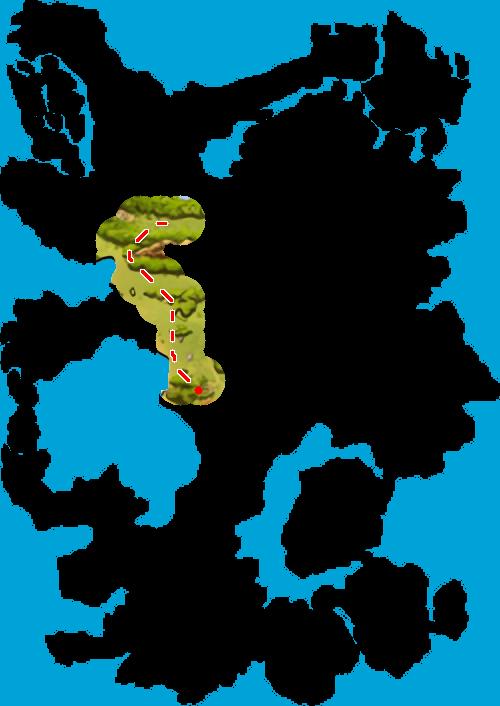
Fill Transparent Areas
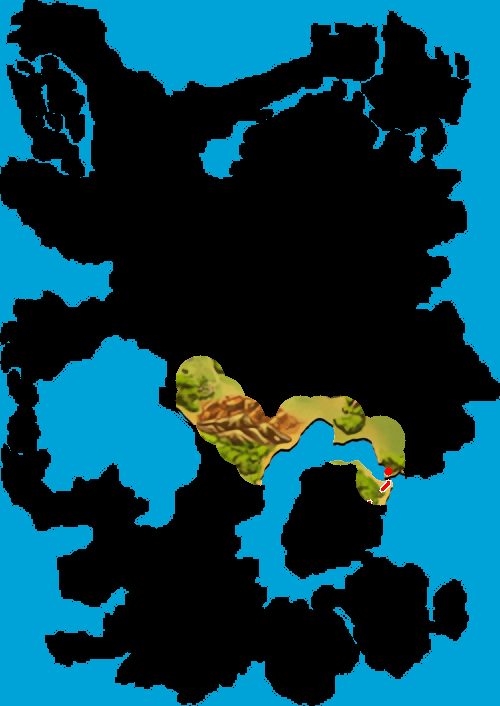
Any remaining transparent pixels are filled with a background layer.
Final Map Output
The completed map shows explored areas, paths, markers, and hidden regions yet to be discovered.




Advanced Features
You can define special grid points where the reveal radius is larger — perfect for cities or key landmarks.
The library supports tons of styles for different themes and usecases.

Examples
Check out these demos:
examples/static_poc.py – Generate one image from your code
examples/pygame_poc – Interactively do pathfinding to wherever you click
examples/readme.py – The code used to automatically generate the images in this README
Contributing & Development
We welcome contributions and ideas! If you’d like to work on rpg_map locally, here’s how to get started.
Set Up the Development Environment
Compile the Rust Extension Locally
Use maturin to build and install the Rust extension module in your local Python environment:
maturin develop --features "extension-module"Generate Python Typings ( .pyi )
The library includes a binary that auto-generates Python type stubs. Run it with:
cargo run --bin stub_gen --features stubgenBuild the Documentation
The documentation uses Sphinx and can be built locally as follows:
python3 -venv env && source env/bin/activate
cd docs
pip3 install -r requirements.txt
sphinx-apidoc -o source/ ../ -f
make html
The output will be available in the docs/build/html/ directory.
Additional Notes
The Rust project uses pyo3 to create Python bindings — see Cargo.toml for feature flags and build options.
Type hints are manually generated via the stub_gen tool, ensuring compatibility with type checkers and IDEs. Interestingly sphinx uses the docs defined in the Rust code though, the pyi file is only for IDE type hinting when using the library.
License
MIT
1 maintainer

Metadata
1 maintainer
Release files for rpg-map 0.1.0
For a detailed explanation of source distributions (sdists) and built distributions (wheels), please see the package formats documentation.
Source distribution (sdist)
| File | Size | Uploaded | Provenance | |
|---|---|---|---|---|
| rpg_map-0.1.0.tar.gz | 22.9 MB | Without provenance | Details |
Built distributions (wheels)
Total release size: 28.4 MB
Release files / rpg_map-0.1.0.tar.gz
| Download URL | rpg_map-0.1.0.tar.gz |
|---|---|
| Size | 22.9 MB |
| Tags | Source |
|
SHA-256 checksum How to use checksums |
df48bf155e0f0d21a1d5fdcd1780611c49cb10c51a5e1d5eae60491bc45d945c
|
|
BLAKE2b-256 checksum How to use checksums |
1854480ff1b27994c8a9c9054274a2c79e7ed8a3ad67a41b0d1387810885fcbc
|
| Upload date | |
|
Uploaded using Trusted Publishing? What is trusted publishing? |
No |
| Uploaded via |
maturin/1.9.0
|
Release files / rpg_map-0.1.0-cp39-abi3-win_amd64.whl
| Download URL | rpg_map-0.1.0-cp39-abi3-win_amd64.whl |
|---|---|
| Size | 198.3 kB |
| Tags | CPython 3.9 Windows x86-64 abi3 |
|
SHA-256 checksum How to use checksums |
cc8cd72528e9a1bfa6664a91e937180f14d7c92649d084c943185607a5093fbc
|
|
BLAKE2b-256 checksum How to use checksums |
ec0eba2c84f33db985bff0eb33e5b05cd97421dd8394b4995be5df6841333a09
|
| Upload date | |
|
Uploaded using Trusted Publishing? What is trusted publishing? |
No |
| Uploaded via |
maturin/1.9.0
|
Release files / rpg_map-0.1.0-cp39-abi3-win32.whl
| Download URL | rpg_map-0.1.0-cp39-abi3-win32.whl |
|---|---|
| Size | 186.5 kB |
| Tags | CPython 3.9 Windows x86-32 abi3 |
|
SHA-256 checksum How to use checksums |
a5d0ef2aac00506898b9e43970f3be8ca3562b780588535af245d0c632a84449
|
|
BLAKE2b-256 checksum How to use checksums |
2d64b8d64f48cc62f0be80371ab1dadb9e1e71c4bd3a16e0e38b0d899d16b837
|
| Upload date | |
|
Uploaded using Trusted Publishing? What is trusted publishing? |
No |
| Uploaded via |
maturin/1.9.0
|
Release files / rpg_map-0.1.0-cp39-abi3-musllinux_1_2_x86_64.whl
| Download URL | rpg_map-0.1.0-cp39-abi3-musllinux_1_2_x86_64.whl |
|---|---|
| Size | 515.7 kB |
| Tags | CPython 3.9 Linux musl 1.2+ x86-64 abi3 |
|
SHA-256 checksum How to use checksums |
029e2f84376b693bed963d7eaff277654eeec6d219b286958d53854b4fd9ca47
|
|
BLAKE2b-256 checksum How to use checksums |
21d6631e3fafc92fc5d769e407b32300390b9971120a74629c3737674be89a4f
|
| Upload date | |
|
Uploaded using Trusted Publishing? What is trusted publishing? |
No |
| Uploaded via |
maturin/1.9.0
|
Release files / rpg_map-0.1.0-cp39-abi3-musllinux_1_2_i686.whl
| Download URL | rpg_map-0.1.0-cp39-abi3-musllinux_1_2_i686.whl |
|---|---|
| Size | 543.1 kB |
| Tags | CPython 3.9 Linux musl 1.2+ x86-32 abi3 |
|
SHA-256 checksum How to use checksums |
09e68c5736c9e72d185186a813640b07912aea626d16a37885ae364e4de20470
|
|
BLAKE2b-256 checksum How to use checksums |
e5c9714fe346b775d55284f400ea21659b64833cf49d15ebb8938d6641d9ff06
|
| Upload date | |
|
Uploaded using Trusted Publishing? What is trusted publishing? |
No |
| Uploaded via |
maturin/1.9.0
|
Release files / rpg_map-0.1.0-cp39-abi3-musllinux_1_2_armv7l.whl
| Download URL | rpg_map-0.1.0-cp39-abi3-musllinux_1_2_armv7l.whl |
|---|---|
| Size | 607.7 kB |
| Tags | CPython 3.9 Linux musl 1.2+ ARMv7l abi3 |
|
SHA-256 checksum How to use checksums |
829c0b962cbcb65a69eb0f58f7daf2bf20968d42b498a7d2510e388cee103f55
|
|
BLAKE2b-256 checksum How to use checksums |
1ea76ec133e671d0956054d4f1da878621d42dcd30117cc6e686ef7cd7498f7c
|
| Upload date | |
|
Uploaded using Trusted Publishing? What is trusted publishing? |
No |
| Uploaded via |
maturin/1.9.0
|
Release files / rpg_map-0.1.0-cp39-abi3-musllinux_1_2_aarch64.whl
| Download URL | rpg_map-0.1.0-cp39-abi3-musllinux_1_2_aarch64.whl |
|---|---|
| Size | 518.9 kB |
| Tags | CPython 3.9 Linux musl 1.2+ ARM64 abi3 |
|
SHA-256 checksum How to use checksums |
e12604d717b298ae292c5711eee67f36a46068852cf1ab258a5868c94dc5d809
|
|
BLAKE2b-256 checksum How to use checksums |
d9f8f025ea2ceba3a50aad9241c63efe5f58d112374995018b0984b819cdbfd2
|
| Upload date | |
|
Uploaded using Trusted Publishing? What is trusted publishing? |
No |
| Uploaded via |
maturin/1.9.0
|
Release files / rpg_map-0.1.0-cp39-abi3-manylinux_2_17_x86_64.manylinux2014_x86_64.whl
| Download URL | rpg_map-0.1.0-cp39-abi3-manylinux_2_17_x86_64.manylinux2014_x86_64.whl |
|---|---|
| Size | 344.9 kB |
| Tags | CPython 3.9 Linux glibc 2.17+ x86-64 abi3 |
|
SHA-256 checksum How to use checksums |
0bfb3bdeb7410db793fee4b4714b00f09207be1c8a41fa8d70941a72dfda140e
|
|
BLAKE2b-256 checksum How to use checksums |
b5e172d6991da2328c6a3528dd5b4de124a605d3483b79fcdf0069619204ac62
|
| Upload date | |
|
Uploaded using Trusted Publishing? What is trusted publishing? |
No |
| Uploaded via |
maturin/1.9.0
|
Release files / rpg_map-0.1.0-cp39-abi3-manylinux_2_17_s390x.manylinux2014_s390x.whl
| Download URL | rpg_map-0.1.0-cp39-abi3-manylinux_2_17_s390x.manylinux2014_s390x.whl |
|---|---|
| Size | 372.1 kB |
| Tags | CPython 3.9 Linux glibc 2.17+ IBM System/390x abi3 |
|
SHA-256 checksum How to use checksums |
ded51b4473000739ed71501d8dd88e617ddb4d81c3126926e6e87b4763907993
|
|
BLAKE2b-256 checksum How to use checksums |
5b72a698a3312e17dfbd1006c4d683130dff34024477e0f8b0c09b7828b19056
|
| Upload date | |
|
Uploaded using Trusted Publishing? What is trusted publishing? |
No |
| Uploaded via |
maturin/1.9.0
|
Release files / rpg_map-0.1.0-cp39-abi3-manylinux_2_17_ppc64le.manylinux2014_ppc64le.whl
| Download URL | rpg_map-0.1.0-cp39-abi3-manylinux_2_17_ppc64le.manylinux2014_ppc64le.whl |
|---|---|
| Size | 478.7 kB |
| Tags | CPython 3.9 Linux glibc 2.17+ PowerPC 64-le abi3 |
|
SHA-256 checksum How to use checksums |
52367bb6e8e8a1e12db6cf6239e55edfb92db07042410aa3cf237aa44767bcc7
|
|
BLAKE2b-256 checksum How to use checksums |
b8e84a88860a9bd8e02db96489143dcaaea5bbc0888c5f27943a4cff6006dfb5
|
| Upload date | |
|
Uploaded using Trusted Publishing? What is trusted publishing? |
No |
| Uploaded via |
maturin/1.9.0
|
Release files / rpg_map-0.1.0-cp39-abi3-manylinux_2_17_armv7l.manylinux2014_armv7l.whl
| Download URL | rpg_map-0.1.0-cp39-abi3-manylinux_2_17_armv7l.manylinux2014_armv7l.whl |
|---|---|
| Size | 346.6 kB |
| Tags | CPython 3.9 Linux glibc 2.17+ ARMv7l abi3 |
|
SHA-256 checksum How to use checksums |
664ab55b6ca8bba591d8f27773764a01c10c73f879b7b6a451b3cecf7af56d6b
|
|
BLAKE2b-256 checksum How to use checksums |
b0c981919e51d6da33ac06becaecfa2948a08f52ac8dd01816f3497a05097fd1
|
| Upload date | |
|
Uploaded using Trusted Publishing? What is trusted publishing? |
No |
| Uploaded via |
maturin/1.9.0
|
Release files / rpg_map-0.1.0-cp39-abi3-manylinux_2_17_aarch64.manylinux2014_aarch64.whl
| Download URL | rpg_map-0.1.0-cp39-abi3-manylinux_2_17_aarch64.manylinux2014_aarch64.whl |
|---|---|
| Size | 340.2 kB |
| Tags | CPython 3.9 Linux glibc 2.17+ ARM64 abi3 |
|
SHA-256 checksum How to use checksums |
55ec79d8d6ebd392dfdd8823370de36cd6440e9cbdaf3d7d504d08c01885e827
|
|
BLAKE2b-256 checksum How to use checksums |
c9ebfcedc7c5305aa289720889e401d6827bdd9d5a928c8ae599a7740acd6f64
|
| Upload date | |
|
Uploaded using Trusted Publishing? What is trusted publishing? |
No |
| Uploaded via |
maturin/1.9.0
|
Release files / rpg_map-0.1.0-cp39-abi3-manylinux_2_5_i686.manylinux1_i686.whl
| Download URL | rpg_map-0.1.0-cp39-abi3-manylinux_2_5_i686.manylinux1_i686.whl |
|---|---|
| Size | 367.5 kB |
| Tags | CPython 3.9 Linux glibc 2.5+ x86-32 abi3 |
|
SHA-256 checksum How to use checksums |
6de5bfc26514e5d36163833d3e9c0d206d6298173712d0859663a3d3abbd1088
|
|
BLAKE2b-256 checksum How to use checksums |
44241cf3051713b7fdebaccadf2c5e6cd702d840279c09a2ecc89c90f5207b27
|
| Upload date | |
|
Uploaded using Trusted Publishing? What is trusted publishing? |
No |
| Uploaded via |
maturin/1.9.0
|
Release files / rpg_map-0.1.0-cp39-abi3-macosx_11_0_arm64.whl
| Download URL | rpg_map-0.1.0-cp39-abi3-macosx_11_0_arm64.whl |
|---|---|
| Size | 311.4 kB |
| Tags | CPython 3.9 abi3 macOS 11.0+ ARM64 |
|
SHA-256 checksum How to use checksums |
003d08afdc5cda0aa83f9db21950e585b5c9bee8e5d8a864abf6991bbea3c647
|
|
BLAKE2b-256 checksum How to use checksums |
d7c046a1b51d83d43a9e5142df3c4aec9da2b5379a5fdb1cf8ecddf9409a5132
|
| Upload date | |
|
Uploaded using Trusted Publishing? What is trusted publishing? |
No |
| Uploaded via |
maturin/1.9.0
|
Release files / rpg_map-0.1.0-cp39-abi3-macosx_10_12_x86_64.whl
| Download URL | rpg_map-0.1.0-cp39-abi3-macosx_10_12_x86_64.whl |
|---|---|
| Size | 323.4 kB |
| Tags | CPython 3.9 abi3 macOS 10.12+ x86-64 |
|
SHA-256 checksum How to use checksums |
64e1c0d2a9e978c6512824a58bf5035e026a1dfc8eaab4207a082419a0415eca
|
|
BLAKE2b-256 checksum How to use checksums |
11dad2a99417be67d1e5bd65e7a9b39d05bacfd5a8cd6a839a91155865436fd6
|
| Upload date | |
|
Uploaded using Trusted Publishing? What is trusted publishing? |
No |
| Uploaded via |
maturin/1.9.0
|
Security for rpg-map 0.1.0
Provenance
Provenance describes where a file came from. On PyPI, provenance is shared via attestations, which provide a verifiable record of the build or publishing details. View details, limitations and caveats.
No provenance found
None of the files in this release were uploaded with provenance metadata.
A note on package security
PyPI is a repository for distributing packages, not a service for auditing them. While third-party security researchers and our staff do their best to detect and remove malicious packages, PyPI cannot guarantee the quality, security or suitability of any given package.
To learn more about protecting yourself from malicious actors, visit our package security documentation.














