
rportion - data structure and operations for rectilinear polygons





The rportion library provides data structure to represent
2D rectilinear polygons (unions of 2D-intervals) in Python 3.9+.
It is built upon the library portion and follows its concepts.
The following features are provided:
- 2D-Intervals (rectangles) which can be open/closed and finite/infinite at every boundary
- intersection, union, complement and difference of rectilinear polygons
- iterator over all maximum rectangles inside and outside a given polygon
In the case of integers/floats it can be used to keep track of the area resulting from the union/difference of rectangles:

Internally the library uses an interval tree to represent a polygon.
Table of contents
Installation
rportion can be installed from PyPi with pip using
pip install rportion
Alternatively, clone the repository and run
pip install -e ".[test]"
python -m unittest discover -s tests
Note that `python
Documentation & usage
Polygon creation
Atomic polygons (rectangles) can be created by one of the following:
>>> import rportion as rp
>>> rp.ropen(0, 2, 0, 1)
(x=(0,2), y=(0,1))
>>> rp.rclosed(0, 2, 0, 1)
(x=[0,2], y=[0,1])
>>> rp.ropenclosed(0, 2, 0, 1)
(x=(0,2], y=(0,1])
>>> rp.rclosedopen(0, 2, 0, 1)
(x=[0,2), y=[0,1))
>>> rp.rsingleton(0, 1)
(x=[0], y=[1])
>>> rp.rempty()
(x=(), y=())
Polygons can also be created by using two intervals of the underlying library
portion:
>>> import portion as P
>>> import rportion as rp
>>> rp.RPolygon.from_interval_product(P.openclosed(0, 2), P.closedopen(0, 1))
(x=(0,2], y=[0,1))
Polygon bounds & attributes
An RPolygon defines the following properties
emptyis true if the polygon is empty.>>> rp.rclosed(0, 2, 1, 2).empty False >>> rp.rempty().empty True
atomicis true if the polygon can be expressed by a single rectangle.>>> rp.rempty().atomic True >>> rp.rclosedopen(0, 2, 1, 2).atomic True >>> (rp.rclosed(0, 2, 1, 2) | rp.rclosed(0, 2, 1, 3)).atomic True >>> (rp.rclosed(0, 2, 1, 2) | rp.rclosed(1, 2, 1, 3)).atomic False
enclosureis the smallest rectangle containing the polygon.>>> (rp.rclosed(0, 2, 0, 2) | rp.rclosed(1, 3, 0, 1)).enclosure (x=[0,3], y=[0,2]) >>> (rp.rclosed(0, 1, -3, 3) | rp.rclosed(-P.inf, P.inf, -1, 1)).enclosure (x=(-inf,+inf), y=[-3,3])
enclosure_x_intervalis the smallest rectangle containing the polygon's extension in x-dimension.>>> (rp.rclosed(0, 2, 0, 2) | rp.rclosed(1, 3, 0, 1)).x_enclosure_interval x=[0,3] >>> (rp.rclosed(0, 1, -3, 3) | rp.rclosed(-P.inf, P.inf, -1, 1)).x_enclosure_interval (-inf,+inf)
enclosure_y_intervalis the smallest interval containing the polygon's extension in y-dimension.>>> (rp.rclosed(0, 2, 0, 2) | rp.rclosed(1, 3, 0, 1)).y_enclosure_interval [0,2] >>> (rp.rclosed(0, 1, -3, 3) | rp.rclosed(-P.inf, P.inf, -1, 1)).y_enclosure_interval [-3,3]
x_lower,x_upper,y_lowerandy_upperyield the boundaries of the rectangle enclosing the polygon.>>> p = rp.rclosedopen(0, 2, 1, 3) >>> p.x_lower, p.x_upper, p.y_lower, p.y_upper (0, 2, 1, 3)
x_left,x_right,y_leftandy_rightyield the type of the boundaries of the rectangle enclosing the polygon.>>> p = rp.rclosedopen(0, 2, 1, 3) >>> p.x_left, p.x_right, p.y_left, p.y_right (CLOSED, OPEN, CLOSED, OPEN)
Polygon operations
RPolygon instances support the following operations:
p.intersection(other)andp & otherreturn the intersection of two rectilinear polygons.>>> rp.rclosed(0, 2, 0, 2) & rp.rclosed(1, 3, 0, 1) (x=[1,2], y=[0,1])
p.union(other)andp | otherreturn the union of two rectilinear polygons.>>> rp.rclosed(0, 2, 0, 2) | rp.rclosed(1, 3, 0, 1) (x=[0,3], y=[0,1]) | (x=[0,2], y=[0,2])
Note that the resulting polygon is represented by the union of all maximal rectangles contained in in the polygon, see Maximum rectangle iterators.p.complement()and~preturn the complement of the rectilinear polygon.>>> ~rp.ropen(-P.inf, 0, -P.inf, P.inf) ((x=[0,+inf), y=(-inf,+inf))
p.difference(other)andp - otherreturn the difference of two rectilinear polygons.rp.rclosed(0, 3, 0, 2) - rp.ropen(2, 4, 1, 3) (x=[0,3], y=[0,1]) | (x=[0,2], y=[0,2])
Note that the resulting polygon is represented by the union of all maximal rectangles contained in in the polygon, see Maximum rectangle iterators.
Rectangle partitioning iterator
The method rectangle_partitioning of a RPolygon instance returns an iterator
over rectangles contained in the rectilinear polygon which disjunctively cover it. I.e.
>>> poly = rp.rclosedopen(2, 5, 1, 4) | rp.rclosedopen(1, 8, 2, 3) | rp.rclosedopen(6, 8, 1, 3)
>>> poly = poly - rp.rclosedopen(4, 7, 2, 4)
>>> list(poly.rectangle_partitioning())
[(x=[1,4), y=[2,3)), (x=[2,5), y=[1,2)), (x=[6,8), y=[1,2)), (x=[2,4), y=[3,4)), (x=[7,8), y=[2,3))]
which can be visualized as follows:
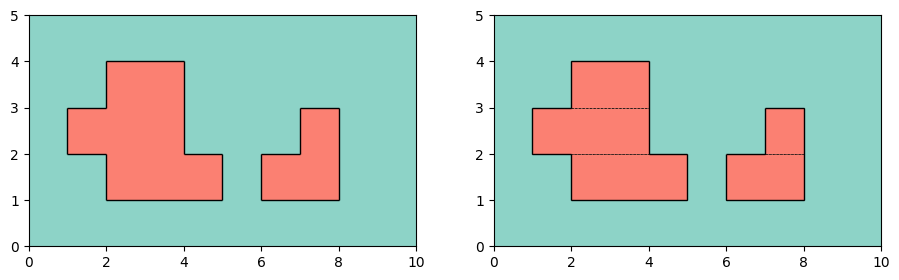
Left: Simple Rectilinear polygon. The red areas are part of the polygon.
Right: Rectangles in the portion are shown with black borderlines. As it is visible
rectangle_partitioning prefers rectangles with long x-interval over
rectangles with long y-interval.
Maximum rectangle iterator
The method maximal_rectangles of a RPolygon instance returns an iterator over all maximal rectangles contained
in the rectilinear polygon.
A maximal rectangle is rectangle in the polygon which is not a real subset of any other rectangle contained in the rectilinear polygon. I.e.
>>> poly = rp.rclosedopen(2, 5, 1, 4) | rp.rclosedopen(1, 8, 2, 3) | rp.rclosedopen(6, 8, 1, 3)
>>> poly = poly - rp.rclosedopen(4, 7, 2, 4)
>>> list(poly.maximal_rectangles())
[(x=[1, 4), y = [2, 3)), (x=[2, 5), y = [1, 2)), (x=[6, 8), y = [1, 2)), (x=[2, 4), y = [1, 4)), (x=[7, 8), y = [1, 3))]
which can be visualized as follows:
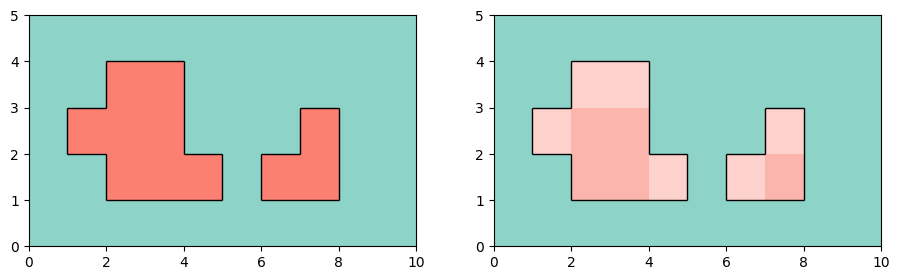
Left: Simple Rectilinear polygon. The red areas are part of the polygon.
Right: Maximal contained rectangles are drawn above each other transparently.
Boundary
The method boundary of a RPolygon instance returns another RPolygon instance representing the boundary of
the polygon. I.e.
>>> poly = rp.closed(0, 1, 2, 3)
>>> poly.boundary()
(x=[1,2], y=[3]) | (x=[1,2], y=[4]) | (x=[1], y=[3,4]) | (x=[2], y=[3,4])
Internal data structure
The polygon is internally stored using an interval tree. Every
node of the tree corresponds to an interval in x-dimension which is representable by boundaries (in x-dimension)
present in the polygon. Each node contains an 1D-interval (by using the library
portion) in y-dimension. Combining those 1D-intervals
yields a rectangle contained in the polygon.
I.e. for the rectangle (x=[0, 2), y=[1, 3)) this can be visualized as follows.
  interval tree with      x-interval corresponding       y-interval stored in
 a lattice-like shape             to each node                each node
       ┌─x─┐                      ┌─(-∞,+∞)─┐                  ┌─()──┐
       │   │                      │         │                  │     │
     ┌─x─┬─x─┐               ┌─(-∞,2)──┬──[0,+∞)─┐          ┌─()──┬──()─┐
     │   │   │               │         │         │          │     │     │
     x   x   x            (-∞,0]     [0,2)     [2,+∞)      ()   [1,3)   ()
The class RPolygon used this model by holding three data structures.
_x_boundaries: Sorted list of necessary boundaries in x-dimension with type (OPENorCLOSED)_used_y_ranges: List of lists in a triangular shape representing the interval tree for the space occupied by the rectilinear polygon._free_y_ranges: List of list in a triangular shape representing the interval tree of for the space not occupied by the rectilinear polygon.
Note that a separate data structure for the area outside the polygon is kept. This is done in order to be able to obtain the complement of a polygon efficiently.
For the example shown above this is:
>>> poly = rp.rclosedopen(0, 2, 1, 3)
>>> poly._x_boundaries
SortedList([(-inf, OPEN), (0, OPEN), (2, OPEN), (+inf, OPEN)])
>>> poly._used_y_ranges
[[(), (), ()],
 [(), [1,3)],
 [()]]
>>> poly._free_y_ranges
[[(-inf,1) | [3,+inf), (-inf,1) | [3,+inf), (-inf,+inf)],
 [(-inf,1) | [3,+inf), (-inf,1) | [3,+inf)],
 [(-inf,+inf)]]
You can use the function data_tree_to_string as noted below to print the internal data structure in a tabular format:
>>> poly = rp.rclosedopen(0, 2, 1, 3)
>>> print(data_tree_to_string(poly._x_boundaries, poly._used_y_ranges, 6))
                |  +inf     2     0
----------------+------------------
     -inf (OPEN)|    ()    ()    ()
      0 (CLOSED)|    () [1,3)
      2 (CLOSED)|    ()
>>> poly = rp.rclosedopen(2, 5, 1, 4) | rp.rclosedopen(1, 8, 2, 3) | rp.rclosedopen(6, 8, 1, 3)
>>> poly = poly - rp.rclosedopen(4, 7, 2, 4)
>>> print(data_tree_to_string(poly._x_boundaries, poly._used_y_ranges, 6))
                |  +inf     8     7     6     5     4     2     1
----------------+------------------------------------------------
     -inf (OPEN)|    ()    ()    ()    ()    ()    ()    ()    ()
      1 (CLOSED)|    ()    ()    ()    ()    () [2,3) [2,3)
      2 (CLOSED)|    ()    ()    ()    () [1,2) [1,4)
      4 (CLOSED)|    ()    ()    ()    () [1,2)
      5 (CLOSED)|    ()    ()    ()    ()
      6 (CLOSED)|    () [1,2) [1,2)
      7 (CLOSED)|    () [1,3)
def data_tree_to_string(x_boundaries,
                        y_intervals,
                        spacing: int):
    col_space = 10
    n = len(y_intervals)
    msg = " " * (spacing + col_space) + "|"
    for x_b in x_boundaries[-1:0:-1]:
        msg += f"{str(x_b.val):>{spacing}}"
    msg += "\n" + f"-" * (spacing+col_space) + "+"
    for i in range(n):
        msg += f"-" * spacing
    msg += "\n"
    for i, row in enumerate(y_intervals):
        x_b = x_boundaries[i]
        msg += f"{str((~x_b).val) + ' (' + str((~x_b).btype) + ')':>{spacing+ col_space}}|"
        for val in row:
            msg += f"{str(val):>{spacing}}"
        msg += "\n"
    return msg
Changelog
This library adheres to a semantic versioning scheme. See CHANGELOG.md for the list of changes.
Contributions
Contributions are very welcome! Feel free to report bugs or suggest new features using GitHub issues and/or pull requests.
License
Distributed under MIT License.
1 maintainer

Metadata
1 maintainer
Release files for rportion 0.2.0
For a detailed explanation of source distributions (sdists) and built distributions (wheels), please see the package formats documentation.
Source distribution (sdist)
| File | Size | Uploaded | |
|---|---|---|---|
| rportion-0.2.0.tar.gz | 21.1 kB | Details |
Built distribution (wheel)
| File | Interpreter | ABI | Platform | Reset |
|---|---|---|---|---|
| rportion-0.2.0-py3-none-any.whl | Python 3 | none | any | Details |
Total release size: 33.1 kB
Release files / rportion-0.2.0.tar.gz
| Download URL | rportion-0.2.0.tar.gz |
|---|---|
| Size | 21.1 kB |
| Tags | Source |
|
SHA-256 checksum How to use checksums |
c7fd6c2b46c904fcf38cdb7505b69efdc7c4423ac973149b5eaad51b92ae5848
|
|
BLAKE2b-256 checksum How to use checksums |
813cab8c1ad3c2f4615800a4afe27715350c912da36c92d69dddabbee916cd06
|
| Upload date | |
|
Uploaded using Trusted Publishing? What is trusted publishing? |
No |
| Uploaded via |
twine/5.0.0 CPython/3.12.2
|
Release files / rportion-0.2.0-py3-none-any.whl
| Download URL | rportion-0.2.0-py3-none-any.whl |
|---|---|
| Size | 12.0 kB |
| Tags | Python 3 |
|
SHA-256 checksum How to use checksums |
f68ea45bfeac8ba1a655dcdf2d5551f803c140900471f95fcf883e6db1ed6076
|
|
BLAKE2b-256 checksum How to use checksums |
e6bba87d3cdaec835f4fe71b70dadeffa85f4b82e833449bcbc32c412c37cff6
|
| Upload date | |
|
Uploaded using Trusted Publishing? What is trusted publishing? |
No |
| Uploaded via |
twine/5.0.0 CPython/3.12.2
|














