

Remote Pipeline Test Framework
End-to-end test framework for GitLab pipeline template authors.
Trigger pipelines, make assertions.
Why
As a GitLab pipeline author, your pipeline and jobs will be used across several projects under varying configurations. Your pipeline template understands the context (branches, tags, vars, source files etc.) and responds accordingly.
The resultant pipeline's status might vary, the number of stages and jobs might change, statuses of the jobs might vary, artifacts may or may not be produced and environments may or may not be provisioned etc.
Should you not setup proper tests for each of these scenarios? Should these tests not be executed on every change of the pipeline template?
Thus, rptf.
Table of Contents
- Quickstart
- Using RPTF with GitLab
- Setup GitLab Access Token
- Usage With Self-Managed GitLab
- Authoring Tests
- Detailed Example
- Test Output
- CLI Options
- JUnit Reports
- License
- Contributing
- Who Uses RPTF
Quickstart
Being authored in Python, rptf is distributed via PyPi: https://pypi.org/project/rptf/
Install rptf locally with pip.
pip install rptf
This makes rptf available for local execution:
rptf --help
Test cases are defined in a Yaml file, which by default is called rptf.yml.
# rptf.yml

should_succeed_with_25_jobs:
    trigger:
        project_id: ...
    assertions:
        pipeline_status: success
        job_count: 25

should_fail_with_1_job:
    trigger:
        project_id: ...
    assertions:
        pipeline_status: failed
        job_count: 1

should_fail_with_3_jobs_deploy_skipped:
    trigger:
        project_id: ...
    assertions:
        pipeline_status: failed
        job_count: 3
        job_status:
            build: success
            test: failed
            deploy: skipped
Each test case contains two sections: trigger and assertions. The example above shows two test project's pipelines being triggered and asserts being make expect the pipelines have 25 jobs and 1 job respectively.
Pipeline status is also asserted, and the second test case expects a failed pipeline.
Using RPTF with GitLab
We can execute rptf within a GitLab pipeline, thus, you have a primary test project which contains the rptf.yml file and includes a .gitlab-ci.yml definition that triggers pipelines in other GitLab projects and makes assertions.
# .gitlab-ci.yml

stages:
    - test

rptf:
    stage: test
    image: python:3
    before_script:
        - pip install rptf
    script:
        - rptf
The rptf job above triggers pipelines defined in rptf.yml as long as the GITLAB_ACCESS_TOKEN provided has sufficient permissions. It's advisable to set the token at the project or group level via GitLab -> Settings -> CICD.
Setup GitLab Access Token
The project containing the rptf job needs to provide GITLAB_ACCESS_TOKEN. This token must be authorized to execute pipelines across all projects defined in rptf.yml.
Usage With Self-Managed GitLab
Environment variable GITLAB_API_URL is read to determine the GitLab instance where the pipelines are created.
You can set this to get rptf to work with your self-managed GitLab instance.
# set GITLAB_API_URL
export GITLAB_API_URL=https://path-to-your-instance/api/v4

# execute rptf
rptf
Authoring Tests
The Yaml specification declares the following attributes that can be used to author test cases:
triggerdefines the target project where pipeline should be triggeredproject_idrequiredrefdefaults tomasterbranchdeprecated in favor ofrefvariablesdefaults to an emppty list `[]'
assertionsdefines assertions to make after pipeline finishes executionpipeline_statusrequired, expected pipeline statusjob_countexpected number of jobsjob_statusdict of expected job status- TODO
artifact_countexpected number of artifacts - TODO
environment_statusdict of expected environment status
Detailed Example
two_jobs_two_artifacts:
    trigger:
        project_id: 11112222
        ref: feature-branch-abc
        variables:
            hello: world
            foo: bar
    assertions:
        pipeline_status: success
        job_count: 2
        job_status:
            artifact-one: success
            artifact-two: success
        artifact_count: 2               # TODO
        environment_status:             # TODO
            success: available          # TODO
            review_env_one: stopped     # TODO
CLI Options
# help
rptf --help             # help

# run tests
rptf                    # by default, executes rptf.yml
rptf --target FILE      # path to test definition yaml

# toggle JUnit test reporting
rptf                    # generates JUnit report
rptf --junit            # generates JUnit report
rptf --no-junit         # JUnit reporting skipped
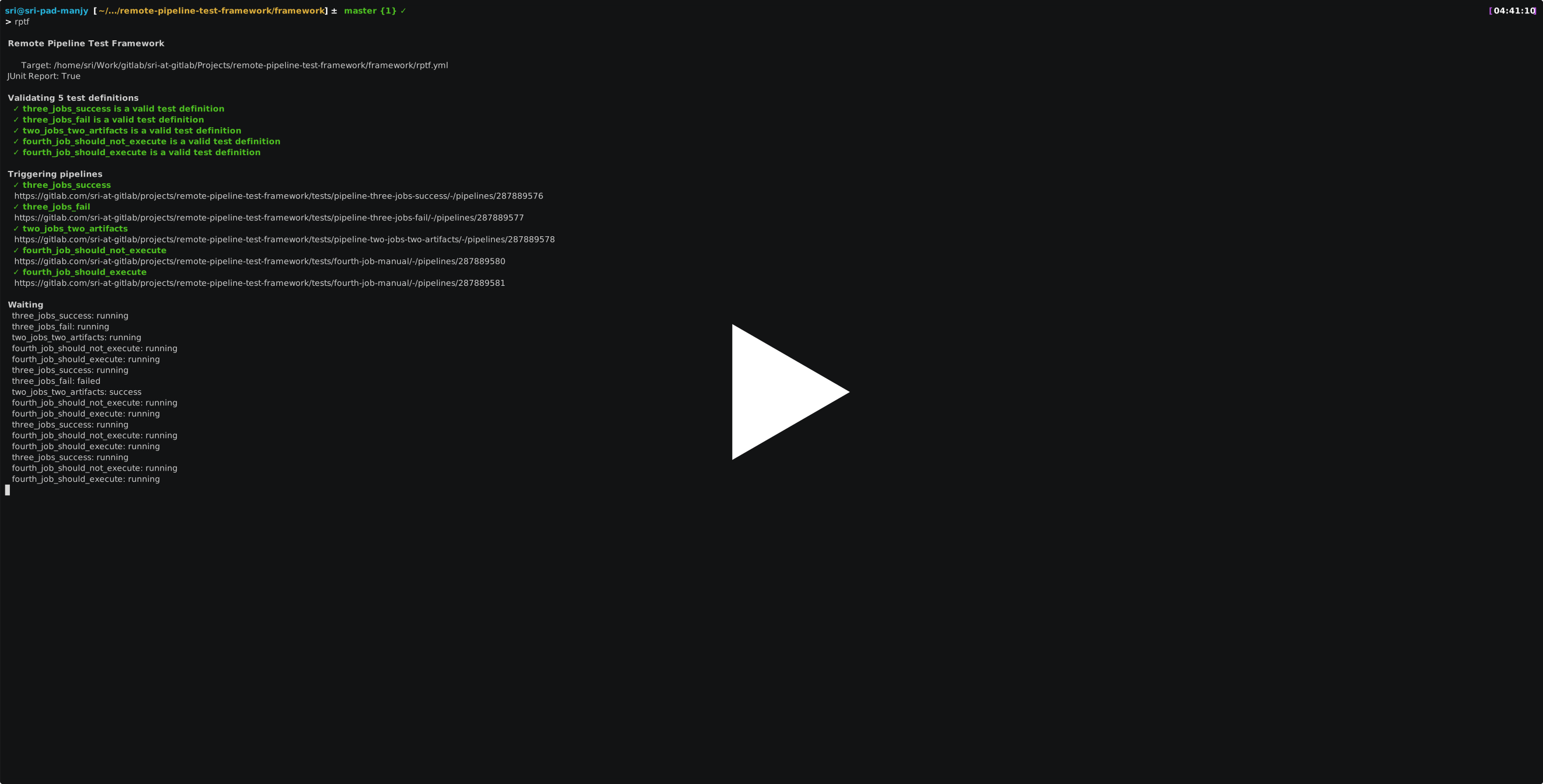
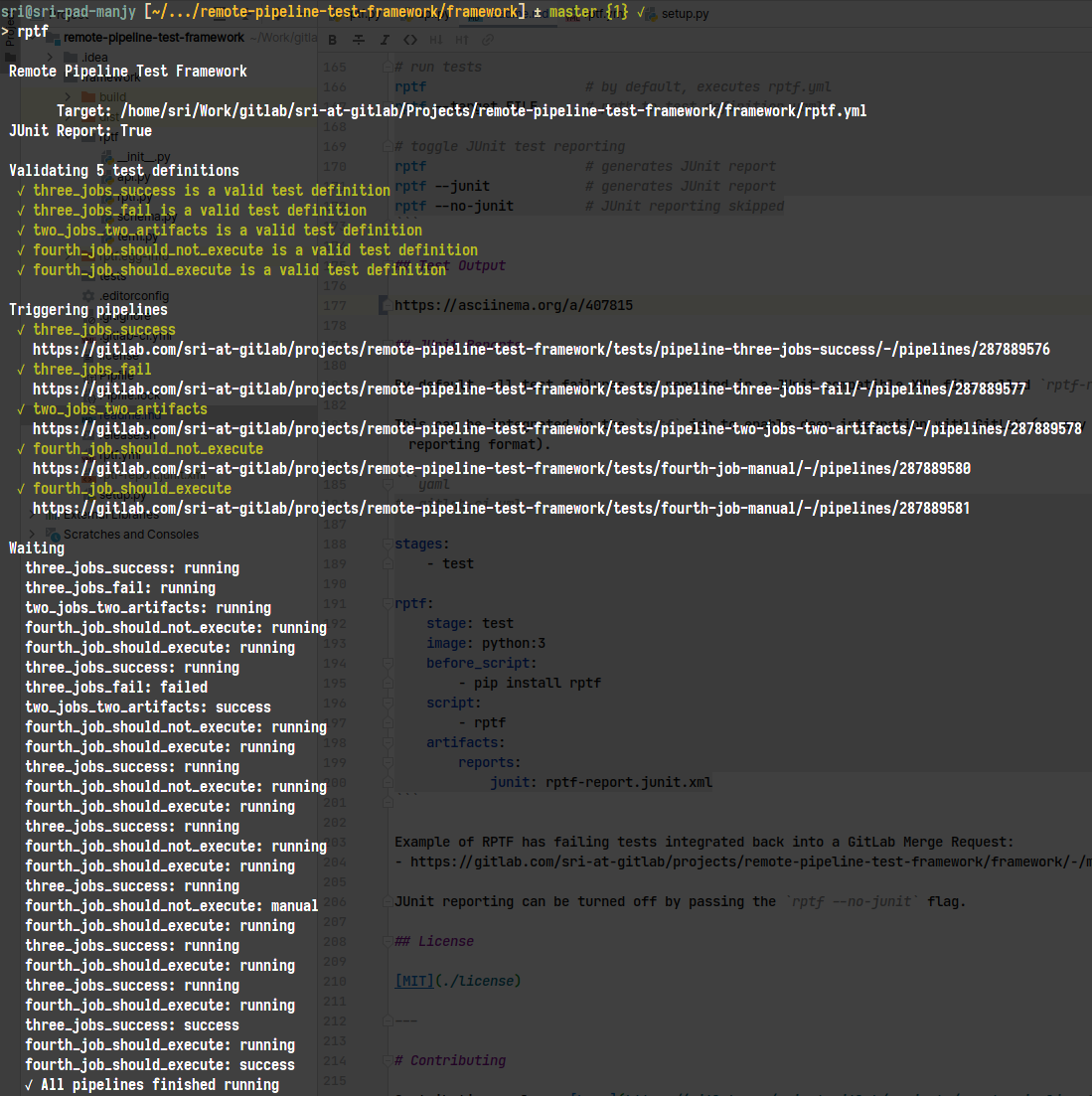
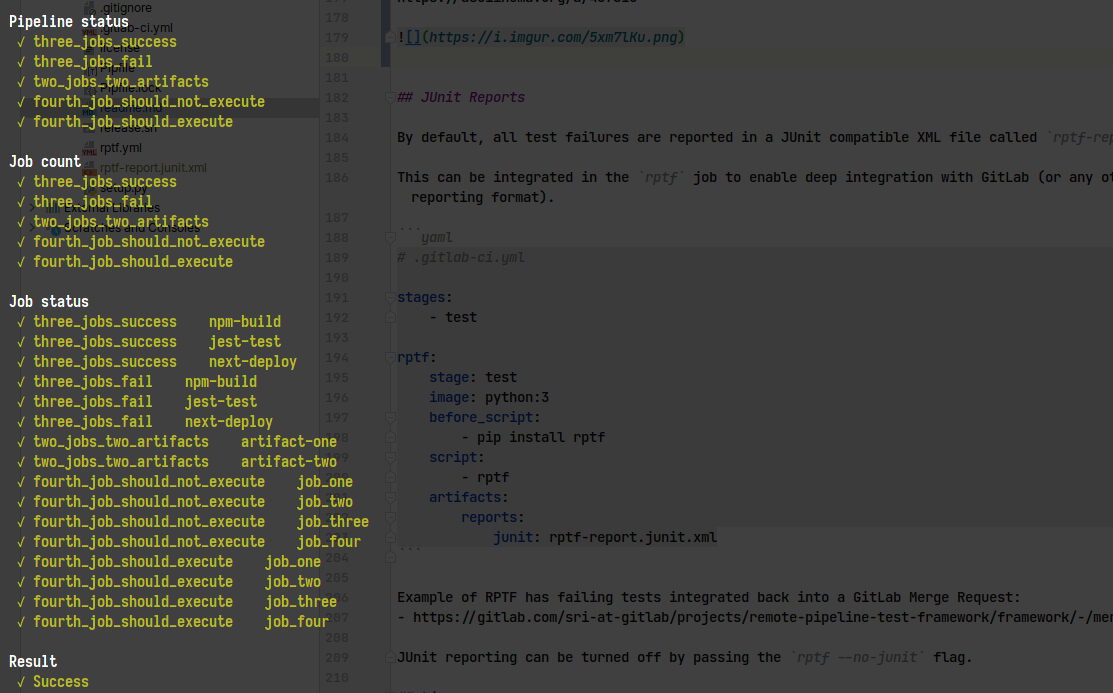
Test Output
JUnit Reports
By default, all test failures are reported in a JUnit compatible XML file called rptf-report.junit.xml.
This can be integrated in the rptf job to enable deep integration with GitLab (or any other tool that supports JUnit reporting format).
# .gitlab-ci.yml

stages:
    - test

rptf:
    stage: test
    image: python:3
    before_script:
        - pip install rptf
    script:
        - rptf
    artifacts:
        reports:
            junit: rptf-report.junit.xml
Example of RPTF has failing tests integrated back into a GitLab Merge Request:
JUnit reporting can be turned off by passing the rptf --no-junit flag.
License
Contributing
Contributions welcome here in the form of feature requests, feature implementations, documentation improvements, examples etc.
# execute locally
pipenv install
pipenv run python -m rptf.rptf
Who Uses RPTF
In-exhaustive list of RPTF users:
- GitLab Five Minute Production App
- LeapMotion
- APNIC
- Brainbits
- Everbridge
- Bolt
Add your organization.
1 maintainer

Metadata
1 maintainer
Release files for rptf 0.1.12
For a detailed explanation of source distributions (sdists) and built distributions (wheels), please see the package formats documentation.
Source distribution (sdist)
| File | Size | Uploaded | Provenance | Actions |
|---|---|---|---|---|
| rptf-0.1.12.tar.gz | 9.7 kB | Without provenance | Details for rptf-0.1.12.tar.gz |
Built distribution (wheel)
| File | Interpreter | ABI | Platform | Actions Reset |
|---|---|---|---|---|
| rptf-0.1.12-py3-none-any.whl | Python 3 | none | any | Details for rptf-0.1.12-py3-none-any.whl |
Total release size: 17.8 kB
Release files / rptf-0.1.12.tar.gz
| Download URL | rptf-0.1.12.tar.gz |
|---|---|
| Size | 9.7 kB |
| Tags | Source |
|
SHA-256 checksum How to use checksums |
b0d44a7e74fa6f3476ae0809fa794d156059b1ed015d468552c776d61fa7fa4d
|
|
BLAKE2b-256 checksum How to use checksums |
ab0d6eb11b498f0a49d42b7472e37ad9e15976a616b63e0e28cbbf00ddf80618
|
| Upload date | |
|
Uploaded using Trusted Publishing? What is trusted publishing? |
No |
| Uploaded via |
twine/3.3.0 pkginfo/1.6.1 requests/2.25.1 setuptools/54.2.0 requests-toolbelt/0.9.1 tqdm/4.55.1 CPython/3.9.5
|
Release files / rptf-0.1.12-py3-none-any.whl
| Download URL | rptf-0.1.12-py3-none-any.whl |
|---|---|
| Size | 8.1 kB |
| Tags | Python 3 |
|
SHA-256 checksum How to use checksums |
c9aa7df9214edde353e01da0be95538df2e084d4916dfe2f76232d670584ae50
|
|
BLAKE2b-256 checksum How to use checksums |
e8d92ecdd2def6b262c561ffb9caead0052e50ea31def0a5087e307f49a5205b
|
| Upload date | |
|
Uploaded using Trusted Publishing? What is trusted publishing? |
No |
| Uploaded via |
twine/3.3.0 pkginfo/1.6.1 requests/2.25.1 setuptools/54.2.0 requests-toolbelt/0.9.1 tqdm/4.55.1 CPython/3.9.5
|
Security for rptf 0.1.12
Provenance
Provenance describes where a file came from. On PyPI, provenance is shared via attestations, which provide a verifiable record of the build or publishing details. View details, limitations and caveats.
No provenance found
None of the files in this release were uploaded with provenance metadata.
A note on package security
PyPI is a repository for distributing packages, not a service for auditing them. While third-party security researchers and our staff do their best to detect and remove malicious packages, PyPI cannot guarantee the quality, security or suitability of any given package.
To learn more about protecting yourself from malicious actors, visit our package security documentation.














