

Same Scene, Different Story:
Evaluating Robot Perception Across Scene Phases in the Wild
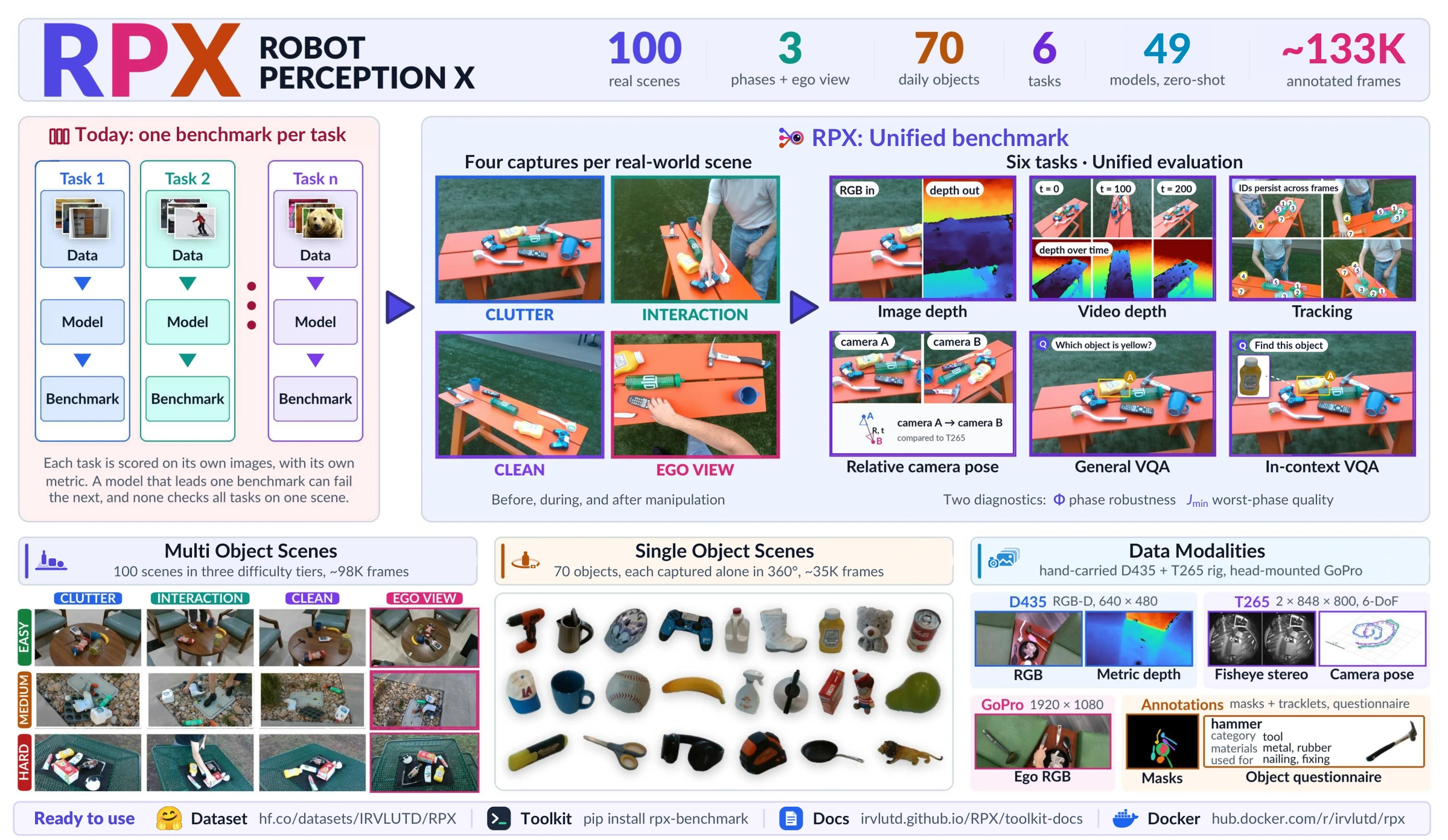
Score a perception model on 100 real scenes recorded before, during and after manipulation,
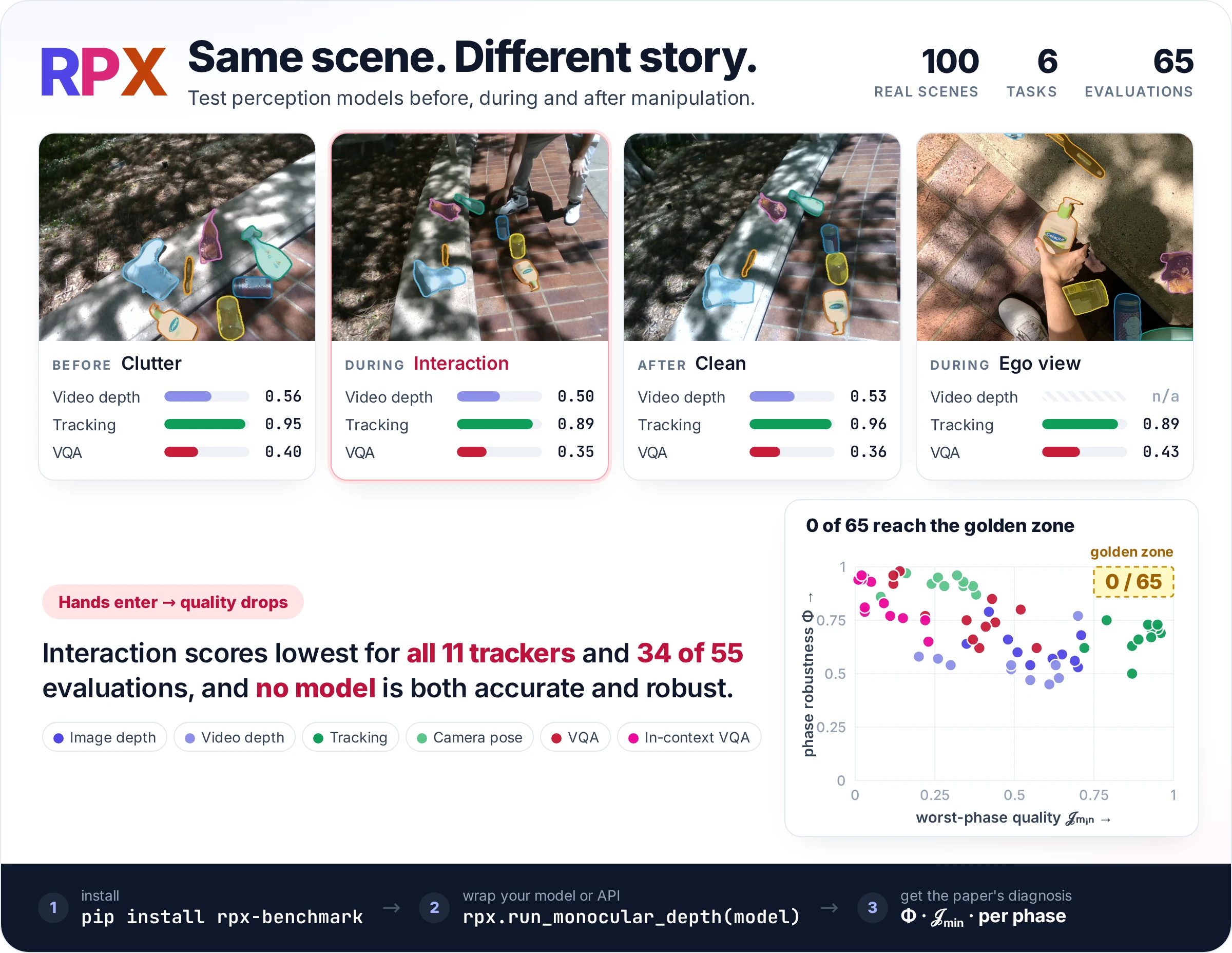
and see where it breaks with phase robustness Φ and worst-phase quality 𝒥min.







Getting started
The rpx-benchmark package provides the data, an adapter per task, the paper's benchmark
protocol, and the Φ and 𝒥min calculator. You write one function that runs your model.
pip install 'rpx-benchmark[hub,schemas]'
The example below scores an image-depth model on a 6-frame trial. The download fetches only this task's files (about 160 MB) and needs no login.
import numpy as np
import rpx_benchmark as rpx

# 1. Download the task's data
manifest = rpx.download_split("monocular_depth", "easy", max_samples=6)

# 2. Your model: RGB image (H, W, 3) in, depth (H, W) in metres out
def predict(rgb):
    return np.ones(rgb.shape[:2], np.float32)

# 3. Wrap it in the task's adapter and run the benchmark
model = rpx.make_numpy_depth_model(predict, name="my-model")
result, report, paths = rpx.run_monocular_depth(rpx.MonocularDepthRunConfig(
    model=model, manifest_path=str(manifest), output_dir="rpx_results/my-model",
))
print(result.aggregated["absrel"], result.aggregated["delta1"])
Φ and 𝒥min compare phases, so they need all three phases of many scenes. Drop
max_samples to download the full tier, run the benchmark again, then:
from rpx_benchmark.examples.summarize_metrics import calculate, read_records

metrics = ["absrel", "rmse", "silog", "delta1"]
summary = calculate(read_records(paths["json"]), metrics)
To try any task before writing code, rpx.benchmark("T2", rpx.download("T2", max_samples=2))
runs it with a placeholder model.
Tasks
Every task follows the steps above with its own download name, adapter and runner.
| Task | Download | Adapter and runner | Paper metrics |
|---|---|---|---|
| T1 Image depth | "monocular_depth" |
make_numpy_depth_modelrun_monocular_depth |
AbsRel, RMSE, SILog, δ1 |
| T2 Video depth | "video_depth" |
make_numpy_video_depth_modelrun_video_depth |
T1's, plus TGM, TGSE |
| T3 Object tracking | "object_tracking" |
make_numpy_tracking_modelrun_object_tracking |
HOTA, MOTA, IDSW |
| T4 Relative camera pose | "relative_camera_pose"* |
make_numpy_pose_modelrun_relative_pose |
AUC at 5°, 10°, 20° |
| T5 VQA | rpx.download("T5") |
vqa.evaluate_vqa |
Acc@0.5, GIoU, center-in-GT |
| T6 In-context VQA | rpx.download("T6") |
vqa.evaluate_vqa |
Acc@0.5, GIoU, center-in-GT |
* Pass manifest_name="relative_pose" as well. Functions are under rpx; vqa is
rpx_benchmark.vqa, and its models return text, so they need no adapter.
dummy_models.py shows the inputs and
outputs of every task.
Prefer the command line?
python -m rpx_benchmark.examples.benchmark_tasks \
    --task T1 --split easy --max-samples 6 --model my_model:predict

# Check the install without downloading anything
python -m rpx_benchmark.examples.benchmark_tasks --task all --smoke
To add a task or a metric, see the toolkit docs on tasks and metrics.
Model contracts and paper models
The table lists what your function receives and returns for each task, and the Docker image that contains every model the paper evaluated on it.
| Task | Input → output | Paper's models, irvlutd/rpx: |
|---|---|---|
| T1 Image depth | RGB (H, W, 3) → depth (H, W) in metres |
depth-zipdepth-latest (10) |
| T2 Video depth | clip (T, H, W, 3) → depth (T, H, W) |
depth-zipdepth-latest (8)depth-dvd-latest (DVD) |
| T3 Object tracking | frame (H, W, 3) → [{"track_id", "boxes"}] |
tracking-dam4sam-rpx-latest (8) |
| T4 Relative camera pose | (rgb_a, rgb_b) → {"rotation", "translation"} |
rcpe-monst3r-rpx-latest (10) |
| T5 VQA | image path + question → JSON {"label", "bbox"} |
vqa-vllm (12) |
| T6 In-context VQA | reference crop + image + question → same | vqa-vllm (12) |
dummy_models.py
has a runnable placeholder for each row. Models that predict relative depth pass
depth_output_kind="relative" to the adapter. The model guide
documents the full input contracts, and the benchmark pages
walk through each task with figures.
For T5 and T6, rpx.download("T5") returns a 58-question quick start and rpx.download("T5", full=True)
the paper's full list (21,000 questions; 10,500 for T6). Pass either, or your own list, to evaluate_vqa; the next section covers models behind an API.
Always pull a specific tag: the bare irvlutd/rpx image is an unrelated legacy image. The
Docker guide also covers the
box- and text-prompted trackers and GemDepth, which ships as a build recipe only.
The generic T3 and T4 runners report per-sample errors. The paper's HOTA and pooled pose AUC come from the
clip- and pair-level reference runners in
benchmark/scripts.
Custom VQA model or API
Any local model or hosted API works as long as it returns text:
from rpx_benchmark.vqa import evaluate_vqa

def predict_vqa(image_paths, prompt, max_new_tokens, output_kind):
    # image_paths is (target,) or (reference_crop, target).
    # Return your model's raw text.
    ...

report = evaluate_vqa(
    "vqa_manifest.jsonl", predict_vqa,
    model_name="my-vlm", model_revision="v1",
    image_cache=".cache/rpx-vqa", output_dir="rpx_results/my-vlm",
)
print(report["metrics"]["bbox_accuracy_at_0_5"])
The reply should be one JSON object with label and bbox (XYXY, normalized to 0–1000). The model never sees
the answers, and replies that fail to parse count as misses. The
VQA guide explains how to prepare the
manifest.
Results
In the paper, quality drops once hands enter the scene, and none of the 65 evaluations is both accurate and robust across phases.
Further reading
- Φ and JEDI calculator: compute Φ and 𝒥min from existing results
- Hardware profiler: latency, throughput and memory
- Mask annotation pipeline: label your own scenes the way RPX was labelled
- Metrics and tasks: add your own
- Dataset card and data guide: 100 scenes, 70 objects, 133,121 frames
Testing
Run the test suite from a source checkout
From benchmark/ in a source checkout:
python -m pip install -e '.[dev,hub,schemas,hf-datasets,analysis,ar-pose-audit]' \
    imageio imageio-ffmpeg av transformers build
python -m pip install torch torchvision \
    --index-url https://download.pytorch.org/whl/cpu
TRACKEVAL=12c8791b303e0a0b50f753af204249e622d0281a
python -m pip install --no-deps \
    "git+https://github.com/JonathonLuiten/TrackEval.git@$TRACKEVAL"

pytest tests -q
ruff check rpx_benchmark tests scripts
mypy rpx_benchmark
python -m build
The tests never download checkpoints. Real-model checks run through the per-image GPU gates in the Docker guide.
Citation
@misc{rpx2026,
  title  = {Same Scene, Different Story: Evaluating Robot Perception Across
            Scene Phases in the Wild},
  author = {{Jishnu Jaykumar P} and Kadosh, Itay and Vijayakumar, Narendhiran and
            Kamath, Srinanditha and Allu, Sai Haneesh and Rangappa, Govind Tyagi and
            Maheshwari, Animesh and Wang, Jikai and Xiang, Yu},
  year   = {2026},
  note   = {Dataset: \url{https://huggingface.co/datasets/IRVLUTD/RPX}}
}
The toolkit is MIT-licensed and the dataset is CC BY 4.0. Pretrained models keep their own licenses.
1 maintainer

Metadata
1 maintainer
Release files for rpx-benchmark 0.3.7
For a detailed explanation of source distributions (sdists) and built distributions (wheels), please see the package formats documentation.
Source distribution (sdist)
| File | Size | Uploaded | |
|---|---|---|---|
| rpx_benchmark-0.3.7.tar.gz | 12.6 MB | Details |
Built distribution (wheel)
| File | Interpreter | ABI | Platform | Reset |
|---|---|---|---|---|
| rpx_benchmark-0.3.7-py3-none-any.whl | Python 3 | none | any | Details |
Total release size: 25.1 MB
Release files / rpx_benchmark-0.3.7.tar.gz
| Download URL | rpx_benchmark-0.3.7.tar.gz |
|---|---|
| Size | 12.6 MB |
| Tags | Source |
|
SHA-256 checksum How to use checksums |
4d1d842853eb4d57b9fb0c815ef1270891ab2cca5f5d33cc010a99600900c0b9
|
|
BLAKE2b-256 checksum How to use checksums |
aba140316a3fc1e26347d7feb293c2c19f3d62813f664d03875c4bc983e92932
|
| Upload date | |
|
Uploaded using Trusted Publishing? What is trusted publishing? |
Yes |
| Uploaded via |
twine/7.0.0 CPython/3.13.14
|
Provenance
Provenance describes where a file came from. On PyPI, provenance is shared via attestations, which provide a verifiable record of the build or publishing details. View details, limitations and caveats.


PyPI Publish Attestation
PyPI verified that this artifact, at this checksum, originated from the publisher listed below.
Signed by GitHub Actions, verified by PyPI on Oct 14, 2026.
Transparency logRelease files / rpx_benchmark-0.3.7-py3-none-any.whl
| Download URL | rpx_benchmark-0.3.7-py3-none-any.whl |
|---|---|
| Size | 12.5 MB |
| Tags | Python 3 |
|
SHA-256 checksum How to use checksums |
36b08c1cb5074c01f245a13ee5bb2dd90466f0ef7dd7d9d258731ec55c762867
|
|
BLAKE2b-256 checksum How to use checksums |
174f2a2e888c9458e5420c6b1269dcfeabaa7634e34f9ff047f9052bd24ec2c3
|
| Upload date | |
|
Uploaded using Trusted Publishing? What is trusted publishing? |
Yes |
| Uploaded via |
twine/7.0.0 CPython/3.13.14
|
Provenance
Provenance describes where a file came from. On PyPI, provenance is shared via attestations, which provide a verifiable record of the build or publishing details. View details, limitations and caveats.
PyPI Publish Attestation
PyPI verified that this artifact, at this checksum, originated from the publisher listed below.
Signed by GitHub Actions, verified by PyPI on Oct 14, 2026.
Transparency log













