



rpyc-async
rpyc-async is an asyncio-native fork of RPyC (Remote Python Call), a transparent library for symmetrical remote procedure calls, clustering, and distributed-computing. RPyC makes use of object-proxying, a technique that employs python’s dynamic nature, to overcome the physical boundaries between processes and computers, so that remote objects can be manipulated as if they were local.
This fork adds native async/await support: async services, async clients, and bidirectional async callbacks driven by a persistent event loop.
Relationship to upstream RPyC
Upstream project |
RPyC by Tomer Filiba and contributors |
Forked at |
RPyC 6.0.1 |
This fork |
rpyc-async 1.1.0 (versioned independently) |
Distribution name |
rpyc-async |
Import name |
rpyc_async (see note below) |
Licence |
MIT (both upstream and this fork) |
The upstream commit history is preserved in this repository, so authorship and provenance of the original RPyC code remain visible in git log. See LICENSE and CONTRIBUTORS for attribution.
Installation
pip install rpyc-async
Requires Python 3.10+. The fork’s import name is rpyc_async, while upstream RPyC still uses rpyc — the two distributions can be installed side by side in the same environment. If you only need the classic synchronous API, install upstream RPyC (pip install rpyc); if you need the asyncio-native API, install this fork (pip install rpyc-async).
Existing code written for upstream can keep the shorter rpyc. spelling by aliasing the import at the top of each module:
import rpyc_async as rpyc
All examples in this README use that alias.
Platform Support
Server Selection Guide
rpyc-async provides two main server implementations. Choose based on your async requirements:
Server Type |
Use When |
Limitations |
|---|---|---|
ThreadedServer |
|
|
AsyncioServer |
|
|
Quick Examples
ThreadedServer (for simple sync/unidirectional async):
from rpyc_async import ThreadedServer, Service

class MyService(Service):
    def exposed_sync_method(self, x):
        return x * 2

server = ThreadedServer(MyService, port=18861)
server.start()
AsyncioServer (for bidirectional async with callbacks):
from rpyc_async import AsyncioServer, Service
import asyncio

class MyService(Service):
    async def exposed_async_with_callback(self, callback, value):
        # Server can call client's async callback
        result = await callback(value * 2)
        return f"Got: {result}"

async def main():
    server = AsyncioServer(MyService, port=18861)
    await server.start()
    # Server runs in background, handle other tasks
    await asyncio.sleep(3600)  # or other async work

asyncio.run(main())
Client for AsyncioServer — use await rpyc.async_connect(...), NOT rpyc.connect():
import rpyc_async as rpyc
import asyncio

async def main():
    conn = await rpyc.async_connect("localhost", 18861)
    try:
        # Native async method — just await.
        result = await conn.root.some_async_method(42)
        # Sync remote method? Wrap with rpyc.async_() to stay event-driven.
        # Keep the wrapper in a variable: it is cached behind a weak ref.
        a_sync = rpyc.async_(conn.root.some_sync_method)
        sync_result = await a_sync(42)
    finally:
        await conn.aclose()   # not conn.close() — that blocks the loop

asyncio.run(main())
rpyc.connect() is synchronous — it blocks socket.connect and every later sync_request on the calling thread. From inside an asyncio event loop it now raises RuntimeError pointing at rpyc.async_connect. See docs/DESIGN_ASYNC_CONNECT_POLICY.md.
For more details on async support, see docs/LIMITATIONS.md.
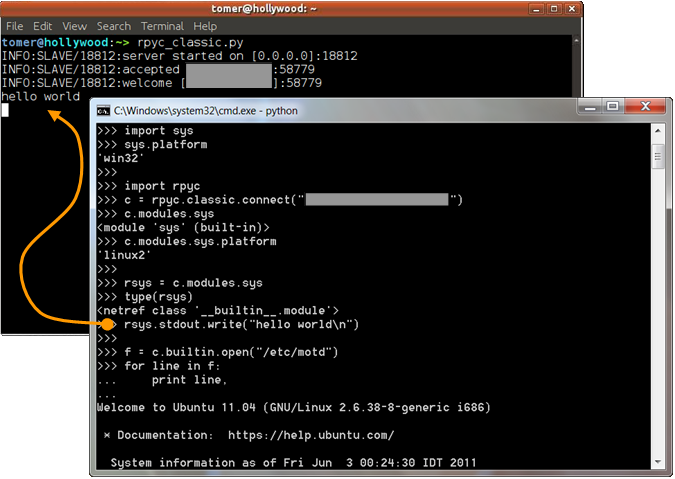
A screenshot of a remote client connecting to a server.
Note that text written to the server’s stdout is actually printed on the server’s console.
Documentation
Migration Guide — moving to the asyncio-native API
Documentation for classic synchronous RPyC lives at https://rpyc.readthedocs.io
1 maintainer

Metadata
1 maintainer
Release files for rpyc-async 1.1.0
For a detailed explanation of source distributions (sdists) and built distributions (wheels), please see the package formats documentation.
Source distribution (sdist)
| File | Size | Uploaded | |
|---|---|---|---|
| rpyc_async-1.1.0.tar.gz | 127.0 kB | Details |
Built distribution (wheel)
| File | Interpreter | ABI | Platform | Reset |
|---|---|---|---|---|
| rpyc_async-1.1.0-py3-none-any.whl | Python 3 | none | any | Details |
Total release size: 270.2 kB
Release files / rpyc_async-1.1.0.tar.gz
| Download URL | rpyc_async-1.1.0.tar.gz |
|---|---|
| Size | 127.0 kB |
| Tags | Source |
|
SHA-256 checksum How to use checksums |
779469b35885f3cea49586f3082d80e39af5d961effb90c5a2dd005513aea627
|
|
BLAKE2b-256 checksum How to use checksums |
ccb5271d7279df64d5d317a485c1b421b870ca7f1203a0567cef8911aa7ce8a6
|
| Upload date | |
|
Uploaded using Trusted Publishing? What is trusted publishing? |
Yes |
| Uploaded via |
twine/7.0.0 CPython/3.13.14
|
Provenance
Provenance describes where a file came from. On PyPI, provenance is shared via attestations, which provide a verifiable record of the build or publishing details. View details, limitations and caveats.


PyPI Publish Attestation
PyPI verified that this artifact, at this checksum, originated from the publisher listed below.
Signed by GitHub Actions, verified by PyPI on Oct 11, 2026.
Transparency logRelease files / rpyc_async-1.1.0-py3-none-any.whl
| Download URL | rpyc_async-1.1.0-py3-none-any.whl |
|---|---|
| Size | 143.2 kB |
| Tags | Python 3 |
|
SHA-256 checksum How to use checksums |
40bc2ffc4b642812c217c258f3fc000c7a3d1d9c1a673eede1858e6db8c6265e
|
|
BLAKE2b-256 checksum How to use checksums |
89337df17631eecbfe3ab705a792672ac98c742296b2ae41dff11e86abd2798b
|
| Upload date | |
|
Uploaded using Trusted Publishing? What is trusted publishing? |
Yes |
| Uploaded via |
twine/7.0.0 CPython/3.13.14
|
Provenance
Provenance describes where a file came from. On PyPI, provenance is shared via attestations, which provide a verifiable record of the build or publishing details. View details, limitations and caveats.
PyPI Publish Attestation
PyPI verified that this artifact, at this checksum, originated from the publisher listed below.
Signed by GitHub Actions, verified by PyPI on Oct 11, 2026.
Transparency log













