

RPython — R and Python, one seamless research workspace






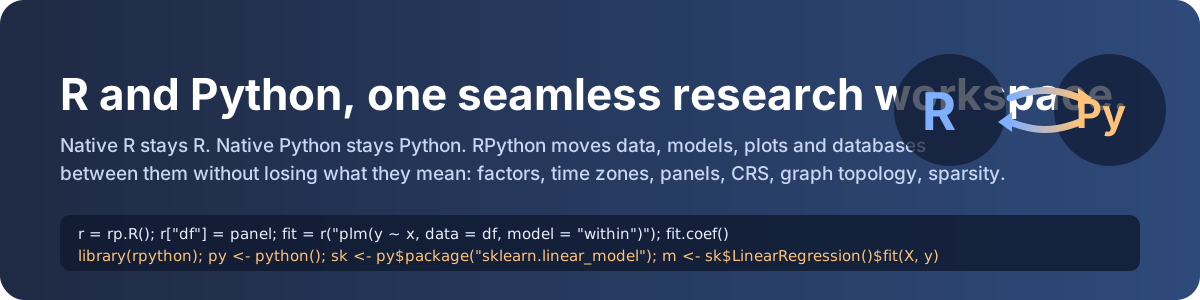
RPython is a high-level, bidirectional, semantic bridge between R and Python. Code runs natively in
its own language; RPython moves data, variables, functions, packages, models, plots, files and database
relations between the two runtimes without silently losing what they mean — factor levels and order,
time zones, time-series frequency, panel keys, survey labels, sparsity, graph topology, coordinate
reference systems. Objects that have no lossless twin stay alive in their runtime behind a proxy you can
still call. Everything RPython decides is inspectable with rp.explain_last().
Common workflows work automatically; unfamiliar or non-convertible objects fall back safely to proxies or explicit diagnostics rather than silently corrupting meaning.
Contents
- What RPython is · Why it exists · Key differentiators
- How it complements existing tools
- Installation · R prerequisites · Python prerequisites
- The first 60 seconds
- Python → R · R → Python · R packages from Python · Python packages from R
- DataFrames · Time series · Panel data · Plots · Save / load
- Jupyter magics · Google Colab
- Databases · Large data · The data universe
- Environment doctor · Explain Mode · Beginner command catalog
- Troubleshooting · Architecture · Benchmarks · Compatibility policy
- Contributing · License · Citation
What RPython is
A Python package (pip install rpython-bridge) plus an R companion package (r-package/, same protocol) that
together give you:
- Native-feel Python:
r = rp.R(); r["df"] = df; fit = r("lm(y ~ x, df)"); fit.coef() - Native-feel R:
py <- python(); sk <- py$package("sklearn.linear_model"); m <- sk$LinearRegression() - A semantic data layer that classifies what an object is (table, panel, time series, sparse matrix, spatial vector, network, labelled survey, survival data, raster, xarray, image …), negotiates the best transfer path (JSON, Arrow IPC, shared file, shared database, proxy) and validates fidelity.
- An isolated R worker (a separate
Rscriptprocess): a crashing native R package cannot take your Python kernel down;r.restart()brings it back. - Universal proxies in both directions: R S3/S4/R6 objects, models, closures; Python classes, sklearn pipelines, torch models, generators.
- Database interoperability that shares the source (SQLite, DuckDB, Parquet/Arrow lakes, SQLAlchemy dialects, document / key-value / graph / time-series / vector / search adapters) instead of copying tables, with secrets that never enter any envelope, log or bundle.
- Explain Mode, a round-trip fidelity engine,
doctor()/check()/self_test()/fix()/restore(), Jupyter/Colab magics, a CLI, anrpython.lockreproducibility manifest and an.rpxbundle format for rich objects.
Why it exists
Researchers who live in both languages keep hitting the same friction: low-level converters exposed to
beginners; R_HOME / DLL / kernel-mismatch setup problems; ordered factors and time zones quietly
changing; panel and time-series structure lost as soon as a DataFrame crosses the border; huge tables
copied twice; rich model objects that either fail to convert or come back as incomplete lists; one
direction excellent and the other an afterthought. RPython treats R and Python as equal first-class
runtimes and treats statistical meaning as data that must survive the trip.
Key differentiators
| Semantic data layer | 20+ object families with per-family fidelity dimensions (values, types, shape, names, index, metadata, semantics, storage, laziness, topology, CRS, temporal) |
| Time series & panels first-class | ts/xts/tsibble ↔ DatetimeIndex/PeriodIndex; plm::pdata.frame ↔ (id, time) MultiIndex; balance, gaps, duplicates reported |
| Smart transfer planner | JSON for small objects, Arrow IPC above 5 000 rows, shared files for datasets/rasters, shared connections for databases, proxies for the rest |
| No silent corruption | explicit NA/NaN/Inf tokens, naive vs aware datetimes, CRS never assumed, multigraphs never collapsed, sparse never densified, int64 never rounded |
| Universal proxy | unknown object ≠ forced lossy conversion — call its methods where it lives |
| Explain Mode & fidelity engine | rp.explain_last(), rp.validate_roundtrip(obj, r) |
| Symmetric | python() in R mirrors rp.R() in Python with the same protocol and the same envelope |
| Diagnostics | rp.doctor(), rp.self_test(full=True), rpython doctor CLI, rpython.lock |
How RPython complements and extends existing R–Python tools
RPython builds on ideas from rpy2, reticulate, rpy2-arrow / Apache Arrow, Rserve / plumber, pyreadr / rdata and SoS; the comparison below is capability-based and refers to the typical experience with those tools as documented at the time of writing, not to a benchmark.
| Capability | Typical existing approach | RPython |
|---|---|---|
| Python → R | rpy2: embedded R, explicit converters | isolated worker, automatic semantic conversion, proxies |
| R → Python | reticulate: embedded Python | python() session with the same envelope and proxies |
| Large data | manual Arrow setup (rpy2-arrow) | transfer planner picks Arrow IPC / shared files automatically |
| Time-series & panel semantics | manual (index/frequency re-created by hand) | first-class families with fidelity checks |
| Unknown rich objects | conversion errors or partial lists | native proxies with method delegation, both ways |
| Environment debugging | tool-specific | rp.doctor(), rpython env, deterministic R selection |
| Package installation | separate ecosystems | r.install("plm"), py$install("polars"), one CLI |
| Notebooks | tool-specific magics | %r, %%r, %py, %%py with -i/-o |
| Conversion transparency | limited | Explain Mode with plan, risks, fidelity report |
| Round-trip validation | not user-facing | rp.validate_roundtrip() per family |
| Databases | SQL → pandas → copy to R | shared lazy relations, bound parameters, secret-free references |
| Process isolation | embedded (crash = kernel crash) | separate worker with restart |
Embedded designs (rpy2, reticulate) have lower per-call latency than a worker process; RPython trades a few milliseconds per call for isolation and symmetry. See docs/benchmarks.md for measured numbers.
Installation
Published on PyPI as rpython-bridge (the name rpython belongs to PyPy's toolchain); the import name is rpython.
pip install rpython-bridge            # core (numpy + pandas)
pip install "rpython-bridge[all]"     # + Arrow, Polars, SciPy, spatial, network, database, scientific, survey, ML, notebook extras
Extras: arrow, polars, sparse, spatial, network, database, scientific, survey, survival, ml, notebook.
The R companion is bundled: the Python package sources it into the worker automatically, so no R-side installation is required to drive R from Python. To drive Python from R, install the R package:
install.packages("remotes")
remotes::install_github("merwanroudane/rpython", subdir = "r-package")
R prerequisites
- R ≥ 4.1 (native pipe / lambda syntax); verified on R 4.5 locally and on the current CRAN release in CI, with jsonlite (
install.packages("jsonlite")). - Recommended for full semantic coverage:
arrow,data.table,Matrix,xts,zoo,haven,survival,sf,igraph,plm,terra,duckdb,RSQLite,dbplyr,ggplot2—rp.fix()installs the core set. - RPython finds R through
rp.config(r_home=...),RPYTHON_R_HOME,R_HOME,PATH, the Windows registry and standard locations, in that order; with several installations it uses the highest version and tells you.
Python prerequisites
Python 3.11–3.13, numpy ≥ 1.24, pandas ≥ 2.0. pyarrow is optional but strongly recommended (large tables).
The first 60 seconds
What happens: we start an isolated R worker, send a pandas DataFrame, fit a model in R, and read the coefficients back as a pandas Series.
import pandas as pd
import rpython as rp

r = rp.R()                                   # start (or reuse) the R worker
df = pd.DataFrame({"x": [1.0, 2.0, 3.0, 4.0], "y": [2.1, 3.9, 6.2, 7.8]})
r["df"] = df                                 # semantic conversion: dtypes, NA, names preserved
fit = r("lm(y ~ x, data = df)")              # rich R object -> stays in R behind a proxy
print(fit.coef())                            # coef(fit) -> pandas Series
print(round(fit.summary().r_squared, 3))     # summary(fit)$r.squared -> float
rp.explain_last()                            # what happened, and how faithful it was
Expected: a Series with (Intercept) ≈ 0.25 and x ≈ 1.93, 0.997, then an Explain report ending in
Overall: lossless ✓. The model object never left R; only what you asked for crossed the bridge.
Python → R quick start
import rpython as rp
r = rp.R()
r("x <- c(1, NA, 3)")                        # run any R code
print(r("mean(x, na.rm = TRUE)"))            # 2.0 -- plain Python float
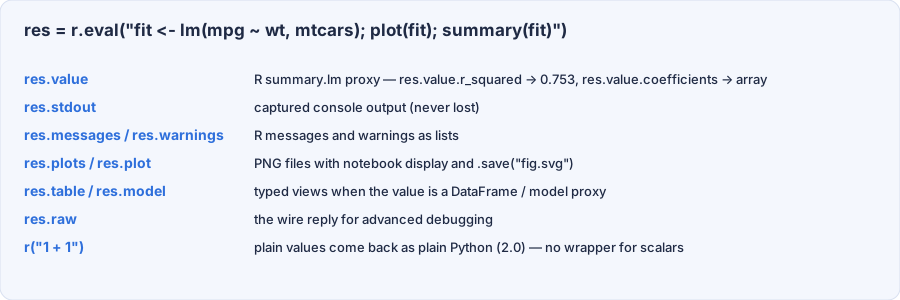
res = r.eval("message('hello'); warning('careful'); 42")
print(res.value, res.messages, res.warnings) # 42.0 ['hello'] ['careful']
r["v"] = [1.0, None, float("nan")]           # None -> NA, nan -> NaN, explicitly
print(r("c(is.na(v)[2], is.nan(v)[3])"))     # [ True  True]
r(code) returns the natural Python value (scalar, numpy array, pandas object, dict/list) or a proxy.
r.eval(code) returns a Result with .value, .stdout, .messages, .warnings, .plots.
Errors arrive as rp.RError with the R message and a recommended action (e.g. r.install('plm')).
R → Python quick start
library(rpython)
py <- python()                                # finds a Python with `rpython` installed
py$run("import numpy as np; np.arange(3)")    # 0 1 2  (R integer vector)
df <- data.frame(x = c(1.5, NA), f = factor(c("a", "b"), ordered = TRUE))
py$assign("df", df)
py$run("df['f'].cat.ordered")                 # TRUE -- ordered factor became an ordered categorical
back <- py$get("df")                          # identical factor levels, order, NA
py$assign("rf", function(x) x * 10)           # an R closure usable from Python
py$run("rf(4.0)")                             # 40
py$close()
R packages from Python
import rpython as rp
r = rp.R()
stats = r.package("stats")                   # any installed package; unknown packages need no registry
print(stats.median([1, 2, 3, 10]))           # 2.5
fn = r.function("paste")                     # a function by name
print(fn("a", "b", sep="-"))                 # a-b
print(r.signature("stats::lm")["args"][:3])  # ['formula', 'data', 'subset']
r.install("plm", "fixest") installs from CRAN; "user/repo" uses GitHub; source="bioc" uses Bioconductor.
Python identifiers map to dotted R names automatically (forecast.auto_arima → forecast::auto.arima).
Python packages from R
py <- python()
sk <- py$package("sklearn.linear_model")
m  <- sk$LinearRegression()
m$fit(matrix(c(1, 2, 3, 4), ncol = 1), c(2, 4, 6, 8))
m$coef_                                        # 2
m$predict(matrix(c(7, 8), ncol = 1))           # 14 16
py$install("polars")                           # pip (or source = "uv" / "conda")
DataFrame transfer
What is preserved — and tested — in both directions:
import numpy as np, pandas as pd, rpython as rp
r = rp.R()
df = pd.DataFrame({
    "x": [1.5, np.nan, 3.0],
    "i": pd.array([1, None, 3], dtype="Int64"),
    "c": pd.Categorical(["lo", "hi", "lo"], categories=["lo", "hi"], ordered=True),
    "t": pd.to_datetime(["2024-01-01", "2024-06-01", "2024-12-31"]).tz_localize("Europe/Paris"),
    "big": [2**40, 1, 2],
    "ville é": ["Paris", "Alger", "Tunis"],
})
r["df"] = df
print(r("c(is.ordered(df$c), class(df$big)[1], format(df$t[1], tz='Europe/Paris', '%H:%M'))"))
back = r["df"]
assert back.equals(df)                       # dtypes, categories, tz, int64, Unicode names: all back
print(rp.validate_roundtrip(df, r).summary())
mtcars row names become the pandas index; iris$Species becomes a categorical; tibbles and data.tables
keep their identity on the way back. Above 5 000 rows the planner switches to Arrow IPC automatically.
Time series
import numpy as np, pandas as pd, rpython as rp
r = rp.R()
y = pd.Series(np.arange(24.0), index=pd.date_range("2020-01-01", periods=24, freq="MS"), name="y")
r["y"] = y
print(r("c(is.ts(y), frequency(y), start(y)[1])"))   # [1. 12. 2020.]
back = r["y"]
assert back.equals(y) and back.index.freq == y.index.freq
q = r("ts(1:8, start = c(2020, 1), frequency = 4)") # R ts -> PeriodIndex series (2020Q1 ...)
print(rp.timeseries(y).describe_structure())
Irregular or tz-aware series become xts; grouped series (rp.timeseries(df, time=, ids=)) become tsibble.
Panel data
import numpy as np, pandas as pd, rpython as rp
r = rp.R()
pdf = pd.DataFrame({"country": np.repeat(["FR", "DE", "IT"], 4), "year": list(range(2000, 2004)) * 3,
                    "gdp": np.arange(12.0)}).drop(index=5)
panel = rp.panel(pdf, id="country", time="year")
print(panel.describe_structure())            # Balanced: No, Missing periods: 1, R representation: pdata.frame
r["p"] = panel                               # plm::pdata.frame when plm is installed
back = r["p"]                                # (country, year) MultiIndex + metadata in .attrs
print(back.index.names, back.attrs["rpython"]["panel"]["balanced"])
Auto-detection never guesses silently: a likely panel shows up as a suggestion in Explain Mode.
Plotting
import rpython as rp
r = rp.R()
res = r.eval("plot(mtcars$wt, mtcars$mpg); hist(mtcars$mpg)")
print(len(res.plots))                        # 2 PNG files; res.plot displays inline in Jupyter
res.plot.save("hist.png")
g = r("ggplot2::ggplot(mtcars, ggplot2::aes(wt, mpg)) + ggplot2::geom_point()")
g.save("scatter.svg")                        # ggplot proxies save to png/svg/pdf via ggsave
Saving and loading
import pandas as pd, rpython as rp
df = pd.DataFrame({"c": pd.Categorical(["a", "b"], ordered=True)})
rp.save(df, "d.parquet")                     # writer chosen by extension and object family
rp.save(df, "d.csv")                         # warns: CSV is lossy -> writes d.csv.rpx.json sidecar
print(rp.load("d.csv")["c"].cat.ordered)     # True -- the sidecar restored the categories
bundle = rp.save(rp.panel(pd.DataFrame({"i": [1, 1], "t": [1, 2], "v": [0.5, 1.5]}), id="i", time="t"), "panel.rpx")
print(type(rp.load(bundle).index).__name__)  # MultiIndex -- the bundle keeps the panel semantics
R objects: fit.save("fit.rds"), rp.load("fit.rds", session=r); anything: rp.save(obj, "x.rpx").
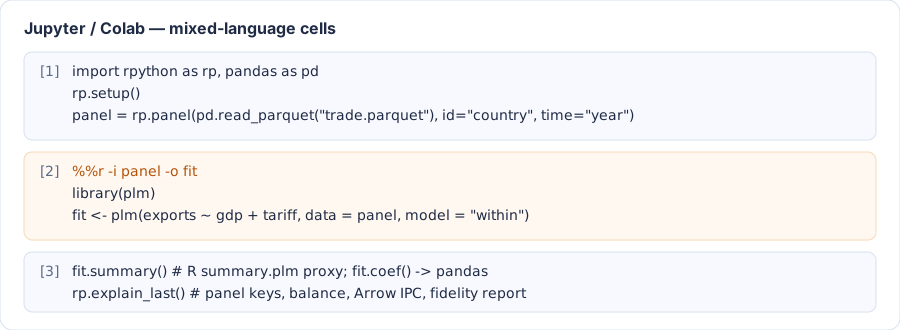
Jupyter magics
%load_ext rpython              # or rp.setup()
%r 1 + 1
%%r -i df -o model
library(plm)
model <- plm(y ~ x1 + x2, data = df, model = "within")
Flags: -i a,b send notebook variables, -o x,y bring R variables back, -s silent, -v show Explain Mode.
Plots display automatically. %%py runs Python in the worker namespace (useful when R drives the notebook).
Google Colab
!pip install "rpython-bridge[arrow]"
import rpython as rp
r = rp.setup()                 # detects Colab's R (or tells you how to provision it), loads the magics
r.install("plm")
Colab runtimes are ephemeral: rpython lock records Python + R package versions and rp.restore()
reinstalls them after a fresh runtime. The walkthrough is in notebooks/colab_quickstart.ipynb.
Databases
import pandas as pd, rpython as rp
db = rp.connect("duckdb:///research.duckdb")               # or sqlite:///, postgresql://user@host/db, a Parquet folder ...
db.write("panel", pd.DataFrame({"country": ["FR", "DE"], "year": [2000, 2000], "gdp": [1.0, 2.0]}))
rel = db.table("panel").filter("year >= ?", [2000])         # lazy; parameters are bound, never pasted
print(rel.describe_structure())                              # Materialised: no
r = rp.R()
db.close()
r["rel"] = rel                                               # R opens the same file (read-only) — 0 rows copied
print(r("nrow(dplyr::collect(rel))"))                        # 2
Passwords in URLs go to a process-local vault; envelopes, logs, Explain output and bundles never contain them.
Large data
The planner chooses the path from the object, its size and both runtimes' capabilities: JSON for small
objects, Arrow IPC above 5 000 rows (or 50 000 array elements), shared files for Arrow datasets,
rasters and NetCDF, shared connections for databases, and proxies for lazy objects (rp.lazy(),
generators, Dask, Polars LazyFrame). A memory guard refuses materialisations above
rp.config(memory_threshold_bytes=...) unless you pass allow_materialize=True.
The data universe
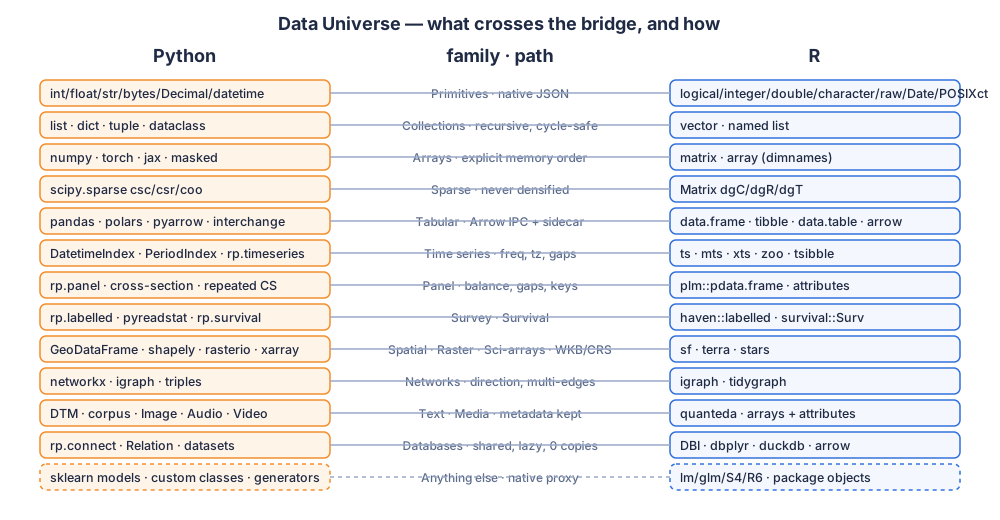
Tabular · Time series · Panel · Cross section · Survey · Spatial · Raster · Spatiotemporal · Networks · Graphs · Sparse matrices · Scientific arrays · Text · Media · Databases · ML/DL tensors · Domain objects · Custom objects — the complete, per-family answer to what is preserved, which path, is it lossless, what if there is no mapping is in docs/data-structures-catalog.md.
import networkx as nx, rpython as rp
r = rp.R()
g = nx.MultiDiGraph([("a", "b"), ("a", "b"), ("b", "b")])   # parallel edges + self loop
r["g"] = g
print(r("c(igraph::ecount(g), igraph::any_multiple(g), igraph::is_directed(g))"))   # [3 1 1]
assert r["g"].number_of_edges() == 3        # never collapsed to a simple graph
Environment doctor
import rpython as rp
rp.doctor()
Platform                 Windows 11 (AMD64)
Environment              terminal / script
Python                   3.11.0  C:\...\python.exe  [system]
R                        4.5.2  C:\Program Files\R\R-4.5.2  [via registry]
R installations          4.5.2 (registry); 4.4.3 (well-known location) ⚠
  pyarrow                25.0.1 ✓
R worker                 ready (R 4.5.2, pid 21840) ✓
  arrow (R)              ok ✓
Python -> R -> Python    ok ✓
Plot transport           ok ✓
Magics                   available (%r / %%r / %py / %%py) ✓

Issues:
- 2 R installations found; using 4.5.2 from registry. Set RPYTHON_R_HOME to choose explicitly.
rp.check() is the 1-second version, rp.self_test(full=True) runs 25+ interoperability checks,
rp.fix() installs missing core packages, rp.restore() replays an rpython.lock.
Explain Mode
import numpy as np, pandas as pd, rpython as rp
r = rp.R()
r["big"] = pd.DataFrame({"a": np.arange(20000), "c": pd.Categorical(np.random.choice(["x", "y"], 20000))})
rp.explain_last()
[python -> R `big`]
Source: pandas.DataFrame
Target: R
Shape: 20,000 x 2
Detected: table — confirmed (pandas.DataFrame (20000, 2)).
Semantic family: table
Transfer: arrow-ipc  [B. lossless standard interchange representation]
Estimated payload: 176.0 KB
Copies: 1
Fidelity:
  Values:    lossless ✓
  Names:     lossless ✓
  Types:     lossless ✓  (dtypes + nullability in sidecar)
  Index:     lossless ✓  (default RangeIndex)
  Overall:   lossless ✓
rp.explain_plan(obj) dry-runs the planner without sending anything.
Beginner command catalog
| Task | Python | R |
|---|---|---|
| start | r = rp.R() |
py <- python() |
| run code | r("1 + 1"), r.eval(code) |
py$run("1 + 1"), py$eval(code) |
| send / get | r["x"] = obj, r["x"] |
py$assign("x", obj), py$get("x") |
| package | r.package("forecast") |
py$package("pandas") |
| install | r.install("plm") |
py$install("polars") |
| function | r.function("paste")("a", "b") |
py$package("math")$sqrt(16) |
| model | fit = r("lm(...)"); fit.coef(); fit.predict(newdata=df) |
m <- sk$LinearRegression(); m$fit(X, y) |
| declare structure | rp.panel(df, id=, time=), rp.timeseries(...), rp.spatial(...), rp.network(...), rp.labelled(...), rp.survival(...) |
attributes come back automatically |
| plots | res = r.eval("plot(x)"); res.plot.save("p.png") |
matplotlib figures are captured |
| save / load | rp.save(obj, path), rp.load(path) |
saveRDS / rp.load("x.rds") |
| database | rp.connect(url).table("t").filter("a > ?", [1]) |
rpx_relation(con, "t") |
| notebook | %r, %%r -i df -o fit, %py, %%py |
— |
| diagnostics | rp.doctor(), rp.check(), rp.self_test(), rp.fix(), rp.explain_last() |
rpx_explain(x) |
| CLI | rpython doctor, rpython self-test --full, rpython install r plm, rpython lock, rpython catalog |
The full catalog with copy-paste examples and explanations is in docs/beginner-catalog.md.
Troubleshooting
| Symptom | What to do |
|---|---|
R runtime not found |
install R; set RPYTHON_R_HOME=C:\Program Files\R\R-4.5.2 (Windows) or add Rscript to PATH; run rpython env |
R worker failed to start … jsonlite |
in R: install.packages("jsonlite") |
| Several R versions, wrong one used | rp.config(r_home=...) or RPYTHON_R_HOME — rp.doctor() lists all candidates |
| Large tables go through JSON | pip install pyarrow and install.packages("arrow") |
RError: there is no package called 'x' |
r.install("x") — compilation errors on Windows need Rtools |
| DuckDB file "used by another process" | one writer at a time: close Python's writer, R opens read-only |
| Jupyter uses a different Python | rpython env shows the interpreter; install rpython in the kernel's Python |
| Naive datetimes come back as UTC-tagged in R | expected: wall clock preserved and flagged rpython_naive; they return naive |
More in docs/troubleshooting.md and docs/faq.md.
Architecture
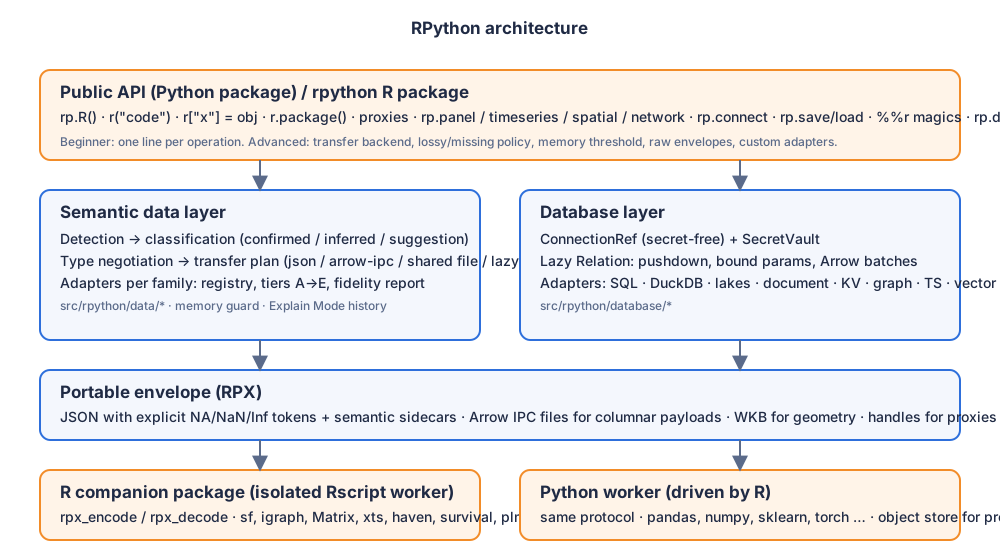
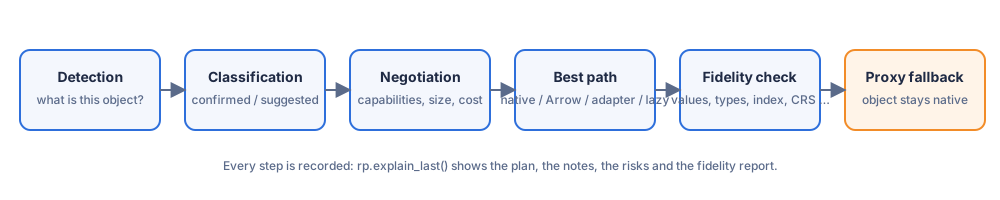
src/rpython/data/ semantic layer and adapters · src/rpython/database/ adapters and lazy relations ·
src/rpython/runtime/ the R worker session · src/rpython/proxy/ R objects and packages as Python objects ·
r-package/ the R companion (worker, python() client, rpx_encode/decode). Details: docs/architecture.md.
Performance and benchmark methodology
python tools/benchmark.py measures startup, scalar round trips, DataFrame transfer (JSON vs Arrow at 1 k /
100 k / 1 M rows), array transfer, plot return and proxy method calls, and writes docs/benchmarks.md with the
hardware, Python/R/package versions and the exact commands. Numbers are only published from that script.
Compatibility policy
Capability detection over version pinning: the R worker reports what is installed, Arrow is used only when
both sides have it, every optional Python dependency is probed at import, and each family has a documented
fallback (Arrow → JSON → proxy). compatibility/*.yaml records tested versions and known issues; unknown
packages are never blocked. CI runs the full R↔Python interop suite on Linux, macOS and Windows for Python 3.11, 3.12 and 3.13 with the current R release, plus a clean wheel-install smoke test; the README support table follows what CI verifies.
Contributing
See CONTRIBUTING.md — adding a converter is one rp.register_converter(...) call in Python
and one rpx_register_encoder()/rpx_register_decoder() pair in R; the test matrix expects a round trip in both
directions and a fidelity definition for the new family.
License
MIT — see LICENSE.
Citation
If RPython is useful in your research, please cite it:
Roudane, M. (2026). RPython: a high-level, bidirectional, semantic bridge between R and Python. https://github.com/merwanroudane/rpython
Author: Dr Merwan Roudane — https://github.com/merwanroudane
1 maintainer

Metadata
1 maintainer
Release files for rpython-bridge 0.1.1
For a detailed explanation of source distributions (sdists) and built distributions (wheels), please see the package formats documentation.
Source distribution (sdist)
| File | Size | Uploaded | Provenance | |
|---|---|---|---|---|
| rpython_bridge-0.1.1.tar.gz | 179.5 kB | Without provenance | Details |
Built distribution (wheel)
| File | Interpreter | ABI | Platform | Reset |
|---|---|---|---|---|
| rpython_bridge-0.1.1-py3-none-any.whl | Python 3 | none | any | Details |
Total release size: 382.0 kB
Release files / rpython_bridge-0.1.1.tar.gz
| Download URL | rpython_bridge-0.1.1.tar.gz |
|---|---|
| Size | 179.5 kB |
| Tags | Source |
|
SHA-256 checksum How to use checksums |
b05cfc440d459e4552b0b2e17437797ee76030388fc44ba8f2f967d0889458df
|
|
BLAKE2b-256 checksum How to use checksums |
6488c4c60f80254546d01ec1ad5d67fdeb52350fca310dfea70c8acae6132fea
|
| Upload date | |
|
Uploaded using Trusted Publishing? What is trusted publishing? |
No |
| Uploaded via |
twine/7.0.0 CPython/3.11.0
|
Release files / rpython_bridge-0.1.1-py3-none-any.whl
| Download URL | rpython_bridge-0.1.1-py3-none-any.whl |
|---|---|
| Size | 202.5 kB |
| Tags | Python 3 |
|
SHA-256 checksum How to use checksums |
8ca8a7d3de751e33afde960e164b09e871e89879ffd8e2a5b49b2afb46ca7d0e
|
|
BLAKE2b-256 checksum How to use checksums |
4a9844c9426cb56f25e3a2433d88496bdce1441be308734f520ee11d3e9b9dec
|
| Upload date | |
|
Uploaded using Trusted Publishing? What is trusted publishing? |
No |
| Uploaded via |
twine/7.0.0 CPython/3.11.0
|
Security for rpython-bridge 0.1.1
Provenance
Provenance describes where a file came from. On PyPI, provenance is shared via attestations, which provide a verifiable record of the build or publishing details. View details, limitations and caveats.
No provenance found
None of the files in this release were uploaded with provenance metadata.
A note on package security
PyPI is a repository for distributing packages, not a service for auditing them. While third-party security researchers and our staff do their best to detect and remove malicious packages, PyPI cannot guarantee the quality, security or suitability of any given package.
To learn more about protecting yourself from malicious actors, visit our package security documentation.














