
rs172
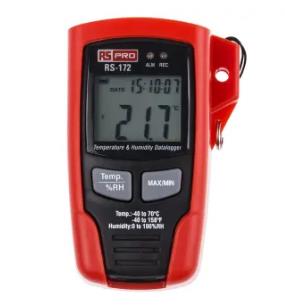
A Python library and CLI for the RS PRO RS-172 temperature/humidity data logger, built on the protocol reverse engineering of the dl141th project (see Credits). The same hardware is sold as the CEM DT-172 and the Voltcraft DL-141TH. The package runs on Windows and Linux and covers every device function of the vendor's "RH And Temp Datalogger" software:
| Vendor software | Library | CLI |
|---|---|---|
| Correct Time | dev.set_time() |
rs172 set-time |
| Datalogger Setup | dev.setup(LoggerConfig(...)) |
rs172 setup ... |
| Setup → Default | dev.restore_defaults() |
rs172 defaults |
| Download Data (+ info/statistics) | dev.download(), dev.read_info() |
rs172 download, rs172 info |
| Battery Power | dev.battery() |
rs172 battery |
| Save | to_csv(), to_json() |
rs172 download -o file.csv|.json |
Printing and the vendor's .record/.xls files are out of scope. A simple plot of exported files is available as an optional extra (see Plotting).
Install
Requires Python ≥ 3.10.
pip install rs172
pip install "rs172[plot]"   # also installs matplotlib for the plot command
For development, clone the repository and run pip install -e ".[dev]".
- Windows: install the Silicon Labs CP210x driver. The vendor installer includes it. The logger then appears as a COM port. The vendor software must be closed, because it keeps the port open.
- Linux: the
cp210xdriver is part of the kernel, and the logger appears as/dev/ttyUSB0. Your user needs access to the port, either by joining thedialoutgroup (sudo usermod -aG dialout $USER, then log in again) or through a udev rule:SUBSYSTEM=="tty", ATTRS{idVendor}=="10c4", ATTRS{idProduct}=="ea60", MODE="0666"
Important device behaviour
- Setup and setting the clock erase the stored data and start a new log. Download first.
rs172 setup --download-first backup.csvdoes both in one step. - Reading the header or downloading stops a running log. Run setup again to start a new one.
rs172 infoandrs172 downloadtherefore ask for confirmation (skip with-y). Setting the clock also ends the running log and erases it, sors172 set-timeasks first too. Querying the battery does not interrupt logging (checked during a running log). - The logger stores at most 16350 samples. Readings are always stored in °C; the °C/°F choice only applies to the alarm thresholds.
CLI
The port is autodetected from the USB ID of the logger's bridge chip (CP210x, 10C4:EA60); nothing is sent to any port for this. Other devices use the same chip, so if there are several such ports, the command stops with an error instead of guessing. To choose the port yourself, use -p COM3 / -p /dev/ttyUSB0 or set RS172_PORT. rs172 ports --probe sends each port the battery query (which does not interrupt logging) to show where an RS-172 answers.
rs172 ports [--probe]             # list CP210x ports; --probe checks which one answers
rs172 battery
rs172 info                        # header: start, rate, sample count, alarms (stops logging; asks first)
rs172 download -y -o data.csv     # or data.json; without -o CSV goes to stdout; -y skips the question
rs172 set-time [--time "2026-11-24 10:00:00"]
rs172 setup -i 5 -u min --start auto --led off --temp-low -10 --temp-high 30 --rh-low 20 --rh-high 80
rs172 setup --interactive           # asks for each setting, shows a summary and the equivalent command, confirms
rs172 defaults
rs172 -vv battery                 # show raw serial traffic
Run rs172 <command> --help for all options. Commands that erase data ask for confirmation unless you pass -y.
Library
from datetime import timedelta
from rs172 import RS172, LoggerConfig, Interval, IntervalUnit, LedCycle, StartMode, to_csv

with RS172.open() as dev:                       # or RS172.open("COM3")
    print(dev.battery())                         # 70%-100%

    log = dev.download()                         # LogData
    print(log.start, log.end, len(log))
    print(log.temperature_stats().max)           # Extreme(value=24.0, time=...)
    for r in log.readings:
        print(r.time, r.temperature_c, r.temperature_f, r.humidity)
    to_csv(log, "backup.csv")

    dev.setup(LoggerConfig(
        interval=Interval.from_timedelta(timedelta(minutes=5)),
        led_cycle=LedCycle.OFF,
        start_mode=StartMode.AUTOMATIC,
        temp_alarm_low=-10, temp_alarm_high=30,
    ))
LoggerConfig.default() returns the vendor's factory defaults. config.record_duration is the vendor's "Rec Time": how long until memory is full.
Plotting
With the plot extra installed (pip install "rs172[plot]"), rs172 plot draws a CSV or JSON file written by rs172 download. Temperature and humidity are shown in two panels that share the time axis. The y axes span at least 4 °C (7.2 °F) and 5 %RH, so sensor noise does not look like big swings.
rs172 plot data.csv                  # opens a window
rs172 plot data.json -o data.png     # saves the plot instead (.png, .pdf, .svg, ...)
rs172 plot data.json --alarms --fahrenheit --title "Server room"
--alarms draws the alarm thresholds, which only JSON exports contain. In Python, use rs172.plot.load(path) and rs172.plot.plot(series); the second returns a matplotlib Figure.
Protocol
docs/protocol.md describes the protocol. It builds on the reverse engineering in Helmut Schmidt's dl141th (MIT), and all of it was re-verified against an RS-172 and the vendor software.
Not verified yet: data readout after a circular-logging wraparound, which needs 16350 samples (≥ 4.5 h at 1 s). Until then, a wrapped circular log is downloaded in memory order.
Tests
pytest
The tests use captured device frames and a byte-level fake logger, so no hardware is needed.
Credits
- Protocol reverse engineering: Helmut Schmidt worked out the serial protocol of the Voltcraft DL-141TH, the same hardware, in dl141th (MIT). This package builds on that work. Every command was re-verified against an RS-172 and the vendor software, and the remaining details were filled in.
- Development: the library, CLI, tests and documentation were written with the help of Claude Code.
License
MIT, see LICENSE. The product photo is taken from the RS Components datasheet for RS stock no. 146-9091. The protocol knowledge builds on dl141th by Helmut Schmidt, also MIT-licensed.
1 maintainer

Metadata
1 maintainer
Release files for rs172 1.0.0
For a detailed explanation of source distributions (sdists) and built distributions (wheels), please see the package formats documentation.
Source distribution (sdist)
| File | Size | Uploaded | Provenance | Actions |
|---|---|---|---|---|
| rs172-1.0.0.tar.gz | 38.7 kB | With provenance | Details for rs172-1.0.0.tar.gz |
Built distribution (wheel)
| File | Interpreter | ABI | Platform | Actions Reset |
|---|---|---|---|---|
| rs172-1.0.0-py3-none-any.whl | Python 3 | none | any | Details for rs172-1.0.0-py3-none-any.whl |
Total release size: 61.6 kB
Release files / rs172-1.0.0.tar.gz
| Download URL | rs172-1.0.0.tar.gz |
|---|---|
| Size | 38.7 kB |
| Tags | Source |
|
SHA-256 checksum How to use checksums |
5b9d1d4f07a4868acfda22f661bfae933c57d6f5a1326a28f566a0f1542738f3
|
|
BLAKE2b-256 checksum How to use checksums |
1d54ca487c6d1261ab6238f44c9194547d83d74396e9a9e1a8444ce351787a2d
|
| Upload date | |
|
Uploaded using Trusted Publishing? What is trusted publishing? |
Yes |
| Uploaded via |
twine/7.0.0 CPython/3.13.16
|
Provenance
Provenance describes where a file came from. On PyPI, provenance is shared via attestations, which provide a verifiable record of the build or publishing details. View details, limitations and caveats.


PyPI Publish Attestation
PyPI verified that this artifact, at this checksum, originated from the publisher listed below.
Signed by GitHub Actions, verified by PyPI on Nov 24, 2026.
Transparency logRelease files / rs172-1.0.0-py3-none-any.whl
| Download URL | rs172-1.0.0-py3-none-any.whl |
|---|---|
| Size | 22.9 kB |
| Tags | Python 3 |
|
SHA-256 checksum How to use checksums |
2b04dec8e8bdc3752ccc338d1100646813b919ca8a87c21c9b24c57ca4085a5e
|
|
BLAKE2b-256 checksum How to use checksums |
33179020e9855ca33c11dcf3741f8734677a24094edefeccdc9b69aa2541773a
|
| Upload date | |
|
Uploaded using Trusted Publishing? What is trusted publishing? |
Yes |
| Uploaded via |
twine/7.0.0 CPython/3.13.16
|
Provenance
Provenance describes where a file came from. On PyPI, provenance is shared via attestations, which provide a verifiable record of the build or publishing details. View details, limitations and caveats.
PyPI Publish Attestation
PyPI verified that this artifact, at this checksum, originated from the publisher listed below.
Signed by GitHub Actions, verified by PyPI on Nov 24, 2026.
Transparency logSecurity for rs172 1.0.0
Provenance
Provenance describes where a file came from. On PyPI, provenance is shared via attestations, which provide a verifiable record of the build or publishing details. View details, limitations and caveats.
Full provenance
Both files in this release have been uploaded with provenance metadata.
Attestation for rs172-1.0.0.tar.gz
PyPI Publish Attestation
PyPI verified that this artifact, at this checksum, originated from the publisher listed below.
Signed by GitHub Actions, verified by PyPI on Nov 24, 2026.
Transparency logA note on package security
PyPI is a repository for distributing packages, not a service for auditing them. While third-party security researchers and our staff do their best to detect and remove malicious packages, PyPI cannot guarantee the quality, security or suitability of any given package.
To learn more about protecting yourself from malicious actors, visit our package security documentation.













