
Rebroadcast old RSS/Atom feed items to a new feed, in shuffled or chronological order.

Project description
RSS-Reruns
Rebroadcast old RSS/Atom feed items to a new feed, in shuffled or chronological order.
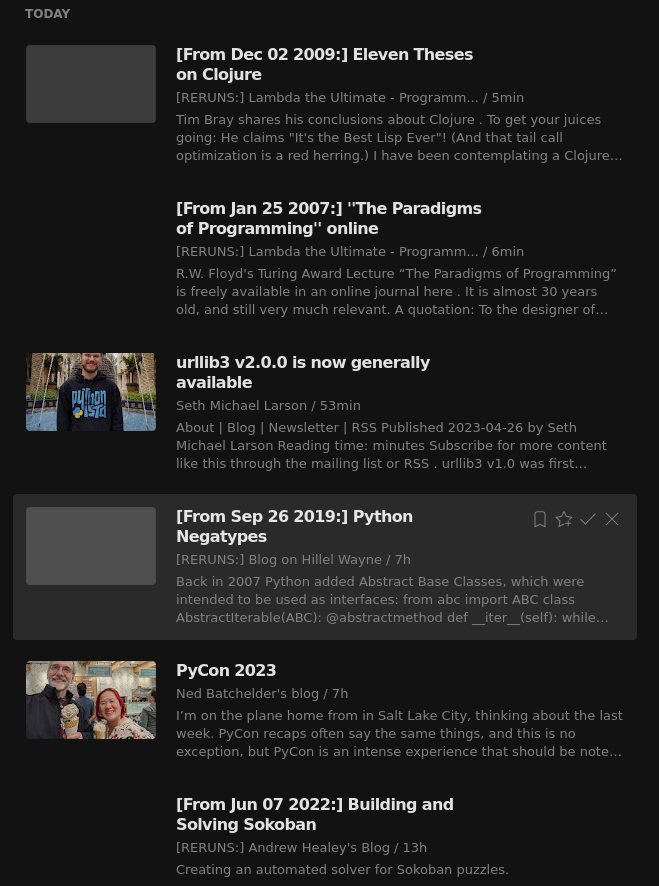
Example screenshot of rebroadcasted entries appearing alongside actual updates from blogs I follow, as seen in my own feed reader:
Installation and example usage
To install the latest version from PyPi:
pip install rssreruns==0.0.14
Example usage to create a feed of reruns, from an existing feed's filepath or URL:
from rssreruns.feedmodifier import FeedModifier as FM
# Initialize from file...
fm = FM.from_file("in/some_old_feed.xml")
# ...or from a URL
fm = FM.from_url("example.org/some_old_feed.xml")
# Add prefixes and/or suffixes to the feed's title
fm.set_feed_title(prefix="[RERUNS:]", suffix="(this is a reruns feed)")
# Add prefixes and/or suffixes to entry titles;
# these can include date formatting for the entry's original pubdate
fm.set_entry_titles(prefix="[From %b %d %Y:]")
# Rebroadcast some entries! Their publication dates will be set to the current datetime
fm.rebroadcast(3)
# Write out the resulting feed to file
fm.write(path="out/my_output_feed.xml")
# ...or as a string (Not Recommended)
big_output_string = fm.write(path=None, pretty_print=False)
The FeedModifier's own settings—the prefixes and suffixes, shuffled vs. chronological order, etc.—are stored in the XML itself, under a separate reruns namespace (allowed by both the RSS and Atom standards) for easy serialization and deserialization:
fm = FM.from_file(path="out/my_output_feed.xml")
fm.rebroadcast(1)
fm.write(path="out/my_output_feed.xml")
(Hosting the generated feed is up to you. I ended up hosting them on S3, and added a little Django frontend.)
About & Motivation
This is a personal project mainly intended for my own use. I've been using a feed reader for a few years, and have gradually come to follow a number of active blogs related to programming, software development, computer science, math, machine learning, and statistics.
As well as active blogs, however, I've also found blogs and site archives with many old entries of interest to me, but which are no longer (or very rarely) updated. Even blogs which are still active also often have archives of material I haven't read, in some cases going back a long time before I followed them. For a few examples: Lambda the Ultimate, Matt Might's blog, Hillel Wayne's excellent and very-much-active blog, and [insert whatever blog you'd personally consider to show Good Taste :)]
I wanted a way to have those old blog posts and essays occasionally show up in my feed reader, sprinkled in with actual updates from the active blogs I follow. This way, slowly reading through those old entries is folded into my routine of checking for new articles to read.
As well as changing the publication date to make an old entry appear newly updated, I ultimately wanted more bells and whistles for Quality Of Life reasons, like being able to show the original publication date in the republished entry titles; specifying random vs. chronological order; toggling whether to keep rebroadcasting entries forever, or stop once every entry has been rebroadcasted; etc.
Limitations
Some sites' feeds contain all entries ever published, while some only keep the most recent entries: among the feeds of interest to me, it's been about half and half each. For the incomplete feeds, I've just scraped the site with BeautifulSoup, generated a complete feed with feedgen, and then used that as input to rss-reruns. Good enough for my purposes.
Disclaimer
rssreruns has been made available on PyPi mostly for my own experience with Python's building and packaging ecosystem, as well as for ease of installation on AWS.
Because it's a personal project, a few decisions were made for learning purposes that I would not make for professional work. In particular, FeedModifier internally makes use of a wrapper class for interacting with lxml elements, a class I wrote as a personal exercise of Reinventing The Wheel (instead of just using lxml's own objectify).
In short, this is a fun little project, not made for Production. See LICENSE.txt for the more formal disclaimers.
Release history Release notifications | RSS feed


Download files
Download the file for your platform. If you're not sure which to choose, learn more about installing packages.
Source Distribution
Built Distribution
Filter files by name, interpreter, ABI, and platform.
If you're not sure about the file name format, learn more about wheel file names.
Copy a direct link to the current filters
File details
Details for the file rssreruns-0.0.15.tar.gz.
File metadata
- Download URL: rssreruns-0.0.15.tar.gz
- Upload date:
- Size: 28.0 kB
- Tags: Source
- Uploaded using Trusted Publishing? No
- Uploaded via: twine/6.1.0 CPython/3.11.13
File hashes
| Algorithm | Hash digest | |
|---|---|---|
| SHA256 |
62b54ef66766a5f02ae9223d1d9fb80f73bbb13bfb34a0b025b349a986f5cc45
|
|
| MD5 |
969be3263212e6ea7c5ec321249e647c
|
|
| BLAKE2b-256 |
a4207be04c98f2bb2552e776a7372c4238ab7bfeeb3c2cb3d44fcb67e25a8c88
|
File details
Details for the file rssreruns-0.0.15-py3-none-any.whl.
File metadata
- Download URL: rssreruns-0.0.15-py3-none-any.whl
- Upload date:
- Size: 18.5 kB
- Tags: Python 3
- Uploaded using Trusted Publishing? No
- Uploaded via: twine/6.1.0 CPython/3.11.13
File hashes
| Algorithm | Hash digest | |
|---|---|---|
| SHA256 |
ad42e5a440d87077e62857738ca8022b53fbe5d1bb5639b5e311d4c348f78db4
|
|
| MD5 |
2dfd4bb2e8bb4f020629f5eeb1c2f4f5
|
|
| BLAKE2b-256 |
b79881b1b6c1e4712e5072dd06f140eba3771571dbc94986fe6b607448495a59
|






