
rsu-to-swp


A pip-installable CLI — usable standalone or as a skill/instruction file for Claude Code, OpenAI Codex, GitHub Copilot, and Cursor — that turns a Fidelity/E*TRADE-style "ByBenefitType" RSU/ESPP export into a real answer for "how much do I actually hold, after tax, right now — and where is it headed?", and then simulates the systematic withdrawal plan (SWP) that gets you from those RSUs to a sustainable annual sell-and-withdraw schedule.
It computes, from the workbook alone:
- Net shares held today, after employer tax withholding at vest, reconciled against shares already sold
- Long-term vs. short-term split (2-year holding-period rule), recomputed fresh from the vest schedule every run
- Projected future vests (net of estimated withholding) through any target date
- The date long-term shares are projected to overtake short-term shares
- Value in USD, and optionally a second currency (e.g. INR) at a rate you supply
- Charts (PNG) for all of the above
- Optionally, a multi-year systematic withdrawal plan (SWP): a sell/tax/ withdraw/remaining-corpus schedule, using each lot's real vest date for long-term/short-term aging and taxing the actual gain — rendered as a dashboard-styled PDF (see SWP mode)
No network calls, no accounts, no API keys — it only reads the .xlsx file you
point it at.
Why this exists
Stock plan portals show you gross grants and vague "sellable" numbers, but answering "what do I actually have, net of tax, and how long until most of it is long-term" means manually cross-referencing grant dates, vest schedules, and withholding — every time you want an updated number. This does that arithmetic once, correctly, from the export you already have.
What it does not do
- Fetch live prices or FX rates — you supply both (or ask an AI agent to look them up for you, see below)
- Give tax or investment advice — it reports holdings and dates; capital-gains tax rules vary by country and change over time
- Assume it knows your withholding rate — the default is a placeholder, see Usage
Install
pip install rsu-to-swp
Or run it once with no install, the way npx runs a Node package —
pipx is the direct Python equivalent:
pipx run rsu-to-swp --xlsx export.xlsx --price 100
Requires Python 3.9+. No other setup — no accounts, no API keys, no network calls at runtime.
Usage
rsu-to-swp \
  --xlsx <path-to-export.xlsx> \
  --price <current-stock-price> \
  [--inr-rate <fx-rate>] \
  [--target YYYY-MM-DD] \
  [--withholding 0.30] \
  [--sold-csv sold.csv] \
  [--charts-dir charts]
(Cloned the repo instead of installing? Run
python3 src/rsu_to_swp/holdings_calculator.py ... with the same flags.)
| Flag | Required | Meaning |
|---|---|---|
--xlsx |
no | Path to the export. Auto-detects if exactly one .xlsx is in the current directory. |
--price |
yes | Current stock price (USD). Not fetched automatically. |
--inr-rate |
no | A second-currency conversion rate. Named for INR but it's just a multiplier — use it for any currency. Omit for USD-only output. |
--target |
no | Project holdings forward to this date (adds a projected-total section + chart). Without it you still get today's holdings, the LT/ST split, and the crossover date. |
--withholding |
no | Tax-withholding rate applied to future (not-yet-vested) tranches, as a decimal. Defaults to 0.3432 — a placeholder, not a universal rate. Check your plan's actual withholding (often visible in the sheet's "Tax Withholding" records) and pass your own. |
--sold-csv |
no | CSV (date,lot,qty) for sales the export doesn't already reflect — e.g. sold via a different account view. lot is an RSU Grant Number or the literal ESPP. |
--charts-dir |
no | Where to save PNGs. Default charts/. |
How it finds RSU vs. ESPP data
It identifies sheets by row content, not by sheet name or column order:
rows with Record Type Grant / Vest Schedule are treated as RSU; rows with
Record Type Purchase are treated as ESPP. Extra columns, renamed sheets, and
reordered columns are all tolerated. Sheets that match neither shape are
skipped with a note, not silently dropped.
Handling shares already sold
Two layers, both automatic:
- Sheet-detected sales — each RSU grant and the ESPP lot carry a "Sellable Qty." figure representing what's actually available right now. The script compares that against the sum of vested-tranche net shares; any shortfall is treated as a sale and removed from the oldest lots first (standard FIFO tax-lot convention) before computing the LT/ST split.
- Off-sheet sales the export doesn't know about — pass
--sold-csv.
SWP mode: a sell + withdraw plan, as a PDF
Add --swp plus a few assumptions to simulate a multi-year systematic
withdrawal plan — how much to sell each year to fund a target withdrawal rate,
whether the corpus keeps growing after that withdrawal, and what it costs in
tax:
rsu-to-swp \
  --xlsx <path-to-export.xlsx> --price <price> --inr-rate <fx-rate> \
  --swp \
  --stock-growth 0.15 \
  --fx-growth 0.15 \
  --withdrawal-rate 0.03 \
  --first-sale-years 1 \
  --swp-years 20 \
  --ltcg-rate 0.125 \
  --stcg-rate 0.30 \
  --swp-pdf swp_plan.pdf
| Flag | Meaning |
|---|---|
--swp |
Enables the simulation (off by default). |
--stock-growth / --fx-growth |
Assumed annual growth rates (decimals). Assumptions you supply, not predictions — run it again with different values to compare scenarios. |
--withdrawal-rate |
Fraction of that year's pre-sale corpus value sold to fund the withdrawal, every year. |
--first-sale-years |
Years from today before the first sale (0 = sell starting this year). |
--swp-years |
Projection horizon. |
--ltcg-rate / --stcg-rate |
Long-/short-term capital gains tax rates, applied to the gain, not the full sale. Default to 12.5% / 30% — placeholders, not universal figures. Use your own jurisdiction's rates. |
--swp-pdf |
Output path. Default swp_plan.pdf. |
What makes the simulation more than a spreadsheet formula:
- Real per-lot aging — every lot (each RSU tranche, the ESPP lot) ages into long-term at its own actual vest/purchase date plus 2 years, not an aggregate approximation. Long-term lots are sold oldest-first each year; short-term lots are only touched once long-term supply runs out.
- Tax on the gain, not the proceeds — when the sheet's
"Est. Cost Basis (per share):" column is populated, tax =
(sale price − cost basis) × shares sold × rate. Lots missing a cost basis are taxed as if 100% of the proceeds were gain (a conservative/worst-case number) — flagged in both the console output and the PDF, so you know which numbers to trust less. - Future vests join the pool on their real vest date, not on day one, so early years correctly have less to sell from than later years.
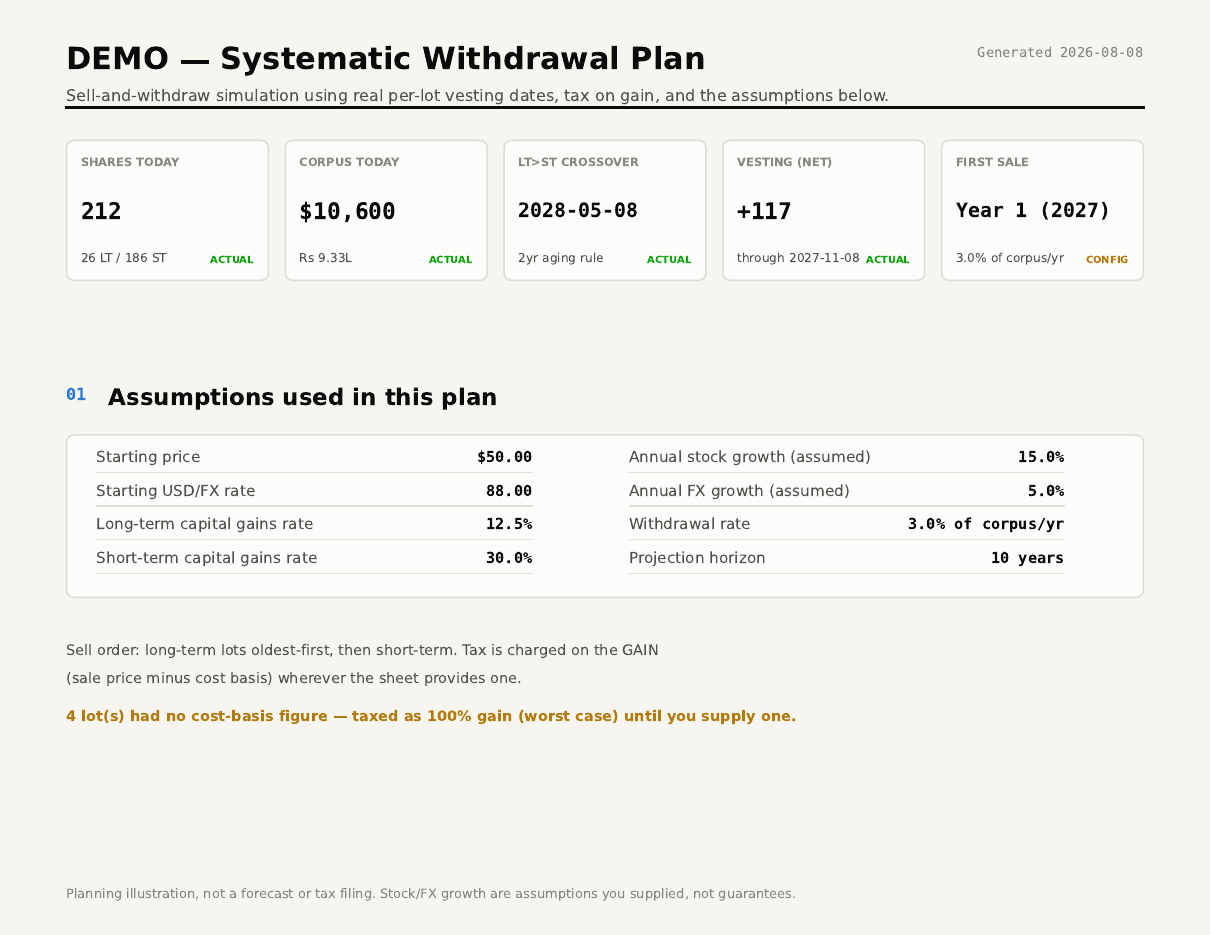
The PDF has five pages: a cover with stat tiles (current holdings, corpus,
crossover date, first-sale trigger), the assumptions used, the full yearly
schedule, corpus/withdrawal charts, tax-methodology notes, and a one-line
strategy summary (now → wait → first sale → annual selling → withdrawal →
corpus growth). example/swp_plan.pdf is a full sample generated from the
synthetic data below.
Example (synthetic data — no real portfolio involved)
example/generate_sample.py builds a fake export (example/sample_export.xlsx,
ticker DEMO) with dates computed relative to today, so it always
demonstrates a realistic mix of long-term, short-term, upcoming, and
already-partially-sold lots, however far in the future you run it:
cd example
python3 generate_sample.py
rsu-to-swp \
  --xlsx sample_export.xlsx --price 50 --inr-rate 88 \
  --target 2028-02-08 --charts-dir charts
Output (numbers will differ slightly by run date):
=== SALES DETECTED / APPLIED (already netted out of holdings below) ===
  grant DEMO-G-100234501: 40 sh already sold (per sheet's Sellable Qty.)

Workbook: sample_export.xlsx  |  Price: $50.00  |  USD->INR: 88.0  |  As of: 2026-08-08

=== TODAY: holdings after withholding tax and any sales ===
  RSU (net)     158 sh   $  7,900.00   INR    695,200.00
  ESPP (net)     54 sh   $  2,700.00   INR    237,600.00
  TOTAL         212 sh   $ 10,600.00   INR    932,800.00

  Long-term (>=2yr):
      26 sh   $  1,300.00   INR    114,400.00
  Short-term (<2yr):
     186 sh   $  9,300.00   INR    818,400.00

=== PROJECTED NEW VESTS THROUGH 2028-02-08 ===
  grant DEMO-G-100234501  vest 2027-05-08  gross=100
  grant DEMO-G-100234777  vest 2026-11-08  gross=40
  grant DEMO-G-100234777  vest 2027-11-08  gross=40
  gross=180  est.withheld=63  est.net_new=117

=== PROJECTED TOTAL AS OF 2028-02-08 ===
  TOTAL         329 sh   $ 16,450.00   INR  1,447,600.00
  Long-term      92 sh   $  4,600.00   INR    404,800.00
  Short-term    237 sh   $ 11,850.00   INR  1,042,800.00

=== LONG-TERM vs SHORT-TERM CROSSOVER ===
  Long-term shares first exceed short-term shares on: 2028-05-08  (LT=212 sh, ST=117 sh)
  (based on the vest schedule in the sheet, aging existing lots past 2yr and scheduled future
  vests net of an estimated 34.32% withholding; already-sold shares are excluded throughout)

Charts saved to charts/
And one of the five generated charts:
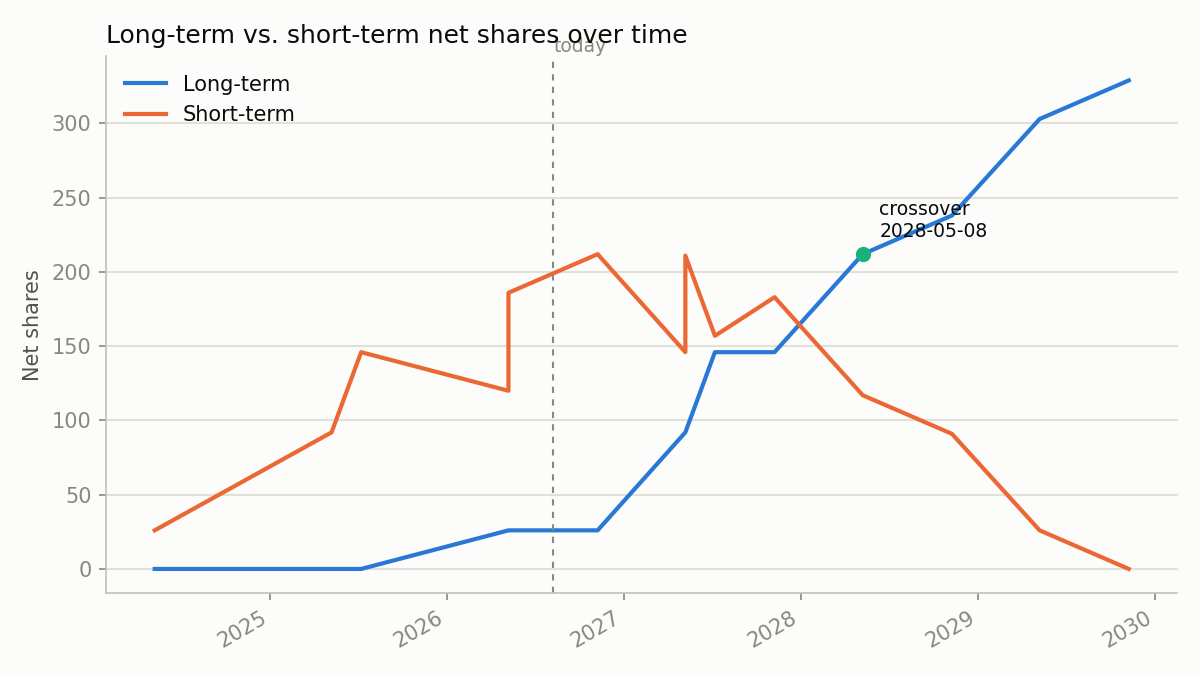
The other four (long_vs_short_term.png, rsu_vs_espp.png,
today_vs_projected.png, upcoming_vests.png) are in example/charts/ too.
example/swp_plan.pdf is a full sample SWP report from the same synthetic
data (see SWP mode above for the
command that generated it) — its cover page looks like this:
Using it with an AI coding agent
Works as a project skill/instruction file for four agents out of the box — all four read the same underlying instructions, so behavior doesn't drift between them:
| Agent | File | Setup |
|---|---|---|
| Claude Code | .claude/skills/stock-holdings/SKILL.md |
rsu-to-swp-install-skill (see below) |
| OpenAI Codex (and other AGENTS.md-aware agents) | AGENTS.md (repo root) |
Just clone/open the repo — read automatically |
| GitHub Copilot | .github/copilot-instructions.md |
Same — symlinked to AGENTS.md |
| Cursor | .cursor/rules/rsu-to-swp.mdc |
Same — Cursor pulls it in when the request looks relevant |
SKILL.md and the calculator script both ship inside the PyPI package, so
installing it is enough to set the Claude Code skill up too:
pip install rsu-to-swp
rsu-to-swp-install-skill            # installs into ./.claude/skills/stock-holdings
rsu-to-swp-install-skill --user     # installs into ~/.claude/skills — every project
Claude Code picks it up automatically on its next run in that scope — see
SKILL.md (or the tool-agnostic AGENTS.md) for the instructions it follows
(locating your workbook, asking you for a price/FX rate, running the
calculator, and reporting the results). It works with any workbook in this
export shape, not just the sample data here.
Prefer not to install anything? Clone the repo — AGENTS.md,
.github/copilot-instructions.md, and .cursor/rules/rsu-to-swp.mdc are
plain files already in place, and you can copy
.claude/skills/stock-holdings/ into another project by hand instead of
running the installer.
You can also just run rsu-to-swp directly (see Usage) without any
agent at all.
Known limitations
- Price and FX rate are point-in-time inputs you supply — not live or predicted. Treat any projected-date dollar/other-currency figure accordingly.
- Withholding on future (not-yet-vested) tranches is an estimate
(
granted × rate, rounded up) — actual withholding depends on the fair market value at the real vest date, which isn't known yet. - The FIFO oldest-lot-first sale assumption is a convention for reconstructing what you likely still hold, not necessarily your actual tax-lot election. Don't use it as the basis for a tax filing without checking against your broker's specific-lot records.
- SWP mode compounds price/FX growth at a constant annual rate — real markets and currencies move in steps, not smoothly. Treat multi-year SWP figures (especially past ~8-10 years) as illustrating the mechanism, not a forecast.
- SWP tax figures are a planning estimate, not a filing-ready calculation — cost basis is per-lot average FMV, not specific-share-lot elections, and tax rates/rules change. Confirm with a tax advisor before acting.
- This tool does not give tax or investment advice.
Privacy
This repo ships only synthetic example data. If you use this against your
own export, keep your real .xlsx file and any generated charts/ out of
version control — the included .gitignore already excludes both by default.
License
MIT — see LICENSE.
1 maintainer

Metadata
1 maintainer
Release files for rsu-to-swp 0.1.1
For a detailed explanation of source distributions (sdists) and built distributions (wheels), please see the package formats documentation.
Source distribution (sdist)
| File | Size | Uploaded | |
|---|---|---|---|
| rsu_to_swp-0.1.1.tar.gz | 25.4 kB | Details |
Built distribution (wheel)
| File | Interpreter | ABI | Platform | Reset |
|---|---|---|---|---|
| rsu_to_swp-0.1.1-py3-none-any.whl | Python 3 | none | any | Details |
Total release size: 53.2 kB
Release files / rsu_to_swp-0.1.1.tar.gz
| Download URL | rsu_to_swp-0.1.1.tar.gz |
|---|---|
| Size | 25.4 kB |
| Tags | Source |
|
SHA-256 checksum How to use checksums |
7e46e15ecd8559c27eb636f6b67c3aa40ded27c8df9e09c850ea64d46c23c6d2
|
|
BLAKE2b-256 checksum How to use checksums |
cabf94f9e59a0912a887e212935425e288040ba5cdafaf7b82a5f13430388d9a
|
| Upload date | |
|
Uploaded using Trusted Publishing? What is trusted publishing? |
Yes |
| Uploaded via |
twine/7.0.0 CPython/3.13.14
|
Provenance
Provenance describes where a file came from. On PyPI, provenance is shared via attestations, which provide a verifiable record of the build or publishing details. View details, limitations and caveats.


PyPI Publish Attestation
PyPI verified that this artifact, at this checksum, originated from the publisher listed below.
Signed by GitHub Actions, verified by PyPI on Aug 9, 2026.
Transparency logRelease files / rsu_to_swp-0.1.1-py3-none-any.whl
| Download URL | rsu_to_swp-0.1.1-py3-none-any.whl |
|---|---|
| Size | 27.8 kB |
| Tags | Python 3 |
|
SHA-256 checksum How to use checksums |
79cc484a89852ec71fc7a1c4b3bb4438e598a909de6b8b9770baefa2cb175365
|
|
BLAKE2b-256 checksum How to use checksums |
9886acb9d1415ce1770b2f6843dd79c0cdf9cb51d979925aaec66851623c0d7d
|
| Upload date | |
|
Uploaded using Trusted Publishing? What is trusted publishing? |
Yes |
| Uploaded via |
twine/7.0.0 CPython/3.13.14
|
Provenance
Provenance describes where a file came from. On PyPI, provenance is shared via attestations, which provide a verifiable record of the build or publishing details. View details, limitations and caveats.
PyPI Publish Attestation
PyPI verified that this artifact, at this checksum, originated from the publisher listed below.
Signed by GitHub Actions, verified by PyPI on Aug 9, 2026.
Transparency log













