
Solve electrical circuits

Project description
RTDS Circuit Analysis
RTDS Circuit Analysis is a Python software for solving electrical circuits, when given their netlist. It
accepts literal values for each component value (such as Vin for the voltage for a source), and output the solutions
as mathematical expressions/equations, based upon these literal values.
Installation
If you plan on using the command line interface for this software, you can use pipx for this:
pipx install rtds-circuit-analysis
If you want to use the library, however, you might prefer using pip for the installation:
pip install rtds-circuit-analysis
Netlist
Before actually using this program, you will need to write the circuit you want to analise as a netlist.
This software uses a netlist style similar to SPICE programs, where each line corresponds to each component in the
circuit. They will be formatted like VIN IN 0 V, where:
- The the first letter in the first word,
Vis the component type (V for voltage source, R for resistors, etc), and together with the other letters,VIN, make up the component name. - The second and third words are the nodes the component is connected to. Their names are arbitrary, except for the node 0, which will always be ground. It is also always necessary.
- The final word will be the value for the circuit. It can be a literal (such as in this case,
V), a numeric value (like10k), or a combination of both (like10VIN).
For more info on how to write your netlists, check out here
For example, here is a basic RLC circuit...
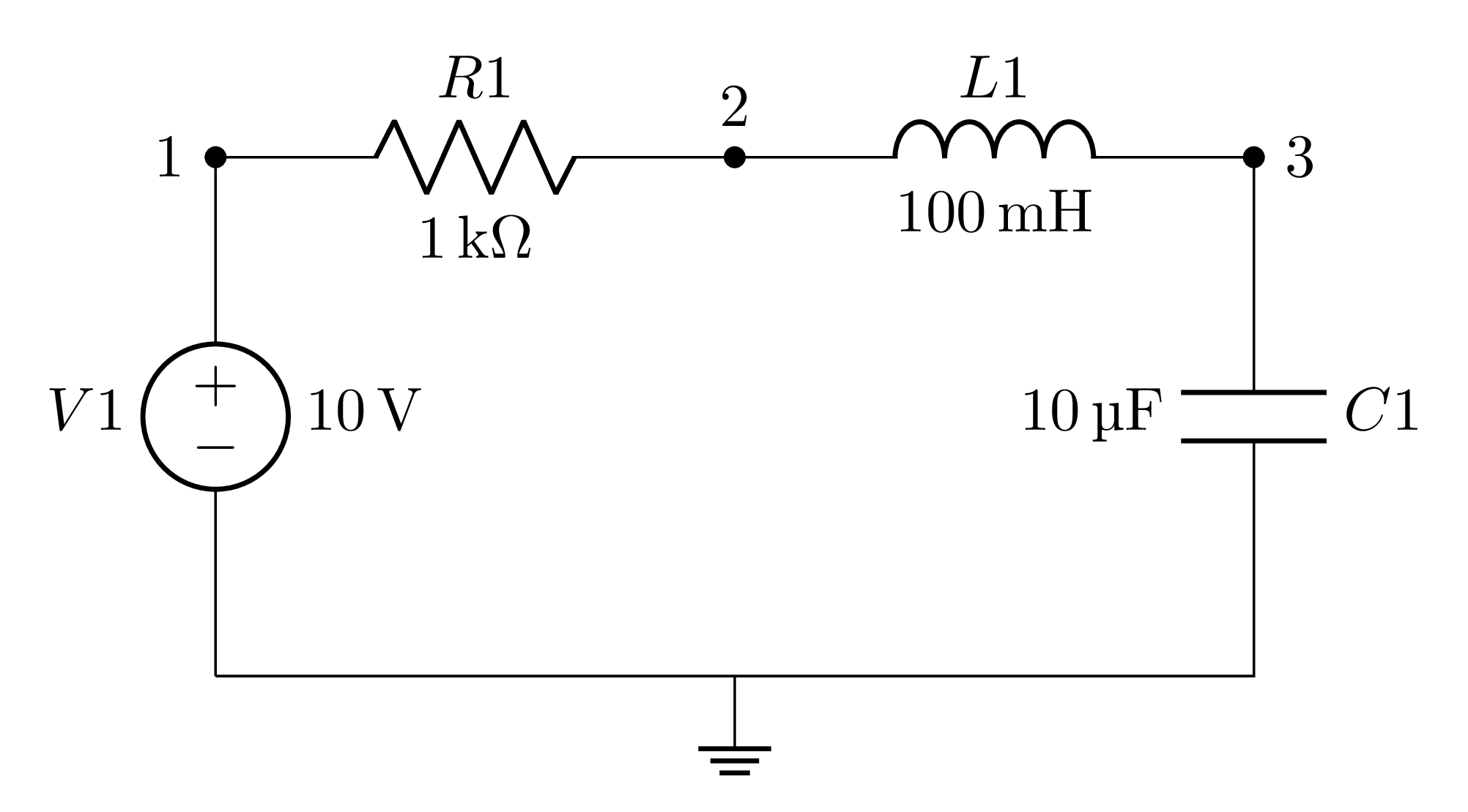
... and its netlist representation:
V1 1 0 10
R1 1 2 1k
L1 2 3 100m
C1 3 0 10u
Usage
After creating the netlist, store it into a netlist.cir, and choose how you intent on using this software:
Command Line Interface
The basic usage for the CLI software is in the form:
rtds-circuit-analysis netlist.cir
This will print all the solutions for the circuit (node voltages, currents, states, etc). You can use flags to filter the output. For example, to show only the currents for each component, you can run:
rtds-circuit-analysis netlist.cir -i
You can filter it even more, by giving the components/node names to the flags as parameters. So, if you want the voltage and current for the resistor R1 only, you can run:
rtds-circuit-analysis netlist.cir -v R1 -i R1
To take a look at every flag available, run the help command:
rtds-circuit-analysis -h
For more info on how to use the cli, check out here
Library
To solve the circuit, you need to import the Circuit class, and pass the netlist as a parameter, creating a circuit
object.
from rtds_circuit_analysis import Circuit

circuit = Circuit("netlist.cir")
This circuit object will have all circuit solutions stored as attributes. So, for example, to find the voltage at node
"2", you can use:
circuit.node_voltages["2"]
You can also use the print methods to print the solutions for the circuit in a formatted manner, similar to the
CLI. For example, to print the voltages for the components R1 and R2, you can run:
circuit.print_component_voltages("R1", "R2")
For more info on how to use the library, check out here
Output Examples
Some examples of the full output for some circuits and their netlists:
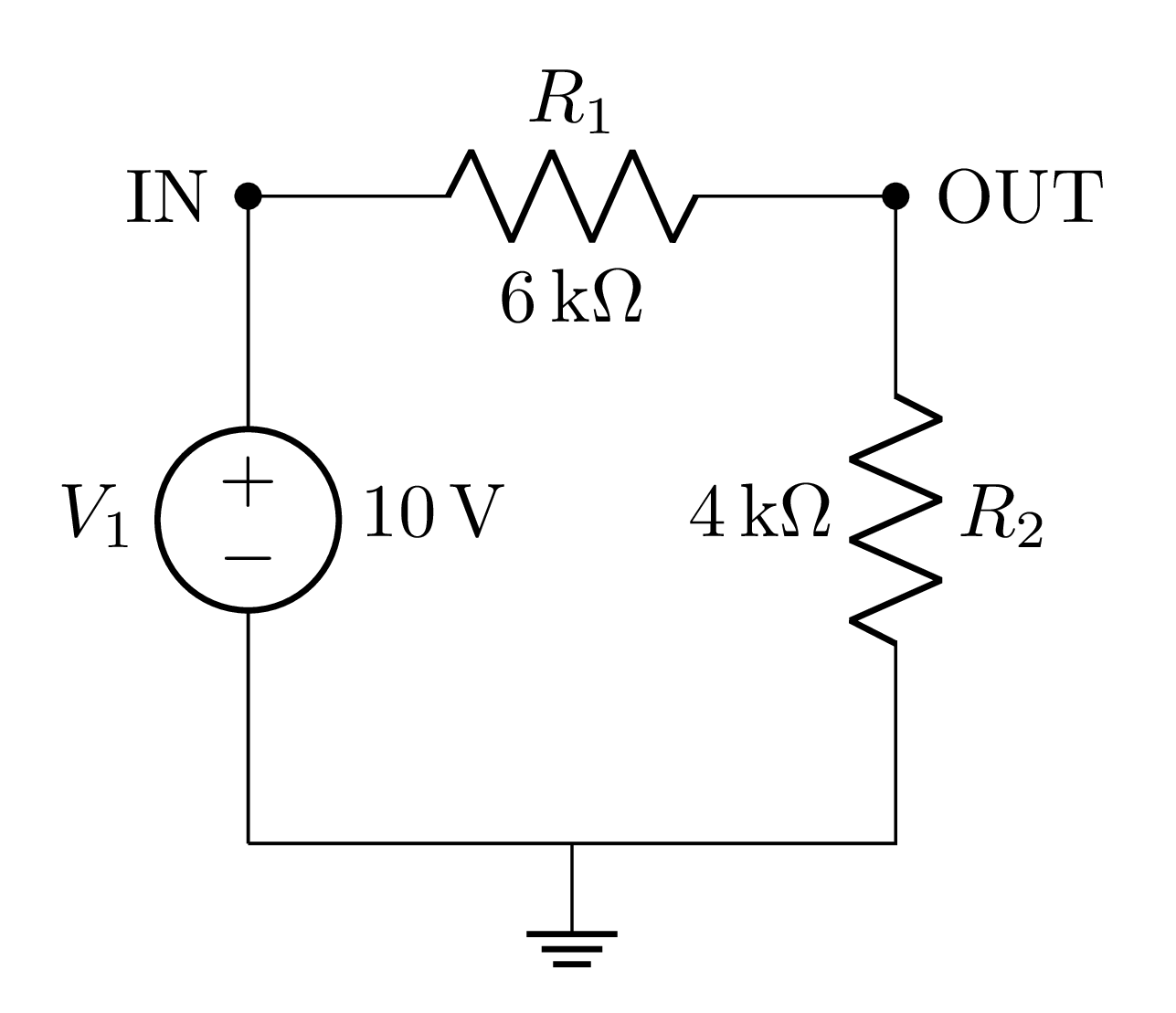
Voltage Divisor
Circuit
Netlist
V1 IN 0 10
R1 IN OUT 6k
R2 OUT 0 4k
Output
*** Currents ***

V1 --> 1/1000
R1 --> 1/1000
R2 --> 1/1000

*** Voltages (components) ***
R1 --> 6
R2 --> 4

*** Voltages (nodes) ***
IN --> 10
OUT --> 4

*** This circuit is stateless ***
RLC Circuit
Circuit
Netlist
V1 1 0 10
R1 1 2 1k
L1 2 3 100m
C1 3 0 10u
.STEP 1e-3
Output
*** Currents ***
V1 --> IL1
R1 --> IL1
C1 --> IL1

*** Voltages (components) ***
R1 --> 1000*IL1
L1 --> -1000*IL1 - VC1 + 10

*** Voltages (nodes) ***
1 --> 10
3 --> VC1
2 --> 10 - 1000*IL1

*** State equations (continuous) ***
dIL1/dt = -10000*IL1 - 10*VC1 + 100
dVC1/dt = 100000*IL1

*** State equations (forward) ***
IL1_{n} = -9*IL1_{n-1} - VC1_{n-1}/100 + 1/10
VC1_{n} = 100*IL1_{n-1} + VC1_{n-1}

*** State equations (backward) ***
IL1_{n} = IL1_{n-1}/12 - VC1_{n-1}/1200 + 1/120
VC1_{n} = 25*IL1_{n-1}/3 + 11*VC1_{n-1}/12 + 5/6

*** State equations (trapezoidal) ***
IL1_{n} = -17*IL1_{n-1}/25 - VC1_{n-1}/625 + 2/125
VC1_{n} = 16*IL1_{n-1} + 23*VC1_{n-1}/25 + 4/5
For more info on how to interpret the solutions, check out here
Project details


Download files
Download the file for your platform. If you're not sure which to choose, learn more about installing packages.
Source Distribution
Built Distribution
Filter files by name, interpreter, ABI, and platform.
If you're not sure about the file name format, learn more about wheel file names.
Copy a direct link to the current filters
File details
Details for the file rtds_circuit_analysis-0.3.0.tar.gz.
File metadata
- Download URL: rtds_circuit_analysis-0.3.0.tar.gz
- Upload date:
- Size: 33.0 kB
- Tags: Source
- Uploaded using Trusted Publishing? No
- Uploaded via: twine/7.0.0 CPython/3.14.6
File hashes
| Algorithm | Hash digest | |
|---|---|---|
| SHA256 |
1a7729fe06744b0d47531791aa6bd9d59d400c7148a31b009302bd895eaf230b
|
|
| MD5 |
b00403c7f57f4e8627fe75fd927a5102
|
|
| BLAKE2b-256 |
cb82c5e18866634aa64d4b5df1870f87fbbb21f97da0e742485e7b33bb529a87
|
File details
Details for the file rtds_circuit_analysis-0.3.0-py3-none-any.whl.
File metadata
- Download URL: rtds_circuit_analysis-0.3.0-py3-none-any.whl
- Upload date:
- Size: 31.7 kB
- Tags: Python 3
- Uploaded using Trusted Publishing? No
- Uploaded via: twine/7.0.0 CPython/3.14.6
File hashes
| Algorithm | Hash digest | |
|---|---|---|
| SHA256 |
51663eded32c948ee33d724b375701b571c31306a6b6126517ff0b1c59756ab5
|
|
| MD5 |
039a9b6c9862a7443f75a88cb62d43ed
|
|
| BLAKE2b-256 |
649b6837ba8d87c95934b1e2759dfb62d27a158cd25bee93fd34fff470f43fd9
|






