
rtl_433_discoverandsubmit
A Home Assistant integration that connects to an MQTT server, listens to rtl_433 events and allows users to add devices through the standard discovery flow.
Features
- Connects to an MQTT server.
- Listens to
rtl_433events in real-time. - Uses Home Assistant's config flow to manage devices.
- No entities are created without user confirmation.
- Includes a command line interface for manual discovery.
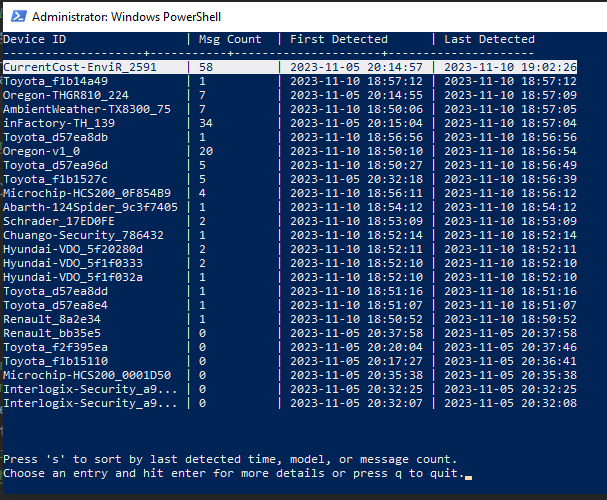
- Allows sorting of devices by last seen time, model or message count.
- Press k in the CLI to reset message counters.

Screenshot of devices listed
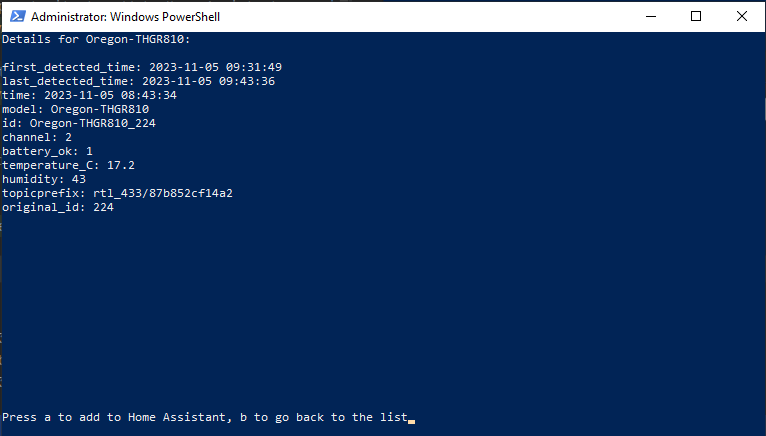
Detailed device view and opportunity to add to Home Assistant
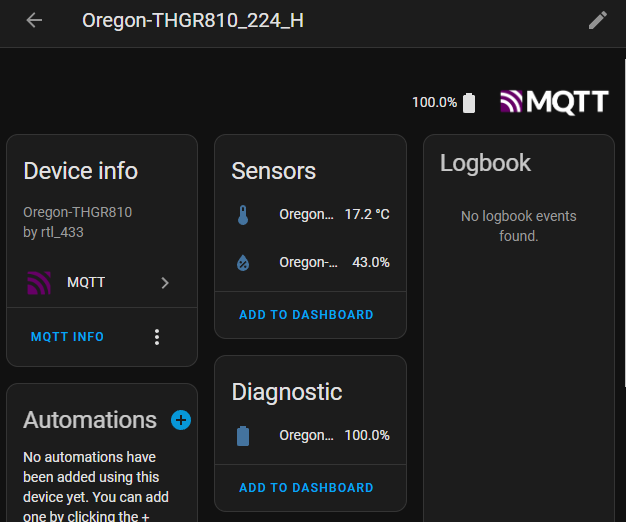
Device added to Home Assistant
Installation
You can install rtl_433_discoverandsubmit directly from PyPI:
pip install rtl_433_discoverandsubmit
Usage
Install the custom integration and add it via Home Assistant's integrations page. During setup you will be asked for MQTT connection details and the topic to listen to. Newly discovered devices will trigger a prompt asking whether they should be added.
The package also installs a small CLI tool called rtl_433_discoverandsubmit which can be used without Home Assistant. Run it with your MQTT connection details:
rtl_433_discoverandsubmit --mqtt_server 192.168.1.10 --mqtt_port 1883 --topic rtl_433/+/events
Use the s key to cycle sorting of detected devices and k to reset the message counters if you want to start again. Accepted devices are persisted in ~/.rtl_433_discoverandsubmit/devices.json.
##Contributing
Feedback, bug reports, and pull requests are super welcome on this project. If you face any issues, please raise them in the issue tracker.
##License
This project is licensed under the MIT License. See the LICENSE file for more details.
1 maintainer

Download files
Download the file for your platform. If you're not sure which to choose, learn more about installing packages.
Source Distribution
Built Distribution
Filter files by name, interpreter, ABI, and platform.
If you're not sure about the file name format, learn more about wheel file names.
Copy a direct link to the current filters
File details
Details for the file rtl_433_discoverandsubmit-0.1.14.tar.gz.
File metadata
- Download URL: rtl_433_discoverandsubmit-0.1.14.tar.gz
- Upload date:
- Size: 16.6 kB
- Tags: Source
- Uploaded using Trusted Publishing? No
- Uploaded via:
twine/6.1.0 CPython/3.9.23
File hashes
| Algorithm | Hash digest | |
|---|---|---|
| SHA256 |
759871e93b418dd7b1e65fbd0406e54b88223ff66e8e9d69bc11afcc4bab63bd
|
|
| MD5 |
83b40787fadec1b248b2a14bab3ed84a
|
|
| BLAKE2b-256 |
254fd989aa71b359cf1e822b5290ad495c9c527ed7e08927e60c35aab3be4d92
|
File details
Details for the file rtl_433_discoverandsubmit-0.1.14-py3-none-any.whl.
File metadata
- Download URL: rtl_433_discoverandsubmit-0.1.14-py3-none-any.whl
- Upload date:
- Size: 18.7 kB
- Tags: Python 3
- Uploaded using Trusted Publishing? No
- Uploaded via:
twine/6.1.0 CPython/3.9.23
File hashes
| Algorithm | Hash digest | |
|---|---|---|
| SHA256 |
82077ef832bb01e666c63416505c24ae0e6914178a90e6fd2e9b072250173697
|
|
| MD5 |
f26eca9d9d66d2082d0e49bc188dff86
|
|
| BLAKE2b-256 |
03b341bbee2ba1ecf589da1284a3f778272e16ac50afbc2cb6d149c956992065
|














