
A PyNaCl frontend with custom encodings, compression, and key derivation

Project description
rtty-soda
A PyNaCl frontend with custom encodings, compression, and key derivation.
Features
- Public key encryption (Curve25519-XSalsa20-Poly1305)
- Secret key encryption (XSalsa20-Poly1305)
- Key derivation (Argon2id-Blake2b)
- Text compression:
- brotli (Brotli, best ratio, default)
- zstd (Zstandard, fast, good ratio)
- zlib (Deflate, used by gzip)
- bz2 (Bzip2, used in tar.bz2)
- lzma (LZMA, good ratio on large data)
- raw (No compression, improves security)
- Custom encodings:
- base10 (Decimal)
- base26 (Latin)
- base31 (Cyrillic)
- base32 (RFC 4648)
- base36 (Latin with digits)
- base64 (RFC 4648)
- base94 (ASCII printable)
- binary (Raw bytes)
Installation
Package manager
- Install uv
- Install rtty-soda:
% uv tool install "rtty-soda[cli]" - Remove rtty-soda:
% uv tool uninstall rtty-soda
Docker
% docker run -it --rm -h rtty-soda -v .:/app/host nett/rtty-soda:0.7.1
% docker run -it --rm -h rtty-soda -v .:/app/host nett/rtty-soda:0.7.1-tools
Getting help
All commands have [-h | --help] option.
% soda
Usage: soda [OPTIONS] COMMAND [ARGS]...

Options:
  --version   Show the version and exit.
  -h, --help  Show this message and exit.

Commands:
  compression            List supported compression libs.
  decrypt-password (dp)  Decrypt message (password).
  decrypt-public (d)     Decrypt message (public).
  decrypt-secret (ds)    Decrypt message (secret).
  encode                 Encode file.
  encodings              List supported encodings.
  encrypt-password (ep)  Encrypt message (password).
  encrypt-public (e)     Encrypt message (public).
  encrypt-secret (es)    Encrypt message (secret).
  genkey                 Generate private/secret key.
  google-auth (ga)       Google Authenticator TOTP.
  kdf                    Key derivation function.
  kdf-profiles           List supported KDF profiles.
  pubkey                 Get public key.
Some commands have aliases, so % soda encrypt-password ... and % soda ep ...
are equivalent.
Public key encryption
Key generation
% soda genkey | tee alice | soda pubkey - | tee alice_pub
8hFMSwo/6pTCRQfNqYxkSpDI/0v92zkESYj4mN2eXXk=

% soda genkey | tee bob | soda pubkey - | tee bob_pub
SlwXUXlbgVEMC51KUjWBfa0+XtFY4JhVXJ1Ogu4BnUk=

% soda genkey -h
Usage: soda genkey [OPTIONS]

  Generate private/secret key.

Options:
  -s, --key-passphrase TEXT  Private/secret key passphrase.
  -e, --encoding ENCODING    See `soda encodings`.  [default: base64]
  -o, --output-file FILE     Write output to file.
  -g, --group-len INTEGER    [default: 0]
  --line-len INTEGER         [default: 80]
  --padding INTEGER          [default: 0]
  -v, --verbose              Show verbose output.
  -h, --help                 Show this message and exit.
Encryption
Alice sends the message to Bob:
% cat message
A telegraph key is a specialized electrical switch used by a trained operator to
transmit text messages in Morse code in a telegraphy system.
The first telegraph key was invented by Alfred Vail, an associate of Samuel Morse.
(c) Wikipedia

% soda encrypt-public alice bob_pub message | tee encrypted | cut -c 1-80
2d0w2ZYvGoRHXHJk/WT8NepRGyC+Bm1v7f1Vjmm9ZFLx1dW7mnzqT2uXfFIpP2sKP5QISVVsb/WidEcH

% soda encrypt-public -h
Usage: soda encrypt-public [OPTIONS] PRIVATE_KEY_FILE PUBLIC_KEY_FILE
                           MESSAGE_FILE

  Encrypt message (public).

Options:
  -t, --text                     Treat message as text (binary if not
                                 specified).
  -s, --key-passphrase TEXT      Private/secret key passphrase.
  --key-encoding ENCODING        See `soda encodings`.  [default: base64]
  -e, --data-encoding ENCODING   See `soda encodings`.  [default: base64]
  -c, --compression COMPRESSION  See `soda compression`.  [default: brotli]
  -o, --output-file FILE         Write output to file.
  -g, --group-len INTEGER        [default: 0]
  --line-len INTEGER             [default: 80]
  --padding INTEGER              [default: 0]
  -v, --verbose                  Show verbose output.
  -h, --help                     Show this message and exit.
Decryption
% soda decrypt-public bob alice_pub encrypted
A telegraph key is a specialized electrical switch used by a trained operator to
transmit text messages in Morse code in a telegraphy system.
The first telegraph key was invented by Alfred Vail, an associate of Samuel Morse.
(c) Wikipedia
Secret key encryption
Alice and Bob share a key for symmetric encryption:
% soda genkey > shared
% soda encrypt-secret shared message -o encrypted
% soda decrypt-secret shared encrypted -o message
Another day, they share a password:
% echo qwerty | soda encrypt-password - message -p interactive -o encrypted
% echo qwerty | soda decrypt-password - encrypted -p interactive -o message
Key derivation
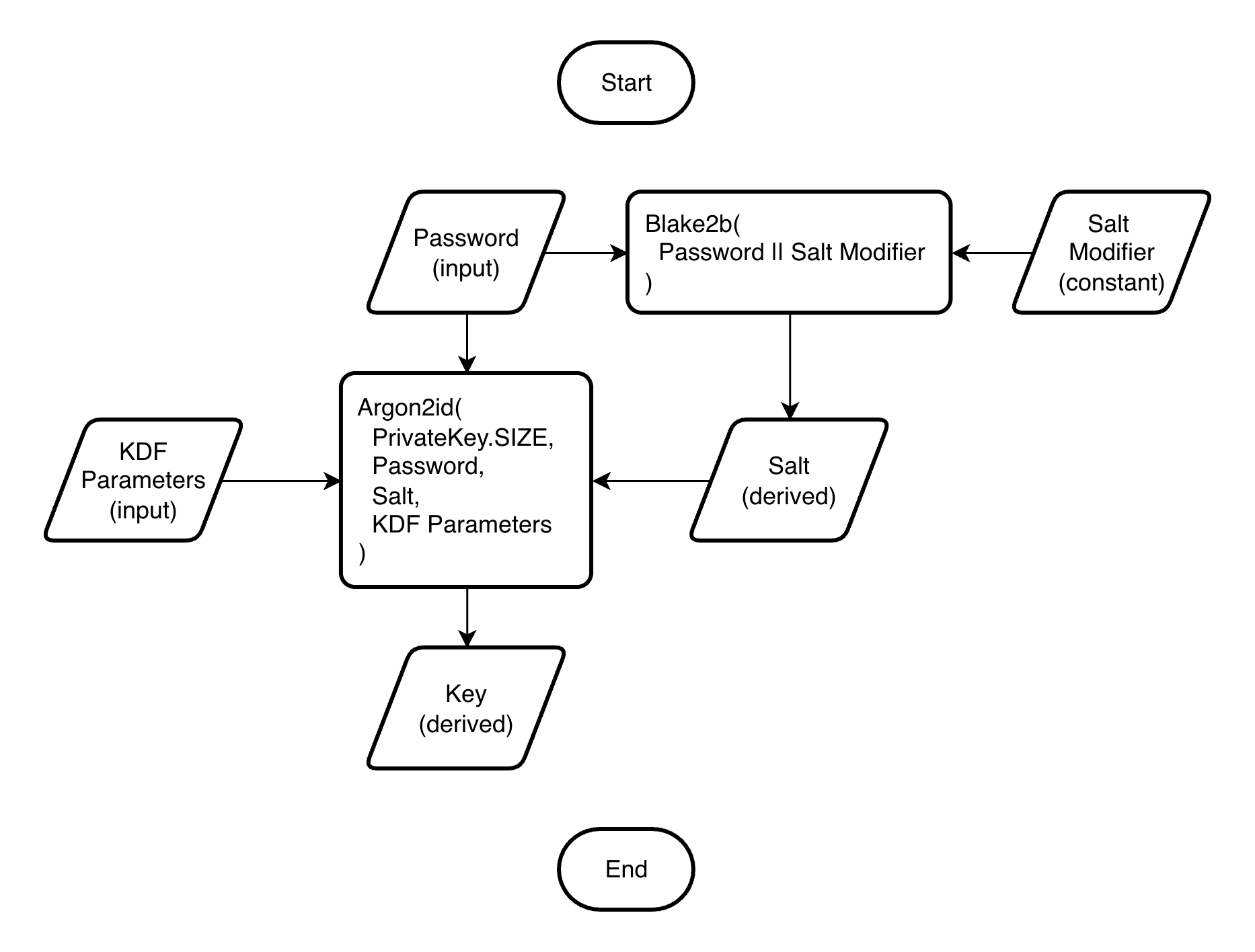
The KDF function derives the key from the password using Argon2id, a memory-hard algorithm that makes brute-force attacks expensive by requiring large amounts of memory.
It accepts different profiles:
- interactive (64 MiB, 2 passes)
- moderate (256 MiB, 3 passes)
- sensitive (1 GiB, 4 passes)
The top profile uses 1 GiB - half the memory of the RFC 9106 recommendation for practical use. The profiles are defined by libsodium.
The KDF function is deterministic, so identical passwords produce identical keys. No metadata is stored or asked of the user to keep the interface simple. The trade-off is that password strength is critical.
% echo qwerty | soda kdf - -p interactive
HqbvUXflAG+no3YS9njezZ3leyr8IwERAyeNoG2l41U=

% soda kdf -h
Usage: soda kdf [OPTIONS] PASSWORD_FILE

  Key derivation function.

Options:
  -s, --key-passphrase TEXT  Private/secret key passphrase.
  -e, --encoding ENCODING    See `soda encodings`.  [default: base64]
  -p, --profile PROFILE      See `soda kdf-profiles`.  [default: sensitive]
  -o, --output-file FILE     Write output to file.
  -g, --group-len INTEGER    [default: 0]
  --line-len INTEGER         [default: 80]
  --padding INTEGER          [default: 0]
  -v, --verbose              Show verbose output.
  -h, --help                 Show this message and exit.
Text compression
That works as follows:
- The plaintext is prepared:
- In binary mode (default), the message is read as bytes
- In text mode (
-t, --text), the message is read as a string, stripped, and encoded with SCSU, reducing the size of Unicode messages by 15–50%
- The plaintext is compressed with the compression lib
- The 16-byte MAC and 24-byte nonce are added
- The result is encoded with Base64, which adds ~33% overhead
% soda es shared message -t -v -c brotli > /dev/null
Plaintext: 238
Ciphertext: 216
Overhead: 0.908
Groups: 1
% soda es shared message -t -v -c zstd > /dev/null
Plaintext: 238
Ciphertext: 276
Overhead: 1.160
Groups: 1
% soda es shared message -t -v -c zlib > /dev/null
Plaintext: 238
Ciphertext: 280
Overhead: 1.176
Groups: 1
% soda es shared message -t -v -c bz2 > /dev/null
Plaintext: 238
Ciphertext: 336
Overhead: 1.412
Groups: 1
% soda es shared message -t -v -c lzma > /dev/null
Plaintext: 238
Ciphertext: 320
Overhead: 1.345
Groups: 1
% soda es shared message -t -v -c raw > /dev/null
Plaintext: 238
Ciphertext: 372
Overhead: 1.563
Groups: 1
Encoding
The rtty-soda supports various encodings:
% soda encrypt-public alice bob_pub message --data-encoding base36 --group-len 5 --text
2T4XT IVK0M UBUQR NPP9X U0HAU JH44C DEJ8L MV4EK HAS15 09JXO 6EYB3 5CAAB 4H3BW
0O8EO 9CQ9M 93O0C 8IKYI FW9EZ HWMSR GZSUR AZBGV 9Y26D Q63JA P3OK1 HLEM8 KZJ3D
ZX7QU DP9WT FTZUP KIA9L 53LTP 6FB8A HSO9B Y8IJ0 3ZWXI ZO2VX 9B3RP 2Z7DR T9IBE
AI404 D2282 PGX6G WT85T WSCNF WD4DF 9RDHF OXRUA TYS2I 45LJ1 05W
Environment variables
Common options can be set in the environment variables:
% cat ~/.soda/example.env
SODA_TEXT=0
SODA_KEY_PASSPHRASE="He in a few minutes ravished this fair creature, or at least would have ravished her, if she had not, by a timely compliance, prevented him."
SODA_KEY_ENCODING=binary
SODA_DATA_ENCODING=binary
SODA_COMPRESSION=brotli
SODA_KDF_PROFILE=sensitive
SODA_GROUP_LEN=0
SODA_LINE_LEN=0
SODA_PADDING=0
SODA_VERBOSE=0
Private/secret key passphrase
The key can be protected with an additional passphrase, similar to SSH keys.
When --key-passphrase <passphrase> is used, the key is automatically
encrypted or decrypted using the same parameters as the following command:
% soda encrypt-password <passphrase> <key> --kdf-profile sensitive --data-encoding binary --compression raw
Alternative usage
-
Password source
% echo "A line from a book or a poem" | soda kdf - -e base94 -p interactive x\R9"~8Ujh^_uh:Ty<!t(ZNzK=5w^ukew~#-x!n -
WireGuard keyer
% echo "A line from a book or a poem" | soda kdf - -p interactive -o privkey % cat privkey uIoBJdgaz8ZP3/n/9KzdUNvFi7DxbUQdQ9t8ujwGnMk= % soda pubkey privkey F2B674kXVcTznnRPWCVasx1miCT+yUtXQ3P5Ecee4zI= % cat privkey | wg pubkey F2B674kXVcTznnRPWCVasx1miCT+yUtXQ3P5Ecee4zI= -
Secure storage
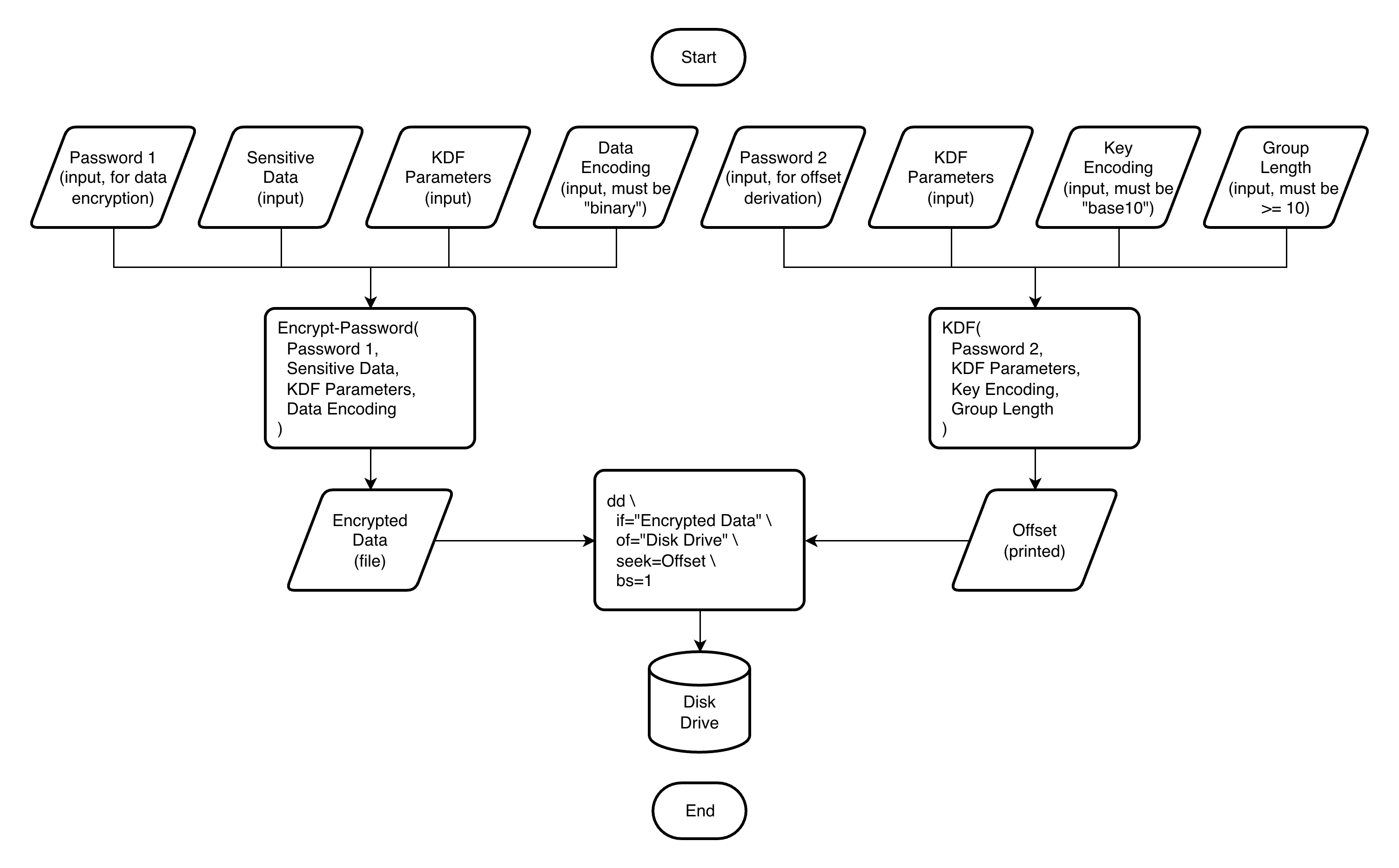
% echo "A remarkable example of misplaced confidence" > sensitive_data % echo "Blessed with opinions, cursed with thought" > data_password % soda ep data_password sensitive_data -e binary -p interactive -o encrypted_data % echo "Too serious to be wise" > offset_password % soda kdf offset_password -e base10 -p interactive -g 10 | head -1 6174465709 4962164854 2541023297 3274271197 5950333784 2118297875 9632383288 % sudo dd if=./encrypted_data of=/dev/sdb1 bs=1 seek=6174465709 75+0 records in 75+0 records out 75 bytes transferred in 0.000769 secs (97529 bytes/sec) -
Google Authenticator keyer
% soda genkey -e base32 | tee totp_key
CEC265QHHVCWNRG2CP5J4P4BTRKYLBIF2CXSUEVOM3HJYRRCJBEA====
% soda google-auth totp_key
106 072 (expires in 8s)
Compatibility
During the initial development (versions prior to 1.0.0), I can break backwards compatibility.
Releases
This project follows a rolling release cycle. Each version bump represents where I completed a full test cycle. When testing passes successfully, I commit and release - so every release is a verified stable point.
Release history Release notifications | RSS feed


Download files
Download the file for your platform. If you're not sure which to choose, learn more about installing packages.
Source Distribution
Built Distribution
Filter files by name, interpreter, ABI, and platform.
If you're not sure about the file name format, learn more about wheel file names.
Copy a direct link to the current filters
File details
Details for the file rtty_soda-0.7.1.tar.gz.
File metadata
- Download URL: rtty_soda-0.7.1.tar.gz
- Upload date:
- Size: 14.7 kB
- Tags: Source
- Uploaded using Trusted Publishing? No
- Uploaded via: uv/0.10.2 {"installer":{"name":"uv","version":"0.10.2","subcommand":["publish"]},"python":null,"implementation":{"name":null,"version":null},"distro":{"name":"macOS","version":null,"id":null,"libc":null},"system":{"name":null,"release":null},"cpu":null,"openssl_version":null,"setuptools_version":null,"rustc_version":null,"ci":null}
File hashes
| Algorithm | Hash digest | |
|---|---|---|
| SHA256 |
9be1b9b5e0d5e83207271527fc781595a067c9ea0f90e73bc80d5c473707f553
|
|
| MD5 |
e60c160283c88e024d723f01e1042938
|
|
| BLAKE2b-256 |
0c6c80c771cd41b71101a288e36ac7343e96451c1d16263070b72789e2ddcc3d
|
File details
Details for the file rtty_soda-0.7.1-py3-none-any.whl.
File metadata
- Download URL: rtty_soda-0.7.1-py3-none-any.whl
- Upload date:
- Size: 22.5 kB
- Tags: Python 3
- Uploaded using Trusted Publishing? No
- Uploaded via: uv/0.10.2 {"installer":{"name":"uv","version":"0.10.2","subcommand":["publish"]},"python":null,"implementation":{"name":null,"version":null},"distro":{"name":"macOS","version":null,"id":null,"libc":null},"system":{"name":null,"release":null},"cpu":null,"openssl_version":null,"setuptools_version":null,"rustc_version":null,"ci":null}
File hashes
| Algorithm | Hash digest | |
|---|---|---|
| SHA256 |
a061826aa6fed49628d418e99fe58dbdc92e5d4e0213031d30940916b9355323
|
|
| MD5 |
c74336f685bd9fea6b3fd15a9c15b670
|
|
| BLAKE2b-256 |
efd474f7ad2e13b9b61ef0e648669ffd0787cf5b7a05e5e65e097ce53f71d512
|






