
rubis







ADC board for 16 channels Slow Control on Raspberry pi. This repository provides board design and control software.
Demo
- 30 seconds to start

- Web watching demo
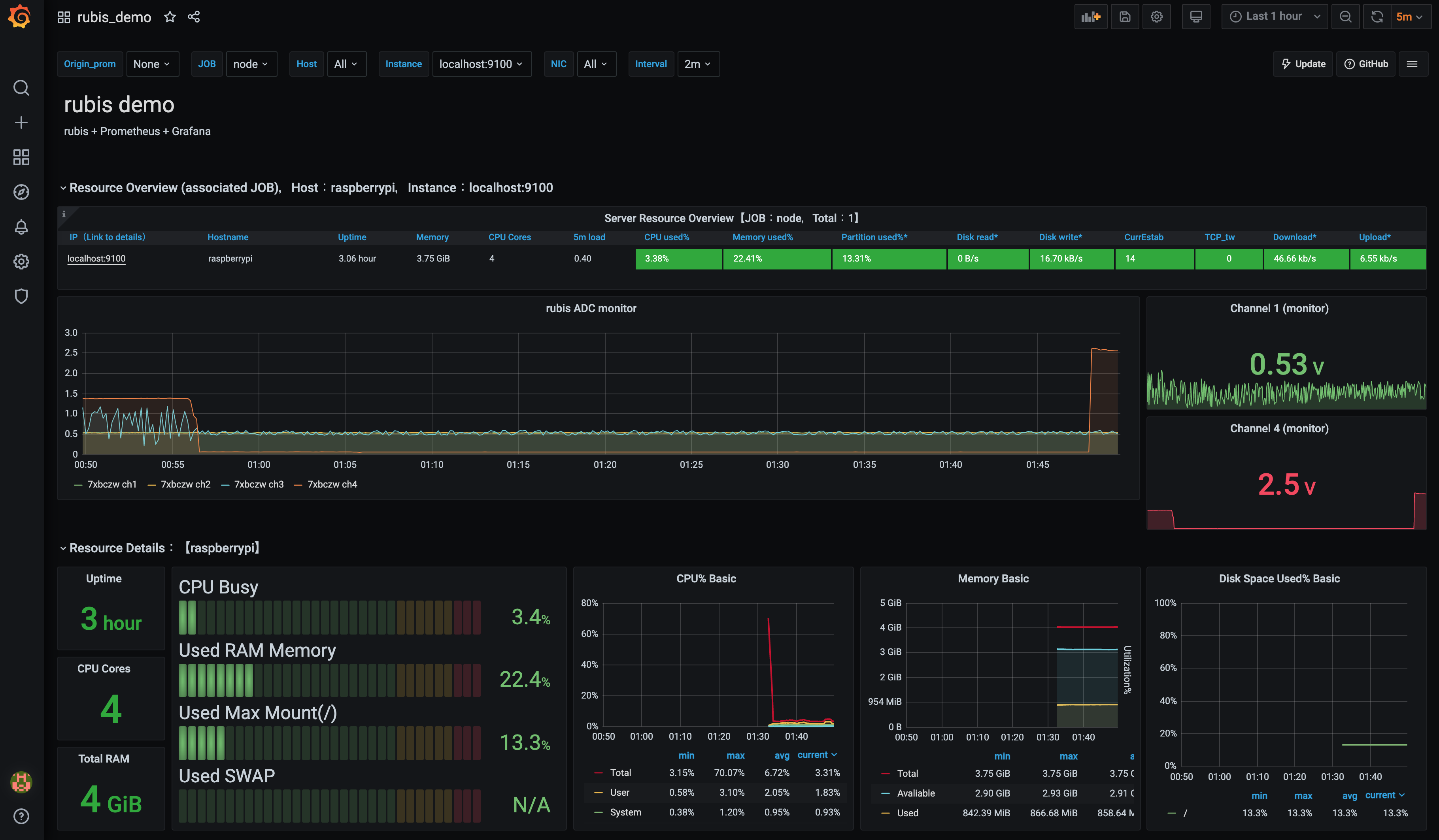 It is easy to watch your sensors with rubis + Grafana
- PCB view on Raspbery Pi
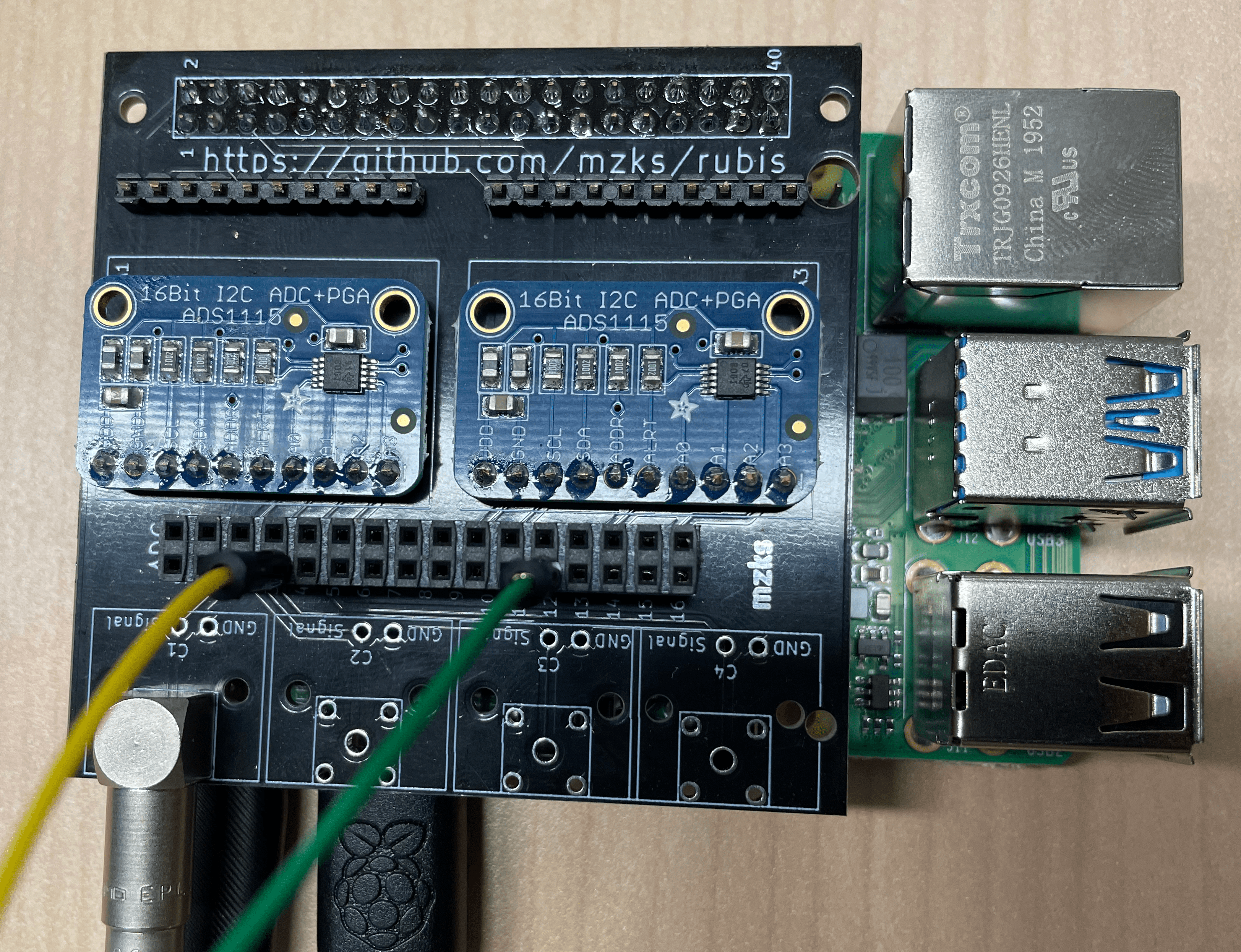
Feature
- Standalone
- Inexpensive
- Multi channels (16 ch) and additional connectors (4 ch)
- Including CLI software (This!)
Hardware components
- rubis board - less than 5 dollars at elecrow
- Raspberry Pi (1B+, 2B, 3B, 3B+, 4B, Zero)
- PIN Socket
- ADC Board * 1--4 / 20 dollers per board
- BNC Connector ( * 4, optional)
- SMA Connector ( * 4, optional)
- LEMO Connector (Optional)
Hardware
You need to connect the four GPIO pins arranged in a square (Pin 3 -- SDA, Pin 4 -- 5V, Pin 5 -- SCL, Pin 6 -- GND).
Software
Install
Before run, enable I2C on Raspberry Pi. (sudo raspi-config)
Then, you can find the i2c devices like this.
> sudo i2cdetect -y 1
     0  1  2  3  4  5  6  7  8  9  a  b  c  d  e  f
00:          -- -- -- -- -- -- -- -- -- -- -- -- --
10: -- -- -- -- -- -- -- -- -- -- -- -- -- -- -- --
20: -- -- -- -- -- -- -- -- -- -- -- -- -- -- -- --
30: -- -- -- -- -- -- -- -- -- -- -- -- -- -- -- --
40: -- -- -- -- -- -- -- -- 48 49 4a 4b -- -- -- --
50: -- -- -- -- -- -- -- -- -- -- -- -- -- -- -- --
60: -- -- -- -- -- -- -- -- -- -- -- -- -- -- -- --
70: -- -- -- -- -- -- -- --
If you will use an old raspberry pi, run sudo apt install libatlas-base-dev to use numpy (This tool doesn't depend on numpy).
Then, type pip3 install rubis
The rubis binary will be provided at ~/.local/bin/rubis
You want mysql store, please see Database setting below.
Usage
When you execute rubis without option, logging immidiately starts with default configurations.
You can use your custom configuration file with -c option.
rubis -g generates template config file.
Edit them, then run rubis -c custom_config.json.
At the strong request of the author's supervisor, the following commands are available to people in CYGNUS (dark matter search experiment) without creating or editing a new configuration file.
rubis -c cygnus
In addition of cygnus, one_board and mysql configurations are pre-defined.
Some configurations can be overwrited with command line options.
rubis -h provides option descriptions.
The output file format is CSV/MySQL.
As a default, the csv files like sc-20211029-75enrt.csv are created.
The 75enrt is a unique hash created by configurations.
The hash helps separation not to mix files taken with different configurations.
The CSV format is like that.
time,ch1,ch2,ch3,ch4,ch5,ch6,ch7,ch8,ch9,ch10,ch11,ch12,ch13,ch14,ch15,ch16
2021-10-29 00:49:50, 0.5481417, 0.5476417, 0.5483917, 0.5476417, 0.5432666, 0.5430166, 0.5441416, 0.5433916, 0.5486417, 0.5478917, 0.5482667, 0.5477667, 0.5441416, 0.5446416, 0.5440166, 0.5440166
2021-10-29 00:50:51, 0.5486417, 0.5483917, 0.5475167, 0.5476417, 0.5437666, 0.5435166, 0.5435166, 0.5436416, 0.5482667, 0.5483917, 0.5485167, 0.5481417, 0.5451416, 0.5451416, 0.5438916, 0.5437666
2021-10-29 00:51:51, 0.5480167, 0.5478917, 0.5480167, 0.5475167, 0.5432666, 0.5431416, 0.5430166, 0.5437666, 0.5482667, 0.5481417, 0.5481417, 0.5480167, 0.5445166, 0.5436416, 0.5443916, 0.5443916
2021-10-29 00:52:51, 0.5487667, 0.5481417, 0.5481417, 0.5481417, 0.5437666, 0.5437666, 0.5438916, 0.5435166, 0.5487667, 0.5482667, 0.5483917, 0.5478917, 0.5448916, 0.5440166, 0.5442666, 0.5438916
2021-10-29 00:53:52, 0.5482667, 0.5486417, 0.5476417, 0.5477667, 0.5438916, 0.5437666, 0.5432666, 0.5435166, 0.5487667, 0.5481417, 0.5481417, 0.5485167, 0.5445166, 0.5440166, 0.5441416, 0.5440166
2021-10-29 00:54:52, 0.5482667, 0.5478917, 0.5477667, 0.5478917, 0.5433916, 0.5430166, 0.5436416, 0.5438916, 0.5487667, 0.5487667, 0.5488918, 0.5478917, 0.5451416, 0.5447666, 0.5442666, 0.5441416
2021-10-29 00:55:53, 0.5487667, 0.5480167, 0.5478917, 0.5475167, 0.5441416, 0.5437666, 0.5435166, 0.5433916, 0.5487667, 0.5480167, 0.5483917, 0.5482667, 0.5452666, 0.5450166, 0.5448916, 0.5441416
2021-10-29 00:56:53, 0.5487667, 0.5483917, 0.5482667, 0.5481417, 0.5440166, 0.5438916, 0.5441416, 0.5443916, 0.5491418, 0.5487667, 0.5483917, 0.5482667, 0.5446416, 0.5442666, 0.5441416, 0.5445166
2021-10-29 00:57:54, 0.5478917, 0.5483917, 0.5480167, 0.5480167, 0.5441416, 0.5438916, 0.5440166, 0.5442666, 0.5491418, 0.5488918, 0.5488918, 0.5481417, 0.5450166, 0.5443916, 0.5441416, 0.5442666
The -r option makes "dry-run".
With the option, this rubis works on general system not raspberry pi even without ADS board.
It helps to know how rubis works.
The -l option show rubis log.
It helps to find the logfile place and configuration with hash.
If you miss a config to generate hash, -b option helps you.
rubis -b g2hlpc generates the config file run before.
The -q option kill all rubis processes.
With the -s option, rubis uses the stored cofiguration used in the previous run.
For analysis with pandas dataframe, it is easy to extract the csv files.
import pandas as pd
from glob import glob

hash_str = '75enrt'
df = [pd.read_csv(name, parse_dates=[0], index_col=0) for name in sorted(glob('./*'+hash_str+'.csv'))]
df = pd.concat(df)
Config option
| Configure name | Description | Option | Overwrite option |
|---|---|---|---|
path |
Path to store the data | Default: "./" | -p |
file_header |
File header of generated file | Default: "sc" | -f |
naming |
Naming style of file | 'date_hash.csv', etc. Available keywords : 'head', 'date', 'id', 'hash', 'host' |
-n |
rubis_id |
rubis id (string) | Used to identify your rubis board | -i |
time_interval_sec |
Data taking time interval (sec) | Default: 10 | -t |
available_boards |
List of available ADS1115 boards | Default: [1,2,3,4] | -a |
output |
Output format | "csv", "db", or "both" |
-o |
delimiter |
Delimiter for csv output | ",", " ", "space", etc. |
-d |
commentout_string |
Strings to be added on the csv file header | default: "" | |
time_format |
Time column format | "timestamp", "datetime" (default), or strftime format (for example, "%H:%M:%S") | |
boards |
Setting for each ADS1115 board | "gain" option is available |
|
sources |
Setting for each channels |
If you select naming including "date", a new file will be created day by day.
The sources should be set like,
"1":{
    "name": "ch1",
    "description": "channel 1",
    "type": "volt"
    },
"2":{
    "name": "ch2",
    "description": "channel 2",
    "type": "linear"
    "a": 2.0,
    "b": 1.2
    },
The name is used for csv header. For the type, "volt", "raw", "millivolt", and "linear" are available.
"linear" returns the value "a" * (volt) + "b". The "a" and "b" should be written in the config file, for each sources.
Database setting
If you want database store, do like that additionaly
sudo apt install mariadb-server
sudo mysql -u root
MariaDB [(none)]> UPDATE mysql.user SET password=password('newpassword') WHERE User = 'root';
MariaDB [mysql]> UPDATE mysql.user SET plugin='' WHERE User='root';
MariaDB [mysql]> GRANT ALL PRIVILEGES ON *.* TO 'root'@'localhost' identified by 'newpassword' with grant option;
MariaDB [mysql]> exit
sudo systemctl restart mysql
You need an external access, please make a user.
CREATE USER 'rubis'@'10.37.%' IDENTIFIED BY 'password';
GRANT ALL ON *.* TO 'rubis'@'10.37.%';
FLUSH PRIVILEGES;
And comment out the bind-address line in /etc/mysql/mariadb.conf.d/50-server.cnf.
In addition, add default_time_zone='+00:00' at the bottom of the file.
Then run sudo systemctl restart mysql.
If you need static IP access, please edit /etc/dhcpcd.conf like this.
# Example static IP configuration:
interface eth0
static ip_address=***.***.***.***/** # your IP/mask
static routers=***.***.***.*** # your gateway
static domain_name_servers=***.***.***.*** ***.***.***.*** # your DNS
When you set "db" or "both" for output in config file, the following settings are required.
"db":{
    "login":{
        "host": "127.0.0.1",
        "port": 3306,
        "user": "root",
        "passwd": "newpassword",
        "autocommit": true},
    "name": "rubis"
    }
For developers
Clone this repository on your machine, then run make.sh.
If you need something, please feel free to send a PR or ask me on issue.
1 maintainer

Release files for rubis 1.0.1
For a detailed explanation of source distributions (sdists) and built distributions (wheels), please see the package formats documentation.
Source distribution (sdist)
| File | Size | Uploaded | |
|---|---|---|---|
| rubis-1.0.1.tar.gz | 16.1 kB | Details |
Built distribution (wheel)
| File | Interpreter | ABI | Platform | Reset |
|---|---|---|---|---|
| rubis-1.0.1-py3-none-any.whl | Python 3 | none | any | Details |
Total release size: 34.9 kB
Release files / rubis-1.0.1.tar.gz
| Download URL | rubis-1.0.1.tar.gz |
|---|---|
| Size | 16.1 kB |
| Tags | Source |
|
SHA-256 checksum How to use checksums |
1fbaa1fbddc9333d75d137ec2580581a69a511ed232c57e54d02699b3cc15aff
|
|
BLAKE2b-256 checksum How to use checksums |
07991eae236bfee90509574fb5d9ba64c52d438426563d5f865ed218da49f48e
|
| Upload date | |
|
Uploaded using Trusted Publishing? What is trusted publishing? |
No |
| Uploaded via |
twine/3.7.1 importlib_metadata/4.10.0 pkginfo/1.8.2 requests/2.26.0 requests-toolbelt/0.9.1 tqdm/4.62.3 CPython/3.10.1
|
Release files / rubis-1.0.1-py3-none-any.whl
| Download URL | rubis-1.0.1-py3-none-any.whl |
|---|---|
| Size | 18.8 kB |
| Tags | Python 3 |
|
SHA-256 checksum How to use checksums |
161ac5bc6ce370fa64bcb78454d69fe474cc53ded59e98fcf9ed4c2942cfd876
|
|
BLAKE2b-256 checksum How to use checksums |
2df5fa755367ca55059d3b3df1c4d2c7e900b0f8684614f8d042a728e9300a08
|
| Upload date | |
|
Uploaded using Trusted Publishing? What is trusted publishing? |
No |
| Uploaded via |
twine/3.7.1 importlib_metadata/4.10.0 pkginfo/1.8.2 requests/2.26.0 requests-toolbelt/0.9.1 tqdm/4.62.3 CPython/3.10.1
|














