
### What is Rubix?
Python library that makes it easy to perform common DevOps tasks inside Jupyter Notebooks. E.g. plot Cloudwatch metrics, rollback your ECS/kubernetes app etc.
### When to use it?
While Rubix can be used in many contexts, it's most useful for writing incident runbooks/playbooks. On-call can read instructions & execute steps right from the Jupyter Notebook. I wrote more about the use case [here](https://hackernoon.com/simplify-devops-with-jupyter-notebook-c700fb6b503c).
### Why Jupyter Notebook?
- Jupyter allows interleaving instructions and executable code. Ideal for quick incident response.
- Rich HTML output makes it easy to plot graphs, show deployment status etc.
- Low friction way to edit/view/execute notebooks in a browser.
# Live In Action
Checkout this 1-minute debugging session to see how Rubix helped root cause API latency issue.
[](https://www.youtube.com/watch?v=vvLXSAHCGF8&rel=0&autoplay=0 "API Latency Demo")
# Documentation
Currently following integrations are supported in Rubix, would love to add more. Note that Jupyter Notebook supports executing [shell commands](http://docs.nurtch.com/en/latest/nurtch-platform/index.html#run-shell-commands-in-notebook) & [SQL queries](http://docs.nurtch.com/en/latest/nurtch-platform/index.html#run-sql-queries-in-notebook) out of the box.
* [Rubix](http://docs.nurtch.com/en/latest/rubix-library/index.html)
* [Cloudwatch](http://docs.nurtch.com/en/latest/rubix-library/aws/cloudwatch.html)
* [Elastic Container Service (ECS)](http://docs.nurtch.com/en/latest/rubix-library/aws/ecs.html)
* [Kubernetes](http://docs.nurtch.com/en/latest/rubix-library/kubernetes.html#api-usage)
# Installation
Rubix exclusively works with Jupyter notebooks. You can [install Jupyter](http://jupyter.org/install) locally or use [JupyterHub](https://jupyterhub.readthedocs.io/en/stable/#) multi user setup. I also built built [nurtch](http://nurtch.com) (commercial) for easy multi user Jupyter setup.
* For your Jupyter/JupyterHub setup, just execute the following at the top of any notebook. Bang operator tells Jupyter to execute this as a terminal command.
```
!pip install rubix
```
* Rubix is pre-installed with [nurtch](http://nurtch.com) multi-user Jupyter setup.
# Usage
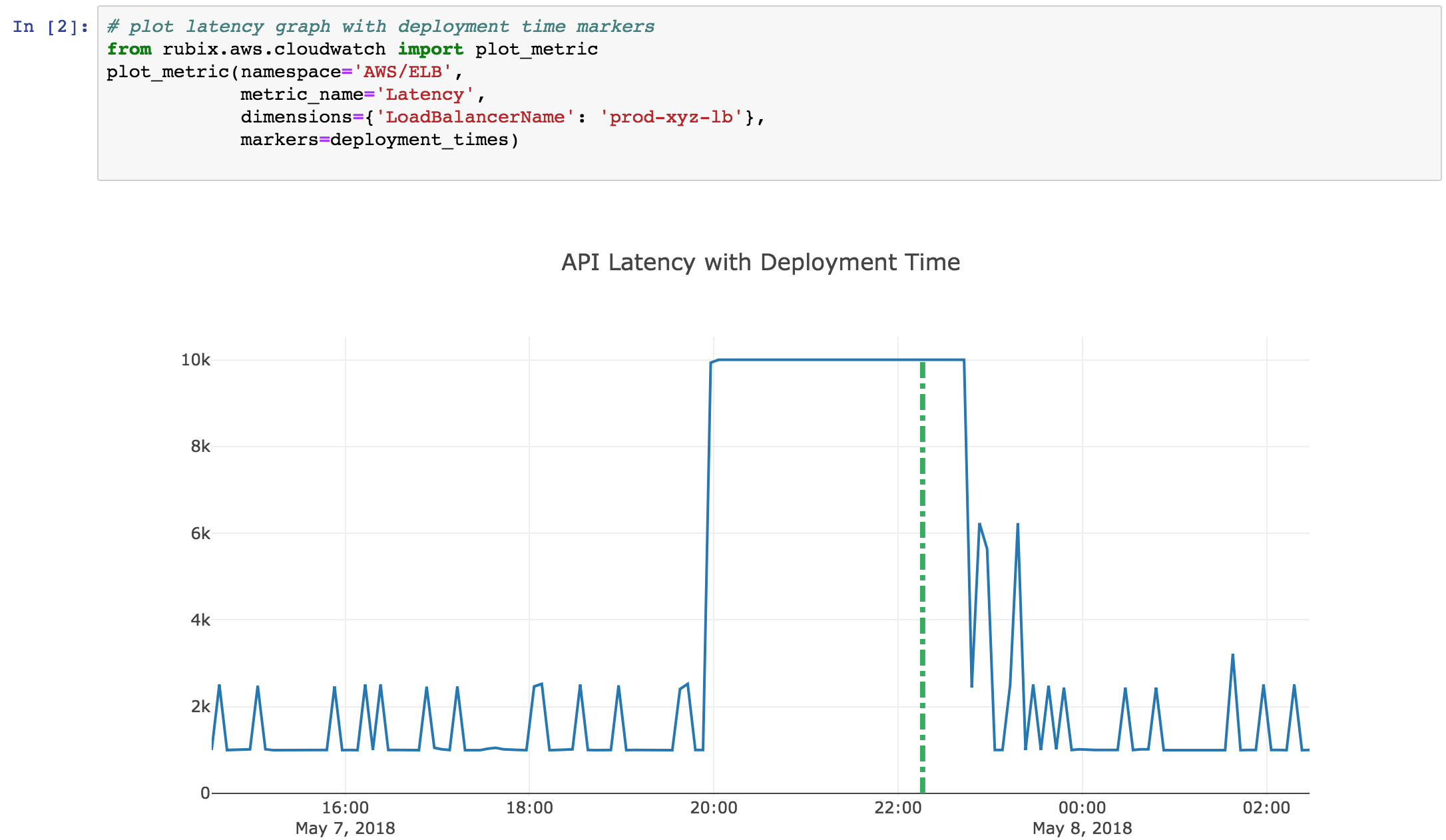
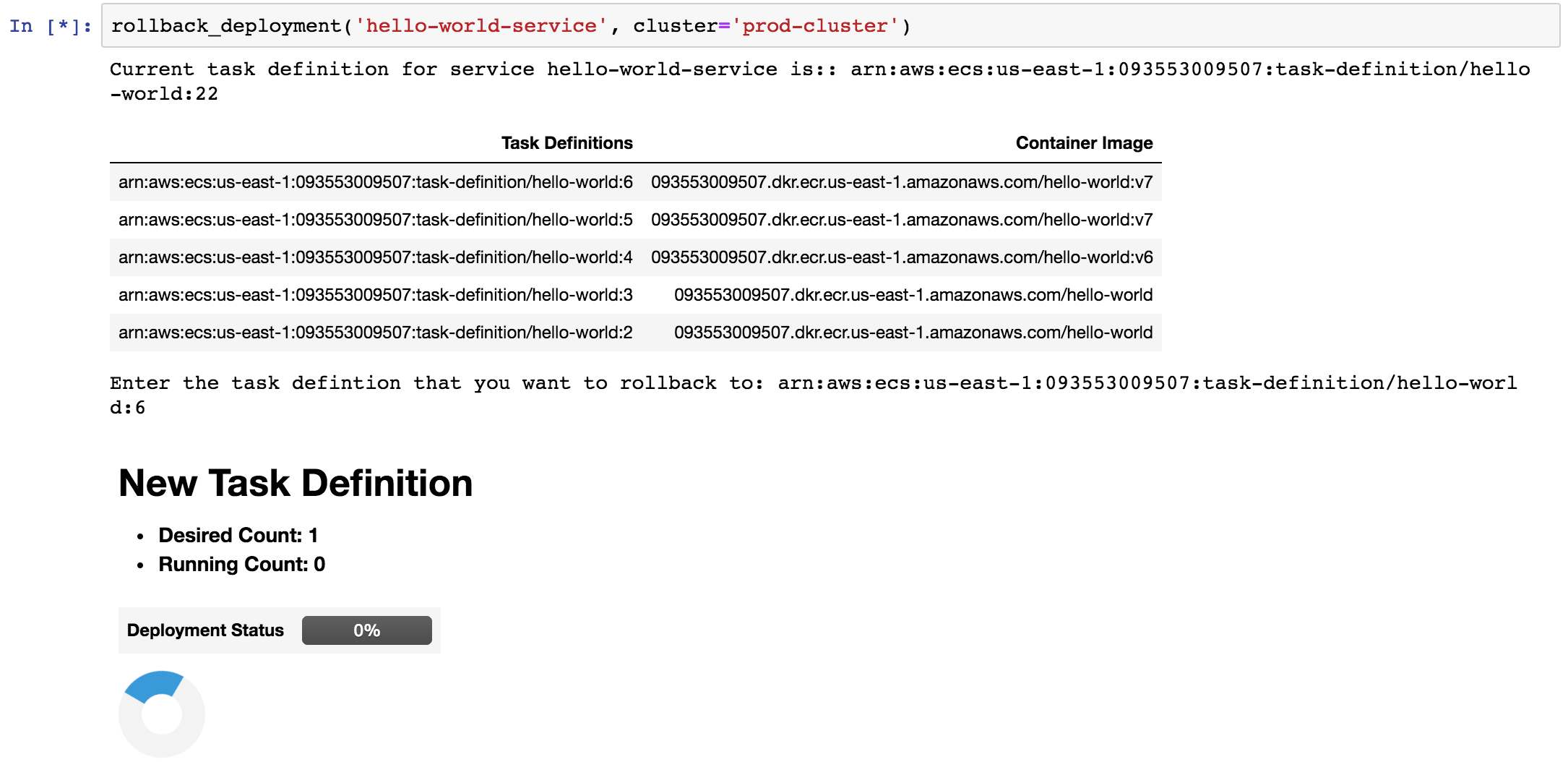
Complete documentation is linked above. Here are some usage examples.
### Plot Cloudwatch Metrics
### Rollback Service in ECS
# Contribute
If you see any problem, open an issue or send a pull request. For additional integrations open an issue with `Feature Request` tag & clearly describe the operations you want to perform. You can write to me at [amit@nurtch.com](mailto:amit@nurtch.com) or DM me on [twitter](https://twitter.com/amittrathi).
1 maintainer

Metadata
1 maintainer
Release files for rubix 0.0.9
For a detailed explanation of source distributions (sdists) and built distributions (wheels), please see the package formats documentation.
Source distribution (sdist)
| File | Size | Uploaded | Provenance | |
|---|---|---|---|---|
| rubix-0.0.9.tar.gz | 7.4 kB | Without provenance | Details |
Built distribution (wheel)
| File | Interpreter | ABI | Platform | Reset |
|---|---|---|---|---|
| rubix-0.0.9-py3-none-any.whl | Python 3 | none | any | Details |
Total release size: 16.2 kB
Release files / rubix-0.0.9.tar.gz
| Download URL | rubix-0.0.9.tar.gz |
|---|---|
| Size | 7.4 kB |
| Tags | Source |
|
SHA-256 checksum How to use checksums |
111ee15f01abe8f5c9339d0bea5f3797c43d01df35cf1c1b60965dfab47deb77
|
|
BLAKE2b-256 checksum How to use checksums |
db50ee8a215d98b494b31556cac41886ce633031170e25dbc2f8b9ff5abe53e0
|
| Upload date | |
|
Uploaded using Trusted Publishing? What is trusted publishing? |
No |
| Uploaded via |
twine/1.11.0 pkginfo/1.4.2 requests/2.19.1 setuptools/39.2.0 requests-toolbelt/0.8.0 tqdm/4.23.4 CPython/3.6.5
|
Release files / rubix-0.0.9-py3-none-any.whl
| Download URL | rubix-0.0.9-py3-none-any.whl |
|---|---|
| Size | 8.8 kB |
| Tags | Python 3 |
|
SHA-256 checksum How to use checksums |
65dbfdbd68d95db62dee0807b57d03604a572882a8dff6286c782d2dff00ae41
|
|
BLAKE2b-256 checksum How to use checksums |
e56ead1165d525b56c3e483eafe765e60652f8999221e294368805552a669c71
|
| Upload date | |
|
Uploaded using Trusted Publishing? What is trusted publishing? |
No |
| Uploaded via |
twine/1.11.0 pkginfo/1.4.2 requests/2.19.1 setuptools/39.2.0 requests-toolbelt/0.8.0 tqdm/4.23.4 CPython/3.6.5
|
Security for rubix 0.0.9
Provenance
Provenance describes where a file came from. On PyPI, provenance is shared via attestations, which provide a verifiable record of the build or publishing details. View details, limitations and caveats.
No provenance found
None of the files in this release were uploaded with provenance metadata.
A note on package security
PyPI is a repository for distributing packages, not a service for auditing them. While third-party security researchers and our staff do their best to detect and remove malicious packages, PyPI cannot guarantee the quality, security or suitability of any given package.
To learn more about protecting yourself from malicious actors, visit our package security documentation.














