
ruDALL-E
Generate images from texts





pip install rudalle==1.1.3
🤗 HF Models:
ruDALL-E Malevich (XL)
ruDALL-E Emojich (XL) (readme here)
ruDALL-E Surrealist (XL)
ruDALL-E Kandinsky (XXL) (soon)
Minimal Example:



Example usage ruDALL-E Malevich (XL) with 3.5GB vRAM!
Finetuning example
generation by ruDALLE:
import ruclip
from rudalle.pipelines import generate_images, show, super_resolution, cherry_pick_by_ruclip
from rudalle import get_rudalle_model, get_tokenizer, get_vae, get_realesrgan
from rudalle.utils import seed_everything

# prepare models:
device = 'cuda'
dalle = get_rudalle_model('Malevich', pretrained=True, fp16=True, device=device)
tokenizer = get_tokenizer()
vae = get_vae(dwt=True).to(device)

# pipeline utils:
realesrgan = get_realesrgan('x2', device=device)
clip, processor = ruclip.load('ruclip-vit-base-patch32-384', device=device)
clip_predictor = ruclip.Predictor(clip, processor, device, bs=8)
text = 'радуга на фоне ночного города'

seed_everything(42)
pil_images = []
scores = []
for top_k, top_p, images_num in [
    (2048, 0.995, 24),
]:
    _pil_images, _scores = generate_images(text, tokenizer, dalle, vae, top_k=top_k, images_num=images_num, bs=8, top_p=top_p)
    pil_images += _pil_images
    scores += _scores

show(pil_images, 6)

auto cherry-pick by ruCLIP:
top_images, clip_scores = cherry_pick_by_ruclip(pil_images, text, clip_predictor, count=6)
show(top_images, 3)

super resolution:
sr_images = super_resolution(top_images, realesrgan)
show(sr_images, 3)

text, seed = 'красивая тян из аниме', 6955

Image Prompt
see jupyters/ruDALLE-image-prompts-A100.ipynb
text, seed = 'Храм Василия Блаженного', 42
skyes = [red_sky, sunny_sky, cloudy_sky, night_sky]

VideoDALL-E | ruCogVideo by @cene555
Video generation example
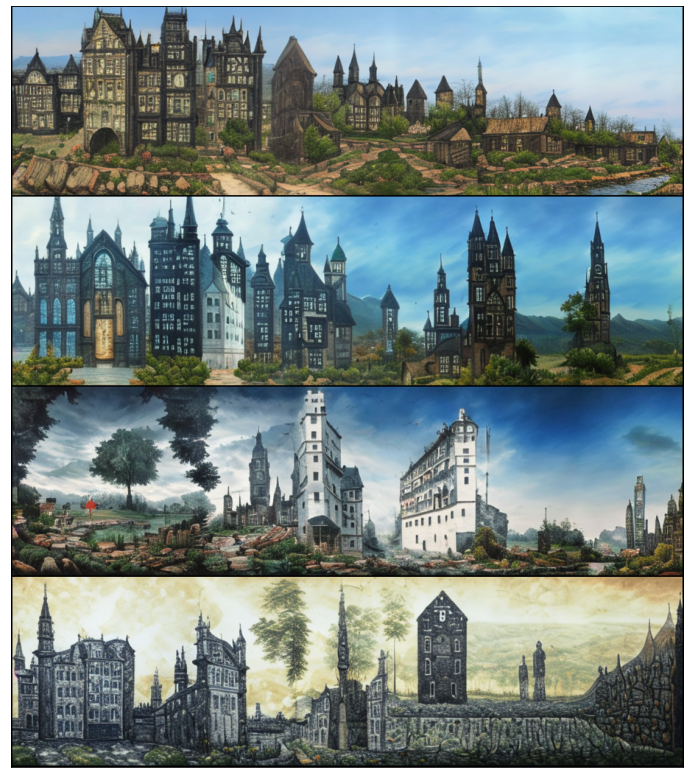
Aspect ratio images -->NEW<--
Kandinsky 12B
Request access: Here
роботы акварелью в стиле ван гога


FID = 15.4 (COCO Valid)
🚀 Contributors 🚀
- @bes shared great idea and realization with IDWT for decoding images with higher quality 512x512! 😈💪 thanks a lot for your constructive advices, appreciate it
- @neverix thanks a lot for contributing for speed up of inference
- @Igor Pavlov trained model and prepared code with super-resolution
- @oriBetelgeuse thanks a lot for easy API of generation using image prompt
- @Alex Wortega created first FREE version colab notebook with fine-tuning ruDALL-E Malevich (XL) on sneakers domain 💪
- @Anton Lozhkov Integrated to Huggingface Spaces with Gradio, see here
Supported by

Social Media


1 maintainer

Metadata
1 maintainer
Release files for rudalle 1.1.3
For a detailed explanation of source distributions (sdists) and built distributions (wheels), please see the package formats documentation.
Source distribution (sdist)
| File | Size | Uploaded | Provenance | Actions |
|---|---|---|---|---|
| rudalle-1.1.3.tar.gz | 36.5 kB | Without provenance | Details for rudalle-1.1.3.tar.gz |
Built distribution (wheel)
| File | Interpreter | ABI | Platform | Actions Reset |
|---|---|---|---|---|
| rudalle-1.1.3-py3-none-any.whl | Python 3 | none | any | Details for rudalle-1.1.3-py3-none-any.whl |
Total release size: 76.7 kB
Release files / rudalle-1.1.3.tar.gz
| Download URL | rudalle-1.1.3.tar.gz |
|---|---|
| Size | 36.5 kB |
| Tags | Source |
|
SHA-256 checksum How to use checksums |
ae724e2832ecbe3304d874d72cfa5d6260140e03ae14042c0bb18b8c52c80d0f
|
|
BLAKE2b-256 checksum How to use checksums |
0b0a198c29b772028acb7c2bd7c34a4115439162325af51dbb9aada3b2dabcfd
|
| Upload date | |
|
Uploaded using Trusted Publishing? What is trusted publishing? |
No |
| Uploaded via |
twine/4.0.0 CPython/3.9.12
|
Release files / rudalle-1.1.3-py3-none-any.whl
| Download URL | rudalle-1.1.3-py3-none-any.whl |
|---|---|
| Size | 40.2 kB |
| Tags | Python 3 |
|
SHA-256 checksum How to use checksums |
c4065c0cab1ff18360f2966ea64a091dc359c1c1e679eb7a0d893693394006ec
|
|
BLAKE2b-256 checksum How to use checksums |
bc0a34815b148ebfa8aa1c8ea05457c29a2aad7ea14a8bc5f7893a9050231ee9
|
| Upload date | |
|
Uploaded using Trusted Publishing? What is trusted publishing? |
No |
| Uploaded via |
twine/4.0.0 CPython/3.9.12
|
Security for rudalle 1.1.3
Provenance
Provenance describes where a file came from. On PyPI, provenance is shared via attestations, which provide a verifiable record of the build or publishing details. View details, limitations and caveats.
No provenance found
None of the files in this release were uploaded with provenance metadata.
A note on package security
PyPI is a repository for distributing packages, not a service for auditing them. While third-party security researchers and our staff do their best to detect and remove malicious packages, PyPI cannot guarantee the quality, security or suitability of any given package.
To learn more about protecting yourself from malicious actors, visit our package security documentation.














