
Apache Spark integration for Rulebricks — apply decision-table based rules to Spark DataFrames at scale.
Verified details
These details have been verified by PyPIProject links
GitHub Statistics
Maintainers

Project description
Rulebricks Spark



Apache Spark integration for Rulebricks. Apply decision-table based rules to Spark DataFrames at scale.
from rulebricks_spark import solve

scored = solve(
    spark.table("breach_reports"),
    rule="breach-triage",
    api_key=dbutils.secrets.get("rulebricks", "api_key"),
)

scored.display()
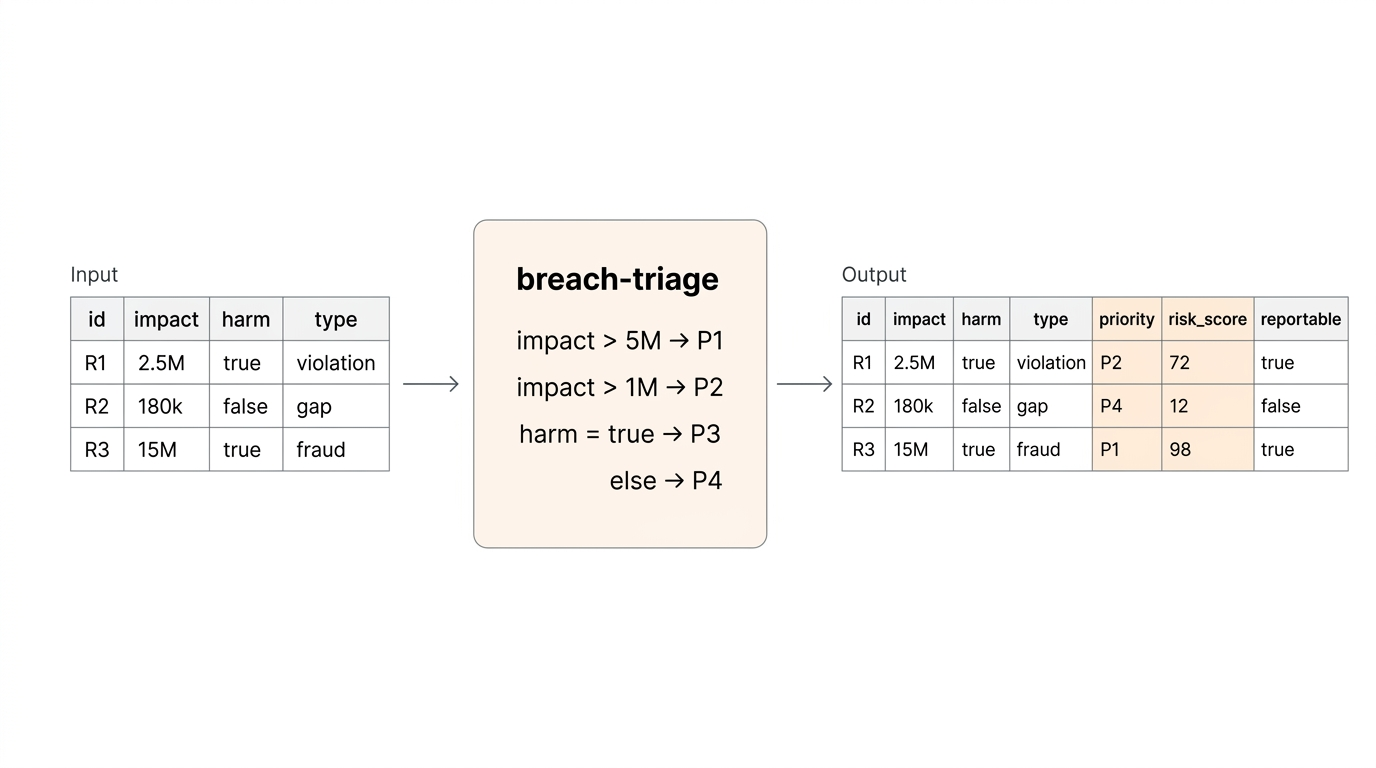
Rule outputs overwrite existing columns, or automatically create new ones. Works in any PySpark environment — Databricks, EMR, Synapse, or a local cluster.
Why
Changing business & policy logic shouldn't live in notebooks or SQL CASE statements. Rulebricks enables business users to directly author & manage decision tables in a visual UI, with versioning, audit logs, and test suites. rulebricks-spark then lets your Spark pipelines consume those rules at scale without wrapping the HTTP API yourself.
Edit a rule in the Rulebricks UI. Rerun your notebook. Different results, no code change.
Install
pip install rulebricks-spark
Databricks
In a notebook cell:
%pip install rulebricks-spark
dbutils.library.restartPython()
Or install as a cluster library (PyPI source, package rulebricks-spark) so every notebook on the cluster has it available.
Quickstart
from rulebricks_spark import solve

df = spark.table("claims_raw")

scored = solve(
    df,
    rule="claims-triage",
    api_key=dbutils.secrets.get("rulebricks", "api_key"),
)

scored.write.mode("overwrite").saveAsTable("claims_scored")
Rule output fields are appended as new columns. A trailing _rb_error column is null on success and carries the error message on failure, so you can isolate problem rows without failing the whole job.
How it works
- Driver side: fetch the rule's response schema once via the Rulebricks SDK, build the Spark output
StructType. - Executor side: each partition's pandas chunks are split into batches (default 500 rows) and sent to
bulk_solve. Multiple batches per partition run concurrently in a thread pool (default 4). - Result assembly: rule outputs are coerced to the declared Spark types, collided input columns are overwritten, errors land in
_rb_error.
Effective parallelism = num_executors × max_concurrent_requests_per_partition.
API
solve(df, rule, *, api_key, ...) -> DataFrame
| Argument | Default | Description |
|---|---|---|
df |
— | Input Spark DataFrame. |
rule |
— | Rulebricks rule slug. |
api_key |
— | Your Rulebricks API key. |
base_url |
https://rulebricks.com |
Override for self-hosted deployments. |
batch_size |
500 |
Rows per bulk_solve call (max 1000). |
max_concurrent_requests_per_partition |
4 |
Concurrent batches per Spark partition. |
input_mapping |
None |
{df_column: rule_field} for renaming inputs. |
output_schema |
None |
Explicit StructType to skip schema inference. |
on_conflict |
"overwrite" |
"error" or "overwrite" when output names collide with inputs. |
on_missing_input |
"default" |
"error" or "default" (use rule's declared defaults). |
on_error |
"continue" |
"raise" to fail the job; "continue" to isolate in _rb_error. |
auto_repartition |
False |
Repartition a single-partition DataFrame for parallelism. |
timeout_seconds |
60.0 |
Per-request timeout. |
max_retries |
3 |
Retry attempts for 408/429/5xx/timeout/reset. |
Returns a new DataFrame. Spark DataFrames are immutable — solve() does not mutate the input.
Common patterns
Column names don't match the rule's inputs
solve(
    df,
    rule="eligibility",
    api_key=key,
    input_mapping={
        "fin_impact": "financial_impact",
        "dso": "days_since_occurrence",
    },
)
Unmapped columns pass through as-is.
Call from SQL via Unity Catalog
Register the scored DataFrame as a view, or wrap solve() in a Python function that your analysts can use:
def triage_breaches(input_table: str, output_table: str):
    df = spark.table(input_table)
    scored = solve(df, rule="breach-triage", api_key=get_key())
    scored.write.mode("overwrite").saveAsTable(output_table)
Self-hosted Rulebricks
solve(
    df,
    rule="underwriting",
    api_key=key,
    base_url="https://rules.acme.internal",
)
High-throughput tuning
For large batch jobs against a self-hosted Rulebricks instance:
solve(
    df.repartition(32),           # match executor count
    rule="score",
    api_key=key,
    batch_size=1000,              # max
    max_concurrent_requests_per_partition=8,
)
Effective throughput: 32 partitions × 8 concurrent × 1000 rows = 256k rows in flight.
Inspecting errors
scored = solve(df, rule="score", api_key=key, on_error="continue")

# Successful rows
scored.filter("_rb_error IS NULL")

# Failed rows, for investigation
scored.filter("_rb_error IS NOT NULL").select("report_id", "_rb_error").show(truncate=False)
Explicit output schema (typed arrays / structs)
By default, rule outputs of type list and object are serialized as JSON strings. To get typed ArrayType or StructType columns, pass an explicit output_schema:
from pyspark.sql.types import StructType, StructField, StringType, ArrayType, DoubleType

schema = StructType([
    StructField("priority", StringType()),
    StructField("tags", ArrayType(StringType())),
    StructField("score", DoubleType()),
])

solve(df, rule="triage", api_key=key, output_schema=schema)
Performance notes
- Batch size: 500 is a reasonable default. Raise to 1000 for simple rules, and drop to 100–200 for rules involving large payloads.
- Concurrency: each executor hits the Rulebricks API in parallel. Against the managed cloud, rate and account limits may kick in before you saturate workers — watch for 429s in
_rb_error. Against a self-hosted cluster, the autoscaler handles it. Read more about self-hosted Rulebricks for production volumes. - Partition count:
solve()inherits the input DataFrame's partitioning. If your DataFrame has one huge partition, either call.repartition(n)yourself or passauto_repartition=True. - Schema inference cost: a single driver-side API call at job start. Cache the schema or pass
output_schemaexplicitly to skip it for repeated runs.
Error handling
The _rb_error column is always present in the output.
on_error="continue"(default): batch failures mark every row in the failed batch with the error string, leaving rule output columnsnull. The job completes.on_error="raise": the Spark task fails on the first batch error, propagating to job failure.
Retries run automatically for 408 / 425 / 429 / 500 / 502 / 503 / 504, timeouts, and connection resets, using exponential backoff (2^attempt seconds, capped at 30).
Requirements
- Python 3.9+
- PySpark 3.3+
rulebricksSDK 1.0+pandas1.5+pyarrow10+
Development
git clone https://github.com/rulebricks/spark
cd rulebricks-spark
pip install -e ".[dev]"
pytest
Run only the fast unit tests:
pytest -m "not requires_spark"
Run the end-to-end tests (requires PySpark and a JVM):
pytest -m requires_spark
License
MIT — see LICENSE.
Links
Project details
Verified details
These details have been verified by PyPIProject links
GitHub Statistics
Maintainers
Release history Release notifications | RSS feed


Download files
Download the file for your platform. If you're not sure which to choose, learn more about installing packages.
Source Distribution
Built Distribution
Filter files by name, interpreter, ABI, and platform.
If you're not sure about the file name format, learn more about wheel file names.
Copy a direct link to the current filters
File details
Details for the file rulebricks_spark-0.1.0.tar.gz.
File metadata
- Download URL: rulebricks_spark-0.1.0.tar.gz
- Upload date:
- Size: 194.8 kB
- Tags: Source
- Uploaded using Trusted Publishing? Yes
- Uploaded via: twine/6.1.0 CPython/3.13.12
File hashes
| Algorithm | Hash digest | |
|---|---|---|
| SHA256 |
3a51b55e211757b9980ba505089bfd4b60561f9861641fc4531067d4b6aad813
|
|
| MD5 |
3cdbcb87813f7c03a0cd52ed2a82105a
|
|
| BLAKE2b-256 |
d69460cac0b8f36e2e5fa5eabb7f4a18da43bf59fe0c5ddfeaec7847c78d877d
|
Provenance
The following attestation bundles were made for rulebricks_spark-0.1.0.tar.gz:
Publisher:
release.yml on rulebricks/spark
-
Statement:
-
Statement type:
https://in-toto.io/Statement/v1 -
Predicate type:
https://docs.pypi.org/attestations/publish/v1 -
Subject name:
rulebricks_spark-0.1.0.tar.gz -
Subject digest:
3a51b55e211757b9980ba505089bfd4b60561f9861641fc4531067d4b6aad813 - Sigstore transparency entry: 1322614700
- Sigstore integration time:
-
Permalink:
rulebricks/spark@374f8bf9e443c5142be312ae0c98e3169e25f95e -
Branch / Tag:
refs/tags/v0.1.0 - Owner: https://github.com/rulebricks
-
Access:
public
-
Token Issuer:
https://token.actions.githubusercontent.com -
Runner Environment:
github-hosted -
Publication workflow:
release.yml@374f8bf9e443c5142be312ae0c98e3169e25f95e -
Trigger Event:
push
-
Statement type:
File details
Details for the file rulebricks_spark-0.1.0-py3-none-any.whl.
File metadata
- Download URL: rulebricks_spark-0.1.0-py3-none-any.whl
- Upload date:
- Size: 21.2 kB
- Tags: Python 3
- Uploaded using Trusted Publishing? Yes
- Uploaded via: twine/6.1.0 CPython/3.13.12
File hashes
| Algorithm | Hash digest | |
|---|---|---|
| SHA256 |
ab7b5b398bf27eed02513e0ad72d84165b51cd7fcc9794792b7dc44db0381916
|
|
| MD5 |
217b7220706de5ff8f001646e60659cf
|
|
| BLAKE2b-256 |
e9a1b3a4fbd74a6a3c85b23592d743e06211eae86245a915552f7c94cff49f57
|
Provenance
The following attestation bundles were made for rulebricks_spark-0.1.0-py3-none-any.whl:
Publisher:
release.yml on rulebricks/spark
-
Statement:
-
Statement type:
https://in-toto.io/Statement/v1 -
Predicate type:
https://docs.pypi.org/attestations/publish/v1 -
Subject name:
rulebricks_spark-0.1.0-py3-none-any.whl -
Subject digest:
ab7b5b398bf27eed02513e0ad72d84165b51cd7fcc9794792b7dc44db0381916 - Sigstore transparency entry: 1322614810
- Sigstore integration time:
-
Permalink:
rulebricks/spark@374f8bf9e443c5142be312ae0c98e3169e25f95e -
Branch / Tag:
refs/tags/v0.1.0 - Owner: https://github.com/rulebricks
-
Access:
public
-
Token Issuer:
https://token.actions.githubusercontent.com -
Runner Environment:
github-hosted -
Publication workflow:
release.yml@374f8bf9e443c5142be312ae0c98e3169e25f95e -
Trigger Event:
push
-
Statement type:






