
PCI Payment Page Script Audit: requirement 6.4.3 and 11.6.1 on your checkout markup
Runs the same checker as our npm package on a Node.js runtime that pip installs for you (
nodejs-wheel-binaries) - no system Node.js needed. Your files are checked locally.
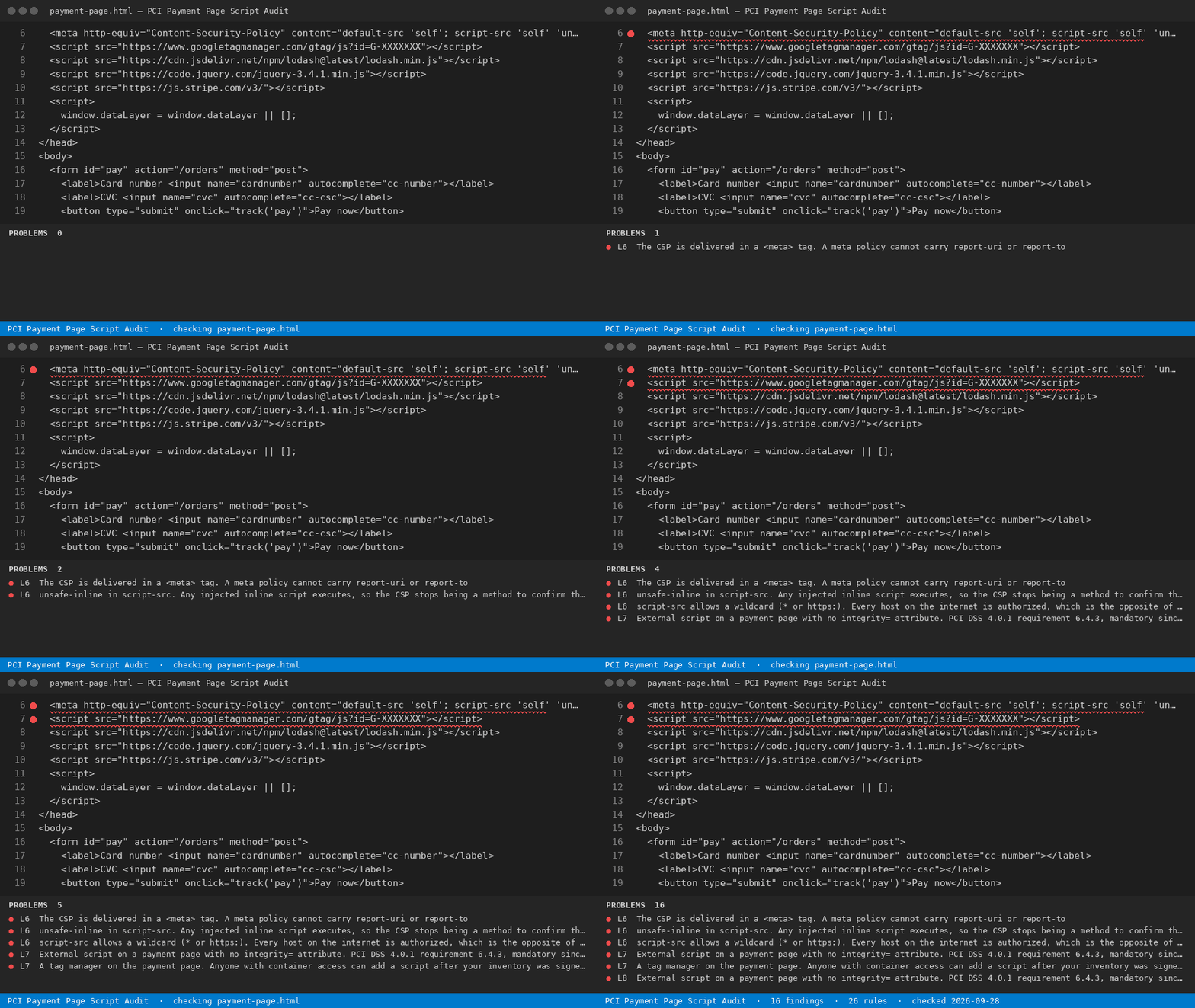
PCI DSS 4.0.1 requirements 6.4.3 and 11.6.1 have been mandatory since 2025-03-31, and the PCI SSC revised FAQ 1331 on 2026-08-04 so a QSA agreement alone no longer marks them not applicable. This reads a checkout page and names every script that has no authorization method, no integrity method and no inventory row.
Install
pci-payment-page-script-audit file
Node 18+. The same 26 rules as the VS Code extension, from a terminal or CI.
Free
- Audit the checkout page you have open against all 26 PCI script-security rules - every script, every line, the requirement each one fails and the fix, no key asked.
--ruleslists every rule
With a licence ($29 once)
- Export the dated 6.4.3 script inventory as the evidence file you hand the assessor, across every payment page in the repository, with CI output that fails a build when an unauthorized script appears.
pci-payment-page-script-audit --dir ./templates --report html --out report.html
A PCI consultant bills about $76/hour in the US in 2026 (Salary.com, August 2026) and a QSA-assisted SAQ runs $5,000-$20,000; building the script inventory by hand is the part you are paying for.
Use from an AI agent (MCP)
Claude Code · Cursor · Windsurf · any MCP client - add to your MCP config:
{ "mcpServers": { "pci-payment-page-script-audit": { "command": "pci-payment-page-script-audit", "args": ["--mcp"] } } }
Tools: check_text and check_file (free) · check_dir (licence). The agent gets every finding with the line number.
Use in CI
- name: PCI Payment Page Script Audit: requirement 6.4.3 and 11.6.1 on your checkout markup
  run: pip install rulestamp-pci-payment-page-script-audit && pci-payment-page-script-audit --dir . --ci
The folder sweep, reports and CI mode need one licence — one payment, no subscription. Set READYSTACK_LICENSE=<key> or run --license <key> once.
Install (PyPI)
pip install rulestamp-pci-payment-page-script-audit
pci-payment-page-script-audit --help
1 maintainer

Metadata
1 maintainer
Release files for rulestamp-pci-payment-page-script-audit 0.1.8
For a detailed explanation of source distributions (sdists) and built distributions (wheels), please see the package formats documentation.
Source distribution (sdist)
| File | Size | Uploaded | Provenance | |
|---|---|---|---|---|
| rulestamp_pci_payment_page_script_audit-0.1.8.tar.gz | 16.9 kB | Without provenance | Details |
Built distribution (wheel)
| File | Interpreter | ABI | Platform | Reset |
|---|---|---|---|---|
| rulestamp_pci_payment_page_script_audit-0.1.8-py3-none-any.whl | Python 3 | none | any | Details |
Total release size: 35.7 kB
Release files / rulestamp_pci_payment_page_script_audit-0.1.8.tar.gz
| Download URL | rulestamp_pci_payment_page_script_audit-0.1.8.tar.gz |
|---|---|
| Size | 16.9 kB |
| Tags | Source |
|
SHA-256 checksum How to use checksums |
3a557475ab9093be892741ee7d14ef48111bfb22df404501f931b75c0a5a3920
|
|
BLAKE2b-256 checksum How to use checksums |
66a99a0082459411d7db586c2a4379ac8089b6443673366e7ff78b43e8a8dddf
|
| Upload date | |
|
Uploaded using Trusted Publishing? What is trusted publishing? |
No |
| Uploaded via |
twine/7.0.0 CPython/3.12.3
|
Release files / rulestamp_pci_payment_page_script_audit-0.1.8-py3-none-any.whl
| Download URL | rulestamp_pci_payment_page_script_audit-0.1.8-py3-none-any.whl |
|---|---|
| Size | 18.8 kB |
| Tags | Python 3 |
|
SHA-256 checksum How to use checksums |
d14ee7ef4c9f8cec89c9bf2768458548f2bb3d5a0a1a6673e2fc1a4eb8807cb3
|
|
BLAKE2b-256 checksum How to use checksums |
11592c5293b28460a363f99a45e62bbbc3f91767532e511d738aba900a2a54fe
|
| Upload date | |
|
Uploaded using Trusted Publishing? What is trusted publishing? |
No |
| Uploaded via |
twine/7.0.0 CPython/3.12.3
|
Security for rulestamp-pci-payment-page-script-audit 0.1.8
Provenance
Provenance describes where a file came from. On PyPI, provenance is shared via attestations, which provide a verifiable record of the build or publishing details. View details, limitations and caveats.
No provenance found
None of the files in this release were uploaded with provenance metadata.
A note on package security
PyPI is a repository for distributing packages, not a service for auditing them. While third-party security researchers and our staff do their best to detect and remove malicious packages, PyPI cannot guarantee the quality, security or suitability of any given package.
To learn more about protecting yourself from malicious actors, visit our package security documentation.













