
RuleVis: Interactive Wazuh Rule Graph Explorer
RuleVis is a powerful analysis tool that transforms your Wazuh ruleset into a dynamic, interactive force-directed graph. It helps you visualize the complex relationships between rules, identify critical dependencies, discover structural issues, and analyze the distribution of your rule IDs.
This tool is designed for security engineers, SOC analysts, and Wazuh administrators who need to understand, maintain, and develop complex custom rulesets.

Features
- Interactive Graph Visualization: Renders your entire ruleset as a graph using D3.js and HTML Canvas for high performance.
- Dependency Analysis: Clearly shows parent-child relationships (
if_sid,if_group, etc.) with directed edges. - Node Expansion: Interactively expand nodes to reveal their parent or child dependencies on demand.
- Detailed Rule Information: Click on any rule to see its full description, groups, and a complete list of its parents and children.
- Powerful Search: Instantly find and focus on any rule by its ID.
- Graph Statistics Panel: Get at-a-glance insights into your ruleset with statistics like:
- Top 5 rules with the most direct children (foundational rules).
- Top 5 rules with the highest impact (most total descendants).
- Top 5 rules with the most complex dependencies.
- A list of isolated rules.
- Cycles in the rules
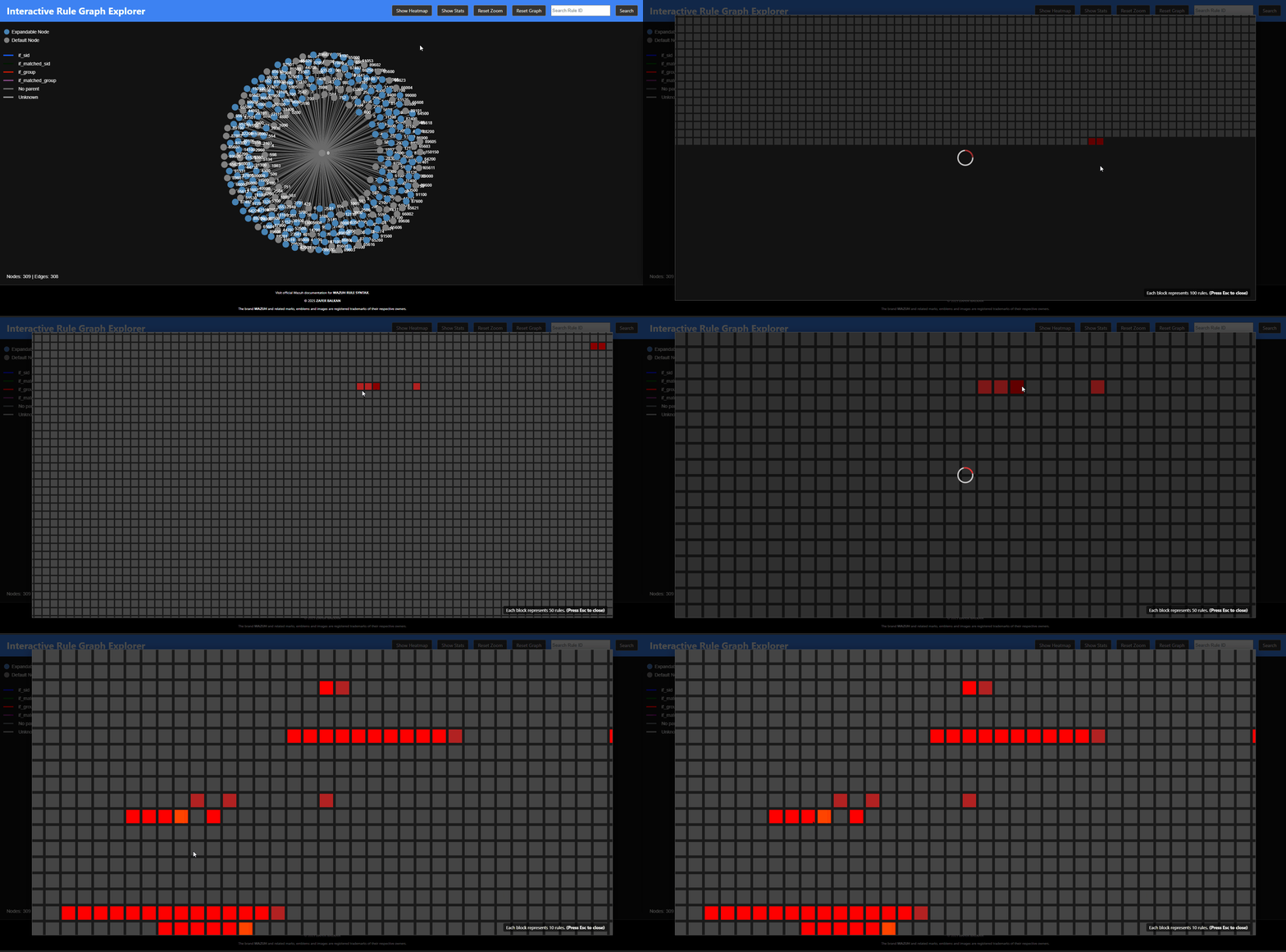
- Rule ID Heatmap: Visualize the entire rule ID space from 0 to 100,000+ to see which ID ranges are heavily used and which are available for custom rules.
- Keyboard Shortcuts: Pause the simulation (
Space), close panels (Esc), and more for an efficient workflow. - Focus: By default, when a node is highlighted, any node except for the selected node and its neighbords are dimmed. That allows better focus minimizing visual complexity.
The Problem It Solves
Wazuh's rule engine builds a complex, tree-like structure in memory. While powerful, this structure is invisible to the user. It can be difficult to:
- Understand the full impact of changing a single rule.
- Find redundant rules or overly complex dependency chains.
- Identify structural issues like circular dependencies, which can impact performance.
- Know which ID ranges are safe to use for new custom rules.
RuleVis makes these invisible structures visible, turning abstract XML files into a tangible, explorable map.
Installation
Using pipx (recommended)
pipx install rulevis
Using pip (for testing)
pip install rulevis
Using source
-
Clone the repository:
git clone https://github.com/zbalkan/rulevis.git
cd rulevis
-
Create and activate a Python virtual environment:
python -m venv .venv
source .venv/bin/activate
Or for Windows
python -m venv .venv
source .venv\Scripts\activate.ps1
-
Install dependencies:
pip install -r requirements.txt
Usage
The tool is run from the command line. You must provide the path to the directory (or directories) containing your Wazuh rule XML files.
rulevis --path /var/ossec/ruleset/rules,/var/ossec/etc/rules
Arguments:
--path, -p: (Required) A comma-separated list of paths to your Wazuh rule directories. This should include both the default rules and your custom rules.-h, --help: Show the help message.
Once executed, the script will:
- Parse all
.xmlfiles in the specified paths. - Build a graph model of the rule relationships.
- Pre-calculate statistics and heatmap data.
- Start a local web server.
- Automatically open the tool in your default web browser.
Key Features in Action
Graph Statistics
Quickly identify the most important and complex rules in your entire ruleset. Click on any rule in the list to instantly navigate to it in the main graph.

Rule ID Heatmap
Get a bird's-eye view of your rule ID landscape. Dark gray blocks are unused and available for your custom rules, while brighter red blocks indicate heavily populated ranges. This is invaluable for planning and organizing a large custom ruleset.
Technical Overview
The project is composed of three main Python modules and a JavaScript frontend:
generator.py: Parses the Wazuh XML rule files and uses thenetworkxlibrary to build aMultiDiGraphobject representing the rule relationships. It saves this graph to a temporary file.analyzer.py: Loads the graph file and usesnetworkxto perform complex calculations (descendants, ancestors, etc.). It pre-calculates the data needed for the Statistics Panel and the Rule ID Heatmap and saves them to temporary JSON files.visualizer.py: A Flask web application that serves the frontend and provides a clean API for the visualization to fetch graph, stats, and heatmap data.graph.js: The core frontend logic. It uses D3.js for the force simulation and user interactions, and renders the main graph to an HTML Canvas for high performance. The interactive heatmap is rendered using SVG for its superior event handling and styling capabilities.
Here’s a ready-to-paste README subsection that explains rulevis logging clearly and professionally for your users. It assumes the per-user setup you’ve implemented.
Logging
rulevis automatically writes diagnostic and operational logs to a user-specific location. Logs are plain text encoded in UTF-8 and include timestamps, module names, and severity levels. The application creates its log directory if it does not exist.
| Platform | Log file location | Example path |
|---|---|---|
| Windows | %LocalAppData%\rulevis\Logs\rulevis.log |
C:\Users\<user>\AppData\Local\rulevis\Logs\rulevis.log |
| macOS | ~/Library/Logs/rulevis/rulevis.log |
/Users/<user>/Library/Logs/rulevis/rulevis.log |
| Linux / BSD | $XDG_STATE_HOME/rulevis/rulevis.log or fallback ~/.local/share/rulevis/logs/rulevis.log |
/home/<user>/.local/state/rulevis/rulevis.log |
rulevis follows the XDG Base Directory specification on Unix-like systems and Windows conventions under %LocalAppData%.
The log file records informational messages, warnings, and errors emitted during execution. You can safely delete it; a new one will be created automatically on the next run.
Notes
While the documentation defines <if_level> as another condition creating a parent-child relationship, it has not been used in any built-in rules. And as a personal choicem I decided to omit that deliberately.
There is another if, called <if_fts>, that is used for first time seen events, not creating a parent-child relationship. Theefore it is not mentioned.
1 maintainer

Release files for rulevis 1.0.5
For a detailed explanation of source distributions (sdists) and built distributions (wheels), please see the package formats documentation.
Source distribution (sdist)
| File | Size | Uploaded | |
|---|---|---|---|
| rulevis-1.0.5.tar.gz | 40.0 kB | Details |
Built distribution (wheel)
| File | Interpreter | ABI | Platform | Reset |
|---|---|---|---|---|
| rulevis-1.0.5-py3-none-any.whl | Python 3 | none | any | Details |
Total release size: 74.1 kB
Release files / rulevis-1.0.5.tar.gz
| Download URL | rulevis-1.0.5.tar.gz |
|---|---|
| Size | 40.0 kB |
| Tags | Source |
|
SHA-256 checksum How to use checksums |
17ca224e96e1bbf9b2e93f4989d9819b8b9728fe611161b5f1487abf8c9d0796
|
|
BLAKE2b-256 checksum How to use checksums |
d5d849425be51054b61c8c46fbd7f875226056c964c614489c2e78e98c5315f4
|
| Upload date | |
|
Uploaded using Trusted Publishing? What is trusted publishing? |
Yes |
| Uploaded via |
twine/7.0.0 CPython/3.13.14
|
Provenance
Provenance describes where a file came from. On PyPI, provenance is shared via attestations, which provide a verifiable record of the build or publishing details. View details, limitations and caveats.


PyPI Publish Attestation
PyPI verified that this artifact, at this checksum, originated from the publisher listed below.
Signed by GitHub Actions, verified by PyPI on Sep 28, 2026.
Transparency logRelease files / rulevis-1.0.5-py3-none-any.whl
| Download URL | rulevis-1.0.5-py3-none-any.whl |
|---|---|
| Size | 34.1 kB |
| Tags | Python 3 |
|
SHA-256 checksum How to use checksums |
c957af5a1f1d4f450c692ae437acfe68ebd3010433d3a8cd85d5891fa599361b
|
|
BLAKE2b-256 checksum How to use checksums |
809316fbf4b568eb16fe35aa4337424de93c8c60d8f81def9696f01e0b19e198
|
| Upload date | |
|
Uploaded using Trusted Publishing? What is trusted publishing? |
Yes |
| Uploaded via |
twine/7.0.0 CPython/3.13.14
|
Provenance
Provenance describes where a file came from. On PyPI, provenance is shared via attestations, which provide a verifiable record of the build or publishing details. View details, limitations and caveats.
PyPI Publish Attestation
PyPI verified that this artifact, at this checksum, originated from the publisher listed below.
Signed by GitHub Actions, verified by PyPI on Sep 28, 2026.
Transparency log













