
rumblex
Transcription with word-level timestamps, speaker labels and subtitles, built on Reson8/Rumble-2-Flash.
Rumble-2-Flash ships an auxiliary CTC head next to its decoder. rumblex uses it for word timestamps: the decoder writes the text, and the CTC head force-aligns that text to the audio. It reuses the encoder pass the decoder already ran, so alignment costs one linear layer plus a Viterbi search, not a second model.
Rumble-2-Flash is a 0.5B-parameter speech recognition model fine-tuned from Qwen3-ASR-0.6B. Its model card lists 45 languages; the benchmarks here cover English and Dutch.
rumblex is an independent project and is not affiliated with Reson8.
Features
- Reads anything ffmpeg can (wav, mp3, m4a, mp4, mkv, ...). Long recordings are split into speech chunks with Silero VAD.
- Batched transcription. A chunk's output doesn't depend on what it is batched with. The model's
language,prompt(context / hotwords),digits,fillerandverbatimoptions are exposed. - Word timestamps from the CTC head. If alignment fails on a chunk, its words get proportional times instead, so a long job doesn't stop.
- Optional speaker labels via pyannote, per word. Segments are split where the speaker changes.
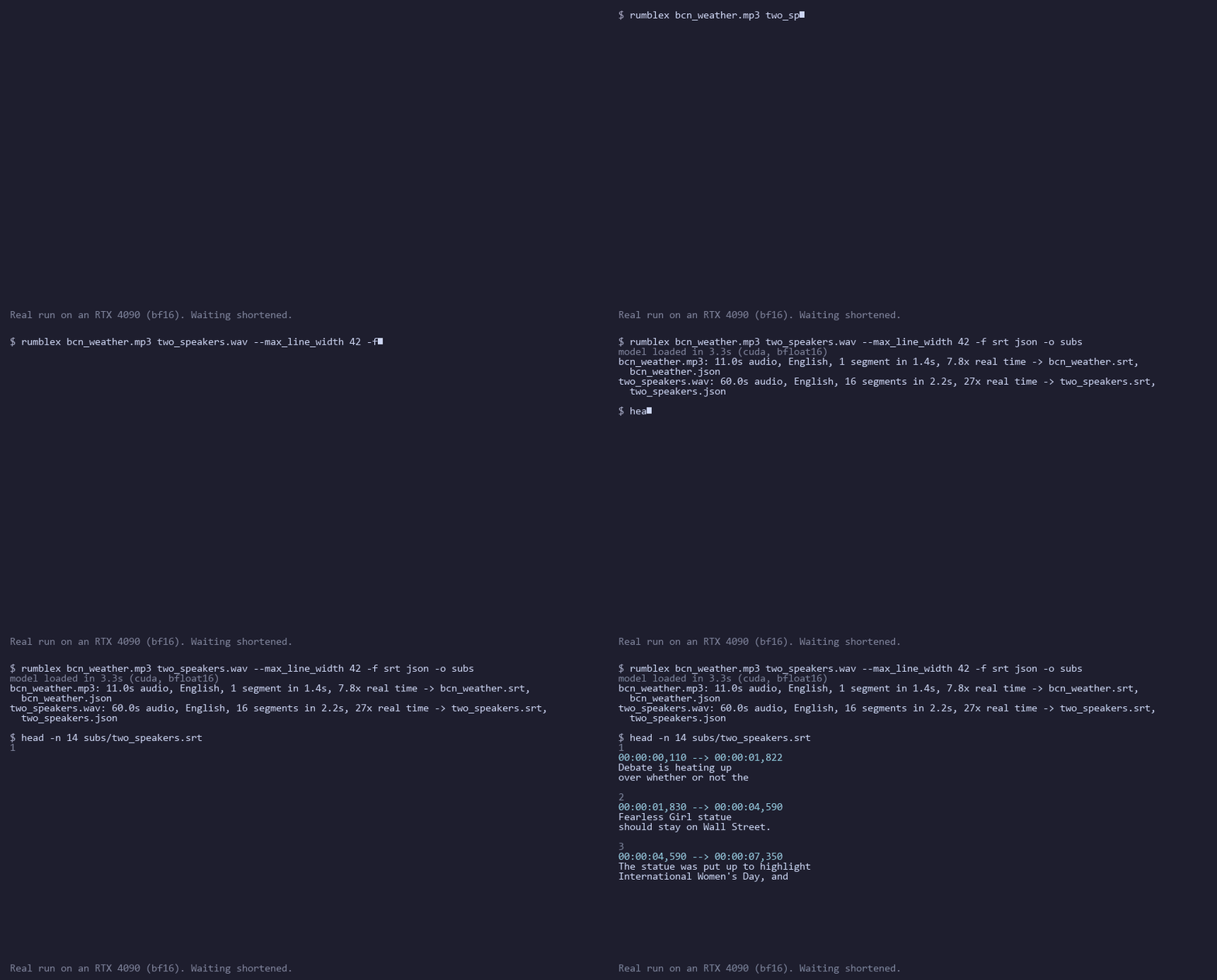
- Writes JSON, SRT, VTT (optionally with per-word karaoke tags), TSV and TXT.
Install
pip install rumblex
pip install "rumblex[diarize]"   # with speaker labels (pyannote)
You also need Python 3.11 or 3.12 and ffmpeg on PATH. pip takes PyTorch from PyPI, which is a CPU-only build
on Windows. For a GPU on Windows, or for an older GPU, install torch and torchaudio for your CUDA version
from pytorch.org first. GPUs from Ampere on run in bf16,
older ones (e.g. Pascal) in float32. A GPU is strongly recommended; the model runs on a 6 GB GTX 1060 in
float32 at the default batch size of 8. CPU works but is slow.
From source:
git clone https://github.com/EdwardGlockner/rumblex && cd rumblex
uv sync                     # PyTorch's CUDA 12.6 builds, which still support Pascal
uv sync --extra diarize
The lock file pins PyTorch's CUDA 12.6 wheels on Linux and Windows and PyPI's build on macOS. For RTX
50-series GPUs (which need CUDA 12.8+), install torch yourself and use pip install -e . instead.
Use
rumblex meeting.mp4                                   # all formats into the current folder
rumblex talk.wav -f srt vtt --max_line_width 42       # subtitles with cues split at 42 chars
rumblex interview.m4a --language Dutch --diarize -f srt txt
rumblex call.wav --prompt "Kubernetes, metoprolol"   # context / hotwords for the model
import rumblex

model = rumblex.load_model()  # Reson8/Rumble-2-Flash, GPU if available
result = rumblex.transcribe("meeting.mp4", model)  # segments with word timestamps
for seg in result.segments:
    print(seg.start, seg.end, seg.text)
rumblex.write_result(result, "meeting.mp4", "out/", ["srt", "json"])
More in examples/quickstart.py and examples/batch_subtitles.py, which writes subtitles for a folder of files.
Faster decoding with vLLM
On Linux with a recent NVIDIA GPU, decoding can run on a vLLM
server. pip install "rumblex[vllm]" adds the client; vLLM itself goes wherever the server runs:
vllm serve Reson8/Rumble-2-Flash --max-model-len 4096 --gpu-memory-utilization 0.5
rumblex meeting.mp4 --vllm_url http://localhost:8000/v1
Word timestamps still come from a local pass of the audio encoder, so leave GPU memory for it. On our LibriSpeech run this was 601× real time against 467× without vLLM, with the same WER and timing error (docs/bench_2026-11-20_rtx4090_release).
Speaker labels
The pyannote models are gated. Accept the conditions on
pyannote/speaker-diarization-community-1,
then run hf auth login. pyannote.audio 4 sends usage telemetry by default. rumblex turns it off
unless you set PYANNOTE_METRICS_ENABLED=true yourself.
Compared with WhisperX
Both systems ran on the same audio on one rented RTX 4090, in one session, with the code released as
0.1.0: rumblex in bf16 at batch 32 (the default is 8), and WhisperX 3.8.6 with large-v3 in float16 at
batch 16 with its default wav2vec2 aligners (large-v3-turbo was not measured). The language was given to
both. For the English sets rumblex ran with --no_digits, since their references spell numbers out.
WER uses Whisper's normalizers. Speed is one long file per dataset (20–60 min) made from that dataset's
audio, timed from decoded audio to aligned words with the models already loaded. Raw results, settings
and caveats:
docs/bench_2026-11-20_rtx4090_release.
| dataset | rumblex WER | WhisperX WER | rumblex speed | WhisperX speed |
|---|---|---|---|---|
| AMI meetings (500 utt.) | 10.9% | 17.2% | 329× real time | 104× |
| Earnings-22 calls (500 utt.) | 9.3% | 10.6% | 430× | 102× |
| LibriSpeech test-clean (200 utt.) | 2.2% | 1.6% | 467× (601× with vLLM) | 92× |
| FLEURS Dutch (364 utt.) | 9.2% | 7.0% | 380× | 79× |
rumblex was 3–5× faster on every set. Over 40% of WhisperX's time goes to its alignment step (7–17 s per file); rumblex's alignment reuses the encoder pass and took 0.3–0.9 s. rumblex had the lower WER on meetings and earnings calls, WhisperX on clean read speech and on Dutch. Most of rumblex's lead on AMI and Earnings-22 is fewer deleted words (177 vs 353 and 231 vs 427). rumblex passes clips of up to 20 s to the model whole, while WhisperX runs its VAD on every clip, so on long recordings, where both use a VAD, the gap may be smaller. These are samples of a few hundred utterances per set, and speeds also depend on the host CPU.
The model card reports 6.05% on FLEURS Dutch under the Open ASR Leaderboard's scoring, which we did not reproduce. An earlier diagnostic run (vLLM vs transformers, bf16 vs float32, with and without VAD) gave 9.2–9.6% every time, so none of those pipeline choices explains the gap. Part of it is that FLEURS mixes digits and spelled-out numbers in its references (docs/bench_2026-11-20_rtx4090_diagnose).
Timestamp accuracy
Measured on the 200 LibriSpeech utterances in the same run, against Montreal Forced Aligner reference
alignments. The settings were chosen on dev_clean (docs/alignment_eval.md).
| mean absolute error | rumblex | WhisperX |
|---|---|---|
| word start | 58 ms | 75 ms |
| word end | 57 ms | 34 ms |
The Rumble encoder produces 13 frames per second (80 ms apart within each second), while WhisperX's aligner works at 20 ms, and that shows in the word ends. rumblex moves a word's end back to where the audio goes quiet, which brought its end error down from 75 to 57 ms in development. The reference is another forced aligner, not human labels.
How it works
- ffmpeg decodes the audio to 16 kHz mono.
- Silero VAD finds the speech, running over many stretches of the file at once (on the GPU if there is one). Speech is packed into chunks of up to 20 s. Pauses under 0.5 s don't split speech unless a chunk would run past 20 s, and pauses over 2 s never end up inside a chunk. Audio of 20 s or less skips VAD and goes in whole.
- Rumble-2-Flash transcribes the chunks in batches. A hook keeps the encoder's
ln_poststates (13 frames/s). - The CTC head and a Viterbi search align the decoder's own tokens to those states. Tokens are grouped into words at the leading-space marker. A word ends where the next one starts, or earlier if the audio goes quiet before that.
- Optionally, pyannote labels speakers and each word takes the speaker it overlaps most.
- The writers produce JSON, SRT, VTT, TSV and TXT.
Model details measured for this project: docs/model_inspection.md.
Limitations
- Word timing resolution is limited by the encoder's frame rate (13 per second). Word ends in particular are less precise than WhisperX's 20 ms aligner (57 vs 34 ms mean error on LibriSpeech).
- Each chunk is decoded on its own, so a sentence that runs across a chunk boundary in long audio can be broken there, sometimes with a capital letter mid-sentence.
- Words are split at spaces, so languages written without spaces (Chinese, Japanese) get one "word" per chunk.
- On clean read English and on FLEURS Dutch, WhisperX large-v3 had the lower WER in our runs. Only English and Dutch have been measured.
- Speaker labels need the
[diarize]extra and access to pyannote's gated models. - The vLLM backend needs Linux and a GPU vLLM supports.
Development
uv sync --extra dev
uv run pytest
uv run ruff check . && uv run ruff format --check .
Benchmarks and research scripts: scripts/README.md. Every measured number in this README links to its raw results; the full list is in docs/README.md.
License
Apache-2.0. Rumble-2-Flash is Apache-2.0 as well. The pyannote models have their own terms.
1 maintainer

Metadata
1 maintainer
Release files for rumblex 0.1.0
For a detailed explanation of source distributions (sdists) and built distributions (wheels), please see the package formats documentation.
Source distribution (sdist)
| File | Size | Uploaded | Provenance | Actions |
|---|---|---|---|---|
| rumblex-0.1.0.tar.gz | 68.6 kB | With provenance | Details for rumblex-0.1.0.tar.gz |
Built distribution (wheel)
| File | Interpreter | ABI | Platform | Actions Reset |
|---|---|---|---|---|
| rumblex-0.1.0-py3-none-any.whl | Python 3 | none | any | Details for rumblex-0.1.0-py3-none-any.whl |
Total release size: 121.4 kB
Release files / rumblex-0.1.0.tar.gz
| Download URL | rumblex-0.1.0.tar.gz |
|---|---|
| Size | 68.6 kB |
| Tags | Source |
|
SHA-256 checksum How to use checksums |
1895a8dafd3d899f5e6ad8bba9df548e9c1624ce46afe92ea8073b979e566899
|
|
BLAKE2b-256 checksum How to use checksums |
a09c69e8925d22a9ef58d64c508dc0b788edda1a5c5ffc215ebb0537a817c0b8
|
| Upload date | |
|
Uploaded using Trusted Publishing? What is trusted publishing? |
Yes |
| Uploaded via |
twine/7.0.0 CPython/3.13.16
|
Provenance
Provenance describes where a file came from. On PyPI, provenance is shared via attestations, which provide a verifiable record of the build or publishing details. View details, limitations and caveats.


PyPI Publish Attestation
PyPI verified that this artifact, at this checksum, originated from the publisher listed below.
Signed by GitHub Actions, verified by PyPI on Nov 21, 2026.
Transparency logRelease files / rumblex-0.1.0-py3-none-any.whl
| Download URL | rumblex-0.1.0-py3-none-any.whl |
|---|---|
| Size | 52.8 kB |
| Tags | Python 3 |
|
SHA-256 checksum How to use checksums |
753c2a484cb884c04a7793c9463f70ce794051413300bca9c98fc4551320ced3
|
|
BLAKE2b-256 checksum How to use checksums |
d0b2a73580997a11818de8d2f0367256557479675e7c960f53177fa274d1f0d4
|
| Upload date | |
|
Uploaded using Trusted Publishing? What is trusted publishing? |
Yes |
| Uploaded via |
twine/7.0.0 CPython/3.13.16
|
Provenance
Provenance describes where a file came from. On PyPI, provenance is shared via attestations, which provide a verifiable record of the build or publishing details. View details, limitations and caveats.
PyPI Publish Attestation
PyPI verified that this artifact, at this checksum, originated from the publisher listed below.
Signed by GitHub Actions, verified by PyPI on Nov 21, 2026.
Transparency logSecurity for rumblex 0.1.0
Provenance
Provenance describes where a file came from. On PyPI, provenance is shared via attestations, which provide a verifiable record of the build or publishing details. View details, limitations and caveats.
Full provenance
Both files in this release have been uploaded with provenance metadata.
Attestation for rumblex-0.1.0.tar.gz
PyPI Publish Attestation
PyPI verified that this artifact, at this checksum, originated from the publisher listed below.
Signed by GitHub Actions, verified by PyPI on Nov 21, 2026.
Transparency logA note on package security
PyPI is a repository for distributing packages, not a service for auditing them. While third-party security researchers and our staff do their best to detect and remove malicious packages, PyPI cannot guarantee the quality, security or suitability of any given package.
To learn more about protecting yourself from malicious actors, visit our package security documentation.













