
run-tickets





English | Русский
Run a feature's tickets overnight with a coding agent: one ticket at a time, a fresh agent for every step, and every step checked by the runner rather than taken on the agent's word.
It picks up where Matt Pocock's skills leave off:
/to-spec → /to-tickets → run-tickets → a finished branch in your repository.
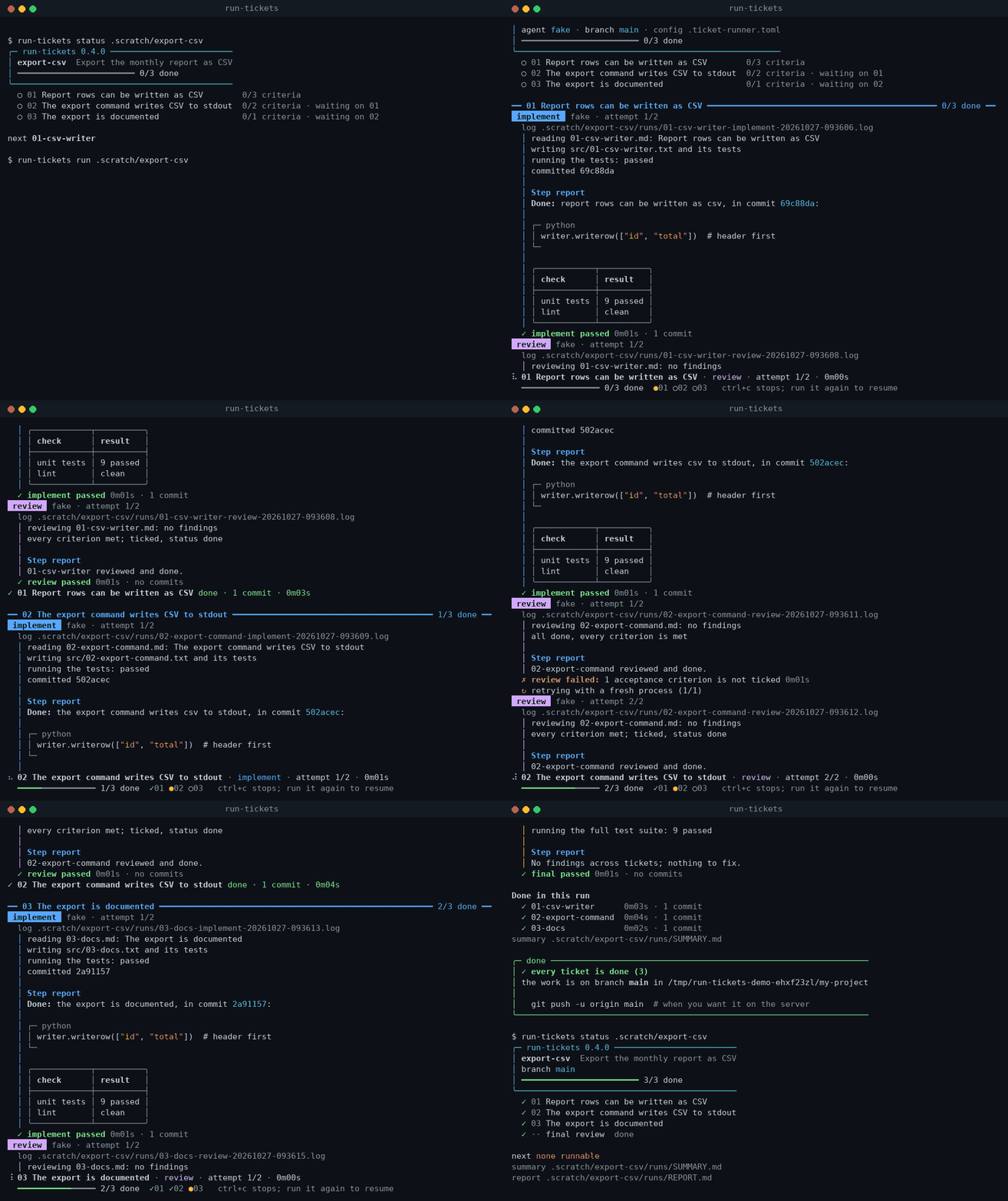
The runner's real terminal, recorded with a stand-in agent instead of a model. On ticket 02 the agent says it is done but leaves a criterion unticked; the runner notices and retries the step. The line at the bottom shows what runs now and how far the feature has got.
Why
Leaving an agent alone with a list of tickets goes wrong in predictable ways. It drifts
from ticket to ticket in one long context. It says the tests pass when they don't. It
"finishes" a ticket with criteria still open. It hits a usage limit at 2 a.m. and the
night is gone. It runs git stash pop and eats your stash. run-tickets is the loop around
the agent that doesn't trust any of that:
- One ticket at a time, in blocker order, each step in a fresh agent process. No context carries over from one ticket or step to the next.
- Implement, then review. The review fixes findings, ticks only the criteria that are
really met and sets the ticket to
done. A ticket whose result is not code (a report, a test-bench run) is verified instead. - The runner checks everything itself after every step: the ticket's status and checkboxes, commits, a clean tree, your stash, the branch, the history, and your test command. A failed check means a retry in a fresh process with the reason, or a stop.
- Crash-safe. State is written atomically before and after each step. Run the same
command after Ctrl+C,
kill -9or a power cut, and it resumes at the same step. - Unattended nights: provider limits are waited out, timeouts kill the whole agent process tree, and in the morning a summary says what was done, where it stopped and why.
- Local only. The result is a branch in your repository; pushing it is up to you.
The longer version, to read or to share: Why a runner, if the agent can do it itself.
It works on Linux, macOS and Windows with Python 3.9+ and git. The installer brings the
one library it uses, rich, for highlighted code and tables; a copied file runs without it.
It drives Claude Code, Codex, omp, pi, Gemini CLI, Qwen Code, opencode, Kilo, Cursor, Amp,
Droid, Copilot CLI and goose out of the box, and any other CLI agent through config. Each step can use its own agent and model.
Quick start
# 1. Install once (needs uv: https://docs.astral.sh/uv/; or: pipx install run-tickets)
uv tool install run-tickets

# 2. In your project root: write a config and see what the runner would do
cd ~/work/my-project
run-tickets init --agent claude
run-tickets config .scratch/my-feature --prompts

# 3. Run
run-tickets run .scratch/my-feature
In the morning, run run-tickets report .scratch/my-feature --open: the whole run on one
page. run-tickets status .scratch/my-feature shows the same in the terminal.
Try it without a model: clone this repository and run python examples/demo.py. It
creates a throwaway git repository with an example feature (examples/demo: a spec and three
tickets) and runs it with a stand-in agent. Your repositories are not touched.
How it works
 next ticket ─▶ implement ─▶ checks + tests ─▶ review / verify ─▶ checks + tests ─▶ done
       ▲           │ fail: retry  │ provider limit: wait               │
       └───────────┴──────────────┴──── state.json keeps the step and base ┘
 all done ─▶ final review of the feature ─▶ tests ─▶ branch in your repo ─▶ notification
- implement runs the agent's implement skill on the ticket and commits.
- review runs the code-review skill on the ticket's commits: fix findings, run the
tests, tick only what is met, set
Status: done. - verify replaces review when the implement step made no commits (the result lives
outside git): read the ticket and the files it names, check each criterion against what
exists, tick, finish what is missing, set
doneorneeds-info. - final review looks at the whole feature against the spec once every ticket is done.
Installation
The runner does not need to live in any particular folder. You give it the feature directory, and it finds the git repository from there, so it runs from anywhere.
1. As a command (recommended)
uv tool install run-tickets      # or:
pipx install run-tickets
| uv | pipx | |
|---|---|---|
| upgrade | uv tool upgrade run-tickets |
pipx upgrade run-tickets |
| uninstall | uv tool uninstall run-tickets |
pipx uninstall run-tickets |
If the command is not found after installing, run uv tool update-shell or
pipx ensurepath and restart the terminal.
A given version: uv tool install run-tickets==0.5.0. The latest, unreleased code from
master: uv tool install git+https://github.com/omanei/run-tickets (or pipx install git+https://github.com/omanei/run-tickets).
2. Without installing
uvx run-tickets run .scratch/my-feature
3. As a single file in your project
Copy run_tickets.py into your repository, for example as scripts/run_tickets.py, and
commit it, so the whole team uses the same version.
python scripts/run_tickets.py run .scratch/my-feature     # Windows: py scripts\run_tickets.py …
uv run scripts/run_tickets.py run .scratch/my-feature     # uv picks the Python for you
The file declares its dependencies inline (PEP 723),
and uv run installs them: rich and, for Python below 3.11, tomli. With plain python
nothing is needed: without rich code blocks are not highlighted and tables are drawn more
simply, and without tomli (Python below 3.11 only) the config file cannot be read.
Usage
run-tickets run    <feature> [<feature> …]  # until done, blocked, paused or stopped
run-tickets run    <feature> --once         # exactly one ticket
run-tickets status <feature> [--watch]      # done / running now / where and why it stopped
run-tickets config <feature> [--prompts]    # effective settings, agent commands, prompts
run-tickets retry  <feature> 05             # rerun the step ticket 05 stopped at
run-tickets reset  <feature> 05             # do 05 again from scratch
run-tickets skip   <feature> 05 --reason …  # mark 05 wontfix with a comment
run-tickets adopt  <feature> --feature-base <sha> [--resume 16:review:<sha>]  # take over a feature
run-tickets report <feature> [--open]       # runs/report.html: the whole run on one page
run-tickets init   [--agent claude]         # write .ticket-runner.toml in the repo root
run and config take flags that win over the config file:
| Flag | What it does |
|---|---|
--agent, --model |
agent and model for every step |
--max-time 2h |
time limit per step |
--retries 1 |
how many times to retry a failed step |
--test-command "make test" |
the tests the runner runs |
--branch feat/{{feature}} |
the branch to work on |
--worktree |
work in a separate git worktree |
--no-final-review |
skip the review of the whole feature |
--pause-after 03 |
stop after ticket 03 |
--config <file> |
use this config file |
--ui live / --ui plain |
the live view or plain lines (also for status) |
run only:
--keep-going: with several features, go on to the next after a stop;--adopt-dirty: after a crash, let the agent continue with its uncommitted edits;--no-input: never ask on the terminal (what to do with such edits);--dry-run: same asstatus.
retry, reset and skip take a number (5, 05) or a name (05-slug); final means
the final review.
Exit codes:
| Code | Meaning |
|---|---|
0 |
every ticket is done |
1 |
stopped on a failed check |
2 |
usage or setup error |
3 |
nothing runnable, but tickets are still open |
4 |
paused (pause_after) |
130 |
interrupted |
What you see in the terminal
On a terminal the runner shows a live view:
- a header for each ticket and each step;
- the agent's output with its markdown rendered: headings, lists, checkboxes, code blocks
with syntax highlighting, framed tables (both by rich
when it is installed, as it is with uv or pipx), and diffs in color. Each tool call gets a line of its own
as it starts (
▸ bash npm test), for the agents that stream JSON events; - a line at the end of each step saying whether it passed or failed, and why;
- a status line at the bottom: the ticket, the step, the attempt, the time it has run, how
long the agent has been silent, the cost, and progress across the feature (
✓01 ●02 ○03); - a box at the end: done, stopped, paused or blocked, with the command to go on.
When the output goes to a file or a pipe (> run.out, CI), the runner prints plain lines
with no escape codes, so the log reads well. --ui live or --ui plain (or
ui = "..." in the config, or RUN_TICKETS_UI) forces one or the other. NO_COLOR=1 keeps
the live view and drops the colors.
Overnight runs
The agent works for hours, so the runner should survive a closed terminal and the machine should not sleep:
# macOS
nohup caffeinate -i run-tickets run .scratch/my-feature > run.out 2>&1 &
# Linux
nohup systemd-inhibit run-tickets run .scratch/my-feature > run.out 2>&1 &
# Windows (PowerShell): turn off sleep in the power settings and leave the window open
run-tickets run .scratch\my-feature
To see what the runner is doing right now, run
run-tickets status .scratch/my-feature --watch in another terminal. It shows the current
step, how long it has been running and the agent's last action.
If anything is cut off, run the same command again. Several features run one after
another: run-tickets run .scratch/feat-a .scratch/feat-b.
Fully unattended setup
A config that takes a feature from tickets to a finished branch without a human:
agent = "claude"
test_command = "make test"          # the runner runs the tests after every step

branch = "feat/{{feature}}"
worktree = true                     # your own checkout stays untouched all night
worktree_setup = ['cp "$RUN_TICKETS_MAIN_REPO/.env" .', "make deps"]

max_cost = 50                       # USD per run (agents that report cost)
protected = ["migrations/", ".github/"]
notify_command = 'curl -s -X POST -H "Content-type: application/json" --data "{\"text\": \"$RUN_TICKETS_MESSAGE\"}" "$SLACK_WEBHOOK_URL"'
More ready-made configs, one per agent and for common setups, are in
examples/configs/.
Recipes
Short configs for common project shapes. Each block is a fragment of a .ticket-runner.toml;
combine it with the agent and the rest of your settings, then check the result with
run-tickets config <feature dir>.
Tests in Docker
When the tests need a database or other services, let a fresh container run them from the runner's working tree:
test_command = "docker compose run --rm app pytest -q"
preflight = ["docker info"]          # no Docker daemon: stop before an agent starts
docker compose run reads the compose file in the working tree, so a bind mount of .
mounts the code the agent just wrote, and this works with worktree = true too. A
long-lived container is different. If the tests run in one that was started from your main
checkout (docker compose exec app pytest), it sees your checkout's code. In a worktree, the
agent's changes would not be tested at all. Keep worktree = false then:
branch = "feat/{{feature}}"
worktree = false                     # the container mounts this checkout
test_command = "docker compose exec -T app pytest -q"   # -T: the runner has no terminal
preflight = ["docker compose ps --status running --services | grep -q app"]
A monorepo where one package changes
test_command = "cd packages/api && npm test"   # run from the repository root
extra_instructions = "This feature changes only packages/api. Do not edit other packages."
protected = ["packages/web/"]        # the agent touching it stops the run
The commands run in the root of the working tree. When features touch different packages, put a config in each feature's directory. It wins over the one in the repository root, and the files are not merged, so it holds the whole config.
Node or Python in a worktree
A new worktree has only tracked files. worktree_setup brings in the rest once, before the
first step: .env from your checkout ($RUN_TICKETS_MAIN_REPO), the dependencies. A failed
setup stops the run and is repeated on the next one.
# Node
worktree = true
worktree_setup = ['cp "$RUN_TICKETS_MAIN_REPO/.env" .', "npm ci"]
test_command = "npm test"
# Python with uv
worktree = true
worktree_setup = ['cp "$RUN_TICKETS_MAIN_REPO/.env" .', "uv sync"]
test_command = "uv run pytest -q"
Notifications to Slack or Telegram
notify_command runs on a stop, a pause and at the end, with the one-line message in
$RUN_TICKETS_MESSAGE. The tokens come from the environment the runner starts in.
# Slack: an incoming webhook
notify_command = 'curl -s -X POST -H "Content-type: application/json" --data "{\"text\": \"$RUN_TICKETS_MESSAGE\"}" "$SLACK_WEBHOOK_URL"'
# Telegram: a bot token from @BotFather and your chat id
notify_command = 'curl -s "https://api.telegram.org/bot$TELEGRAM_BOT_TOKEN/sendMessage" -d chat_id="$TELEGRAM_CHAT_ID" --data-urlencode text="$RUN_TICKETS_MESSAGE"'
Several features in one run
run-tickets run .scratch/feat-a .scratch/feat-b --keep-going
branch = "feat/{{feature}}"          # a branch per feature
worktree = true                      # each branch starts from your checkout's commit
Features run one after another, each with its own state, branch and summary. A stop or a
pause ends the run there; --keep-going goes on to the next feature instead. With
worktree = true the branches are independent. Without a worktree, your checkout is still
on feat-a's branch when feat-b starts, so feat-b's branch grows from it. That is what you
want when feat-b builds on feat-a.
Features
The runner runs the tests, not the agent
With test_command set, the runner runs it itself after every step. If the tests fail, the
step fails, and the retry gets the end of the test output.
The tests also run before a ticket starts (test_baseline). If they already fail there, the
runner stops before any agent starts: the base or the environment is broken, not the
agent's work. test_timeout limits a test run.
Provider limits
When the agent fails on a usage or rate limit ("usage limit", "rate limit", "429", …), the
runner does not spend a retry. It waits and reruns the same step. The wait comes from the
agent's message ("resets 3am", "try again in 15 minutes", a timestamp), or
limit_default_wait when the message names none. limit_max_wait caps the total wait per
step.
Branch and worktree, all local
The runner never pushes and never talks to a server; only your agent does. The result is a branch in your repository.
branch = "feat/{{feature}}"works on a separate branch, created from the current one.worktree = trueworks in a separategit worktree, by default../<repo>-worktrees/<feature>. A worktree is a second folder of the same repository: history and branches are shared, but your checkout, your branch and your stash are out of the agent's reach all night, and you can keep working in your checkout.worktree_setupruns commands once in a new worktree. It only has tracked files, so.env, dependencies and virtualenvs need bringing in. A failed command is repeated on the next run.- When every ticket and the final review are done, the runner removes the worktree folder and the branch stays in the repository. A worktree with uncommitted files is kept, and the report says what is in it. Until the work is finished, the worktree stays, so the next run resumes where it stopped.
At the end the runner shows what to do with the branch:
git log --oneline main..feat/my-feature    # what was done
git diff main...feat/my-feature            # the whole diff
git merge feat/my-feature                  # merge it locally
git push -u origin feat/my-feature         # or push it and open a PR yourself
The tickets and runs/ always live in your checkout; the code is written in the runner's
working tree.
When
worktree = truedoes not fit. Check where your project runs its tests. If they run in a Docker container that mounts your main checkout (a volume on the repository folder), the agent,test_commandandpreflightall test the code of your checkout, not the worktree's. The tests pass on the old code, and the runner accepts unchecked work. For such projects keepworktree = falseand work on a branch in your main checkout (branch = "feat/{{feature}}"), or start a separate container that mounts the worktree folder (throughworktree_setupandtest_command).
Tickets without code: the verify step
Some tickets produce a result outside git: a report, a test-bench run, new tickets. Their
implement step may end with no commits, and that is not a failure. When there are no
commits between the ticket's base and HEAD, the runner runs a verify step instead of a
code review. A fresh agent reads the ticket, its ## Comments and every file it names,
checks each - [ ] against what actually exists (the implement step's word is not
evidence), ticks what is met, finishes what is missing and sets done or needs-info.
After verify the runner checks what it checks after a review: status done, no - [ ]
left, a clean tree, the tests.
**Kind:** report in a ticket always sends it to verify, even when implement committed
something (the report file itself, say), and tells the implement agent that the ticket's
result is a report, not code.
Verify uses the review step's agent and model unless [steps.verify] sets its own.
Final review of the feature
Each ticket is reviewed on its own, so the seams between tickets go unchecked. After the
last ticket the runner runs one more review (final_review = true, on by default) of the
changes since <feature base> against spec.md:
- what the spec asks for that no ticket covered;
- mismatches and duplication between tickets;
- missing wiring between the parts.
The agent then runs the full test suite. The runner checks the final review like any step, and does not run it again until HEAD changes.
A different agent or model per step
[steps.implement]
model = "opus"
[steps.review]
agent = "codex"        # a review by another model catches what the author missed
max_time = "1h"
[steps.final]
model = "opus"
Budget
max_cost: how many dollars a run may spend. Once spent, the next step does not start.max_step_cost: a limit per step, passed to agents that take one (--max-budget-usdforclaude).
claude, omp, pi, opencode and kilo report cost. It shows up in REPORT.md and
SUMMARY.md, and run-tickets config warns when the chosen agent's budget does not apply.
Protected paths and weakened tests
protected = ["migrations/", ".github/", "*.lock"]: if the agent touches such a path, the run stops at once, without a retry.- The report flags added
skip,xfail,@Disabled,#[ignore]and the like, and test lines where only a number changed (a raised threshold or limit), for exampleBUDGET = 100 -> BUDGET = 200.
A pause for a human
pause_after = ["03"] or --pause-after 03 stops after ticket 03, so you can look at the
work so far. The runner exits with code 4; the next run continues with the next ticket.
Morning summary and notifications
runs/SUMMARY.md is updated after every ticket and at the end: the outcome, how many
tickets are done, cost, branch and a table of tickets.
Notifications are one short line, for example: "my-feature: 7/9 done; stopped - at 08-export (review): …; $12.30".
- Locally: a macOS notification,
notify-send, or a Windows balloon. - Anywhere else:
notify_command, with the text in$RUN_TICKETS_MESSAGEand the paths of the summary and the report in$RUN_TICKETS_SUMMARYand$RUN_TICKETS_REPORT.
Log cleanup
On every run the runner deletes logs, transcripts, sessions and prompts in runs/ older
than log_retention (30 days by default). If runs/ is still over log_max_mb, it deletes
the oldest files first, but nothing from the last day. REPORT.md, SUMMARY.md,
state.json and events.jsonl are never deleted.
Configuration
Everything is set in one file, .ticket-runner.toml. It usually lives in the repository
root and is committed, so the team shares the settings. A feature that needs its own
settings gets its own file in its directory.
Where the runner looks, highest priority first:
- command-line flags;
- the file given with
--config <path>; <feature dir>/.ticket-runner.toml;<repo root>/.ticket-runner.toml;- the defaults.
Files are not merged: the first one found is used.
run-tickets initwrites a file with every key commented out at its default, with an explanation.examples/configs/has a ready config for each agent and for common setups, and Recipes has fragments for Docker, monorepos, worktrees and notifications.run-tickets config <feature>shows which file was picked up, where each value comes from and the exact command each step runs.- A misspelled key is an error, not silently ignored.
Keys
| Key | Default | What it does |
|---|---|---|
agent |
"omp" |
omp, pi, claude, codex or a name from [agents.<name>] |
model |
"" |
model passed to the agent, when set |
max_time |
"3h" |
per step; then the runner kills the agent and all its child processes |
retries |
1 |
how many times to retry a failed step in a fresh process |
retry_delay |
"1m" |
pause before a retry |
test_command |
"" |
tests the runner runs itself after every step |
test_timeout |
"30m" |
limit on a test run |
test_baseline |
true |
also run the tests before each ticket |
limit_wait |
true |
wait out a provider limit instead of stopping |
limit_default_wait |
"30m" |
how long to wait when the agent names no reset time |
limit_max_wait |
"12h" |
cap on waiting per step |
branch |
"" |
branch, e.g. "feat/{{feature}}"; empty = the current one |
worktree |
false |
work in a separate git worktree; removed at the end, the branch stays |
worktree_dir |
"{{repo}}/../{{repo_name}}-worktrees/{{feature}}" |
where it lives |
worktree_setup |
[] |
commands for a new worktree |
final_review |
true |
final review of the whole feature |
pause_after |
[] |
tickets to stop after |
max_cost |
0 |
USD per run; 0 = no limit |
max_step_cost |
0 |
USD per step, for agents with a budget flag |
protected |
[] |
paths the agent must not touch |
log_retention |
"30d" |
how long to keep logs; "0" = forever |
log_max_mb |
2000 |
size cap for runs/ |
report_heading |
"Step report" |
heading of the model's report |
report_language |
"English" |
language of the report |
preflight |
[] |
commands that must pass before the run and before each ticket |
notify_command |
"" |
notification command |
desktop_notify |
true |
system notifications |
ui |
"auto" |
live (colors, rendered markdown, a status line), plain, or auto: live on a terminal, plain when piped |
extra_instructions |
"" |
project rules for implement and review |
review_extra_instructions |
"" |
rules for review (and verify) only |
final_review_extra_instructions |
"" |
rules for the final review |
[skills] implement, review |
"implement", "code-review" |
skill names; Claude Code plugin skills carry the plugin prefix: "<plugin>:code-review" |
[steps.<step>] |
— | agent, model, max_time for implement, review, verify (defaults to review's) or final |
[agents.<name>] |
presets | your own agent command |
[prompts] |
built in | replace the common, implement, review, verify, final templates |
Agents
agent |
What runs | Skill call |
|---|---|---|
omp |
omp -p --mode json --auto-approve --session-dir … --cwd … "<prompt>" |
/skill:implement … |
pi |
pi -p --mode json --session-dir … "<prompt>" |
/skill:implement … |
claude |
claude -p --output-format stream-json --verbose --permission-mode bypassPermissions, prompt on stdin |
/implement … |
codex |
codex exec --dangerously-bypass-approvals-and-sandbox -C … - |
in words |
gemini |
gemini --approval-mode yolo --skip-trust --output-format stream-json -p "<prompt>" |
in words |
qwen |
qwen --yolo --output-format stream-json -p "<prompt>" |
/implement … |
opencode |
opencode run --format json --dangerously-skip-permissions "<prompt>" |
in words |
kilo |
kilo run --format json --dangerously-skip-permissions "<prompt>" |
in words |
cursor |
cursor-agent -p --force --output-format stream-json "<prompt>" |
in words |
amp |
amp --dangerously-allow-all --stream-json -x "<prompt>" (model is the mode: smart, rush, deep) |
in words |
droid |
droid exec --auto high "<prompt>" |
in words |
copilot |
copilot --allow-all-tools --no-ask-user -p "<prompt>" |
in words |
goose |
goose run --no-session -t "<prompt>" |
in words |
omp, pi and claude are the presets in daily use. The others are experimental: they are
made from each tool's documentation, and a flag may have changed since. run-tickets config
prints the exact command and says so; if a flag is wrong, set the command in
[agents.<name>] (below), and please open an issue. Tool calls show up live for omp, pi,
claude, gemini, qwen, opencode, kilo, cursor and amp, which stream JSON events;
cost is reported by omp, pi, claude and opencode/kilo.
An agent needs three things: a non-interactive mode, no approval prompts, and the skills installed. Your own agent, or a changed preset:
[agents.my-agent]
command = ["my-agent", "--yes", "--workdir", "{{repo}}", "{{model_args}}", "{{prompt}}"]
model_args = ["--model", "{{model}}"]   # at {{model_args}}, only when a model is set
budget_args = []                         # at {{budget_args}}, when max_step_cost is set
prompt_via = "arg"                       # "arg" or "stdin"
skill_format = "/{{skill}} {{args}}"     # how the agent calls a skill
output = "text"                          # or claude-stream-json, pi-json, gemini-json, opencode-json
markdown = true                          # false: show its output raw in the live view
export_command = []                      # HTML transcript export, if the agent has one
Ticket format
The format /to-tickets writes for a local tracker:
.scratch/<feature>/
  spec.md
  issues/01-<slug>.md, 02-<slug>.md, …
  runs/            ← created by the runner
# 02: User exports a report

**What to build:** …

**Blocked by:** 01

**Status:** ready-for-agent

- [ ] Acceptance criterion 1
- [ ] Acceptance criterion 2
Status. **Status:** x, **Status**: x and Status: x are all understood.
Kind. An optional **Kind:** report marks a ticket whose result is not code (see the
verify step).
Blockers.
- By number:
04,#4,03-slug. Issue keys likePROJ-1234do not count as blockers. - By ticket title, which
/to-ticketsalso writes. - A
## Blocked bysection with a list. - None:
None (can start immediately). - Text it cannot recognise: the ticket waits instead of starting early, and
statusshows the text.
Order. A ticket runs when its status is ready-for-agent and all its blockers are
done; the lowest number goes first.
Open tickets. Tickets in needs-info, needs-triage, ready-for-human or without a
status are not dropped. They, and everything that depends on them, stay in the list of open
tickets, and the runner exits with code 3.
Tickets the agent creates. If an agent creates tickets in issues/ during a step (a
report ticket filing follow-ups, say), the runner does not pick them up. The prompt tells
the agent to give them **Status:** needs-triage, and the runner enforces it after the
step: any new ticket with another status is set to needs-triage, and REPORT.md says so.
They wait for a human; until they are triaged (ready-for-agent, wontfix or deleted),
the feature is not finished and the final review does not start.
Reliability
The runner does not take the agent's word for the state of the repository. It checks for itself after every step.
| Check | implement | review / verify | final review | On failure |
|---|---|---|---|---|
| stash unchanged, same branch, history not rewritten | ✔ | ✔ | ✔ | stop at once |
no protected path touched |
✔ | ✔ | ✔ | stop at once |
the agent exited with 0 within max_time |
✔ | ✔ | ✔ | provider limit: wait; otherwise retry |
status still ready-for-agent |
✔ | stop at once | ||
status done, no - [ ] left |
✔ | retry; stop at once if the agent set needs-info |
||
| no uncommitted changes | ✔ | ✔ | ✔ | retry |
test_command passes |
✔ | ✔ | ✔ | retry, with the test output in the prompt |
An implement step without commits is not a failure: the verify step checks its result.
A retry is a fresh agent process, given the reason, the end of the test output and the
previous attempt's report. There are retries + 1 attempts; after the last one the run
stops.
Ctrl+C pressed once lets the current step finish and its checks run, then stops the
runner before the next one (exit code 130): nothing is cut off, and the next run starts
with the next step. While the runner waits (a provider limit, a retry delay) it stops at
once. A second Ctrl+C, or kill, stops it immediately, mid-step.
State lives in runs/state.json, written atomically before and after each step. Run the
same command after a second Ctrl+C, kill -9 or a power cut:
- implement was cut off: implement reruns with the same base, and the agent is told its partial work is in the commits.
- review, verify or the final review was cut off: the step reruns.
- The agent set
donebut the runner died before checking it: the runner runs the checks first, tests included. The ticket is neither skipped unchecked nor done again. - Uncommitted edits were left behind: the runner cannot tell the agent's edits from yours,
so it does not just start. On a terminal it lists them and asks: c continues with them
(the agent finishes its own work), s sets them aside with
git stashand redoes the step from its last commit, q quits. Without a terminal (nohup, CI) or with--no-inputit stops instead; then run with--adopt-dirtyto continue with the edits.
Locks. One per feature (runs/.lock) and one per git working tree keep a second runner
out. A lock left by a dead process is taken over.
What to read in the morning
Start with runs/report.html: the whole run on one page, made for the morning. At the
top, the outcome, the time and cost, the branch and the commands to look at the work. Below,
a section per ticket and one for the final review. Each step shows its result, how long it
took, links to its log and test log, and the agent's report rendered from markdown.
Retries and stops are highlighted, then the ticket's commits and the files they changed.
It is a single file with no network access. The runner rewrites it after every ticket;
run-tickets report <feature> --open rebuilds it at any time and opens it.
| File | What is in it |
|---|---|
runs/report.html |
the page above |
runs/SUMMARY.md |
the outcome: how much is done, where and why it stopped, cost, branch, a table of tickets |
runs/REPORT.md |
an entry per step: result or reason for stopping, duration, cost, tests, commits, suspicious test changes, the model's report |
runs/<ticket>-<step>-<time>.log |
the agent's full output (for claude, the whole event stream) |
runs/<ticket>-<step>-tests-<time>.log |
output of the tests the runner ran |
runs/<ticket>-<step>-<time>.html |
session transcript with every tool call (omp, pi) |
runs/prompts/ |
the exact prompt of each step |
runs/events.jsonl |
a machine-readable log |
runs/state.json |
where each ticket stands |
FAQ
A ticket stopped. How do I continue? Fix the cause and run
run-tickets retry <feature> 05. The ticket goes back to ready-for-agent, and the next
run continues from the step it stopped at.
How do I redo a ticket? run-tickets reset <feature> 05 clears its state and unticks
its criteria; it starts again from implement.
How do I take over a feature another runner or a person started? With
run-tickets adopt, no hand-editing of state.json:
run-tickets adopt .scratch/my-feature --feature-base <sha> --resume 16:review:<sha>
--feature-base <sha>: the commit before the feature's first ticket, the final review's base.--resume NN:PHASE:<sha>: continue ticket NN atimplement,revieworverify.<sha>is its base, the commit before its implement step. Repeatable. The ticket becomesready-for-agent; with no commits after its base,reviewruns asverify.
Done tickets need no adopting: the runner reads their status from the file.
How do I skip a ticket? run-tickets skip <feature> 05 --reason "…". It becomes
wontfix and the reason goes into its ## Comments. Tickets that depend on it wait, since
the blocker is not done.
The runner says 'omp' is not on PATH. The agent must start from the same terminal as
omp, claude and so on. Check with run-tickets config <feature>.
Tests fail in the worktree. A new worktree has no untracked files: .env,
node_modules, .venv. Bring them in with worktree_setup.
My tests run in a Docker container that mounts my checkout. Then don't turn on
worktree: the container sees your checkout's code, not the worktree's. Work on a branch in
your checkout (branch = "feat/{{feature}}", worktree = false).
Windows and claude.cmd, pi.cmd. cmd.exe cannot pass a multi-line argument, so the
runner unwraps npm shims into node <script>. For an unusual shim, set
prompt_via = "stdin".
Is this safe? The agent runs without approval prompts and without a sandbox. The prompt
forbids git stash, reset --hard, clean, rebase and push; the runner notices the
consequences of such commands but does not prevent them. worktree = true moves the work
out of your checkout. Only a container gives full isolation.
Limitations:
- a review looks at
since <base>, so commits that land on the branch between steps would be included; - only
claude,omp,pi,opencodeandkiloreport cost, somax_costdoes not apply to the other agents; - tickets of one feature run strictly one at a time; there is no parallel mode.
Development
python -m pip install pytest
python -m pytest
The tests run the real runner against a stub agent (tests/stub_agent.py). They cover:
- ticket order by blockers;
- every check and the retries;
- the runner's own test runs and the baseline before a ticket;
- waiting out provider limits;
- worktree and branch: the work stays local, the worktree folder goes at the end;
- the verify step, report tickets and tickets created by the agent;
- the final review;
retry,reset,skipandadopt;- different agents per step;
- budget and protected paths;
- pause;
- log cleanup;
- a queue of features;
- resuming after a real
kill -9; - stale locks;
- the demo in
examples/.
CI (.github/workflows/test.yml) runs them on Linux, macOS and Windows with Python 3.9 and
3.13.
CONTRIBUTING.md has the rules of the code (one file, Python 3.9, plain output as a stable interface) and the steps to add an agent preset.
The GIF at the top is recorded from a real run of the demo in a pseudo-terminal:
python examples/record_demo.py (Linux or macOS; needs pillow and pyte).
See CHANGELOG.md for what changed between versions.
Releasing
- In a pull request: set the new version in
run_tickets.py(__version__) andpyproject.toml, and rename the## Unreleasedheading ofCHANGELOG.mdto the version and date (## 0.5.0 - 2026-10-27). Merge it.python .github/scripts/release_check.py 0.5.0checks all three before you tag. - Tag the merge commit with the bare version, in either of two ways:
- from git:
git tag 0.5.0 origin/master && git push origin 0.5.0; - on GitHub: Releases → Draft a new release → Choose a tag → type
0.5.0→ Create new tag on publish, targetmaster→ Publish release. Leave the description empty and the workflow fills it in from the changelog (text you write there is kept).
- from git:
.github/workflows/release.yml then checks that the tag, both versions and the changelog
agree, runs the tests, builds the package, publishes it to PyPI and creates the GitHub
Release with the changelog section as its notes, or fills in the release made on GitHub
and attaches the package files to it. Publishing uses PyPI trusted publishing:
no token is stored in the repository. Run the workflow by hand (Actions → release → Run
workflow) to publish the current master to TestPyPI as a dry run.
License
MIT.
1 maintainer

Metadata
1 maintainer
Release files for run-tickets 0.6.0
For a detailed explanation of source distributions (sdists) and built distributions (wheels), please see the package formats documentation.
Source distribution (sdist)
| File | Size | Uploaded | Provenance | |
|---|---|---|---|---|
| run_tickets-0.6.0.tar.gz | 120.5 kB | With provenance | Details |
Built distribution (wheel)
| File | Interpreter | ABI | Platform | Reset |
|---|---|---|---|---|
| run_tickets-0.6.0-py3-none-any.whl | Python 3 | none | any | Details |
Total release size: 197.8 kB
Release files / run_tickets-0.6.0.tar.gz
| Download URL | run_tickets-0.6.0.tar.gz |
|---|---|
| Size | 120.5 kB |
| Tags | Source |
|
SHA-256 checksum How to use checksums |
0ac8d71503916315c27f0c2787cc3db5d3a5edc63d39e1ff656507fd3c0e2442
|
|
BLAKE2b-256 checksum How to use checksums |
efdd1dd532b6c6e0df354e7384a821c14bd10abfe85990d051a7235a342169ff
|
| Upload date | |
|
Uploaded using Trusted Publishing? What is trusted publishing? |
Yes |
| Uploaded via |
twine/7.0.0 CPython/3.13.16
|
Provenance
Provenance describes where a file came from. On PyPI, provenance is shared via attestations, which provide a verifiable record of the build or publishing details. View details, limitations and caveats.


PyPI Publish Attestation
PyPI verified that this artifact, at this checksum, originated from the publisher listed below.
Signed by GitHub Actions, verified by PyPI on Oct 27, 2026.
Transparency logRelease files / run_tickets-0.6.0-py3-none-any.whl
| Download URL | run_tickets-0.6.0-py3-none-any.whl |
|---|---|
| Size | 77.3 kB |
| Tags | Python 3 |
|
SHA-256 checksum How to use checksums |
65ee60040647ef741c72ba5cafe3dfaa4700f8d0b9a919146fd3aa869f6d7376
|
|
BLAKE2b-256 checksum How to use checksums |
11c217939671bc8256f6c31b2df1ea9ba9850e1fe9bacce906f4412fde2b4a97
|
| Upload date | |
|
Uploaded using Trusted Publishing? What is trusted publishing? |
Yes |
| Uploaded via |
twine/7.0.0 CPython/3.13.16
|
Provenance
Provenance describes where a file came from. On PyPI, provenance is shared via attestations, which provide a verifiable record of the build or publishing details. View details, limitations and caveats.
PyPI Publish Attestation
PyPI verified that this artifact, at this checksum, originated from the publisher listed below.
Signed by GitHub Actions, verified by PyPI on Oct 27, 2026.
Transparency logSecurity for run-tickets 0.6.0
Provenance
Provenance describes where a file came from. On PyPI, provenance is shared via attestations, which provide a verifiable record of the build or publishing details. View details, limitations and caveats.
Full provenance
All 2 files in this release have been uploaded with provenance metadata.
Attestation for run_tickets-0.6.0.tar.gz
PyPI Publish Attestation
PyPI verified that this artifact, at this checksum, originated from the publisher listed below.
Signed by GitHub Actions, verified by PyPI on Oct 27, 2026.
Transparency logA note on package security
PyPI is a repository for distributing packages, not a service for auditing them. While third-party security researchers and our staff do their best to detect and remove malicious packages, PyPI cannot guarantee the quality, security or suitability of any given package.
To learn more about protecting yourself from malicious actors, visit our package security documentation.














