
RunBridge Hub
Give programs and agents access to browsers on remote devices through HTTP / MCP.
简体中文 · English · Quick start · Documentation · Changelog (Chinese) · Issues


RunBridge Hub is the server component of RunBridge. It accepts connections from RunBridge Node, allocates exclusive device leases, manages browser sessions, and routes commands and results. Clients use HTTP or MCP without connecting directly to the Node's browser port.
Use it for automation programs, agent tools, and test teams that need to share browser devices. Browsers, Playwright, and page objects stay on Node devices; Hub itself needs only a Python environment.
Highlights
| Capability | What you can do |
|---|---|
| Shared HTTP and MCP entry | Use the same authorization, sessions, and execution flow from programs and agents |
| Remote browser operations | Let Nodes connect to Hub and access their browsers through one gateway |
| Exclusive Node leases | Claim, renew, and release an entire Node; reclaim expired or idle leases without overlapping ownership |
| Queryable results | Deduplicate requests and recover their original status after timeouts or disconnections |
| Page streaming | Observe the same page being operated on using frames captured by Node |
| Read-only dashboard | Search and filter devices; inspect connections, occupancy, capabilities, heartbeats, and measured control-channel RTT |
Screenshots
The dashboard brings device connections, resource occupancy, and capabilities together, on desktop and mobile. Open a node for details. Dashboard access uses its own read-only token.
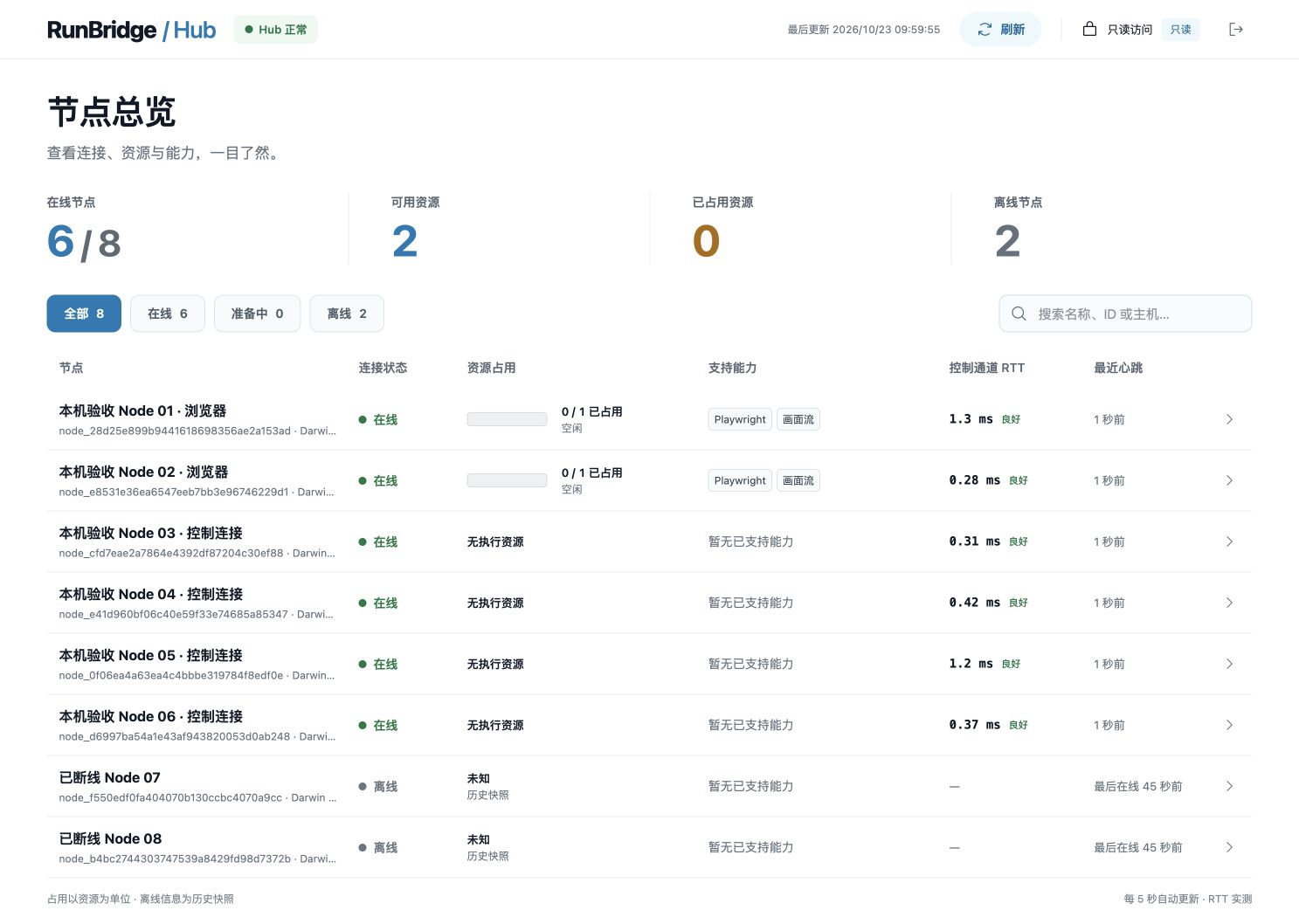
This screenshot shows a local acceptance environment at the time of capture, using the Chinese UI. Your dashboard displays the connected Hub's actual state. See the dashboard guide for field definitions.
How it works
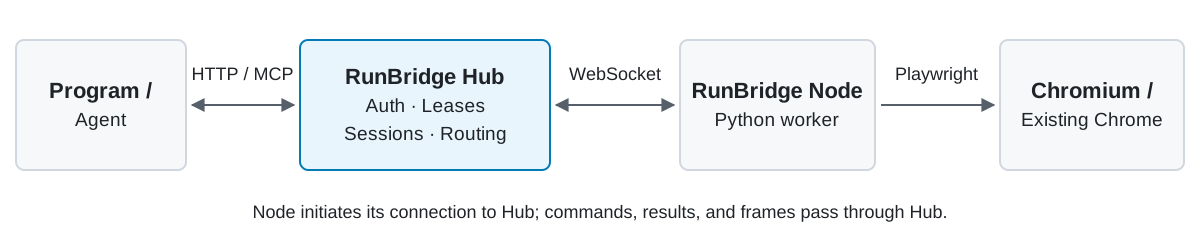
Deploy Hub and Node separately: Hub provides the service entry, and Node executes on the browser device. Each has its own configuration, identity, and runtime environment.
Quick start
Install from PyPI after this version is published
Run in a new deployment directory with Python 3.14 and uv. Until the release is uploaded, use the source route below. With this installation, continue at step 2. HTTP-only users may omit [mcp].
mkdir -p ~/runbridge-hub
cd ~/runbridge-hub
uv venv --python 3.14 .venv
uv pip install --python .venv/bin/python "runbridge-hub[mcp]==0.9.3" -i http://mirrors.aliyun.com/pypi/simple/ --trusted-host mirrors.aliyun.com
.venv/bin/runbridge-hub generate-token --output .runbridge/enrollment.token
.venv/bin/runbridge-hub generate-token --output .runbridge/hub.token
1. Install Hub
On the Hub machine, prepare Git, Python 3.14.x, and uv. These commands use a macOS / Linux shell:
git clone https://github.com/Pegasus-Yang/Run-Bridge-Hub.git
cd Run-Bridge-Hub
uv sync --locked --no-dev -i http://mirrors.aliyun.com/pypi/simple/ --trusted-host mirrors.aliyun.com
.venv/bin/runbridge-hub generate-token --output .runbridge/enrollment.token
.venv/bin/runbridge-hub generate-token --output .runbridge/hub.token
uv creates .venv at the repository root. The two credentials serve different roles: Node enrollment and client claims. For installation from a wheel in a separate directory, see deployment.
2. Save configuration and start Hub
Create hub.yaml in the current installation directory. Replace public_url with the Hub base URL reachable from both Node and clients:
host: 0.0.0.0
enrollment_token_file: .runbridge/enrollment.token
hub_token_file: .runbridge/hub.token
public_url: http://hub.example:8787
.venv/bin/runbridge-hub serve --settings hub.yaml
Leave that terminal running and check from another terminal:
curl --fail http://127.0.0.1:8787/health
Expect {"status":"ok","protocol_version":2}. Open the Dashboard URL from the startup log. An empty list is normal before devices enroll. Keep credential files and dashboard links containing the read-only token private.
For a source installation, add the optional MCP dependency below. The PyPI command above already includes this extra:
uv sync --locked --no-dev --extra mcp -i http://mirrors.aliyun.com/pypi/simple/ --trusted-host mirrors.aliyun.com
Add mcp_enabled: true to hub.yaml and restart. Agents connect using Streamable HTTP at the actual Hub base URL plus /mcp. See MCP integration for authentication and tool usage.
3. Connect Node and verify a browser operation
Privately give the Hub URL and original enrollment.token to the device maintainer, who follows the Node quick start. Separately provide hub.token to the client. Follow the client guide to claim Node and save the returned configuration as .runbridge/access.json.
Source installations already include the examples. For PyPI or wheel installations, first download both standard-library scripts into the same paths in your deployment directory:
mkdir -p doc/reference/examples
curl --fail --location https://raw.githubusercontent.com/Pegasus-Yang/Run-Bridge-Hub/main/doc/reference/examples/%E6%89%A7%E8%A1%8C%E4%BC%9A%E8%AF%9D%E8%B0%83%E7%94%A8.py --output doc/reference/examples/执行会话调用.py
curl --fail --location https://raw.githubusercontent.com/Pegasus-Yang/Run-Bridge-Hub/main/doc/reference/examples/node_lease.py --output doc/reference/examples/node_lease.py
Run the example to open a page, read its title, save a PNG, close the browser session, and return Node:
.venv/bin/python doc/reference/examples/执行会话调用.py --access-file .runbridge/access.json --resource-id chromium --url https://example.com --screenshot .runbridge/page.png
.venv/bin/python doc/reference/examples/node_lease.py release --access-file .runbridge/access.json
Use the actual resource ID advertised by Node. The URL must be reachable from the Node device. Check the screenshot, cleanup=COMPLETE, and lease state RELEASED. The quick-start guide includes a complete check using Hub's own health page instead of an external website.
Supported scope
- Current Hub: 0.9.3, paired with Node 0.8.2. Python 3.14.x is required. Hub does not need browsers, Playwright, or Node.js installed.
- 33 project methods and 27 MCP tools are available. The interface borrows Playwright naming; the method reference defines the supported subset. Direct official SDK connections, arbitrary scripts, and SDK callbacks are outside this interface.
- Managed browsers support HTTP / MCP; borrowed Chrome uses HTTP. Frames provide observation; clients verify the business outcome.
- Browser sessions and Node leases are released separately. Return Node after the batch even when the browser is closed. Unknown cleanup keeps the resource quarantined; see leases.
- Dashboard labels and some CLI messages remain Chinese. English documentation does not change runtime language.
Documentation and help
| Start here | Contents |
|---|---|
| Documentation index | Reading paths for deployers, clients, and maintainers |
| Quick start · Deployment | Installation, configuration, startup, checks, handoff, and backups |
| Parameters · Annotated YAML | Options, defaults, paths, and deployment scenarios |
| Client guide · Lease API | Claim devices, operate pages, query results, and release resources |
| MCP integration · DSH integration | Agent tools, plugin settings, and batch lifecycle |
| Page streaming · Dashboard | Observe pages and devices |
| Operations and troubleshooting | Errors, upgrades, unknown cleanup, and offline review |
Development and contributions
Use Issues or submit a Pull Request. Include both component versions, environment, reproduction steps, and redacted error details.
Development uses the root .venv. The contribution guide explains setup and validation and links to the detailed development manual in Chinese. Maintained by Pegasus-Yang.
License
This project uses the MIT License. Bundled Phosphor Icons retain their original MIT license and copyright notice. Other dependencies keep their respective licenses.
1 maintainer

Metadata
1 maintainer
Release files for runbridge-hub 0.9.3
For a detailed explanation of source distributions (sdists) and built distributions (wheels), please see the package formats documentation.
Source distribution (sdist)
| File | Size | Uploaded | Provenance | |
|---|---|---|---|---|
| runbridge_hub-0.9.3.tar.gz | 273.5 kB | Without provenance | Details |
Built distribution (wheel)
| File | Interpreter | ABI | Platform | Reset |
|---|---|---|---|---|
| runbridge_hub-0.9.3-py3-none-any.whl | Python 3 | none | any | Details |
Total release size: 368.0 kB
Release files / runbridge_hub-0.9.3.tar.gz
| Download URL | runbridge_hub-0.9.3.tar.gz |
|---|---|
| Size | 273.5 kB |
| Tags | Source |
|
SHA-256 checksum How to use checksums |
ad00a4e32dcfb198f85ba9bb991e99379b258d949343a6064eda81df5359e7ad
|
|
BLAKE2b-256 checksum How to use checksums |
00fe942fae80c5d9180d6d1f58f1d748a57486c8cab4a95c5b6ad022b9213c62
|
| Upload date | |
|
Uploaded using Trusted Publishing? What is trusted publishing? |
No |
| Uploaded via |
uv/0.13.5 {"installer":{"name":"uv","version":"0.13.5","subcommand":["publish"]},"python":null,"implementation":{"name":null,"version":null},"distro":{"name":"macOS","version":null,"id":null,"libc":null},"system":{"name":null,"release":null},"cpu":null,"openssl_version":null,"setuptools_version":null,"rustc_version":null,"ci":null}
|
Release files / runbridge_hub-0.9.3-py3-none-any.whl
| Download URL | runbridge_hub-0.9.3-py3-none-any.whl |
|---|---|
| Size | 94.5 kB |
| Tags | Python 3 |
|
SHA-256 checksum How to use checksums |
09227a040604aab155bcb9c0703409aaaa564ce071c27367913d357bd77d9816
|
|
BLAKE2b-256 checksum How to use checksums |
e2a9b356cc3f93a288c3dcbd918ba9ba3f448a7fe74d103de29b1eb17ee7ac63
|
| Upload date | |
|
Uploaded using Trusted Publishing? What is trusted publishing? |
No |
| Uploaded via |
uv/0.13.5 {"installer":{"name":"uv","version":"0.13.5","subcommand":["publish"]},"python":null,"implementation":{"name":null,"version":null},"distro":{"name":"macOS","version":null,"id":null,"libc":null},"system":{"name":null,"release":null},"cpu":null,"openssl_version":null,"setuptools_version":null,"rustc_version":null,"ci":null}
|
Security for runbridge-hub 0.9.3
Provenance
Provenance describes where a file came from. On PyPI, provenance is shared via attestations, which provide a verifiable record of the build or publishing details. View details, limitations and caveats.
No provenance found
None of the files in this release were uploaded with provenance metadata.
A note on package security
PyPI is a repository for distributing packages, not a service for auditing them. While third-party security researchers and our staff do their best to detect and remove malicious packages, PyPI cannot guarantee the quality, security or suitability of any given package.
To learn more about protecting yourself from malicious actors, visit our package security documentation.













