
RunBridge Node
Make a local browser available to remote programs and agents.
简体中文 · English · Quick start · Documentation · Changelog (Chinese) · Issues


RunBridge Node is the browser execution component of RunBridge. It runs on the browser device, connects to RunBridge Hub, executes Playwright operations in an independent Python worker, and sends results and page frames back to Hub.
Use it to provide an isolated browser test environment, or to reuse an existing Chrome instance's pages and login state with its owner's authorization. Programs and agents access the device through Hub's HTTP / MCP interface; Node manages browser processes, endpoints, and page objects locally.
Highlights
| Capability | What you can do |
|---|---|
| Managed browser sessions | Launch Chromium for a session and clean up its processes and temporary profile afterward |
| Existing Chrome reuse | Connect to an authorized local instance and retain its original pages and login state when disconnecting |
| One YAML file | Configure Hub, identity, and browser options; automatically enroll, probe, and connect on first startup |
| Central lease allocation | Let Hub manage claims, renewals, and release while Node handles capabilities and execution |
| Multiple instances per device | Provide separate Nodes with independent configurations, identities, and browser resources |
| Frames and cleanup status | Observe the actual page, report cleanup, and quarantine resources when cleanup cannot be confirmed |
How it works and which mode to choose
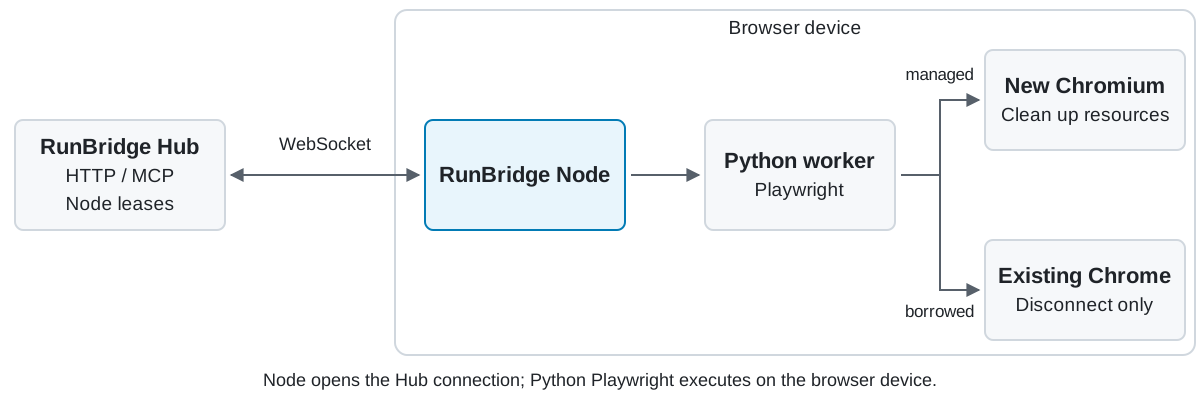
| Choice | managed: isolated browser | borrowed: existing Chrome |
|---|---|---|
| Typical use | Automated tests, independent tasks, agent MCP | Existing login state or a specific browser environment |
| Browser source | Chromium launched by Node for the session | Local Chrome instance explicitly authorized by its owner |
| Session end | Remove this session's browser and temporary profile | Disconnect; retain original pages and login state |
| Page streaming | Capture the managed page directly | Install the optional visual extra when needed |
| Client entry | Hub HTTP / MCP | Hub HTTP |
| Guide | Managed Chromium | Existing Chrome |
Inspect online status, occupancy, and capabilities in the Hub dashboard. Managed mode is headless by default; subscribe to page frames through Hub. Node does not have a separate web management UI.
Quick start
Install from PyPI after this version is published
Prepare Python 3.14, uv, and Hub enrollment material as described below. Until upload, use the source route. With this installation, continue at step 2.
mkdir -p ~/runbridge-node
cd ~/runbridge-node
uv venv --python 3.14 .venv
uv pip install --python .venv/bin/python "runbridge-node[playwright]==0.8.2" -i http://mirrors.aliyun.com/pypi/simple/ --trusted-host mirrors.aliyun.com
.venv/bin/python -m playwright install chromium
1. Install Node and prepare Chromium
On the Node device, prepare Git, Python 3.14.x, and uv. First obtain a reachable Hub base URL and the original enrollment.token from the Hub deployer. Save the token file to ~/Downloads/.
These commands use a macOS / Linux shell and install managed Chromium support:
git clone https://github.com/Pegasus-Yang/Run-Bridge-Node.git
cd Run-Bridge-Node
uv sync --locked --no-dev --extra playwright -i http://mirrors.aliyun.com/pypi/simple/ --trusted-host mirrors.aliyun.com
.venv/bin/python -m playwright install chromium
uv creates .venv at the repository root. Linux also needs the browser's system libraries; see the Playwright browser guide. For installation from a wheel in a separate directory, see deployment.
2. Save enrollment material and configuration
umask 077
mkdir -p .runbridge
cp -n ~/Downloads/enrollment.token .runbridge/enrollment.token
chmod 600 .runbridge/enrollment.token
Create node.yaml in the current installation directory, replacing hub_url with the actual Hub base URL:
hub_url: http://hub.example:8787
enrollment_token_file: .runbridge/enrollment.token
tools:
  playwright: {}
This uses managed, headless Chromium, resource ID chromium, and identity file .runbridge/node.json. Relative paths resolve from the YAML file's directory.
3. Connect and hand off the resource
.venv/bin/runbridge-node run --settings node.yaml
Leave the terminal running. First startup enrolls, probes the browser, and connects; later starts reuse the identity. A separate register command is unnecessary.
Give the logged node_id, resource ID, and mode to the Hub deployer or client. Confirm ONLINE, fresh capabilities, and resource READY / FREE in Hub's dashboard. Follow the Hub client guide to claim Node, operate the page, close the session, and return Node. First startup needs neither a client access file nor Hub's claim credential in the Node process.
Supported scope
- Current Node: 0.8.2, paired with Hub 0.9.3. Python 3.14.x and matching Python Playwright are required. No separate Node.js/npm deployment or Playwright BrowserServer is needed.
- 33 project methods are explicitly implemented; see the Hub method reference. Hub provides HTTP / MCP; Node performs local execution.
- A Node browser resource accepts one active session at a time. Use independent Node instances for concurrent tasks on the same machine.
- Borrowed authorization covers the entire browser instance. Completed page operations persist; releasing resources does not undo business changes.
- Browser sessions and Node leases are released separately. Return Node at batch end; a maintainer reviews unknown cleanup.
- Some CLI messages and Hub dashboard labels remain Chinese. Browser locale defaults are unchanged by the English documentation.
Documentation and help
| Start here | Contents |
|---|---|
| Documentation index | Reading paths for device maintainers, client handoff, and troubleshooting |
| Quick start · Deployment | Installation, enrollment, connection, handoff, restarts, and long-term operation |
| Parameters · Annotated YAML | CLI, defaults, paths, and browser options |
| Managed Chromium · Existing Chrome | New browsers or an existing login environment |
| Multiple Nodes | Independent identities and concurrent tasks |
| Page capture · MCP preparation | Frame support and agent resources |
| Browser credentials and test data · Operations | Credential prompts, private data, disconnections, cleanup, and upgrades |
Development and contributions
Use Issues or submit a Pull Request. Include both component versions, OS, browser version and mode, reproduction steps, and redacted errors.
Development uses the root .venv. The contribution guide covers setup and validation and links to the detailed development manual in Chinese. Maintained by Pegasus-Yang.
License
This project uses the MIT License. Third-party dependencies retain their respective licenses.
1 maintainer

Metadata
1 maintainer
Release files for runbridge-node 0.8.2
For a detailed explanation of source distributions (sdists) and built distributions (wheels), please see the package formats documentation.
Source distribution (sdist)
| File | Size | Uploaded | Provenance | |
|---|---|---|---|---|
| runbridge_node-0.8.2.tar.gz | 149.4 kB | Without provenance | Details |
Built distribution (wheel)
| File | Interpreter | ABI | Platform | Reset |
|---|---|---|---|---|
| runbridge_node-0.8.2-py3-none-any.whl | Python 3 | none | any | Details |
Total release size: 206.1 kB
Release files / runbridge_node-0.8.2.tar.gz
| Download URL | runbridge_node-0.8.2.tar.gz |
|---|---|
| Size | 149.4 kB |
| Tags | Source |
|
SHA-256 checksum How to use checksums |
b1d8359522f2330ff2151dfc50e937894f607b90550c43b43d8627a63b5174a3
|
|
BLAKE2b-256 checksum How to use checksums |
1fb9a79658e7436ab334832cd1f0fef9334c4496afa487ca6aa6be616c9fe41c
|
| Upload date | |
|
Uploaded using Trusted Publishing? What is trusted publishing? |
No |
| Uploaded via |
uv/0.13.5 {"installer":{"name":"uv","version":"0.13.5","subcommand":["publish"]},"python":null,"implementation":{"name":null,"version":null},"distro":{"name":"macOS","version":null,"id":null,"libc":null},"system":{"name":null,"release":null},"cpu":null,"openssl_version":null,"setuptools_version":null,"rustc_version":null,"ci":null}
|
Release files / runbridge_node-0.8.2-py3-none-any.whl
| Download URL | runbridge_node-0.8.2-py3-none-any.whl |
|---|---|
| Size | 56.7 kB |
| Tags | Python 3 |
|
SHA-256 checksum How to use checksums |
87a8203dadf9d1293ab604756de30f840c61f162894664fdb9229486e84e905a
|
|
BLAKE2b-256 checksum How to use checksums |
e55b6a04aceb08d920a6deed27c732208b32c42b5e68239e74d68ee64681b912
|
| Upload date | |
|
Uploaded using Trusted Publishing? What is trusted publishing? |
No |
| Uploaded via |
uv/0.13.5 {"installer":{"name":"uv","version":"0.13.5","subcommand":["publish"]},"python":null,"implementation":{"name":null,"version":null},"distro":{"name":"macOS","version":null,"id":null,"libc":null},"system":{"name":null,"release":null},"cpu":null,"openssl_version":null,"setuptools_version":null,"rustc_version":null,"ci":null}
|
Security for runbridge-node 0.8.2
Provenance
Provenance describes where a file came from. On PyPI, provenance is shared via attestations, which provide a verifiable record of the build or publishing details. View details, limitations and caveats.
No provenance found
None of the files in this release were uploaded with provenance metadata.
A note on package security
PyPI is a repository for distributing packages, not a service for auditing them. While third-party security researchers and our staff do their best to detect and remove malicious packages, PyPI cannot guarantee the quality, security or suitability of any given package.
To learn more about protecting yourself from malicious actors, visit our package security documentation.













