
A terminal first, opinionated AI coding agent written in Python. Works with almost any model via Pydantic-AI.
Verified details
These details have been verified by PyPIProject links
GitHub Statistics
Maintainers

Project description
Rune Code
Rune's a terminal first coding agent, it's my personal forever ongoing personal project.
It builds on the excellent Pydantic-AI which among many things lets you easily switch between different models (Claude vs Gemini) as well as providers (Claude on Bedrock, Gemini on Vertex AI, etc.)
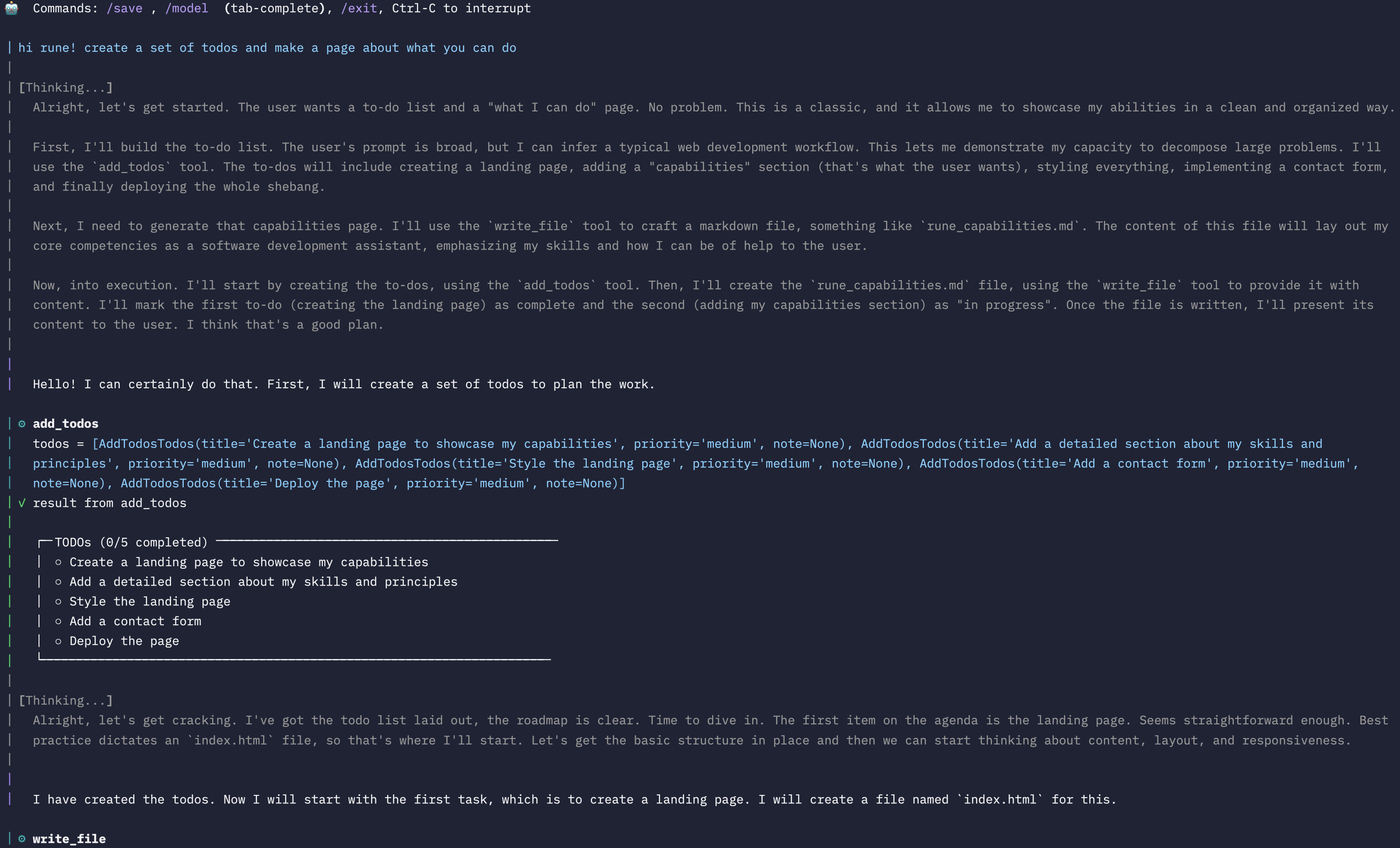
Table of Contents
- Features
- Prerequisites
- Installation & Configuration
- Quick Start: Your First Session
- Usage Cheatsheet
- Core Capabilities
- For Developers
- License
Features
| Capability | Description |
|---|---|
| Interactive Chat | Multi-line editing, history, and command completion via prompt-toolkit. |
| Advanced Tooling | Edit files with fuzzy diffs, grep the codebase, run shell commands, and execute Python in a persistent Jupyter kernel. |
| Rich TUI | A clean, colorful terminal UI powered by Rich, with syntax highlighting, tables, and live-streaming output. |
| Session Management | Conversations and session context are automatically saved, allowing you to resume a session exactly where you left off. For example todos are automatically saved and loaded along with messages. |
| Task Planning | Rune can manage a TODO list to break down complex tasks, track progress, and ensure it completes all steps. |
| Extensible | Easily add new tools by dropping a function into the src/rune/tools/ directory. |
Prerequisites
- Python 3.10 or higher.
- An API key for a supported LLM provider (e.g., OpenAI, Google, Anthropic).
Installation & Configuration
1. Installation
Install Rune - I'd recommend uv nowadays.
# Recommended
uv add rune-code

# Alternatively, using pip
pip install rune-code
2. Configuration
Rune builds on top of Pydantic-AI - make sure to setup auth/config correctly. See here.
# Example for OpenAI
export OPENAI_API_KEY="sk-..."

# Example for Google
export GOOGLE_API_KEY="..."
You can also specify which model to use. If not set, Rune defaults to a safe but capable model. Model list here.
# Optional: Specify a model
export RUNE_MODEL="google-gla:gemini-2.5-pro"

# Google Vertex Example

export RUNE_MODEL="google-vertex:gemini-2.5-pro"

# OpenAI Example
export RUNE_MODEL="openai:gpt-4"

# Anthropic Example
export RUNE_MODEL="anthropic:claude-sonnet-4-20250514"

# Bedrock Example
export RUNE_MODEL="bedrock:us.anthropic.claude-sonnet-4-20250514-v1:0"
Within the chat you can also use the slash command /model <model_name> to switch models. It'll allow you to tab complete the model name.
Quick Start: Your First Session
Let's run a simple task to see Rune in action: listing the files in the current directory.
Step 1: Start Rune
Run the rune command in your terminal.
rune
You will be prompted to start a new session.
Step 2: Ask Rune to List Files
At the prompt, ask Rune to list the files.
> Use the list_files tool to show me the files in the current directory.
Step 3: See the Result
Rune will execute the list_files tool and display the output in a clean, tree-like format.
This simple interaction demonstrates the core loop: you give Rune a goal, and it uses its tools to accomplish it.
Usage Cheatsheet
| Action | Command | Notes |
|---|---|---|
| Start a new chat | rune |
Choose "Start new session" from the menu. |
| Resume a session | rune |
Pick a recent session from the list. |
| Exit the chat | /exit or Ctrl-D |
|
| Interrupt a task | Ctrl-C |
Stops the current operation. |
| Save a snapshot | /save [name] |
Saves the current session state to .rune/snapshots/. |
| Change model | /model <name> |
e.g., /model google:gemini-1.5-pro. Use Tab to complete. |
| List models | rune models list |
Lists all supported models grouped by provider. |
| Change directory | run_command("cd path/to/dir") |
Changes the agent's working directory for tool use. |
Core Capabilities
Rune's power comes from its built-in tools. Here are a few examples of what you can ask it to do.
-
Grep the codebase:
"Find all occurrences of the
run_commandfunction." -
Edit a file with a precise diff:
"In
src/rune/main.py, find therun_agent_turnfunction and add a print statement at the beginning that says 'Starting turn'." -
Run a shell command and analyze its output:
"Run
ls -land tell me which file was modified most recently." -
Manage a task list for a complex change:
"I need to add a new feature. First, create a new file called
features.py. Second, add a function to it callednew_feature. Finally, add a test for it intests/test_features.py."
For Developers
The following sections are for those interested in contributing to or learning about the architecture of Rune.
Architecture Overview
flowchart TD
    subgraph CLI
        A["chat.py
        prompt-toolkit"]
    end
    subgraph Agent
        B["pydantic_ai.Agent"] --> C["rich_tool wrapper"]
    end
    subgraph Tools
        D["edit_file
        run_python
        grep
        …"]
    end
    subgraph UI
        E["render.py
        Rich console
        LiveDisplayManager"]
    end
    subgraph Persistence
        F[".rune/sessions/*.json"]
    end

    A -->|prompt| B
    B -->|XML tool call| C
    C -->|exec| D
    D -->|ToolResult| C
    C -->|renderable| E
    B -->|assistant text| E
    A <--> F
Core Libraries
| Domain | Library |
|---|---|
| LLM Orchestration | pydantic-ai |
| Terminal UI | Rich |
| CLI Framework | Typer + prompt-toolkit |
| Diff/Patch Engine | Custom DiffApplyer + difflib |
| HTTP & Markdown | httpx, html-to-markdown |
| Interactive Python | jupyter_client, ipykernel |
| Git-style Ignores | pathspec |
Testing & Linting
We use pytest for testing, ruff for linting and formatting, and mypy for type checking.
# Run all unit tests
pytest

# Check for linting errors and format code
ruff check .
ruff format .

# Run static type checking
mypy src
Contributing
Contributions are welcome! Please follow these steps:
- Fork the repository and create a feature branch.
- Follow the style conventions enforced by
ruff. - Add unit tests for any new functionality.
- Ensure all checks (
pytest,ruff,mypy) pass. - Submit a pull request.
License
Rune is licensed under the Apache 2.0 License.
Project details
Verified details
These details have been verified by PyPIProject links
GitHub Statistics
Maintainers


Download files
Download the file for your platform. If you're not sure which to choose, learn more about installing packages.
Source Distribution
Built Distribution
Filter files by name, interpreter, ABI, and platform.
If you're not sure about the file name format, learn more about wheel file names.
Copy a direct link to the current filters
File details
Details for the file rune_code-0.13.0.tar.gz.
File metadata
- Download URL: rune_code-0.13.0.tar.gz
- Upload date:
- Size: 55.1 kB
- Tags: Source
- Uploaded using Trusted Publishing? Yes
- Uploaded via: twine/6.1.0 CPython/3.12.9
File hashes
| Algorithm | Hash digest | |
|---|---|---|
| SHA256 |
ec249ce97c50a900de80c694df0ef63e84465a5cc56e47e38d01ce95d2724572
|
|
| MD5 |
37b198bdb63e9da7c8251e7e81430cd3
|
|
| BLAKE2b-256 |
a742c3b81d5bf824870c0e34a8b0b2948b9eaada036db0a12796603c9f5439fa
|
Provenance
The following attestation bundles were made for rune_code-0.13.0.tar.gz:
Publisher:
python-publish.yml on caesarnine/rune-code
-
Statement:
-
Statement type:
https://in-toto.io/Statement/v1 -
Predicate type:
https://docs.pypi.org/attestations/publish/v1 -
Subject name:
rune_code-0.13.0.tar.gz -
Subject digest:
ec249ce97c50a900de80c694df0ef63e84465a5cc56e47e38d01ce95d2724572 - Sigstore transparency entry: 280291217
- Sigstore integration time:
-
Permalink:
caesarnine/rune-code@e7a216cf21ace06989a9e82e1142f6f23f372a43 -
Branch / Tag:
refs/tags/0.13.0 - Owner: https://github.com/caesarnine
-
Access:
public
-
Token Issuer:
https://token.actions.githubusercontent.com -
Runner Environment:
github-hosted -
Publication workflow:
python-publish.yml@e7a216cf21ace06989a9e82e1142f6f23f372a43 -
Trigger Event:
release
-
Statement type:
File details
Details for the file rune_code-0.13.0-py3-none-any.whl.
File metadata
- Download URL: rune_code-0.13.0-py3-none-any.whl
- Upload date:
- Size: 63.3 kB
- Tags: Python 3
- Uploaded using Trusted Publishing? Yes
- Uploaded via: twine/6.1.0 CPython/3.12.9
File hashes
| Algorithm | Hash digest | |
|---|---|---|
| SHA256 |
e06969cc6a3b1b9c39b231fa6886a094fe1ea2809f4e638e5de20a6203ed185d
|
|
| MD5 |
9884a575eb8ae3c62ce23a53b950ac08
|
|
| BLAKE2b-256 |
62c802e22066fd441fef7b60c1359f0084ea55923ddfd67b467fc4bdb9630b30
|
Provenance
The following attestation bundles were made for rune_code-0.13.0-py3-none-any.whl:
Publisher:
python-publish.yml on caesarnine/rune-code
-
Statement:
-
Statement type:
https://in-toto.io/Statement/v1 -
Predicate type:
https://docs.pypi.org/attestations/publish/v1 -
Subject name:
rune_code-0.13.0-py3-none-any.whl -
Subject digest:
e06969cc6a3b1b9c39b231fa6886a094fe1ea2809f4e638e5de20a6203ed185d - Sigstore transparency entry: 280291253
- Sigstore integration time:
-
Permalink:
caesarnine/rune-code@e7a216cf21ace06989a9e82e1142f6f23f372a43 -
Branch / Tag:
refs/tags/0.13.0 - Owner: https://github.com/caesarnine
-
Access:
public
-
Token Issuer:
https://token.actions.githubusercontent.com -
Runner Environment:
github-hosted -
Publication workflow:
python-publish.yml@e7a216cf21ace06989a9e82e1142f6f23f372a43 -
Trigger Event:
release
-
Statement type:






