
RuneCLI
A terminal-first developer tool that turns real GitHub issues into grounded, timed coding quests with RuneScape-inspired progression.
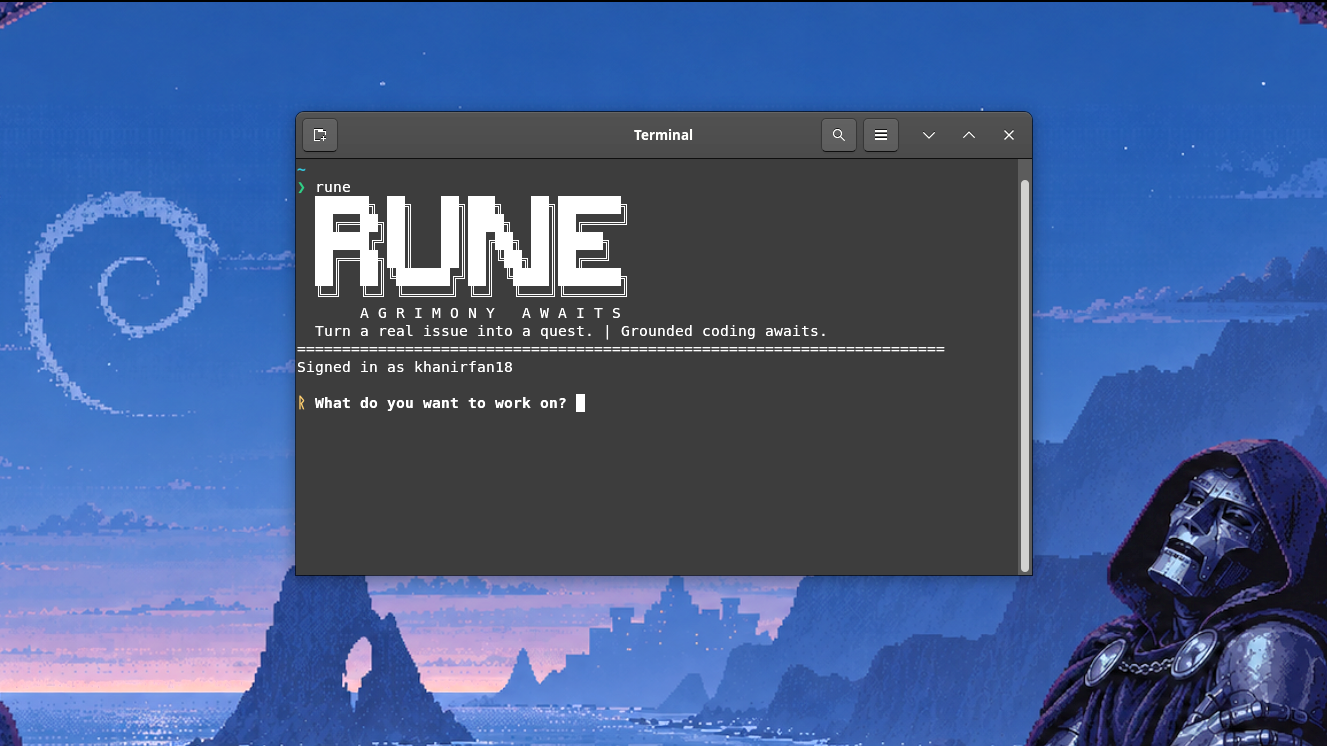
Installation
RuneCLI requires Python 3.11 or newer.
pip install runecli
Or install in an isolated environment using pipx:
pipx install runecli
3-Step Quickstart
-
Login & Configure:
rune
On your first launch, Rune prompts for your GitHub token and Gemini API key, storing them in your local configuration.
-
Pick a Quest: Filter open issues on the Quest Board by keywords, Sage (repo owner), and difficulty. Review Gemma-formulated acceptance criteria and accept a quest.
-
Finish a PR & Claim XP: Follow guided Git commands in your IDE terminal, open a GitHub pull request, and run:
rune refreshWhen your PR is merged before the timer expires, the quest completes and Rune awards RuneScape XP!


How It Works
- Deterministic Code Evidence: When you select an issue, Rune clones a shallow, read-only analysis cache and extracts bounded code evidence (E1–E8) matching the issue discussion.
- Grounded Quest Framing: Rune passes evidence to Google's open-weights Gemma 4 model (
gemma-4-31b-it) via the Gemini API to formulate grounded quest specifications with concrete acceptance criteria. - Guided Git Flow: Rune creates an isolated workspace directory at
~/.rune/workspaces/<quest-id>/, opens your editor (VS Code or Cursor), and prints exact setup commands. Rune only reads Git status to verify setup—you retain full control over branching, commits, and pushes. - XP & Level Progression: Rune tracks PR status matching your quest branch. Merging before the quest timer expires earns RuneScape XP based on quest difficulty.
Contributing
We welcome contributions! Please see our Contributing Guide for local development setup, testing instructions, and pull request guidelines.
Commands
Rune provides three focused commands:
rune
Starts the interactive quest cycle:
- Loads or prompts for credentials (GitHub token and Gemini API key).
- Signs in to GitHub and validates authentication.
- Checks for an installed IDE (VS Code
codeor Cursorcursor). - Checks for any active quest; if none, opens the Quest Board to search open issues.
- Clones a bounded, read-only analysis cache and extracts evidence.
- Generates grounded quest framings with Gemma 4 (
gemma-4-31b-it). - Creates an isolated workspace and launches your IDE.
- Prints guided Git setup commands and verifies your branch before starting the timer.
rune status
Displays the active quest's status, remaining time, acceptance criteria, matched pull request status, and finish instructions.
rune refresh
Checks GitHub for pull request activity matching your quest branch. When your PR is merged, transitions the quest to COMPLETED and awards RuneScape XP.
rune --version (or rune -V)
Displays the installed version of RuneCLI and exits.
Quest Board Filters
- Keywords: 3 to 8 search terms matching issue titles and bodies.
- Sage: The GitHub username or organization whose repositories to search (e.g.
pallets,fastapi). Leave blank to search across public repositories. - Unassigned: Choose
Yesto find unclaimed issues (is:unassigned) orNoto include assigned issues. - Difficulty:
Novice: 60 min / 100 XPIntermediate: 180 min / 150 XPExperienced: 360 min / 250 XPMaster: 540 min / 400 XP
Environment Variables
| Variable | Required | Description |
|---|---|---|
GITHUB_TOKEN |
Yes | Personal access token (classic or fine-grained with repo scope) used to interact with the GitHub API. Never logged or printed. |
GEMINI_API_KEY |
Yes | Google Gemini API key used exclusively with Google's open-weights Gemma 4 model (gemma-4-31b-it). |
RUNE_SEARCH_USER |
No | Pre-fills the Sage prompt on the Quest Board (the GitHub user or org whose issues to search). |
GEMMA_MODEL |
No | Gemma model identifier (defaults to gemma-4-31b-it; also supports gemma-4-26b-a4b-it). Must start with gemma-. |
RUNE_HOME |
No | Custom root directory for local quest records, workspaces, player cache, and analysis clone caches (defaults to ~/.rune). |
Development
To work on RuneCLI from source:
git clone https://github.com/khanirfan18/runeCLI.git
cd runeCLI
python -m pip install -e ".[dev]"
python -m pytest -q
Reporting Issues
Report bugs and feature ideas on GitHub at https://github.com/khanirfan18/runeCLI/issues.
License
MIT License. See LICENSE for details.
1 maintainer

Metadata
1 maintainer
Release files for runecli 0.1.3
For a detailed explanation of source distributions (sdists) and built distributions (wheels), please see the package formats documentation.
Source distribution (sdist)
| File | Size | Uploaded | |
|---|---|---|---|
| runecli-0.1.3.tar.gz | 77.0 kB | Details |
Built distribution (wheel)
| File | Interpreter | ABI | Platform | Reset |
|---|---|---|---|---|
| runecli-0.1.3-py3-none-any.whl | Python 3 | none | any | Details |
Total release size: 127.1 kB
Release files / runecli-0.1.3.tar.gz
| Download URL | runecli-0.1.3.tar.gz |
|---|---|
| Size | 77.0 kB |
| Tags | Source |
|
SHA-256 checksum How to use checksums |
91db86dc646f375633a63327a2ccead862c7f0fce420297f5247844f47e1afe6
|
|
BLAKE2b-256 checksum How to use checksums |
44cdfd74bb07dd06244d8be53f1a83810f29c5a7ade51ba4393f6fd199d30386
|
| Upload date | |
|
Uploaded using Trusted Publishing? What is trusted publishing? |
Yes |
| Uploaded via |
twine/7.0.0 CPython/3.13.14
|
Provenance
Provenance describes where a file came from. On PyPI, provenance is shared via attestations, which provide a verifiable record of the build or publishing details. View details, limitations and caveats.


PyPI Publish Attestation
PyPI verified that this artifact, at this checksum, originated from the publisher listed below.
Signed by GitHub Actions, verified by PyPI on Oct 13, 2026.
Transparency logRelease files / runecli-0.1.3-py3-none-any.whl
| Download URL | runecli-0.1.3-py3-none-any.whl |
|---|---|
| Size | 50.1 kB |
| Tags | Python 3 |
|
SHA-256 checksum How to use checksums |
5678d4799b464016a5b7db414f6ccd9435e7e9d6bca508c3f0c4b2c613c17be2
|
|
BLAKE2b-256 checksum How to use checksums |
11e78c8f63871ea730f81eda58489479e80e09184b9cd651888a471dc4319303
|
| Upload date | |
|
Uploaded using Trusted Publishing? What is trusted publishing? |
Yes |
| Uploaded via |
twine/7.0.0 CPython/3.13.14
|
Provenance
Provenance describes where a file came from. On PyPI, provenance is shared via attestations, which provide a verifiable record of the build or publishing details. View details, limitations and caveats.
PyPI Publish Attestation
PyPI verified that this artifact, at this checksum, originated from the publisher listed below.
Signed by GitHub Actions, verified by PyPI on Oct 13, 2026.
Transparency log













