
A simple, file-based Python library for tracking machine learning experiments.

Project description
RuneLog





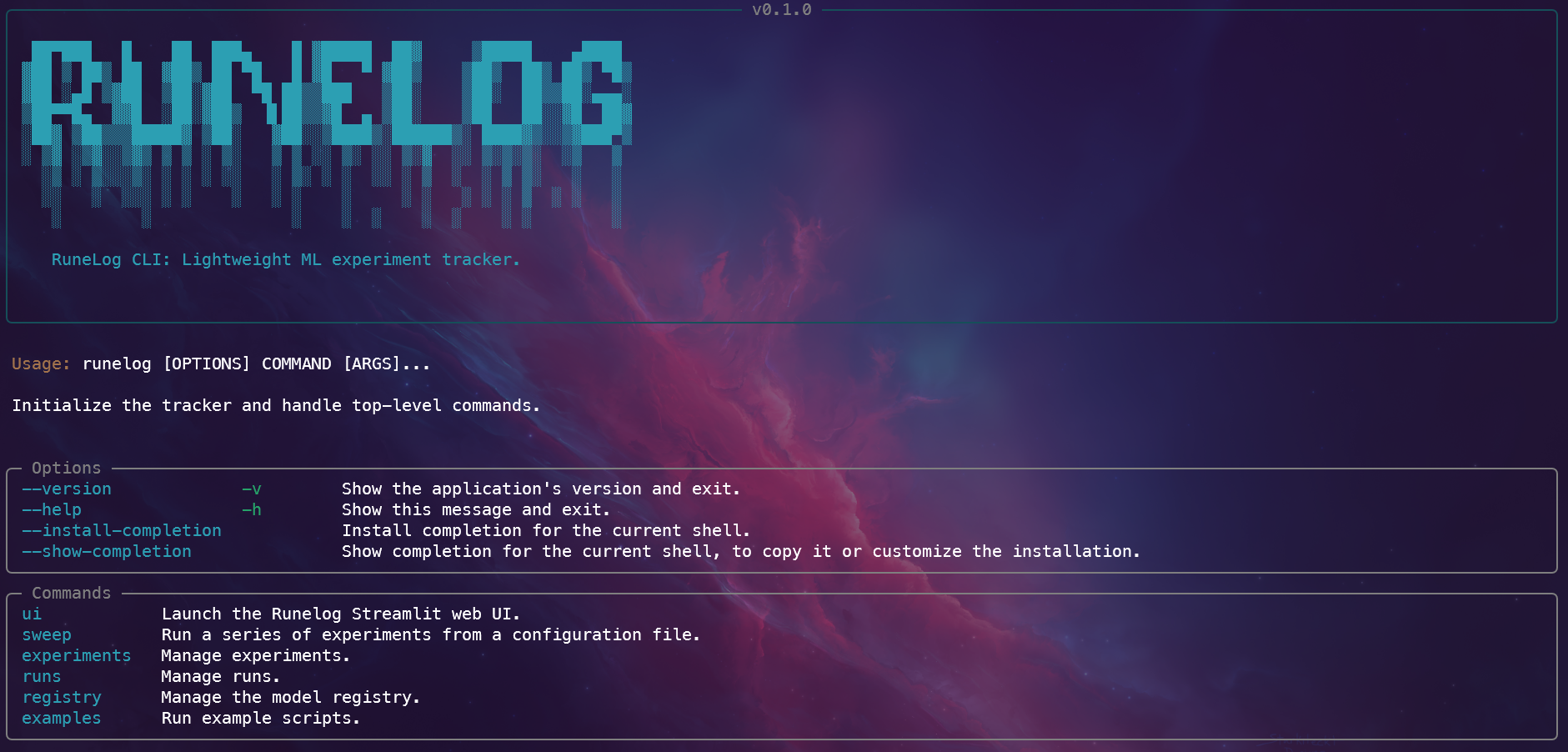
RuneLog is a lightweight, file-system-based Python library for reproducible Machine Learning experimentation.
RuneLog is in active development. The core API is functional but subject to change.
The name RuneLog is a play on words. It's reminiscent of the common run.log() command used to log an experiment in tracking systems, while also treating these powerful, and sometimes mysterious, models as modern-day mystical writings: a "log of runes".
Why RuneLog?
- Zero-Overhead Setup: start tracking runs in a single line
- Local-First, Lightweight: perfect for solo devs or small teams
- Portable & Transparent: data is stored in simple folders/files
Installation
User Setup
This is the recommended way to install runelog if you just want to use it in your projects.
- Make sure you have Python 3.10+ installed.
- Install the library from PyPI using pip:
pip install runelog
That's it! You can now import it into your Python scripts.
Quickstart
Start tracking your ML experiments in just a few lines of code:
from runelog import get_tracker

# 1. Initialize the tracker
tracker = get_tracker()

# 2. Start a run
with tracker.start_run(experiment_name="my-first-experiment"):
    # 3. Your training code and logging calls go here
    tracker.log_metric("accuracy", 0.95)
Check the detailed Quickstart Guide for for a complete runnable example.
Development Setup
- Clone the repository:
git clone https://github.com/gonz4lex/runelog.git
cd runelog
- Create and activate a virtual environment:
python3 -m venv .venv
source .venv/bin/activate  # On Windows: .venv\Scripts\activate
- Install in Editable Mode: Install the package and all development dependencies from your pyproject.toml file.
pip install -e .[dev]
Development Workflow
RuneLog uses Hatch to manage dependencies, environments, and scripts.
Environment Setup
The primary command to enter a fully configured development environment is hatch shell. This will create a virtual environment, install all dependencies listed in pyproject.toml, and activate it.
hatch shell
Formatting Code
RuneLog uses Black for automatic code formatting. To format all project files, run the following command:
hatch run lint:format
Running Tests
The test suite is run using pytest and the test environment is configured to automatically run tests with coverage:
hatch run test
This command is a shortcut for pytest --cov=src/runelog --cov-report=term-missing --cov-report=xml.
Building the Docs
To preview the documentation site locally with live reloading, you can add a docs environment to your pyproject.toml.
hatch run docs:serve
Building the Package
To build the distributable package files (.whl and .tar.gz) just run:
hatch build
The files will be created in the dist/ directory, ready for publishing.
Usage Examples
You can find example scripts in the examples/ directory:
train_model.py
Full pipeline example with:
- logging parameters and metrics
- saving and registering models
- tagging and retrieving models
python examples/train_model.py # or use the CLI: runelog examples train
minimal_tracking.py
Minimal working example with only metric logging.
python examples/minimal_tracking.py # or use the CLI: runelog examples minimal
sweep/sweep.py
Sweep example with configuration file to define runs.
python examples/sweep/sweep.py # or use the CLI: runelog examples sweep
Features
- Core Tracking API: Experiments, runs, parameters, metrics.
- Artifact Logging: Save model files, plots, and other artifacts.
- Model Registry: Version and tag models.
- Streamlit UI: Interactive dashboard to explore runs and the registry.
- Command-Line Interface (CLI) for programmatic interaction.
- Full Test Coverage: Comprehensive unit and integration tests.
🐳 Running the UI with Docker
The easiest way to run the Runelog web UI without setting up a local Python environment is with Docker. You must have Docker installed and running.
Instructions
-
Build the Docker image from the root of the project directory:
docker build -t runelog-app .
-
Use
docker-composeto start the application:docker-compose up -
To access the UI, open your web browser and navigate to: http://localhost:8501
-
To stop the application, press
Ctrl+Cin the terminal, and then run:docker-compose down
Release history Release notifications | RSS feed


Download files
Download the file for your platform. If you're not sure which to choose, learn more about installing packages.
Source Distribution
Built Distribution
Filter files by name, interpreter, ABI, and platform.
If you're not sure about the file name format, learn more about wheel file names.
Copy a direct link to the current filters
File details
Details for the file runelog-0.2.0.tar.gz.
File metadata
- Download URL: runelog-0.2.0.tar.gz
- Upload date:
- Size: 48.6 kB
- Tags: Source
- Uploaded using Trusted Publishing? No
- Uploaded via: twine/6.1.0 CPython/3.10.12
File hashes
| Algorithm | Hash digest | |
|---|---|---|
| SHA256 |
4d0073e4a9bd953ac325a185beb603624edc04c8a21c3271ac6fd1a8279c8555
|
|
| MD5 |
6396665ce3e4c7e8d7ec886b4c00539a
|
|
| BLAKE2b-256 |
46df8b0ff5b59d474bbac8cac28695773c3c35108b9baac09e8fae4fd96631f1
|
File details
Details for the file runelog-0.2.0-py3-none-any.whl.
File metadata
- Download URL: runelog-0.2.0-py3-none-any.whl
- Upload date:
- Size: 23.1 kB
- Tags: Python 3
- Uploaded using Trusted Publishing? No
- Uploaded via: twine/6.1.0 CPython/3.10.12
File hashes
| Algorithm | Hash digest | |
|---|---|---|
| SHA256 |
f0f7c96e62ca3b82c06b88e9c8ef20c05d15a3c8c8697776044424d81863eea0
|
|
| MD5 |
53c7978b43cfb9b13f931c1f33a8182c
|
|
| BLAKE2b-256 |
12bb99ef9b3ea221e6202a337187601545653bb3669f3e3827aff25cf3c0f902
|






