
Menu for Fuzzy Linux Procedures

Project description
rungs -- A Tool for Fuzzy Procedures
rungs is a tool help navigate "fuzzy" procedures on Linux where you might want to:
- skip certain steps if certain vague criteria are met
- repeat certain steps if they failed and trying again makes sense
You very simply specify your procedures within a single .ini file.
Quick Start: from the CLI
- If
python3 -Vshows v3.11 or later, install usingpipx:
python3 -m pip install --user pipx # if pipx not installedpython3 -m pipx ensurepath # if needed (restart terminal)pipx upgrade rungs || pipx install rungs # to install/upgrade- Else for python3.10 and lesser versions, install using
pip:
python3 -m pip install --user --upgrade rungs- To run:
rungs # to run and show all menusrungs {menu-name} # run the specified menurungs --edit # edit your menus
Mnemonic: step through the rungs of your laddered procedure ;-)
A Practical Example -- Manually Updating EndeavourOS
Here is an example menu for manually update an EndeavourOS:
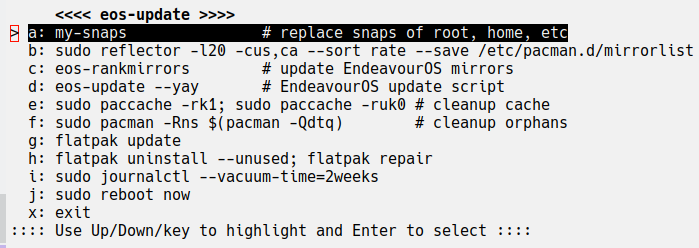
Notes:
- Except for the first personal command, all commands are standard on EndeavourOS.
- All commands are run literally by
bashexcept:exitwhich means exit the menu.rungs {menu-name}runs rungs recursively usingpython3
- To run a command:
- highlight the command by typing the "key" before the ':' or move the cursor with the up/down arrow keys.
- then press ENTER.
- After the command runs, the next command is highlighted and runs with just ENTER if desired.
- To, repeat and skip commands, just select another command rather than the next.
- IMPORTANT: If the menu does not fit within your terminal, then resize until it does fit.
rungs Config: ~/.config/rungs/rungs.ini
Edit ~/.config/rungs/rungs.ini to configure your menu. The "eos-update-menu" was configured by adding this section:
[eos-update]
a: my-snaps               # replace snaps of root, home, etc
b: sudo reflector -l20 -cus,ca --sort rate --save /etc/pacman.d/mirrorlist
c: eos-rankmirrors        # update EndeavourOS mirrors
d: eos-update --yay       # EndeavourOS update script
e: sudo paccache -rk1; sudo paccache -ruk0 # cleanup cache
f: sudo pacman -Rns $(pacman -Qdtq)        # cleanup orphans
g: flatpak update
h: flatpak uninstall --unused; flatpak repair
i: sudo journalctl --vacuum-time=2weeks
j: sudo reboot now
x: exit
So, the config looks nearly the same as the menu, but if you specify a multiline value, then:
- the first line is shown, and
- the subsequent lines are given to bash literally.
In this manner, for very complicated commands, you can provide a summary description of what is to be run.
Additionally:
- keys must be a single character and unique
- if you specify an multicharacter key, only the lead character is used in the menu
rungs Command Line
usage: rungs [-h] [-e] [-n] [menus ...]

positional arguments:
  menus          zero or more arguments

options:
  -h, --help     show this help message and exit
  -e, --edit     edit config (i.e., runs edit-rungs-config)
  -n, --dry-run  show commands w/o running them
Thus, you can:
- run
rungs --editto edit the configuration file. - run
rungswith no arguments to given a menu of all the "ordinary" menus. - provide the name specifiers of the menus to run them; each name spec can match:
- exactly,
- case independent exactly (if unique and ordinary),
- or case independent substring match but only at word boundaries (if unique and ordinary); e.g., for the menus,
['edit-rungs-config', 'example', 'eos-update']:- these name specs would find a menu: 'edit', 'ex', 'EOS-', 'EOS-UPDATE'
- these name specs would NOT: 'date', 'e'.
"Special" (vs "Ordinary") menu names begin with character other than [_A-Za-z0-9], and are excluded from being run unless given the whole, exact, memory sensitive name. A suggested naming convention for menus:
- beginning
>for a sub-menu that should not be called independently - beginning
!for a deprecated menu (but not ready to remove it)
The Edit Menu and Handling Corrupt .ini Files
On first startup, the .ini file contains a menu for editing that you may customize:
[edit-rungs-config]
a: ${EDITOR=-vi} ~/.config/rungs/rungs.ini
x: exit

[example]
a: command-a
b: prompt-b
   command-b
x: exit
For example, you might change the default from vi to geany if installed and desired. Also, note:
- You may remove the
examplewhich shows a multilined value which must be indented lines after the first. - Do NOT remove the
edit-rungs-configmenu; it is needed for--editoption AND recovery. - The
edit-rungs-configshows how to pass variables to your commands. - In case of a corrupt
.ini, you will see the error and theedit-rungs-configmenu. - Each time the
.inifile is read and valid,~/.config/rungs/rungs.ini.bakis written; in the case you just made a terrible change, recover using the.ini.bakfile manually (w/o runningrungs -e).
Practical Examples
The examples subdirectory includes more practical examples, including
- A two-level menu for Fedora updates and release upgrades.
These menus many not be current and are not tested; use only after reviewing for correctness and completeness.
Release history Release notifications | RSS feed


Download files
Download the file for your platform. If you're not sure which to choose, learn more about installing packages.
Source Distribution
Built Distribution
Filter files by name, interpreter, ABI, and platform.
If you're not sure about the file name format, learn more about wheel file names.
Copy a direct link to the current filters
File details
Details for the file rungs-1.0.12.tar.gz.
File metadata
- Download URL: rungs-1.0.12.tar.gz
- Upload date:
- Size: 60.7 kB
- Tags: Source
- Uploaded using Trusted Publishing? No
- Uploaded via: python-requests/2.31.0
File hashes
| Algorithm | Hash digest | |
|---|---|---|
| SHA256 |
c2597a31128d8284338372dba362792a2c870bee10472d317b3641dd3b9d3ea4
|
|
| MD5 |
8e828e0e5b71c4f60f1118069e9f2a23
|
|
| BLAKE2b-256 |
6f6fb04fded3b618adad85abda058f399deb2432ec20c043cf0f6d79389b33af
|
File details
Details for the file rungs-1.0.12-py3-none-any.whl.
File metadata
- Download URL: rungs-1.0.12-py3-none-any.whl
- Upload date:
- Size: 10.9 kB
- Tags: Python 3
- Uploaded using Trusted Publishing? No
- Uploaded via: python-requests/2.31.0
File hashes
| Algorithm | Hash digest | |
|---|---|---|
| SHA256 |
81a48ed5c882049343eaf915d7a951d95c1577db1ff2c3eef37ccd2af25f3fc6
|
|
| MD5 |
6a3de852c4bb4998477e013c3518d55b
|
|
| BLAKE2b-256 |
7ce5ac108a91635c246d505fcc4460a1cecdf3dff32d9f6719a8da16a961c363
|






