
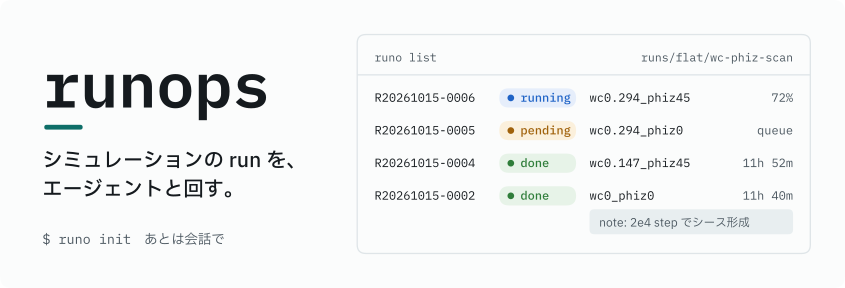




runops は HPC / Slurm のシミュレーションを run directory 単位で記録し、AI エージェントが
case の準備から投入、確認、整理までを進めるためのツールです。人が打つコマンドは
runo init だけです。
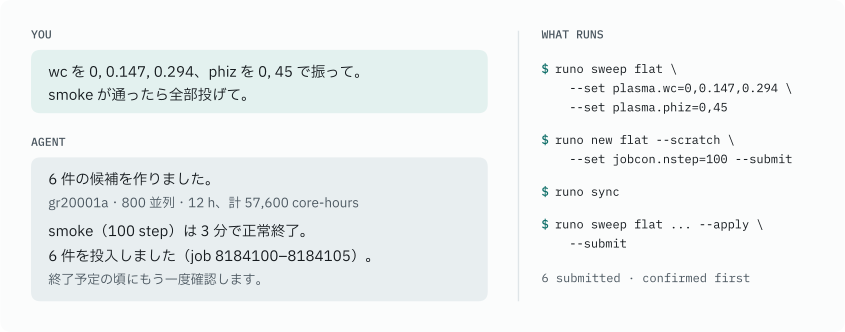
会話から run まで
はじめる
uv tool install runops
mkdir lunar-sheath && cd lunar-sheath
runo init
runo init は計算機の種類と使う simulator を尋ねます。計算機はホスト名から推定するので、
京大スパコンのログインノードなら Enter で進めます。できた directory で Codex か Claude Code を
起動して、調べたいことを話しかけてください。設定を後から変えたいときも、エージェントに伝えれば
runops.toml を書き換えます。
頼めること
| やりたいこと | 頼み方の例 |
|---|---|
| case を用意する | cookbook の平板シースを元に case を作って。gr20001a に 800 並列、120 時間で |
| 試してから本計算 | 100 step だけ smoke で試して、通ったら wc を 3 通りに振った候補を見せて |
| 様子を見る | 先週投げた run の状況を見て。失敗していたら原因をノートに残して |
| 続きを流す | R20261015-0003 の続きを 2 倍の step で |
| 片付ける | 古い run を整理して。消すものと archive するものを先に見せて |
| simulator を足す | パッチを当てた ~/BEACH-dev をビルドして、別の simulator として登録して |
| 更新する | runops と simulator を最新にして |
| v1 から移る | この project を runops v2 に移行して(runo migrate-v1 を dry-run で確認してから) |
投入、削除、整理、移行の前には、エージェントが対象と資源量を示して確認を取ります。
project の中身
lunar-sheath/
├── runops.toml                  site・simulator・launcher の設定
├── cases/
│   └── flat/                    case.toml と base 入力ファイル
├── runs/
│   ├── flat/
│   │   ├── R20261015-0002--wc0.147/
│   │   │   ├── manifest.toml    状態・由来・params・ノート
│   │   │   ├── input/           凍結した入力
│   │   │   ├── submit/job.sh
│   │   │   ├── work/            Slurm のログと出力
│   │   │   └── analysis/
│   │   └── wc-phiz-scan/        sweep はまとめて 1 階層
│   ├── _scratch/                smoke / debug(期限付き)
│   └── _archive/                archive した run
├── LOG.md                       run をまたぐ結論と次の判断
├── notes/                       再利用する知見
└── AGENTS.md, .agents/skills/, .claude/skills/
run は ID が変わらないので、directory を移動してもエージェントは見つけられます。
work/ は Git の対象外で、manifest.toml、input/、job.sh は Git で追えます。
対応 simulator
| simulator | package | 状態 |
|---|---|---|
| MPIEMSES3D | mpiemses3d-tools ≥ 4.20 |
adapter とエージェント向け skill を同梱 |
| BEACH | beach-bem |
次のリリースで同梱。それまでは runops 内蔵の adapter を使用 |
| その他 | 自作の adapter、または generic |
adapter ガイド |
リファレンス · adapter ガイド · SPEC · 開発に参加する · Apache-2.0
1 maintainer

Metadata
1 maintainer
Release files for runops 2.1.2
For a detailed explanation of source distributions (sdists) and built distributions (wheels), please see the package formats documentation.
Source distribution (sdist)
| File | Size | Uploaded | Provenance | |
|---|---|---|---|---|
| runops-2.1.2.tar.gz | 287.6 kB | With provenance | Details |
Built distribution (wheel)
| File | Interpreter | ABI | Platform | Reset |
|---|---|---|---|---|
| runops-2.1.2-py3-none-any.whl | Python 3 | none | any | Details |
Total release size: 371.9 kB
Release files / runops-2.1.2.tar.gz
| Download URL | runops-2.1.2.tar.gz |
|---|---|
| Size | 287.6 kB |
| Tags | Source |
|
SHA-256 checksum How to use checksums |
93b21c6d7df470a9ae4de928bb8f8669ff9d573a9da25d4659ba7c53e2313f88
|
|
BLAKE2b-256 checksum How to use checksums |
91a72ae3a5f168dc922dbc948b3e3c6af33b60c15781c7471829475dea479639
|
| Upload date | |
|
Uploaded using Trusted Publishing? What is trusted publishing? |
Yes |
| Uploaded via |
twine/7.0.0 CPython/3.13.14
|
Provenance
Provenance describes where a file came from. On PyPI, provenance is shared via attestations, which provide a verifiable record of the build or publishing details. View details, limitations and caveats.


PyPI Publish Attestation
PyPI verified that this artifact, at this checksum, originated from the publisher listed below.
Signed by GitHub Actions, verified by PyPI on Oct 15, 2026.
Transparency logRelease files / runops-2.1.2-py3-none-any.whl
| Download URL | runops-2.1.2-py3-none-any.whl |
|---|---|
| Size | 84.3 kB |
| Tags | Python 3 |
|
SHA-256 checksum How to use checksums |
0cb0b6a52ab75225377d00bab8fb06a4fc49995abaf25ebdf10fffb09a53ee30
|
|
BLAKE2b-256 checksum How to use checksums |
9004429777956dcc646fc655c306409d76615d82298da5caa7d465ebf37d1664
|
| Upload date | |
|
Uploaded using Trusted Publishing? What is trusted publishing? |
Yes |
| Uploaded via |
twine/7.0.0 CPython/3.13.14
|
Provenance
Provenance describes where a file came from. On PyPI, provenance is shared via attestations, which provide a verifiable record of the build or publishing details. View details, limitations and caveats.
PyPI Publish Attestation
PyPI verified that this artifact, at this checksum, originated from the publisher listed below.
Signed by GitHub Actions, verified by PyPI on Oct 15, 2026.
Transparency logSecurity for runops 2.1.2
Provenance
Provenance describes where a file came from. On PyPI, provenance is shared via attestations, which provide a verifiable record of the build or publishing details. View details, limitations and caveats.
Full provenance
All 2 files in this release have been uploaded with provenance metadata.
Attestation for runops-2.1.2.tar.gz
PyPI Publish Attestation
PyPI verified that this artifact, at this checksum, originated from the publisher listed below.
Signed by GitHub Actions, verified by PyPI on Oct 15, 2026.
Transparency logA note on package security
PyPI is a repository for distributing packages, not a service for auditing them. While third-party security researchers and our staff do their best to detect and remove malicious packages, PyPI cannot guarantee the quality, security or suitability of any given package.














