
gflow










English | 简体中文
gflow is a lightweight scheduler for a single Linux machine. It brings a Slurm-like workflow to shared GPU workstations and lab servers without cluster setup.
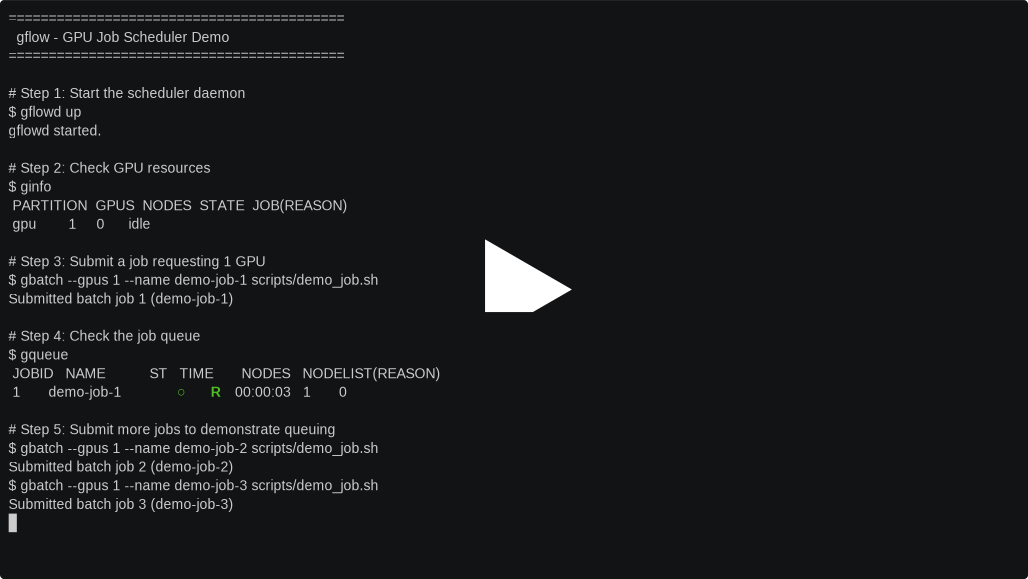
Why gflow
- Queue and run jobs on one machine.
- Submit commands or scripts with GPUs, time limits, dependencies, arrays, and priorities.
- Inspect, attach, cancel, and recover jobs with a small CLI.
Install
Requirements: Linux, tmux, and NVIDIA drivers only if you need GPU scheduling.
Install with Python tooling:
uv tool install runqd
# or
pipx install runqd
# or
pip install runqd
Install with Cargo:
cargo install gflow
Nightly build:
pip install --index-url https://test.pypi.org/simple/ runqd
Quick Start
gflowd init
gflowd start
gbatch --gpus 1 --name demo bash -lc 'echo "hello from gflow"; sleep 30'
gqueue
gjob show <job_id>
gflowd stop
On Linux with a systemd user manager, gflowd service install enables
auto-start on login and automatic crash recovery. gflowd status always shows
how the daemon is hosted (systemd user service, tmux, or direct process).
MCP
gflow can also run as a local MCP server for Claude Desktop, Claude Code, Codex, Cursor, and similar tools:
gflow mcp serve
Keep gflowd running on the same machine. MCP clients start gflow mcp serve as a local stdio server.
Claude Desktop example:
Claude Code:
claude mcp add --scope user gflow -- gflow mcp serve
Codex:
codex mcp add gflow -- gflow mcp serve
Or via ~/.codex/config.toml:
[mcp_servers.gflow]
command = "gflow"
args = ["mcp", "serve"]
If gflow is not on your PATH, replace it with the absolute binary path.
Documentation
Most usage details live in the docs:
Star History
Contact Us
For coordinating contributions and development, please use Slack
Contributing
Please open an Issue or Pull Request.
License
MIT. See LICENSE.
1 maintainer

Metadata
1 maintainer
Release files for runqd 0.4.20
For a detailed explanation of source distributions (sdists) and built distributions (wheels), please see the package formats documentation.
Source distribution (sdist)
| File | Size | Uploaded | Provenance | Actions |
|---|---|---|---|---|
| runqd-0.4.20.tar.gz | 756.2 kB | Without provenance | Details for runqd-0.4.20.tar.gz |
Built distributions (wheels)
| File | Actions Reset | |||
|---|---|---|---|---|
| runqd-0.4.20-py3-none-manylinux2014_x86_64.manylinux_2_17_x86_64.whl | Python 3 | none | Linux glibc 2.17+ x86-64 | Details for runqd-0.4.20-py3-none-manylinux2014_x86_64.manylinux_2_17_x86_64.whl |
| runqd-0.4.20-py3-none-manylinux2014_aarch64.manylinux_2_17_aarch64.whl | Python 3 | none | Linux glibc 2.17+ ARM64 | Details for runqd-0.4.20-py3-none-manylinux2014_aarch64.manylinux_2_17_aarch64.whl |
| runqd-0.4.20-py3-none-macosx_11_0_arm64.whl | Python 3 | none | macOS 11.0+ ARM64 | Details for runqd-0.4.20-py3-none-macosx_11_0_arm64.whl |
| runqd-0.4.20-py3-none-macosx_10_12_x86_64.whl | Python 3 | none | macOS 10.12+ x86-64 | Details for runqd-0.4.20-py3-none-macosx_10_12_x86_64.whl |
Total release size: 21.6 MB
Release files / runqd-0.4.20.tar.gz
| Download URL | runqd-0.4.20.tar.gz |
|---|---|
| Size | 756.2 kB |
| Tags | Source |
|
SHA-256 checksum How to use checksums |
19ec7e5f0f15b384455b9834e33c5ef26ea961ac6fbfaeee9c28bf4b13a98f1e
|
|
BLAKE2b-256 checksum How to use checksums |
bdf8a70339f8344754d57601fd2bcefa0ef985a9a2dcb19dea2e38fdb93fcc04
|
| Upload date | |
|
Uploaded using Trusted Publishing? What is trusted publishing? |
Yes |
| Uploaded via |
uv/0.13.9 {"installer":{"name":"uv","version":"0.13.9","subcommand":["publish"]},"python":null,"implementation":{"name":null,"version":null},"distro":{"name":"Ubuntu","version":"26.04","id":"resolute","libc":null},"system":{"name":null,"release":null},"cpu":null,"openssl_version":null,"setuptools_version":null,"rustc_version":null,"ci":true}
|
Release files / runqd-0.4.20-py3-none-manylinux2014_x86_64.manylinux_2_17_x86_64.whl
| Download URL | runqd-0.4.20-py3-none-manylinux2014_x86_64.manylinux_2_17_x86_64.whl |
|---|---|
| Size | 5.5 MB |
| Tags | Linux glibc 2.17+ x86-64 Python 3 |
|
SHA-256 checksum How to use checksums |
444fda70424fb073189b12919535350b2e9e84dc0fe1fe76eebab35e2250a9c1
|
|
BLAKE2b-256 checksum How to use checksums |
211ac967ce04b07b8f7d39af4ce902182731fb68a42112ed471c65c5b769db23
|
| Upload date | |
|
Uploaded using Trusted Publishing? What is trusted publishing? |
Yes |
| Uploaded via |
uv/0.13.9 {"installer":{"name":"uv","version":"0.13.9","subcommand":["publish"]},"python":null,"implementation":{"name":null,"version":null},"distro":{"name":"Ubuntu","version":"26.04","id":"resolute","libc":null},"system":{"name":null,"release":null},"cpu":null,"openssl_version":null,"setuptools_version":null,"rustc_version":null,"ci":true}
|
Release files / runqd-0.4.20-py3-none-manylinux2014_aarch64.manylinux_2_17_aarch64.whl
| Download URL | runqd-0.4.20-py3-none-manylinux2014_aarch64.manylinux_2_17_aarch64.whl |
|---|---|
| Size | 5.4 MB |
| Tags | Linux glibc 2.17+ ARM64 Python 3 |
|
SHA-256 checksum How to use checksums |
d213d12f757481ee1ea5d4e82a77f7b48401d9229c84ff3d1e72f5b8e160f475
|
|
BLAKE2b-256 checksum How to use checksums |
89592a802306e191478ec12f98f23af171741f025f749e18267dfbf81243adce
|
| Upload date | |
|
Uploaded using Trusted Publishing? What is trusted publishing? |
Yes |
| Uploaded via |
uv/0.13.9 {"installer":{"name":"uv","version":"0.13.9","subcommand":["publish"]},"python":null,"implementation":{"name":null,"version":null},"distro":{"name":"Ubuntu","version":"26.04","id":"resolute","libc":null},"system":{"name":null,"release":null},"cpu":null,"openssl_version":null,"setuptools_version":null,"rustc_version":null,"ci":true}
|
Release files / runqd-0.4.20-py3-none-macosx_11_0_arm64.whl
| Download URL | runqd-0.4.20-py3-none-macosx_11_0_arm64.whl |
|---|---|
| Size | 4.8 MB |
| Tags | Python 3 macOS 11.0+ ARM64 |
|
SHA-256 checksum How to use checksums |
44b1b69d1d183635d8b494664b4b8c23e4245b954ec0556d7e5bc60d68b2a5a0
|
|
BLAKE2b-256 checksum How to use checksums |
c203e743975b2e91d42cf92b3a73b7c53f393f5da7c2c5979f1f2391b4062aa1
|
| Upload date | |
|
Uploaded using Trusted Publishing? What is trusted publishing? |
Yes |
| Uploaded via |
uv/0.13.9 {"installer":{"name":"uv","version":"0.13.9","subcommand":["publish"]},"python":null,"implementation":{"name":null,"version":null},"distro":{"name":"Ubuntu","version":"26.04","id":"resolute","libc":null},"system":{"name":null,"release":null},"cpu":null,"openssl_version":null,"setuptools_version":null,"rustc_version":null,"ci":true}
|
Release files / runqd-0.4.20-py3-none-macosx_10_12_x86_64.whl
| Download URL | runqd-0.4.20-py3-none-macosx_10_12_x86_64.whl |
|---|---|
| Size | 5.1 MB |
| Tags | Python 3 macOS 10.12+ x86-64 |
|
SHA-256 checksum How to use checksums |
8306e986ce43c31d5c36f7cf78eb7324d599757ffb3ad9efc59f39694f6eec29
|
|
BLAKE2b-256 checksum How to use checksums |
8f1dc55a37d1c373d326d57acd6d2af2b34486ea4d93a0785bfee89503fe3273
|
| Upload date | |
|
Uploaded using Trusted Publishing? What is trusted publishing? |
Yes |
| Uploaded via |
uv/0.13.9 {"installer":{"name":"uv","version":"0.13.9","subcommand":["publish"]},"python":null,"implementation":{"name":null,"version":null},"distro":{"name":"Ubuntu","version":"26.04","id":"resolute","libc":null},"system":{"name":null,"release":null},"cpu":null,"openssl_version":null,"setuptools_version":null,"rustc_version":null,"ci":true}
|
Security for runqd 0.4.20
Provenance
Provenance describes where a file came from. On PyPI, provenance is shared via attestations, which provide a verifiable record of the build or publishing details. View details, limitations and caveats.
No provenance found
None of the files in this release were uploaded with provenance metadata.
A note on package security
PyPI is a repository for distributing packages, not a service for auditing them. While third-party security researchers and our staff do their best to detect and remove malicious packages, PyPI cannot guarantee the quality, security or suitability of any given package.
To learn more about protecting yourself from malicious actors, visit our package security documentation.














