

RunRail
Give the scripts, notebooks and queries you already have schedules, retries, approvals and a full run history. One process, one SQLite file, no rewrites.




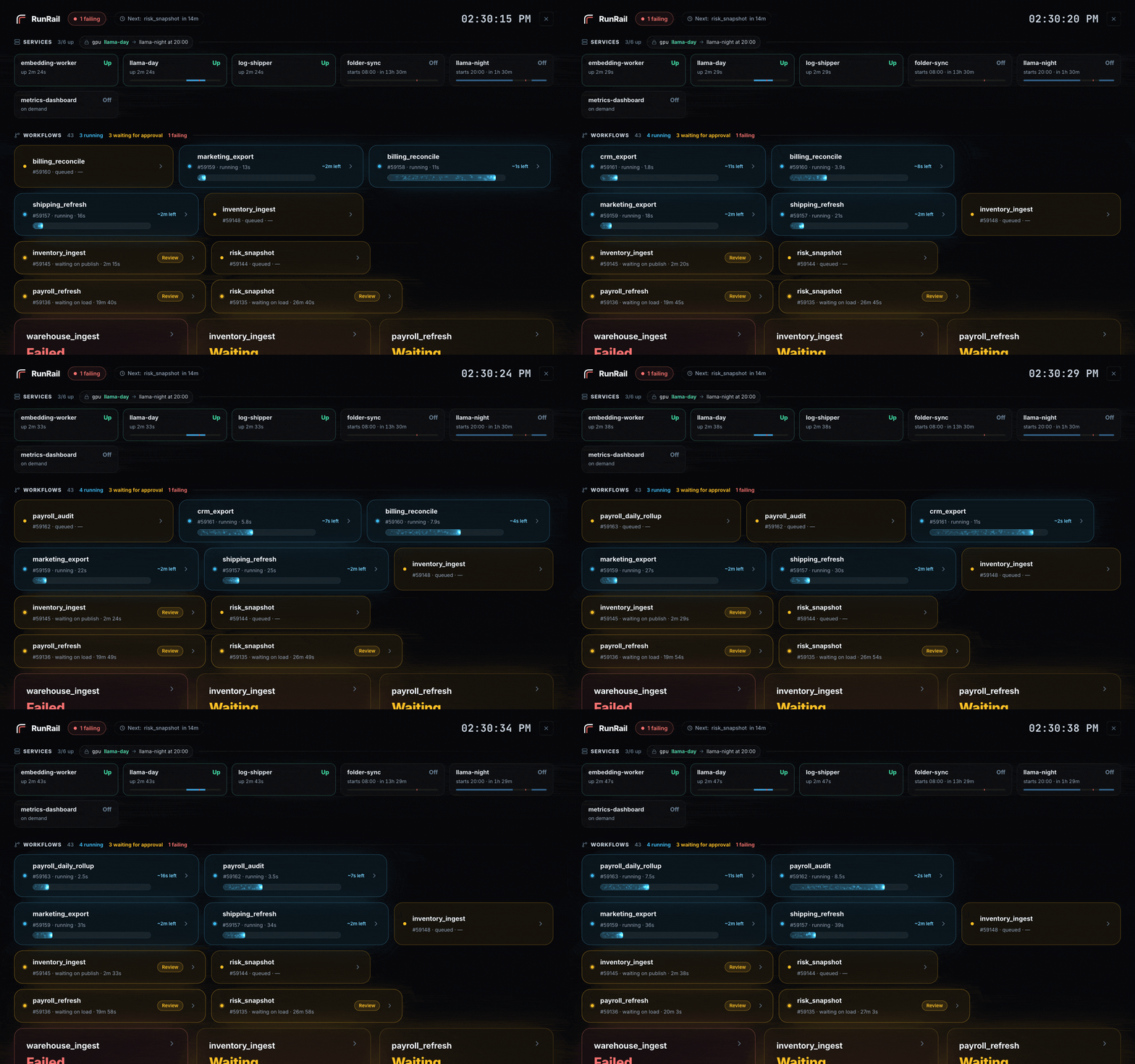
The wallboard: services along the top, then every workflow. Each run's bar is measured against that workflow's own median duration and turns amber when it goes over.
A task in RunRail is a command:
python scripts/refresh_sales.py --date {{ ds }}
That is the whole configuration. Nothing is imported into your code, and there is no DAG file to keep in sync with it. RunRail runs that command on a schedule, in a Python environment you declare, and keeps the logs, the timings and the history.
A service is a command RunRail keeps running instead:
llama-server -m models/qwen2.5-7b-q5.gguf --port 8081
Started with RunRail, inside weekly windows, or by hand; restarted if it crashes; stopped politely when its window closes; and able to take turns with your workflows on a shared GPU.
Sixty seconds to a first run
pipx install runrail     # or: pip install runrail
runrail serve            # first launch asks about importing; press Enter to start fresh
Then, in a second terminal:
cat > hello.yml <<'YAML'
workflows:
  - name: hello
    schedule_cron: "*/5 * * * *"
    tasks:
      - name: say-hello
        task_type: shell
        command: echo "hello from RunRail at {{ ts }}"
YAML

runrail apply hello.yml
runrail run hello
Open http://127.0.0.1:8080. The run is in the history with its logs, and the schedule fires again inside five minutes. The YAML is optional, by the way: everything in that file can be done in the UI, and most things are easier there.
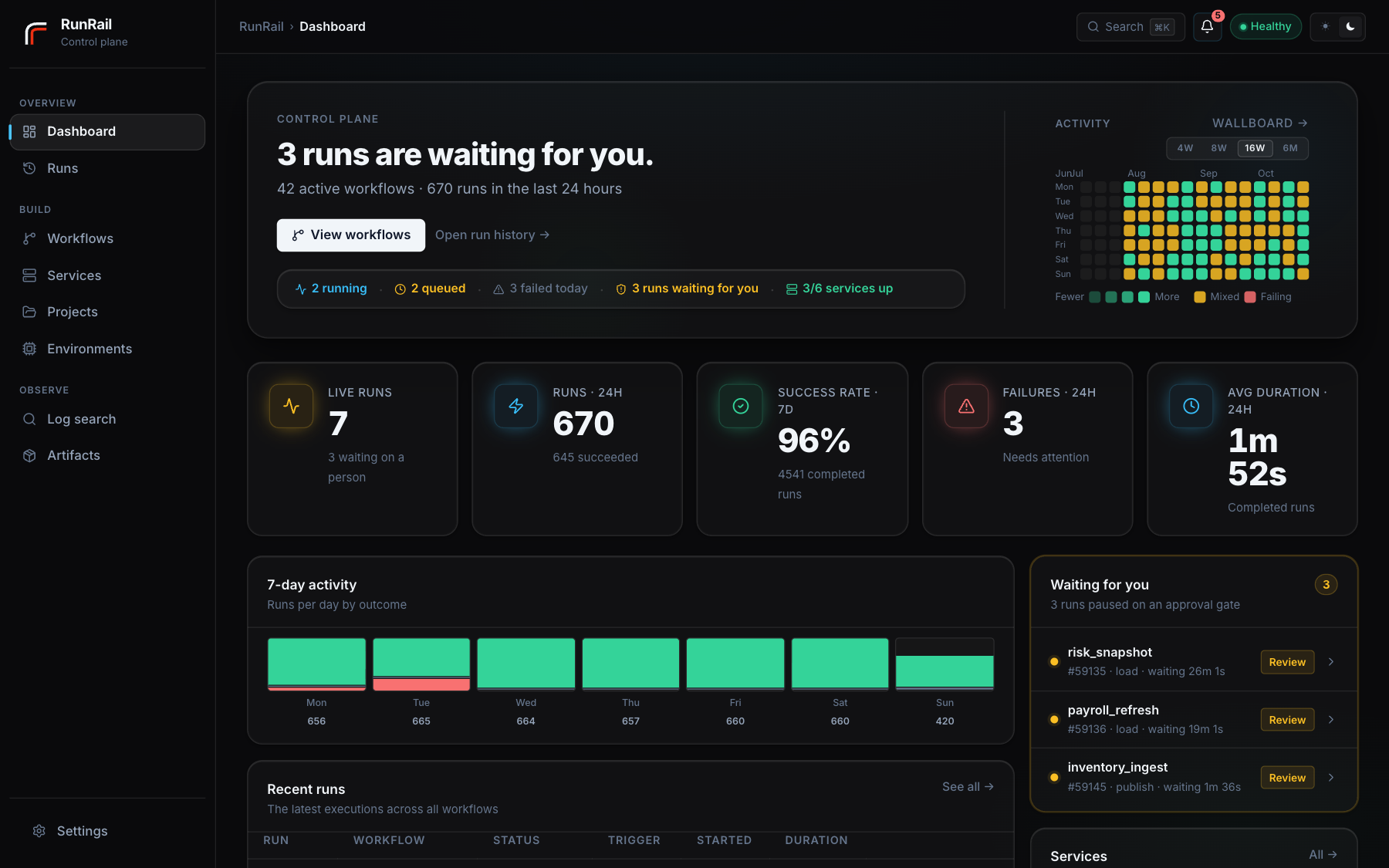
A few workflows later, the dashboard looks like this:
The parts that matter
Your code doesn't change. Point RunRail at a folder. Shell commands, Python scripts, notebooks and SQL files run as they are, each in its own subprocess with its own logs and timeout. Your dependencies are installed into an environment you declare, never into RunRail's own.
Nothing quietly disappears. Every run keeps its logs, its timings and its place in the history, with independent tasks laid out in parallel on a timeline. You can search the logs of every run at once, which is usually how you find out when something actually started going wrong. And a schedule that came due while the machine was asleep is recorded as missed, because a run that never happened is more interesting than one that did.
A failed run picks up where it stopped. Resume re-executes the task that broke and everything downstream, keeping what already succeeded. A three-hour first step doesn't run again because the fourth one failed.
Some things should wait for a person. Mark a task as needing approval and the run parks there, showing the prompt and the exact command it is about to run. It gives up its worker thread while it waits, so a gate left open overnight holds nothing else up.
Some things should stay up rather than finish. A model server, a folder sync, a dashboard. A service runs on RunRail's startup, inside weekly windows (any number, overnight included), or on demand, with a live log and a history of every start and stop. A crashing one is restarted with a growing delay and held after five crashes in ten minutes, with a notification. Two model servers on an exclusive gpu lock take turns, and a GPU workflow waits for whichever one is running, because nothing in RunRail interrupts anything else.
Notebooks come out the other end as reports. An executed notebook renders to HTML on the run page, charts and tables included. /reports/<workflow>/latest always resolves to the newest successful run, so a link you shared last month still shows this morning's numbers.
Also in the box: retries and backfills, per-workflow concurrency, resource locks so two jobs never enter the same database at once, snooze, auto-pause after repeated failures, deadlines that alert while a run is still going, per-task duration trends, notes on a run, webhooks for Slack and Microsoft Teams, YAML export and apply, and a REST API with live docs at /docs.
A look around
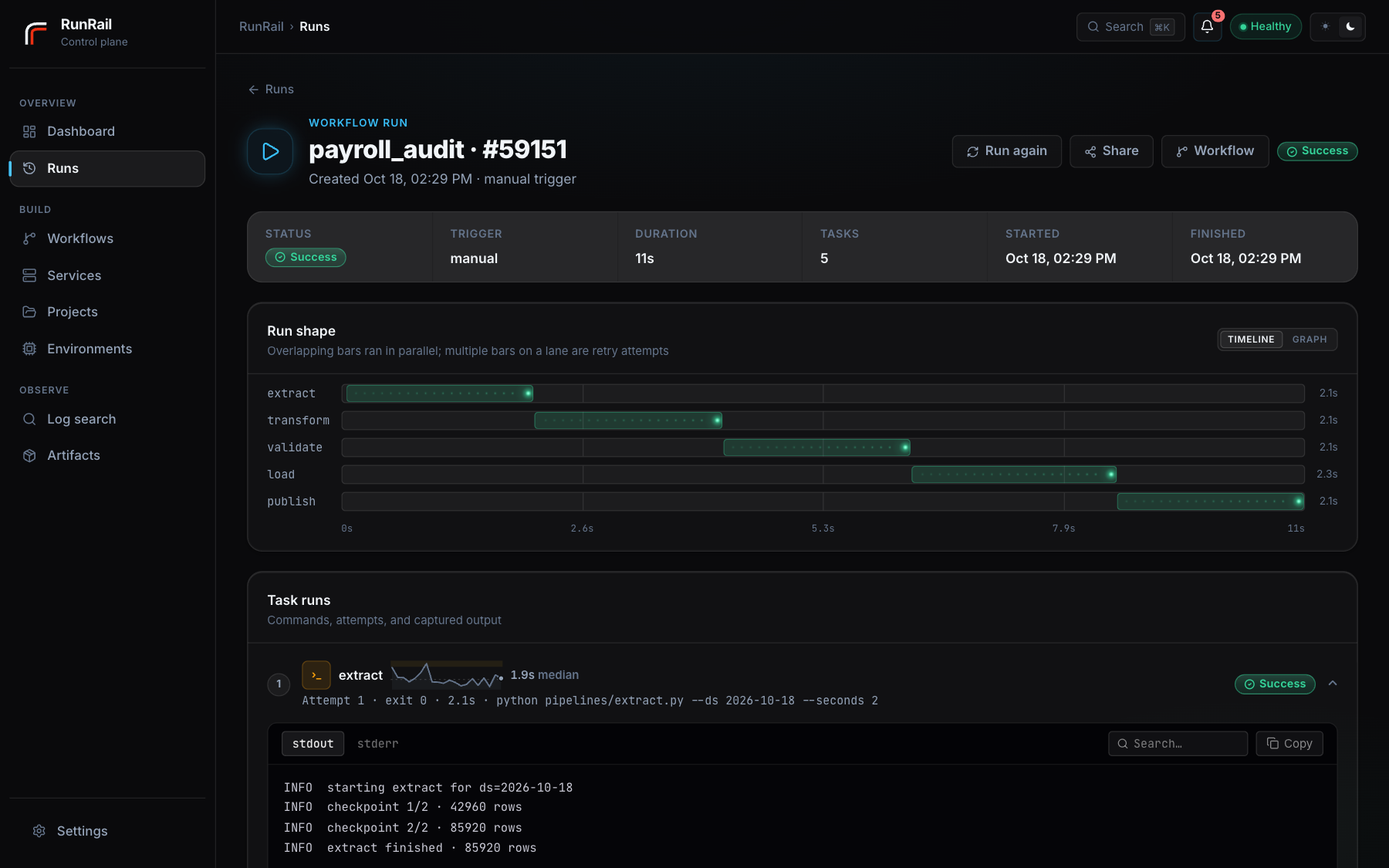
A run in progress. Independent tasks overlap on the timeline, and every attempt keeps its own logs.
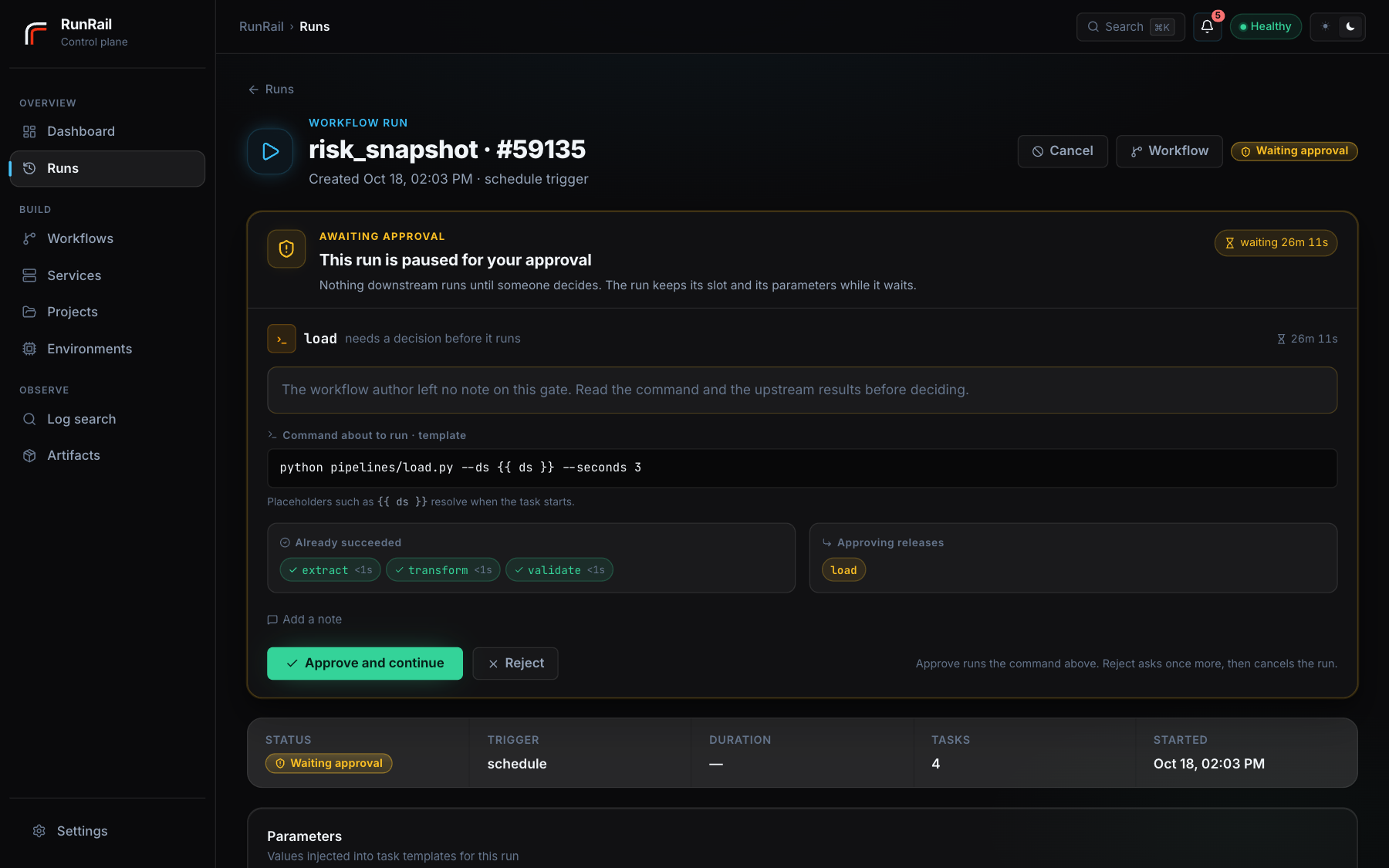
A run waiting on approval, showing the prompt from whoever built the workflow and the command about to execute.
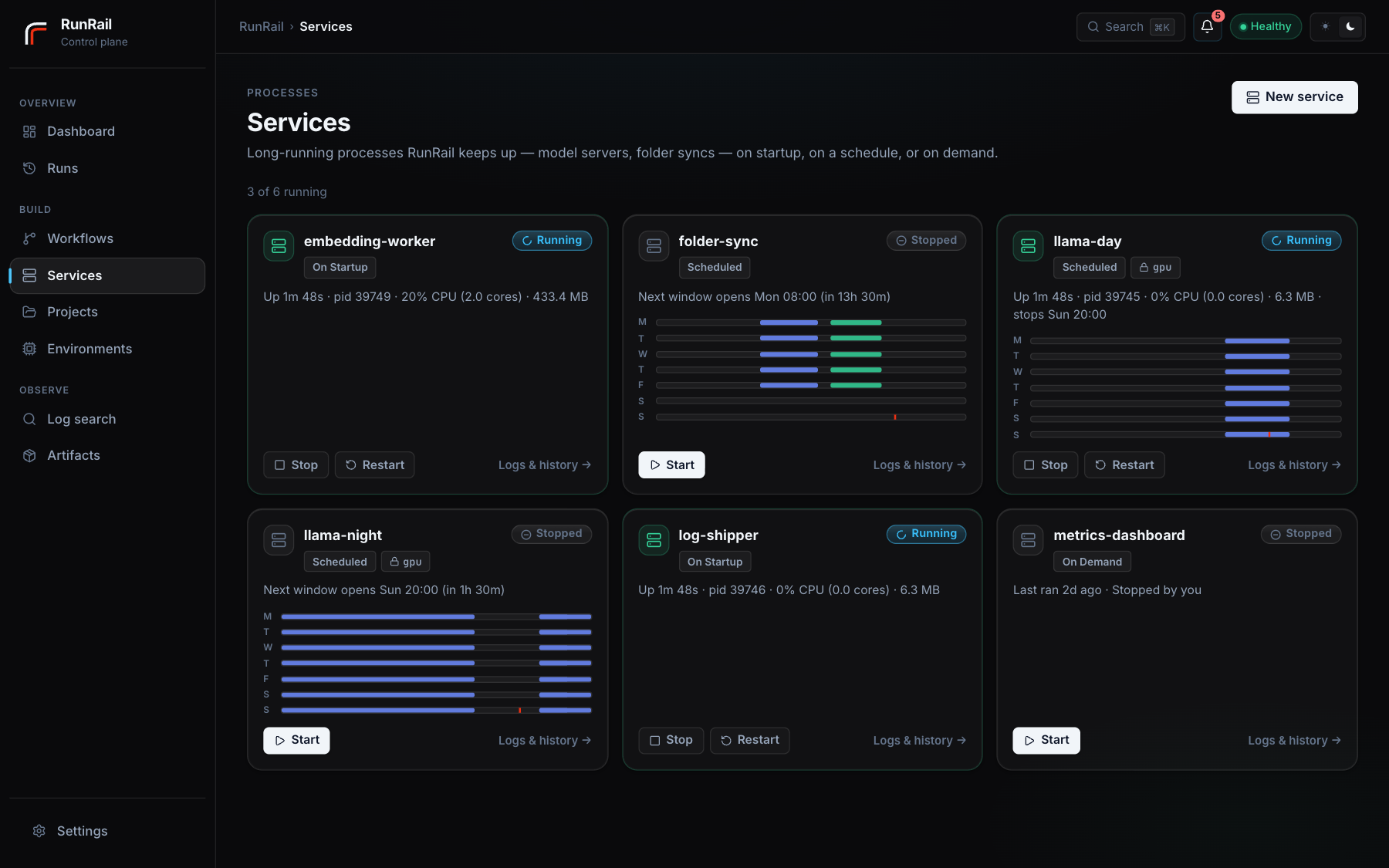
Services. Each card says what the process is doing and why, in the supervisor's own words: up and until when, waiting for a resource and who holds it, stopped by you and when its schedule takes over again.
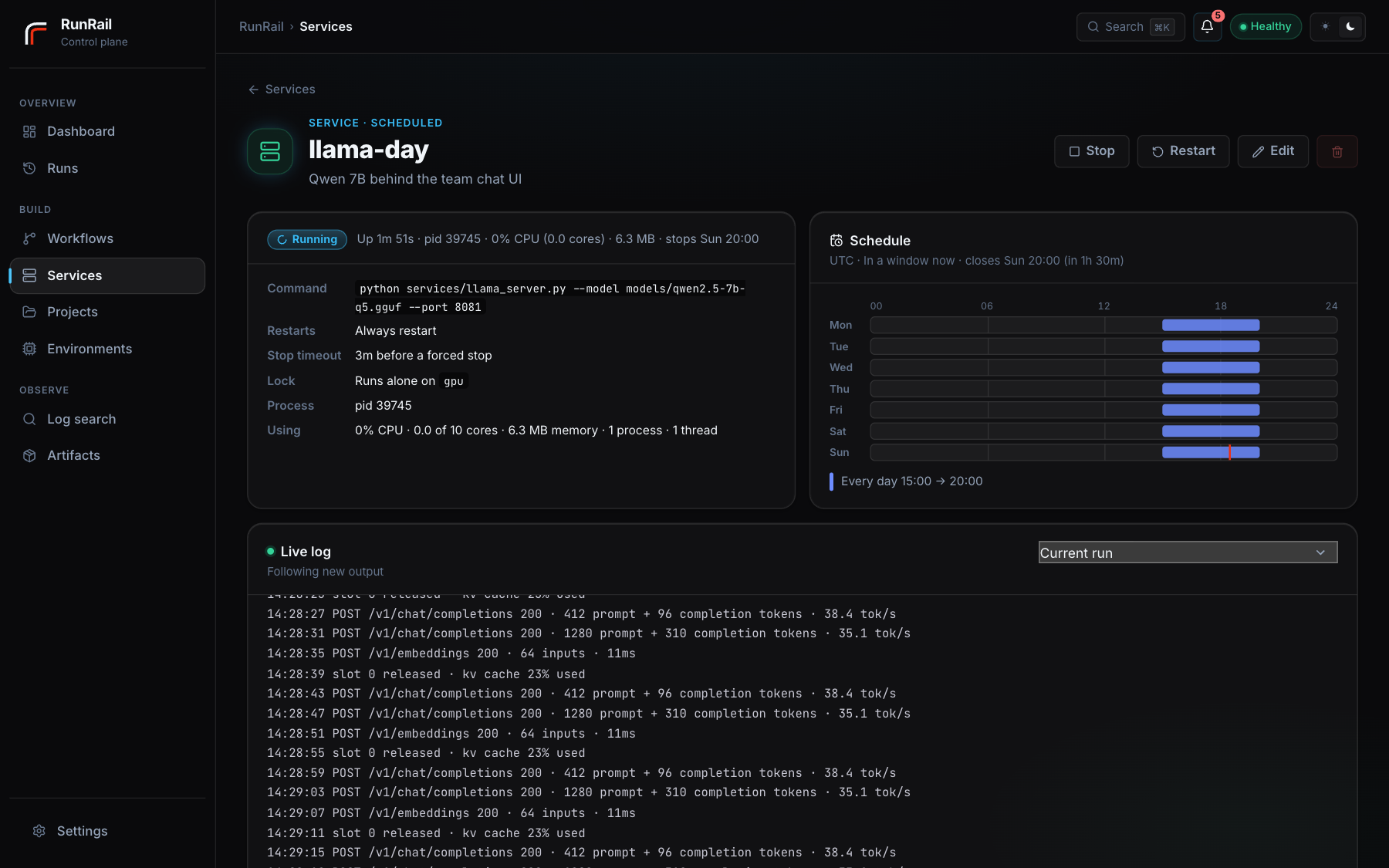
One service, with its schedule as a week, its live log, and every start and stop it has had.
Install
One package with the web UI already built into it. Python 3.11 or newer, nothing else. Startup takes about 0.6 seconds, including creating the database and applying migrations, and the whole thing settles at roughly 96 MB as a single process.
Data lives in a per-user directory:
| OS | Location |
|---|---|
| macOS | ~/Library/Application Support/RunRail |
| Linux | ~/.local/share/RunRail (honours $XDG_DATA_HOME) |
| Windows | %LOCALAPPDATA%\RunRail |
RUNRAIL_HOME moves it, for example RUNRAIL_HOME=./.runrail to keep it beside a project. RunRail also reads a .env from the directory you start it in, which matters if you launch it from more than one place.
Rendering notebooks as HTML reports needs an extra: pipx install "runrail[notebook]". Running notebooks does not; papermill goes into the task's own environment for that.
How it fits together
Projects point at the directories your code lives in. Environments say how Python runs: a managed virtualenv built from pip requirements, an interpreter you already have, or a Conda environment. Workflows group tasks into a dependency graph with an optional schedule. Services are single commands kept running, using the same projects and environments.
Environments resolve per task, then per workflow, then per project. Python and notebook tasks will not fall back to RunRail's own interpreter. That is deliberate: your dependencies are not its dependencies.
For most setups, Environments → New environment → Managed Python is the one to use. Declare pandas==2.3.0 and RunRail builds an isolated virtualenv, records the build log and Python version, and rebuilds atomically when the requirements change. A failed rebuild keeps the last working one. Every managed environment also carries papermill and ipykernel so notebook tasks work, which is about 127 MB before your own packages.
Templating
Commands and paths are Jinja templates. Every run gets:
| Variable | Meaning |
|---|---|
ds |
Logical date (2026-07-08) on the workflow's own calendar: an 18:00 Los Angeles run is that day's run. Set per-date during backfills |
ds_utc |
The same date in UTC (what ds meant before 0.8.1) |
ts / ts_nodash |
Run timestamp in UTC, ISO and compact (20260708T141005) |
run_id, task_run_id |
Identifiers for this execution |
project_root, artifacts_dir |
Resolved paths for the run |
| your parameters | Run and per-task parameters, merged |
Tasks also get the parameters in their environment, for scripts that are not templated: all of them as JSON in RUNRAIL_PARAMS, and each as RUNRAIL_PARAM_<NAME> (RUNRAIL_PARAM_REGION=EU, yes/no as true/false). Notebooks get them as papermill parameters.
Run forms
A workflow can say which parameters a run takes. Under Edit → Run form, give each one a name, a type (text, number, date, choice, yes/no), an optional default, a label and a line of help. Run with… then shows a form instead of a JSON box: a date picker, a dropdown, a switch. Values are checked before anything is queued.
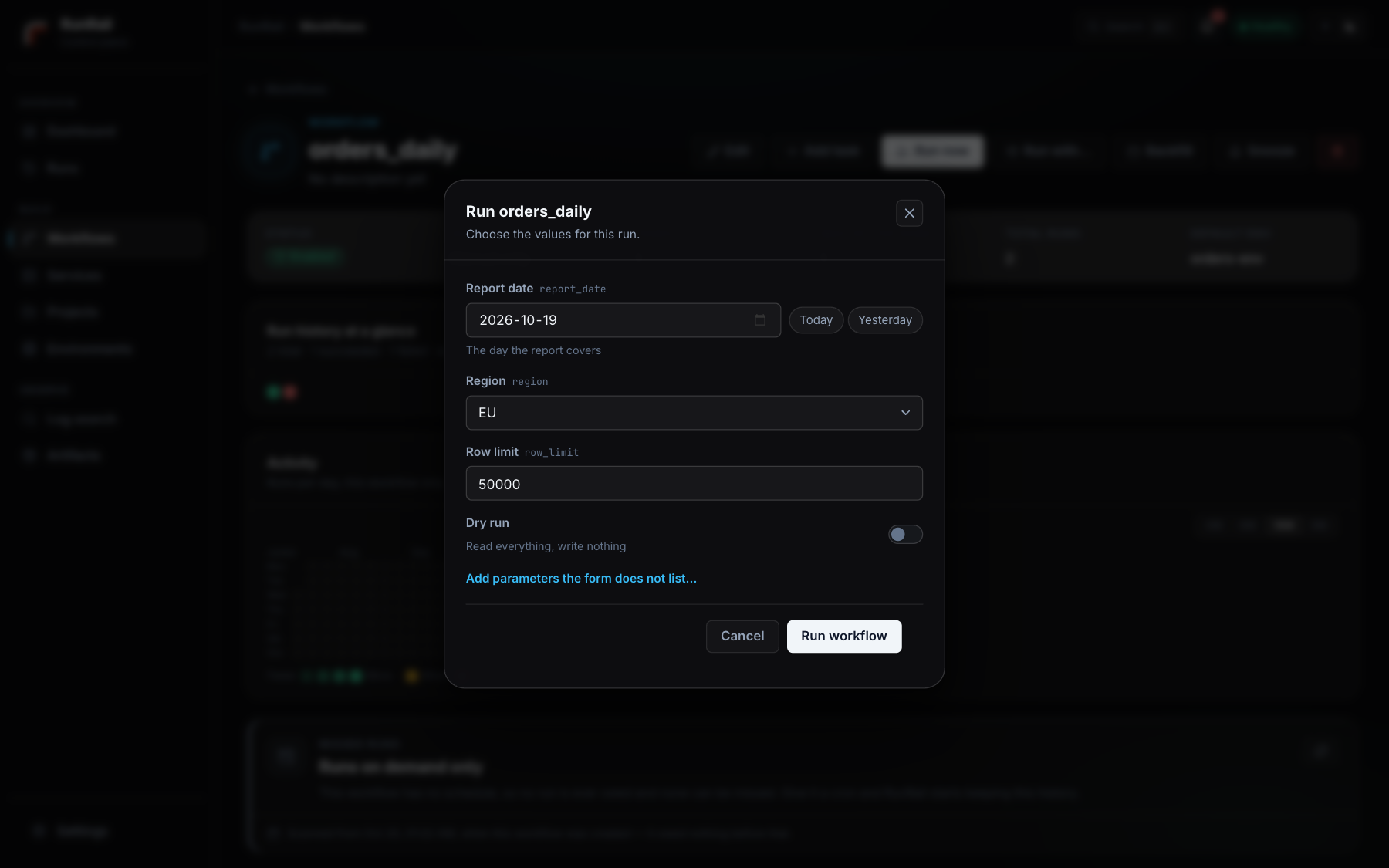
Every way a run starts goes through the same form — the button, the API, runrail run --param, a backfill, the schedule — so a run always records exactly what it ran with. Missing values take their default; a date default can be today or yesterday, counted on the workflow's calendar (in a backfill, from each backfilled day). A required parameter with no default makes Run now ask first, and a scheduled workflow must give one a default, since nobody is there to ask. Parameters the form does not list still pass through as before.
run_parameters:
  - {name: report_date, type: date, default: yesterday, label: Report date}
  - {name: region, type: choice, choices: [EU, US, APAC], default: EU}
  - {name: dry_run, type: bool, default: false}
What changed since the last good run
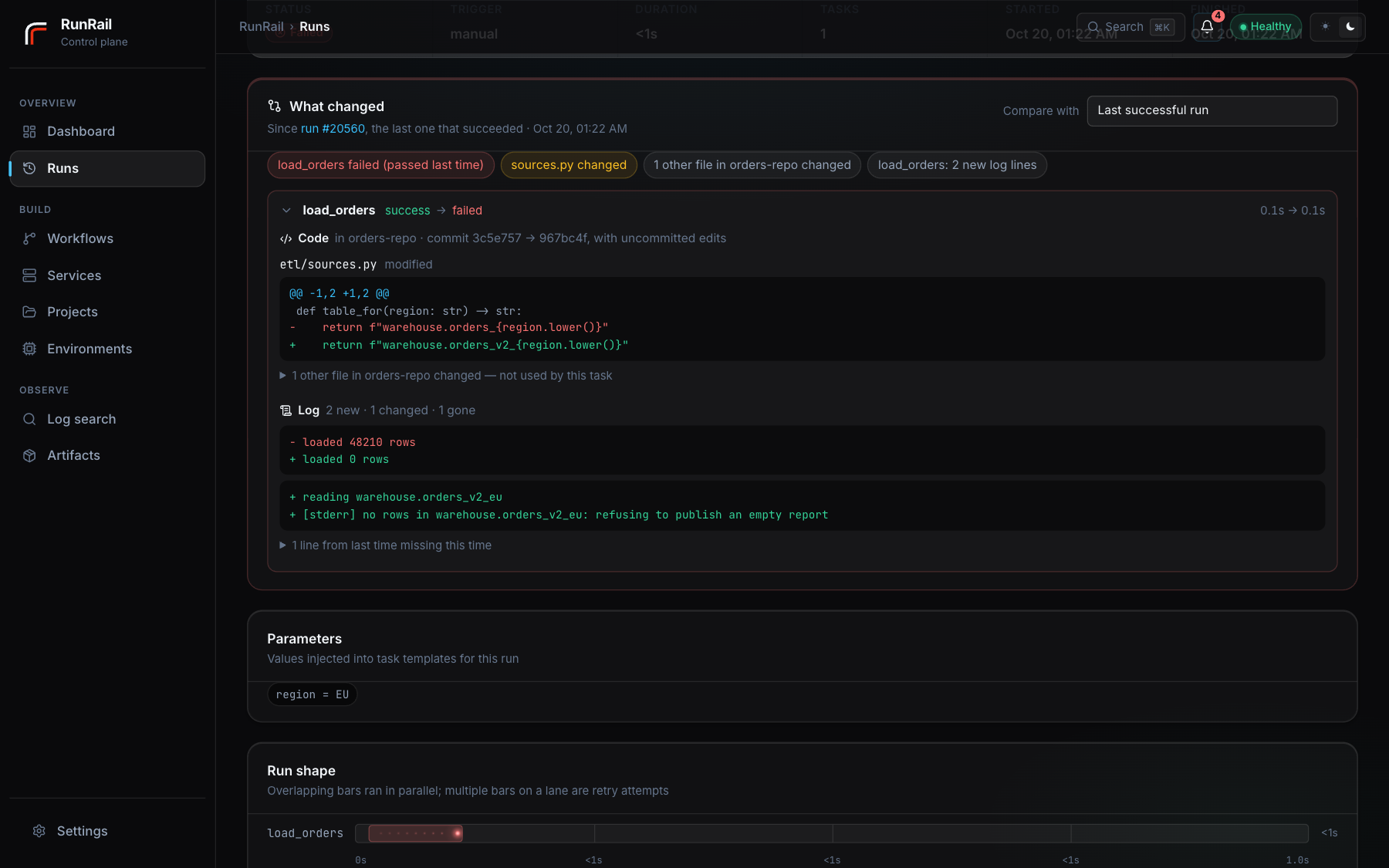
A failed run opens with a What changed panel, comparing it with the last run of the same workflow that succeeded. Any finished run can be compared with any earlier one. It shows only what differs:
-
Parameters that changed.
-
Code, file by file, the files the task uses first. When a task starts, RunRail records the code it is about to run:
- in a project (a RunRail project, a git repository, or a folder with
pyproject.toml/setup.py), every code and config file in it, so a fix in a helper or a config shows up too. In a git repository it uses git's own file list and shows the commit, e.g. "commit 3c5e757 → 967bc4f, with uncommitted edits"; - for a loose script in a shared folder, the script and the local files it imports or opens, not its neighbours.
Each version of a file is stored once (compressed), and a project nobody touched costs nothing. Stored code is kept exactly as long as a run that used it is kept.
It only reads, never writes, and it stays out of what isn't your code. Virtualenvs and conda environments are skipped whatever they're called (by their
pyvenv.cfg/conda-meta), as are caches, build output, and.envfiles, keys and credentials. It is light where reading is costly. On a network drive, only the files the task runs are checked. A OneDrive placeholder is never opened (that would download it). A project that's slow to list isn't listed again for an hour. After the first run, an unchanged file costs one look at its size and date. Settings → Code tracking turns it down to only the files a task runs, or off. - in a project (a RunRail project, a git repository, or a folder with
-
Packages and Python version of the task's environment (from
pip freeze, listed in the background so it never slows a task). -
Commands as run, ignoring the run's own dates and ids.
-
Log lines that are new, gone, or changed. Timestamps, durations and ids are ignored, but counts are not, so
loaded 48210 rows→loaded 0 rowsshows as one changed line. -
Notebook cells whose code or output changed, the cell that failed, and cells that got much slower.
It doesn't guess at causes. When nothing differs, it says so: the cause is then likely outside RunRail (the data, a database, the network). Secrets stay masked here as everywhere else.
CLI
runrail serve                                    # API, UI, scheduler and worker together
runrail run daily-refresh --param region=ca      # queue a run now
runrail backfill daily-refresh --from 2026-06-01 --to 2026-06-30
runrail export -o workflows.yml                  # workflows as YAML you can commit
runrail apply workflows.yml                      # declarative upsert (survives renames)
runrail import ~/old/.runrail                    # bring an existing setup into this home
runrail backup --out tonight.zip                 # configuration + database snapshot + manifest
runrail restore tonight.zip                      # put that database back (with the server stopped)
runrail cleanup --older-than-days 30 --dry-run   # prune old runs, logs and artifacts
runrail status

# or split the process up
runrail api
runrail scheduler
runrail worker --concurrency 8
Notifications
Set a default webhook on the Settings page (or RUNRAIL_NOTIFY_WEBHOOK_URL), or a webhook per workflow. RunRail posts on the first failure after a success, and again when it recovers. A schedule that breaks at midnight sends one message, not three hundred. Ten event kinds go out in all, covering failures, recoveries, auto-pause, approvals, missed schedules, deadlines and services in a crash loop; Settings lets you switch kinds off and set quiet hours, during which nothing is posted — what happened overnight is in Activity in the morning.
Slack and custom receivers get JSON whose text field renders directly. For Microsoft Teams, make a Workflow from the "when a webhook request is received" template (Teams → channel → Workflows) and paste the URL. RunRail recognises Teams URLs and sends the Adaptive Card envelope that flow expects.
Architecture
FastAPI serves the API and the prebuilt React UI. APScheduler is used purely as a clock, writing due runs into the database. While a run executes, the next scheduled iteration collapses into a single queued run rather than stacking up or vanishing, and a 60-second watchdog looks for schedules that have gone quiet and runs that have missed a deadline.
A bounded worker pool (RUNRAIL_WORKER_CONCURRENCY) claims queued runs atomically, so different workflows execute at the same time and a long job never blocks a frequent one. Runs of the same workflow are serialised by its max_concurrent_runs. Inside a run, the task graph executes with real parallelism (RUNRAIL_TASK_PARALLELISM).
Services have a supervisor of their own, beside the worker. Once a second it compares each service's process with what the service should be doing (its mode, its windows, any Start or Stop you pressed) and starts, stops, restarts or waits accordingly. It holds a lease in the database, so with serve and a separate worker running only one of them manages services, and a supervisor taking over from one that died first stops whatever that one left running.
All of it happens on one machine, using threads and subprocesses. There are no remote workers.
SQLite in WAL mode is the default. For PostgreSQL, set RUNRAIL_DB_URL=postgresql+psycopg://user:password@host:5432/runrail; the +psycopg matters, because a bare postgresql:// looks for psycopg2, which isn't installed. CI runs the whole suite against both. Logs live under $RUNRAIL_HOME/logs/, artifacts under $RUNRAIL_HOME/artifacts/<id>/, timestamped so retries never overwrite each other.
Docker is available (docker compose up --build starts RunRail with PostgreSQL on port 8080) and entirely optional.
Configuration
Most of what you would tune lives on the Settings page and applies without a restart: the default webhook and which alerts go out, quiet hours, how long runs are kept (with a preview of what that would delete before it does), and how many runs and tasks execute at once. The same page shows the machine — version, uptime, database and disk, what the worker and the supervisor are doing — and has the operator controls: pause everything new while what is executing finishes, download a backup, and restore one.
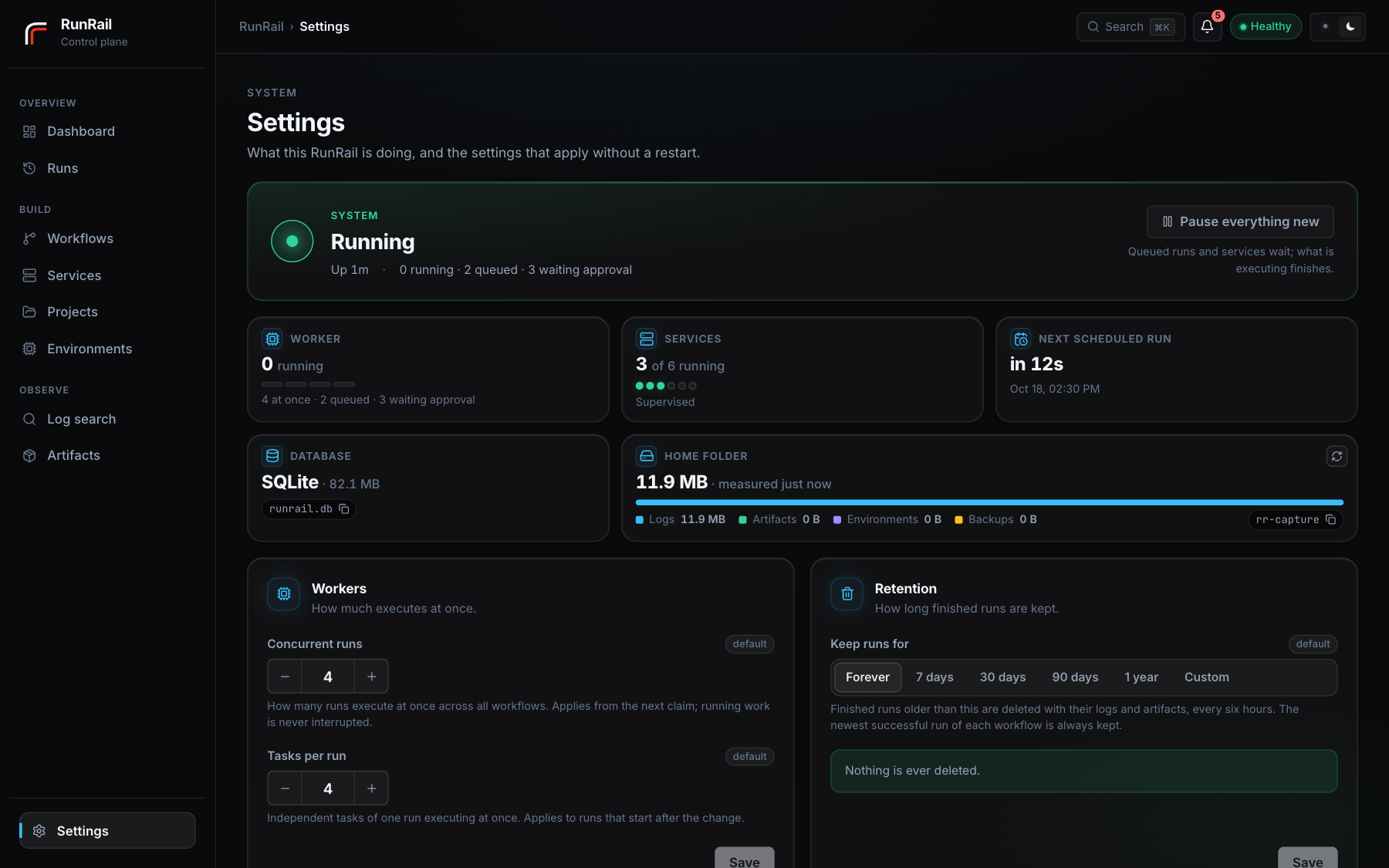
An environment variable pins a setting: the page shows it locked and names the variable, so a deployment that configures RunRail in a unit file or .env stays exactly what that file says.
| Variable | Default |
|---|---|
RUNRAIL_HOME |
Per-user data directory (see Install) |
RUNRAIL_DB_URL |
SQLite at $RUNRAIL_HOME/runrail.db |
RUNRAIL_HOST / RUNRAIL_PORT |
127.0.0.1 / 8080 |
RUNRAIL_WORKER_CONCURRENCY |
4 concurrent runs |
RUNRAIL_TASK_PARALLELISM |
4 concurrent tasks per run |
RUNRAIL_WORKER_POLL_SECONDS |
1.0 |
RUNRAIL_RETENTION_DAYS |
unset; when set, finished runs older than this are deleted with their logs and artifacts |
RUNRAIL_NOTIFY_WEBHOOK_URL |
unset; default webhook |
RUNRAIL_PUBLIC_URL |
unset; base URL for links inside exported files and reports |
RUNRAIL_BROWSE_ROOT |
user home; limits the UI file picker |
RUNRAIL_SQLITE_DB_PATH |
unset; the database SQL tasks run against, unless the task sets sqlite_db_path |
RUNRAIL_SECRETS_KEY |
unset; the key secrets are encrypted with, instead of $RUNRAIL_HOME/secrets.key |
RUNRAIL_CODE_TRACKING |
unset (the Settings choice, auto by default); auto, files or off |
Schedules evaluate in each workflow's own timezone, so "daily at 9:00" stays 9:00 on that workflow's clock across DST. The UI shows occurrences in yours.
Variables and secrets
Settings also holds variables and secrets that every task and service gets as environment variables: a database host, a folder, an API token. Your scripts read them the usual way — $NAME in a shell, %NAME% in a Windows command, os.environ["NAME"] in Python or a notebook — so nothing in them changes. An environment's or a service's own variables win over these when both set the same name.
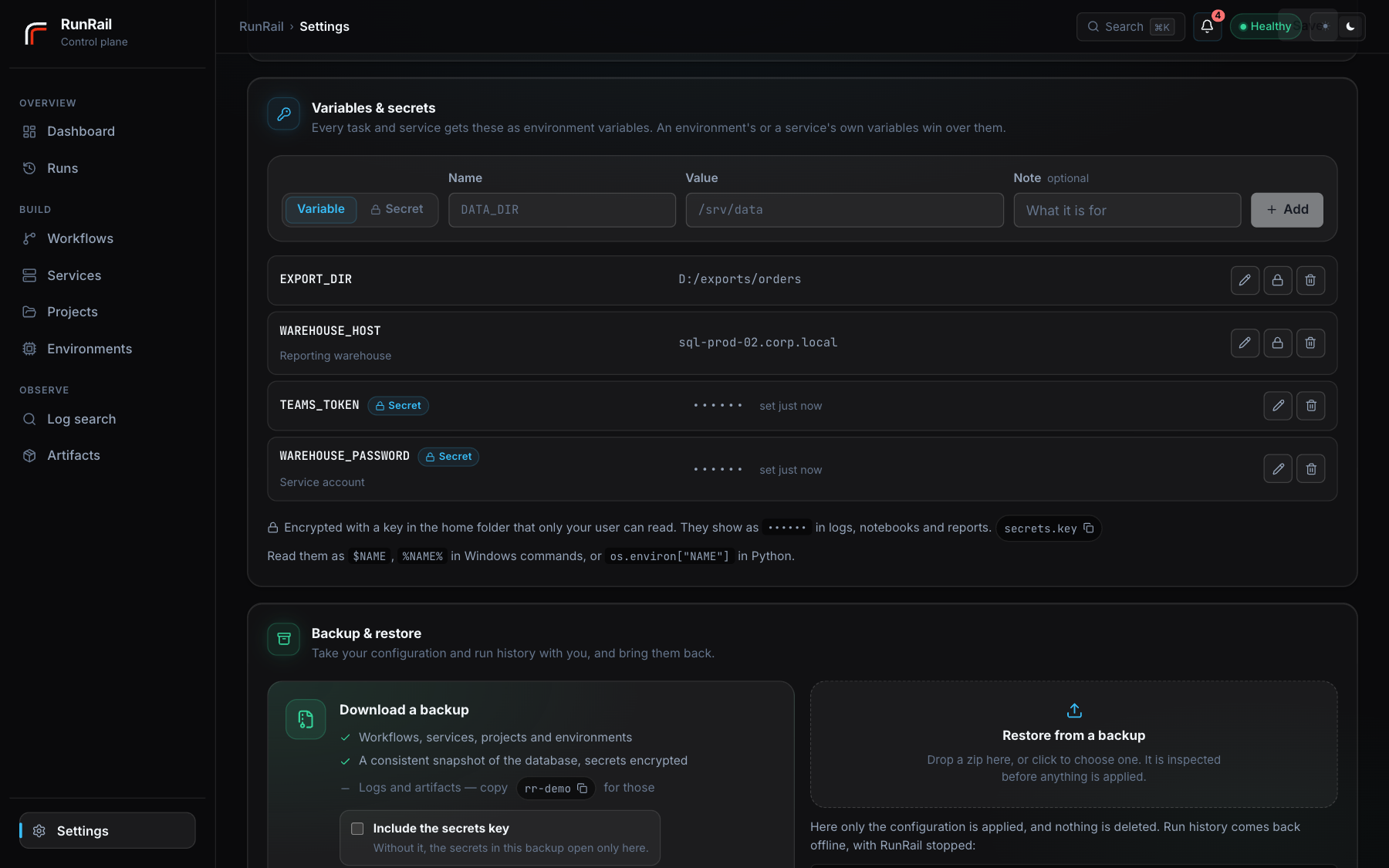
A secret is shown only while you type it. It is stored encrypted, and its value is replaced with •••••• wherever RunRail writes or shows output: task and service logs, the notebooks papermill writes, rendered reports, recorded commands and errors, log search. Logs written before a secret was added are masked when they are read. Masking catches the exact value (and its JSON-escaped form), not a piece or an encoding of it.
The key lives in $RUNRAIL_HOME/secrets.key, readable only by your user; on Windows it is also locked to your Windows account. RUNRAIL_SECRETS_KEY supplies it instead (runrail secrets-key prints the current one). The encryption protects the database file and its backups. It does not protect against code running as your user, which can read the key just as RunRail does.
Backups
runrail backup (or the button on Settings) writes a zip holding the configuration as YAML, a consistent snapshot of the SQLite database and a manifest. Logs and artifacts are not in it — they are the bulk of a home and sit in plain folders under $RUNRAIL_HOME; copy that folder for a full copy. Restoring the configuration (workflows, services, projects, environments) works from the page while RunRail runs, as an upsert that deletes nothing. Restoring the database is runrail restore <zip> with the server stopped; it refuses while one is alive and keeps the database it replaces. Before every schema upgrade RunRail also takes a restore point of its own under $RUNRAIL_HOME/backups/ (the newest three are kept), so a downgrade to the previous version has something to return to. On PostgreSQL the backup holds configuration only; use pg_dump for the database.
Secrets travel inside the database, encrypted; the key stays out of a backup unless you tick Include the secrets key (or pass --include-secrets-key). Without it the secrets open only on the machine that made them, and a restore elsewhere lists them for you to enter again. With it, runrail restore puts the key in place — keep that zip like a password.
Worth knowing
- It's built for one person on one machine. There are no accounts and no roles, by choice rather than omission. If you expose the port beyond localhost, put something in front of it that handles authentication, and narrow
RUNRAIL_BROWSE_ROOTwhile you're there. - Work runs on a single machine. Plenty happens in parallel there, but there are no remote workers.
- SQL tasks run against SQLite only.
- Services are managed by
runrail serveorrunrail worker.runrail apion its own shows them but starts and stops nothing, and the Services page says so. - Variables set on an environment or a service are stored as plain text. Put anything secret in Settings → Variables & secrets, where it is encrypted and masked.
- Log search is a bounded grep rather than an index. Every limit is capped and the response says which cap it hit, so a partial answer never looks like a complete one.
- Missed-run history is recomputed from the current schedule, so editing a cron expression redraws the past under the new one.
Development
pip install -e '.[dev,notebook]'
pytest                                        # 379 backend tests
ruff check src tests

cd frontend
npm install
npm run build     # needed from a clone; the built UI is gitignored, not committed
npm test          # 165 frontend tests
npm run test:e2e  # browser tests against a real `runrail serve` (needs the build above)
The frontend tests check cron previews against fire times generated by the backend's own scheduler, so if the UI ever promises a run time the scheduler wouldn't produce, the build fails. scripts/seed_demo.py fills a throwaway home with a realistic history if you want something to look at.
Licensed under Apache-2.0.
1 maintainer

Metadata
1 maintainer
Release files for runrail 0.8.2
For a detailed explanation of source distributions (sdists) and built distributions (wheels), please see the package formats documentation.
Source distribution (sdist)
| File | Size | Uploaded | Provenance | |
|---|---|---|---|---|
| runrail-0.8.2.tar.gz | 798.5 kB | With provenance | Details |
Built distribution (wheel)
| File | Interpreter | ABI | Platform | Reset |
|---|---|---|---|---|
| runrail-0.8.2-py3-none-any.whl | Python 3 | none | any | Details |
Total release size: 1.6 MB
Release files / runrail-0.8.2.tar.gz
| Download URL | runrail-0.8.2.tar.gz |
|---|---|
| Size | 798.5 kB |
| Tags | Source |
|
SHA-256 checksum How to use checksums |
6d43d4ab905fcb9d2887515840b14199eddb702523d4ebe39042c20001783b47
|
|
BLAKE2b-256 checksum How to use checksums |
73d31c19f3a7ff92181d0c7cedaa4137bc016df2f35e82e42c52b96197119745
|
| Upload date | |
|
Uploaded using Trusted Publishing? What is trusted publishing? |
Yes |
| Uploaded via |
twine/7.0.0 CPython/3.13.14
|
Provenance
Provenance describes where a file came from. On PyPI, provenance is shared via attestations, which provide a verifiable record of the build or publishing details. View details, limitations and caveats.


PyPI Publish Attestation
PyPI verified that this artifact, at this checksum, originated from the publisher listed below.
Signed by GitHub Actions, verified by PyPI on Oct 20, 2026.
Transparency logRelease files / runrail-0.8.2-py3-none-any.whl
| Download URL | runrail-0.8.2-py3-none-any.whl |
|---|---|
| Size | 822.5 kB |
| Tags | Python 3 |
|
SHA-256 checksum How to use checksums |
bb9c3504e75fd1c8cb5dc93d000b1dc1fdb85564a18d1a22fd2a6eaf6711dd04
|
|
BLAKE2b-256 checksum How to use checksums |
111ce18860a035c0057b0e73ad6e544a0cfced00cce7e3687e20724f894945dd
|
| Upload date | |
|
Uploaded using Trusted Publishing? What is trusted publishing? |
Yes |
| Uploaded via |
twine/7.0.0 CPython/3.13.14
|
Provenance
Provenance describes where a file came from. On PyPI, provenance is shared via attestations, which provide a verifiable record of the build or publishing details. View details, limitations and caveats.
PyPI Publish Attestation
PyPI verified that this artifact, at this checksum, originated from the publisher listed below.
Signed by GitHub Actions, verified by PyPI on Oct 20, 2026.
Transparency logSecurity for runrail 0.8.2
Provenance
Provenance describes where a file came from. On PyPI, provenance is shared via attestations, which provide a verifiable record of the build or publishing details. View details, limitations and caveats.
Full provenance
All 2 files in this release have been uploaded with provenance metadata.
Attestation for runrail-0.8.2.tar.gz
PyPI Publish Attestation
PyPI verified that this artifact, at this checksum, originated from the publisher listed below.
Signed by GitHub Actions, verified by PyPI on Oct 20, 2026.
Transparency logA note on package security
PyPI is a repository for distributing packages, not a service for auditing them. While third-party security researchers and our staff do their best to detect and remove malicious packages, PyPI cannot guarantee the quality, security or suitability of any given package.














