
RunRazor
Tools for movement analysis from stationary-camera footage.
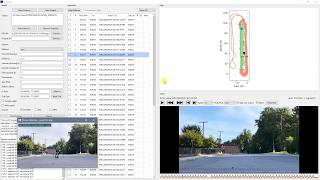
If you film yourself or someone else repeating a course past a fixed camera -- hill repeats, sprints, drills -- RunRazor turns that raw footage into usable clips. It can use the subject's GPS track to find each pass automatically, or you can mark the cuts by hand. It can crop and follow the subject so they stay framed, and lets you compare runs side by side or export the cuts straight to a video editor.
Demo
| Command | What it does |
|---|---|
runrazor |
The main app: extract clips from a video using GPS or manual cut points, review and tune the cuts, reframe, annotate, compare, and export (see rrdocs runrazor) |
rrreframe |
Crop and follow a moving subject automatically so they stay framed (see rrdocs reframe) |
rrcompare |
Play two runs side by side, lined up in time, to compare them (see rrdocs compare) |
rrtag |
Mark matching points in two runs by hand so rrcompare can line them up (see rrdocs compare) |
rrdocs |
Open the bundled documentation in your browser |
Setup
RunRazor needs Python 3.11+, ffmpeg (with ffprobe) on your PATH, and libmpv for GPU-accelerated video playback.
Windows
Install prerequisites using winget (built into Windows 10/11):
winget install Python.Python.3.12 Gyan.FFmpeg mpv.net
Close and reopen your terminal so the new python and ffmpeg commands are on your PATH, then install RunRazor:
pip install runrazor
To update: pip install --upgrade runrazor
macOS
Install prerequisites using Homebrew:
brew install python ffmpeg mpv pipx
pipx install runrazor
To update: pipx upgrade runrazor
Linux (Debian/Ubuntu)
sudo apt update
sudo apt install python3 ffmpeg libmpv-dev pipx
pipx install runrazor
To update: pipx upgrade runrazor
RunRazor Application
The main application ties all the tools together: load a video (and a GPS track, if you have one), review and tune the cut points against the footage, reframe, compare, and export as an editor timeline (FCPXML/EDL) or a stitched MP4.
runrazor
See rrdocs runrazor for all options, hotkeys, time format, and examples.
Reframe
Automatic subject tracking and reframing pipeline. Crops video from a stationary camera to follow a moving subject. You can use this directly without the RunRazor segmentation.
rrreframe input.mp4
You may get reasonable results without any additional arguments.
See rrdocs reframe for fine-tuning, the neural-network detector, handheld mode, deshake, horizon correction, 360 video input, interactive mode, profile mode, and cache options.
Split-screen comparison
Side-by-side comparison of two ski runs (or one run against its own mirror), phase-locked turn-by-turn. It runs on Reframe outputs: each clip's trajectory sidecar (written by default) drives automatic turn-apex detection, and one clip plays at native speed while the other is retimed per turn segment to stay in sync.
rrreframe runA.mp4 --output a.mp4
rrreframe runB.mp4 --output b.mp4
rrcompare a.mp4 b.mp4 -o compare.mp4
To compare against an external clip that was never reframed (or to fix wrong auto-detected turns), tag its apexes with rrtag clip.mp4. See rrdocs compare for turn pairing, mirroring, pane fit, retiming, manual tagging, and the editable alignment JSON.
Licenses
runrazor is released under the MIT License (see LICENSE). It bundles a default subject detector -- the stock YOLOX-Nano model (Apache-2.0, Copyright (c) Megvii Inc.), used under the COCO "person" class. Full attribution and license text are in THIRD_PARTY_LICENSES. For higher accuracy, the larger permissively-licensed YOLOX-S can be dropped in via --nn-model (see rrdocs reframe and training/README.md).
❄🤗❄
1 maintainer

Download files
Download the file for your platform. If you're not sure which to choose, learn more about installing packages.
Source Distribution
Built Distribution
Filter files by name, interpreter, ABI, and platform.
If you're not sure about the file name format, learn more about wheel file names.
Copy a direct link to the current filters
File details
Details for the file runrazor-0.4.0.tar.gz.
File metadata
- Download URL: runrazor-0.4.0.tar.gz
- Upload date:
- Size: 4.7 MB
- Tags: Source
- Uploaded using Trusted Publishing? No
- Uploaded via:
uv/0.11.8 {"installer":{"name":"uv","version":"0.11.8","subcommand":["publish"]},"python":null,"implementation":{"name":null,"version":null},"distro":null,"system":{"name":null,"release":null},"cpu":null,"openssl_version":null,"setuptools_version":null,"rustc_version":null,"ci":null}
File hashes
| Algorithm | Hash digest | |
|---|---|---|
| SHA256 |
7ff779515c3520cba304ed6a5e050e40ec67049d4573d2dc97216bebee2ae82d
|
|
| MD5 |
c263174629f5c0cf761760711dfe7f02
|
|
| BLAKE2b-256 |
6e838d3a0c55331eb8bac190ec7eb2844148f34418688c938df28908e6acd50c
|
File details
Details for the file runrazor-0.4.0-py3-none-any.whl.
File metadata
- Download URL: runrazor-0.4.0-py3-none-any.whl
- Upload date:
- Size: 4.7 MB
- Tags: Python 3
- Uploaded using Trusted Publishing? No
- Uploaded via:
uv/0.11.8 {"installer":{"name":"uv","version":"0.11.8","subcommand":["publish"]},"python":null,"implementation":{"name":null,"version":null},"distro":null,"system":{"name":null,"release":null},"cpu":null,"openssl_version":null,"setuptools_version":null,"rustc_version":null,"ci":null}
File hashes
| Algorithm | Hash digest | |
|---|---|---|
| SHA256 |
2ca1f4b8b7bfda14c15e5154db2efa618080a476f33b9cc8b0406331dd2514e6
|
|
| MD5 |
b522924ab395c2afa8bd68e64eab0d5a
|
|
| BLAKE2b-256 |
59d278c1e20186b1afaaf6e16a8f8c61f20e914815b46a00fbb4c039ace393ee
|














