
Single-file scrollable HTML report for one-shot batch jobs (ETL, ML training, migrations, crawlers). Streaming append-write. No server. No infra.

Project description
runscroll



runscroll — turn one batch run into one scrollable HTML report.
Sprinkle
report.add_*()calls through your batch job. Get a single self-contained HTML file out the other side. Mail it, drop it in S3, attach it to a PR. No server. No account. No infrastructure.
When to use this
| Your situation | runscroll? |
|---|---|
| Batch job ran, want to share what happened | ✅ |
| Daily ETL done, mail a result page to oncall | ✅ |
| ML training run done, drop a post-mortem in the PR | ✅ |
| Migration finished, link an audit page from a ticket | ✅ |
| Crawler finished, browse failures in one HTML | ✅ |
| Live monitoring dashboard | ❌ Grafana / Datadog |
| Compare 50 experiment runs | ❌ MLflow / Weights & Biases |
| Interactive notebook for exploration | ❌ Jupyter |
| Real-time streaming logs | ❌ stdlib logging |
| Generic HTML page builder | ❌ dominate / yattag |
If your row above says "❌", that other tool is the right fit — runscroll is intentionally narrow.
Install
pip install runscroll                                # core, stdlib only
pip install "runscroll[matplotlib,plotly,pil]"       # with adapters
30-second example
from runscroll import Collector

with Collector("report.html", title="Daily ETL") as report:
    report.add_kv({"started_at": "2026-05-05T09:00", "config": "v17"})

    with report.section("Extract"):
        report.add_text(f"loaded {len(rows):,} rows")
        report.add_table(rows[:5], title="Sample input")

    with report.section("Transform"):
        report.add_text("dropped 142 rows (0.3%)", level="warning")
        report.add_table(dropped[:20], title="Sample dropped rows")

    report.add_text("done", level="success")
That produces report.html — one file, no assets folder, no external CDN.
Open it in any browser, mail it, upload it to S3, attach it to a PR.
API surface (the entire library)
Collector(path, title, mode="inline"|"directory", asset_writer=None, log_exceptions=True)
    # context manager: with Collector(...) as report: ...

report.add_text(text, level="info"|"debug"|"warning"|"error"|"success")
report.add_kv(mapping, title="")
report.add_code(code, lang="", title="")
report.add_table(list_of_dicts_or_lists, title="")
report.add_image(bytes_or_path_or_PIL_or_ndarray, caption="", title="")
report.add_figure(matplotlib_or_plotly_figure, title="", description="", close=True)

with report.section(name):              # nested allowed
    ...
That's it. The whole library is one class with eight methods.
Output modes
# inline (default) — one .html file, all assets base64'd in
Collector("report.html", mode="inline")

# directory — index.html + assets/ folder; works as a static site
Collector("report/", mode="directory")

# directory + custom destination — plug in S3 / GCS via AssetWriter
Collector("report/", mode="directory", asset_writer=MyS3Writer(...))
The AssetWriter protocol is one method:
class AssetWriter(Protocol):
    def write(self, relative_path: str, content: bytes) -> None: ...
That's all the library asks. Authentication, region, retries, caching are your concern — runscroll never imports a cloud SDK.
Recipes
Working scripts in examples/ — drop them next to your pipeline as a
starting point.
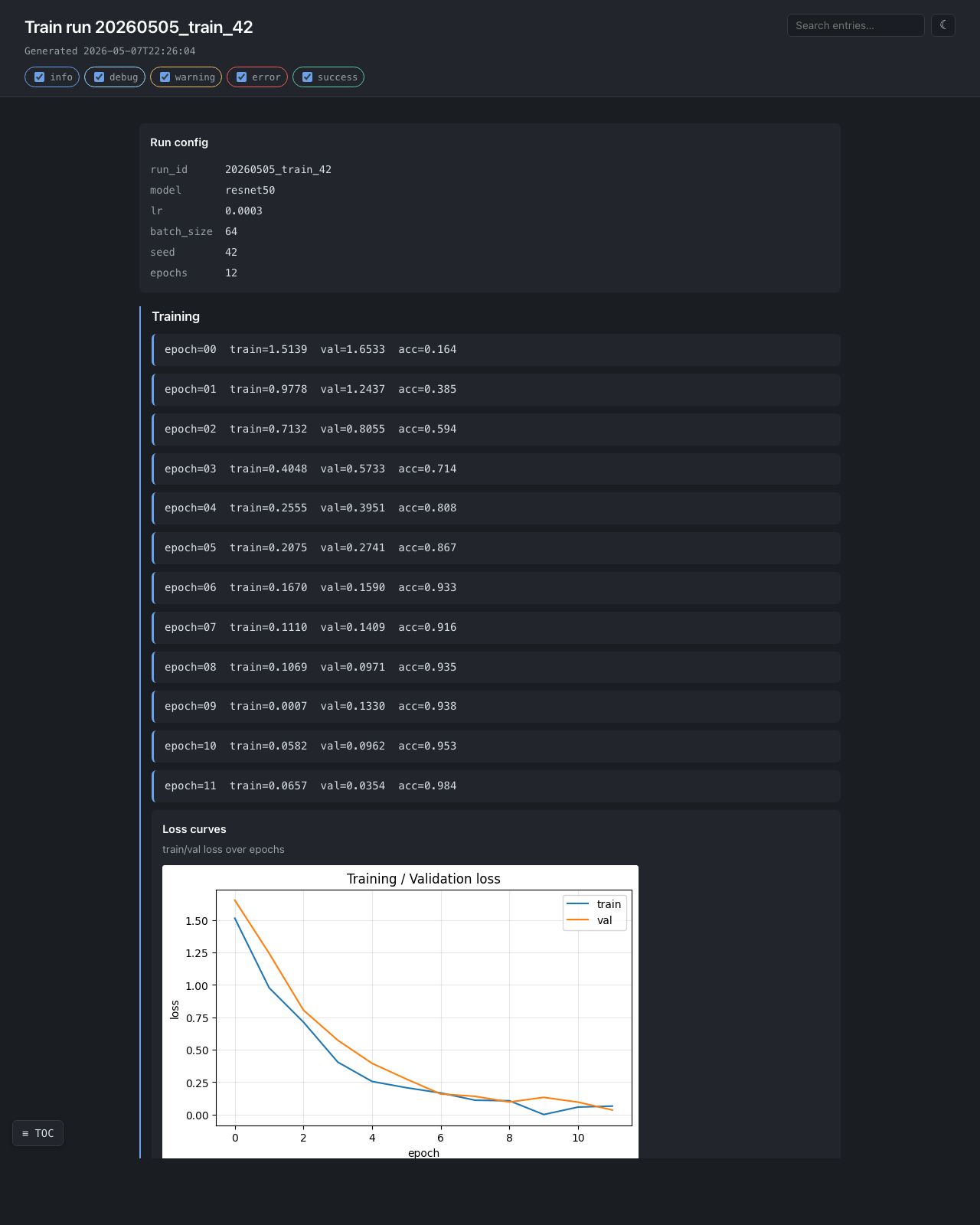
ML training run — examples/ml_training_run.py
Loss curves, confusion matrix, per-class precision/recall, sample worst predictions as inline images. Exercises matplotlib + numpy + PIL + nested sections.
with Collector(out, title=f"Train run {run_id}") as report:
    report.add_kv({"model": "resnet50", "lr": 3e-4, "bs": 64, "seed": 42})
    with report.section("Training"):
        for epoch in range(epochs):
            report.add_text(f"epoch={epoch}  train={tl:.4f}  val={vl:.4f}")
        report.add_figure(plot_loss_curves(history), title="Loss curves")
    with report.section("Holdout"):
        report.add_figure(plot_confusion(y_true, y_pred), title="Confusion")
        report.add_table(per_class_metrics, title="Per-class metrics")
Daily ETL — examples/data_quality_etl.py
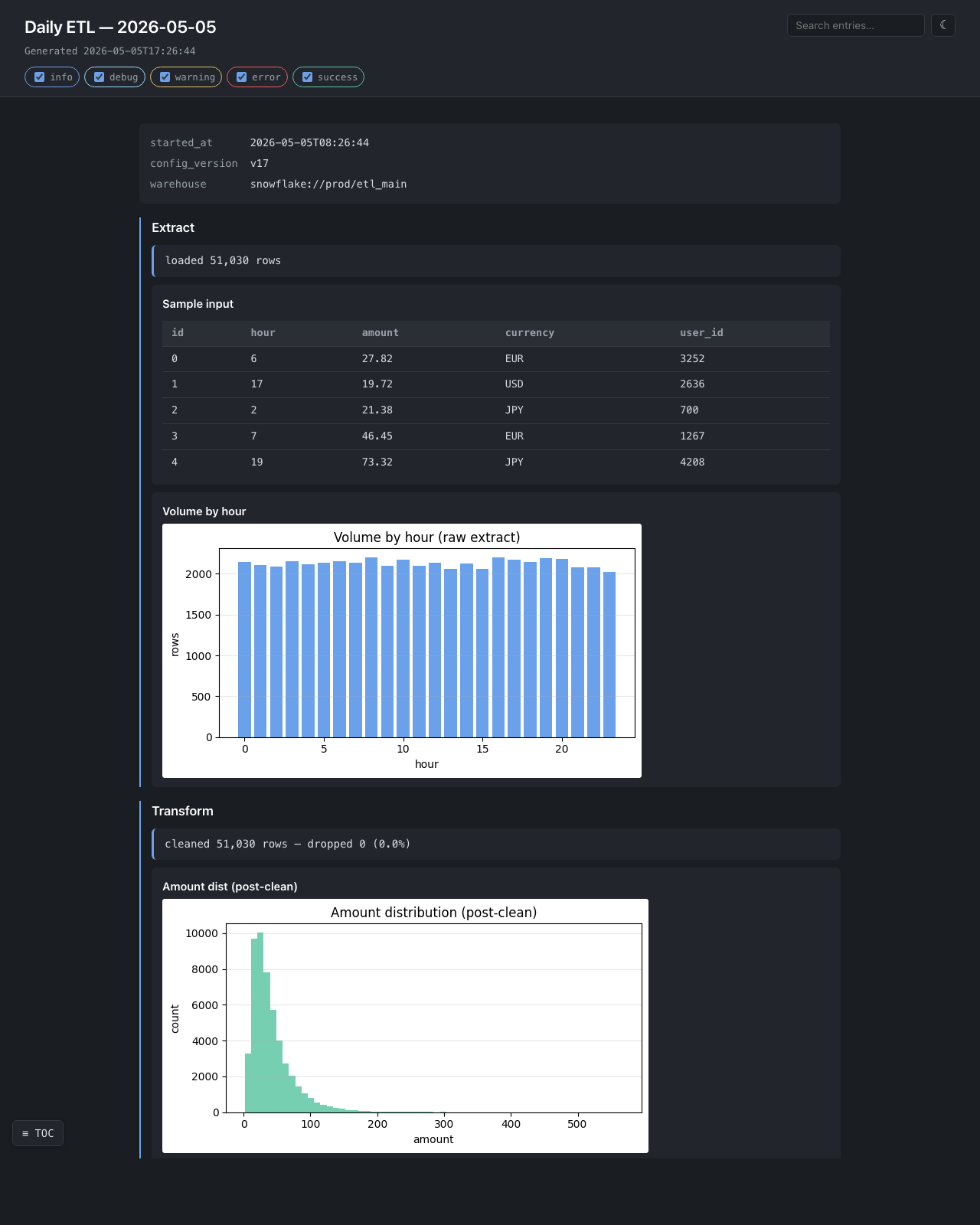
Hourly volume, drop-rate warning with a sample of dropped rows, post-clean distribution. The single-file output ships in a mail attachment.
Migration validation — examples/migration_validation.py
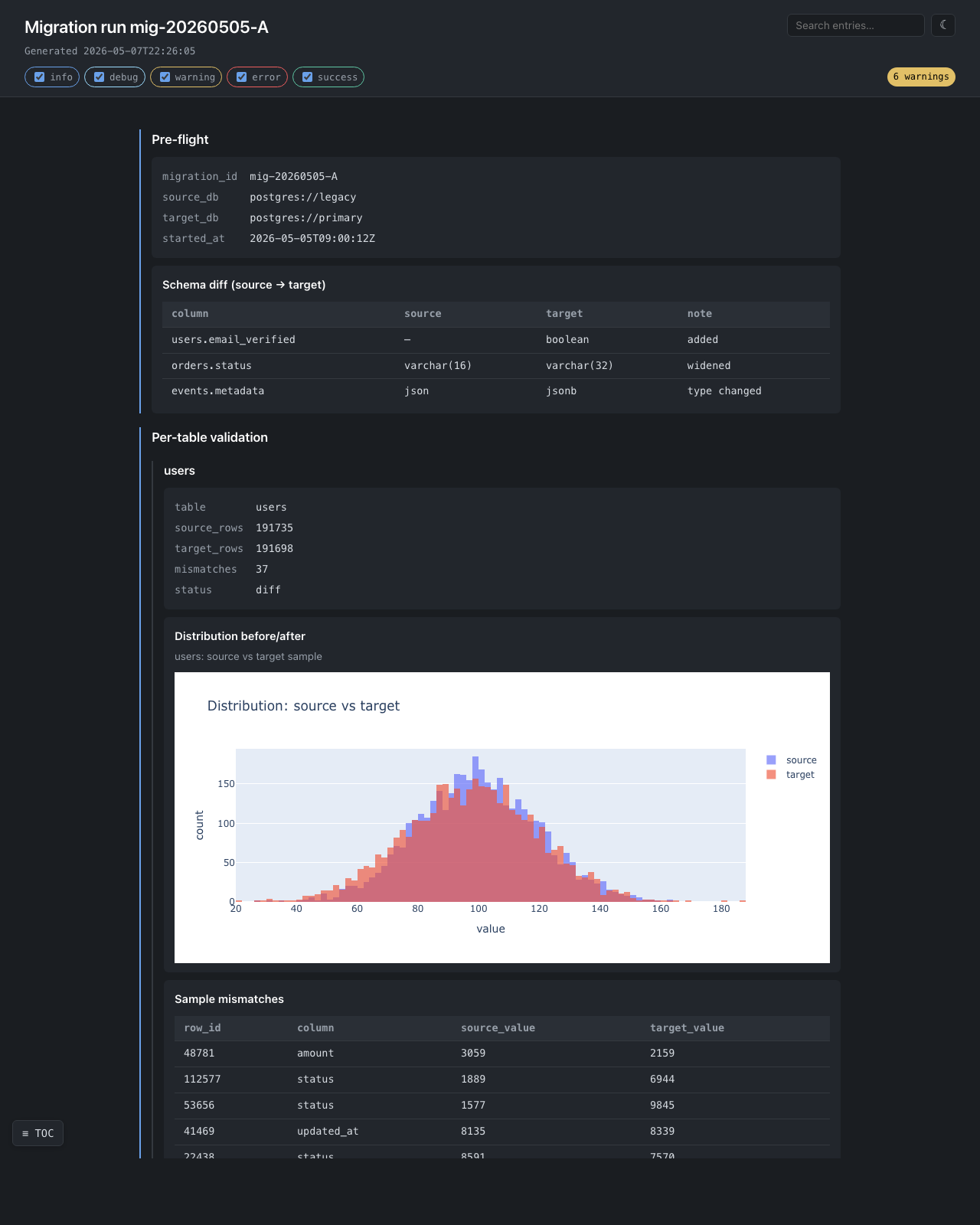
Per-table validation with interactive plotly distributions — zoom,
pan, hover tooltips, all in the single self-contained file. The plotly
bundle is inlined exactly once even when there are dozens of figures.
The 6 warnings badge in the top-right corner is generated client-side
by counting rs-text-warning entries.
Web crawler — examples/web_scraper.py
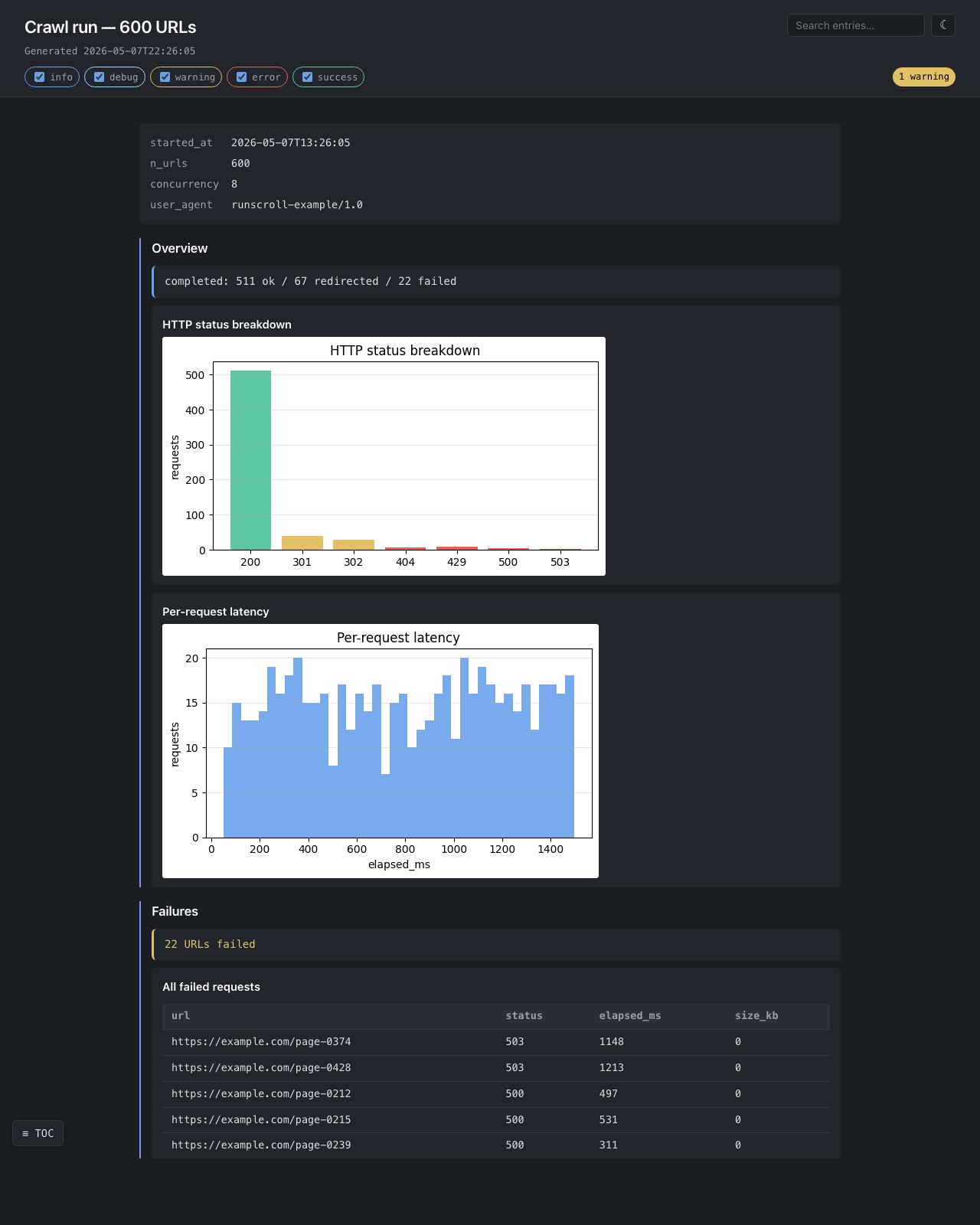
Status-code breakdown, per-request latency histogram, every failed URL in a browsable table.
How memory stays flat
Each add_* call serializes its content to disk and flushes immediately.
There is no in-memory entry buffer. A 500 MiB report uses the same
RAM as a 5 KiB one — only a counter, a section-depth integer, and a file
handle live in Python.
This is the design's first-priority guarantee. The test
tests/test_streaming_memory.py keeps it honest: 30 × 10 MiB writes must
leave less than total_written / 30 resident, and a 30 MiB on-disk image
streamed through add_image must not grow RSS by more than 1 MiB.
What this library is NOT
- ❌ A live monitoring dashboard — Grafana / Datadog.
- ❌ A multi-run experiment tracker — MLflow / Weights & Biases.
- ❌ An interactive notebook — Jupyter.
- ❌ A general HTML builder —
dominate/yattag. - ❌ A cloud SDK wrapper — supply your own
AssetWriter. - ❌ A static site generator — Sphinx / mkdocs.
License
MIT.
Release history Release notifications | RSS feed


Download files
Download the file for your platform. If you're not sure which to choose, learn more about installing packages.
Source Distribution
Built Distribution
Filter files by name, interpreter, ABI, and platform.
If you're not sure about the file name format, learn more about wheel file names.
Copy a direct link to the current filters
File details
Details for the file runscroll-1.0.1.tar.gz.
File metadata
- Download URL: runscroll-1.0.1.tar.gz
- Upload date:
- Size: 476.7 kB
- Tags: Source
- Uploaded using Trusted Publishing? No
- Uploaded via: twine/6.2.0 CPython/3.10.12
File hashes
| Algorithm | Hash digest | |
|---|---|---|
| SHA256 |
ab58d0db30f0bbd55c578d76c0ac29d6188ef1cd5de70f5e2ee7ad1d850cf4b2
|
|
| MD5 |
34aac2a9335954ec5afd92dd33797ace
|
|
| BLAKE2b-256 |
2ccace8acaa56889d15ccffa7770805ef52bae0a19e07c8763ed90b288268bf2
|
File details
Details for the file runscroll-1.0.1-py3-none-any.whl.
File metadata
- Download URL: runscroll-1.0.1-py3-none-any.whl
- Upload date:
- Size: 29.6 kB
- Tags: Python 3
- Uploaded using Trusted Publishing? No
- Uploaded via: twine/6.2.0 CPython/3.10.12
File hashes
| Algorithm | Hash digest | |
|---|---|---|
| SHA256 |
7c5356e949793cd84a959773691be80f290e54f02999a21650902d72fbad0990
|
|
| MD5 |
674bf11d1b84b3ff7fe9d61b509463ae
|
|
| BLAKE2b-256 |
09d97906d051d775e77bbd1dbf5ce463657d03ed704f8dd0720a8c53066206ff
|






